1. 서론
This manual provides essential instructions for the setup, operation, and maintenance of your new Generic Replacement IR Remote Control. This remote is designed to be compatible with various Minix Neo Android 4K HD TV Box models, including T5, X39, U9-H, X6, Z64, X88, U1, U220-XJ, U22-XJ, and Z64-A. Please read this manual thoroughly before use to ensure proper functionality and to maximize your user experience.
2. 제품 오버view
The Generic Replacement IR Remote Control is a direct infrared replacement for your original Minix Neo TV Box remote. It features an ergonomic design and provides basic, essential functions for navigating your TV box interface.

이미지 1: 앞쪽 view of the Generic Replacement IR Remote Control. This image displays the remote's layout, including the power button, directional pad with 'OK' button, volume controls, back button, home button, menu button, and settings button.
3. 설정
3.1 배터리 설치
리모컨 작동에는 AAA 배터리 2개가 필요합니다. 배터리는 리모컨에 포함되어 있지 않으므로 별도로 구매해야 합니다.
- 리모콘 뒷면에 있는 배터리함 덮개를 찾으세요.
- 탭을 누른 상태에서 덮개를 아래로 밀어 분리하세요.
- 2개(2)의 AAA 배터리를 넣고 양극(+)과 음극(-) 단자가 배터리 보관함 내부 표시와 올바르게 맞춰지도록 합니다.
- 배터리 덮개를 제자리에 밀어 넣어 딸깍 소리가 날 때까지 밀어 넣습니다.
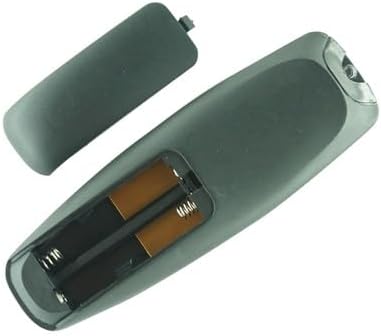
이미지 2: 뒤쪽에 view of the remote control with the battery compartment cover removed, clearly showing the two slots for AAA batteries and their polarity markings.
4. 사용 설명서
4.1 기본 버튼 기능
This remote control provides essential functions for navigating your Minix Neo TV Box. Point the remote directly at your TV box for optimal performance.
- 전원 버튼 (⏻): Turns the TV box on or off.
- 방향 패드(위, 아래, 왼쪽, 오른쪽): 메뉴와 선택 항목을 탐색합니다.
- 확인 버튼: Confirms selections or opens items.
- 뒤로 버튼(↩): 이전 화면 또는 메뉴로 돌아갑니다.
- 홈 버튼 (⌂): Returns to the main home screen of the TV box.
- 메뉴 버튼(☰): Accesses context-sensitive menus or options.
- 설정 버튼(⚙): Opens the system settings menu.
- 볼륨 버튼(+ / -): 볼륨 레벨을 조절합니다.
4.2 호환성
This remote is an infrared (IR) replacement unit designed for the following Minix Neo TV Box models:
- Minix Neo T5
- Minix Neo X39
- Minix Neo U9-H (X8-H Plus)
- Minix Neo X6
- Minix Neo Z64
- Minix Neo X88
- Minix Neo U1
- Minix Neo U220-XJ
- Minix Neo U22-XJ
- Minix Neo Z64-A
Please ensure your TV box model is listed above for guaranteed compatibility. While this remote is a replacement, it may not offer all advanced functions present on your original remote control.
5. 유지관리
리모컨의 수명과 정상적인 작동을 보장하려면 다음 유지 관리 지침을 따르십시오.
- 청소: Use a soft, dry cloth to clean the remote control. Do not use liquid cleaners, aerosols, or harsh chemicals, as these can damage the surface or internal components.
- 배터리 관리 : If the remote control will not be used for an extended period (e.g., one month or more), remove the batteries to prevent leakage and potential damage to the remote.
- 저장: 리모컨은 직사광선, 극한 온도 및 높은 습도를 피해 서늘하고 건조한 곳에 보관하십시오.
- 낙하 방지: 리모컨을 물리적 충격으로부터 보호하십시오. 떨어뜨리면 내부 회로가 손상될 수 있습니다.
6. 문제 해결
If you encounter issues with your remote control, please try the following troubleshooting steps:
- 원격 응답 없음:
- 배터리가 올바른 극성에 맞게 올바르게 삽입되었는지 확인하세요.
- 배터리를 새 AAA 배터리로 교체하세요.
- Ensure there is a clear line of sight between the remote control and the IR receiver on your Minix Neo TV Box. Obstructions can block the signal.
- Move closer to the TV box to rule out range issues.
- 일부 기능이 작동하지 않습니다:
- As a replacement remote, it may not support all advanced or specific functions of your original remote. This remote is designed for basic navigation and control.
- Verify that your TV box model is listed in the compatibility section (Section 4.2).
- 간헐적 작동:
- 배터리 잔량이 부족할 수 있습니다. 배터리를 교체하십시오.
- 직사광선이나 밝은 형광등과 같은 강한 광원이 적외선 신호를 방해하지 않는지 확인하십시오.
7. 사양
| 제품 유형 | IR 교체용 리모컨 |
| 상표 | 일반적인 |
| 전원 | AAA 배터리 2개(포함되지 않음) |
| 색상 | 검은색 |
| 특별 기능 | Ergonomic design, basic functions only |
| 호환 장치 | Minix Neo T5, X39, U9-H, X6, Z64, X88, U1, U220-XJ, U22-XJ, Z64-A Android 4K HD TV Boxes |
8. 중요 사항
- This remote control is an infrared (IR) replacement and may not offer all functions or features of your original equipment manufacturer (OEM) remote.
- Ensure the model number of your Minix Neo TV Box matches one of the compatible models listed in this manual.
- No programming is required for this remote; it operates directly with compatible Minix Neo TV Boxes once batteries are installed.
9. 지원
If you have any questions or encounter issues that cannot be resolved using the troubleshooting steps provided, please contact the seller or retailer from whom you purchased this product. Provide your purchase details and a clear description of the problem for assistance.


