
Infinity NX 10
인피니티 스마트워치 사용 설명서
Model: NX 10
소개
Welcome to the user manual for your Infinity Smartwatch, Model NX 10. This device is designed to enhance your daily life with advanced fitness tracking, communication features, and smart notifications. Featuring a vibrant 1.43" AMOLED screen and robust IP68 water resistance, your smartwatch is built for both everyday use and active lifestyles. Please read this manual carefully to ensure proper operation and maintenance of your device.

Figure 1: Infinity Smartwatch NX 10. This image shows the smartwatch from an angled perspective, highlighting its round AMOLED display, black silicone strap, and two side buttons.
설정
1. 언박싱 및 초기 충전
Upon unboxing, ensure all components are present: the Infinity Smartwatch NX 10 and the charging cable.
- 스마트워치 뒷면의 충전 단자에 자석식 충전 케이블을 연결하세요.
- 케이블의 USB 끝부분을 표준 USB 전원 어댑터(별도 구매) 또는 컴퓨터의 USB 포트에 꽂으세요.
- The watch display will show a charging indicator. Fully charge the device before first use, which typically takes approximately 2 hours.

Figure 2: Smartwatch charging. The image illustrates the smartwatch being charged magnetically, with a green lightning bolt icon on the screen indicating charging status and a "400mAh Battery Capacity" label.
2. 앱 설치 및 페어링
To unlock the full potential of your Infinity Smartwatch, download and install the companion application, 핏 클라우드 프로스마트폰에서.
- Scan the QR code provided in the quick start guide (if available) or search for "Fit Cloud Pro" in your smartphone's app store (Google Play Store for Android, Apple App Store for iOS).
- 애플리케이션을 설치하세요.
- Open the Fit Cloud Pro app and follow the on-screen instructions to create an account or log in.
- 스마트폰에서 Bluetooth가 활성화되어 있는지 확인하세요.
- In the app, navigate to the device pairing section and search for your smartwatch (e.g., "NX 10" or similar Bluetooth name).
- Select your smartwatch from the list to initiate pairing. Confirm the pairing request on both your phone and the smartwatch if prompted.
- Once paired, the app will synchronize data with your smartwatch, and you can customize settings.
작동 지침
1. 기본 탐색
- 터치스크린: Swipe left/right to navigate between main screens (e.g., activity, heart rate, weather). Swipe up/down to access quick settings or notifications. Tap to select an option.
- 측면 버튼: The top button typically acts as a power button (long press) or a back/home button (short press). The bottom button may be customizable or provide quick access to sports modes.

Figure 3: 1.43" AMOLED Screen. This image highlights the vibrant display of the smartwatch, showing a detailed watch face with various data points like time, date, steps, and heart rate.
2. 전화 걸기 및 받기
Your Infinity Smartwatch supports Bluetooth calling, allowing you to make and receive calls directly from your wrist when connected to your smartphone.
- 전화를 걸려면: Access the dialer or contacts list on your smartwatch. You can dial a number directly or select a contact to call.
- 전화를 받으려면: When a call comes in, the smartwatch will display the caller ID. Tap the green answer icon to accept the call or the red icon to decline.

Figure 4: Stay Connected On The Go. This image shows a user interacting with the smartwatch to make a call, illustrating the microphone, dialing, call records, and contacts features.
3. 피트니스 및 건강 추적
The smartwatch is equipped with multiple sensors to monitor your health and fitness activities.
- 보수계: 하루 동안 걸음 수, 이동 거리, 소모 칼로리를 자동으로 추적합니다.
- 심박수 모니터링 : Provides real-time heart rate data. Access this feature from the main menu or set up continuous monitoring in the app.
- 혈압 모니터링 : Offers blood pressure readings. For accurate results, ensure the watch is worn correctly and remain still during measurement. Note: This feature is for reference only and should not be used for medical diagnosis.
- 수면 모니터링: 깊은 수면, 얕은 수면, 깨어있는 시간 등 수면 패턴을 추적합니다. View detailed analysis in the Fit Cloud Pro app.
- 스포츠 모드: Supports over 100 sports modes, including running, cycling, swimming, and more. Select your desired activity to track specific metrics.

Figure 5: Track Every Move. This image displays the smartwatch tracking a swimming activity, with additional visuals of rock climbing and cycling, indicating its multi-sport tracking capabilities.

Figure 6: More than 110 sports modes. This image shows a variety of colorful icons representing different sports activities supported by the smartwatch, overlaid on a background of a person cycling.
4. 사용자 정의
Personalize your smartwatch experience through the Fit Cloud Pro app.
- 시계 모드 : Choose from a wide range of pre-installed watch faces or download new ones via the app. You can also create custom watch faces using your own photos.
- 알림: Configure which app notifications you wish to receive on your smartwatch (e.g., calls, SMS, social media alerts).
- 알람 및 알림: Set alarms, sedentary reminders, and hydration reminders through the app.
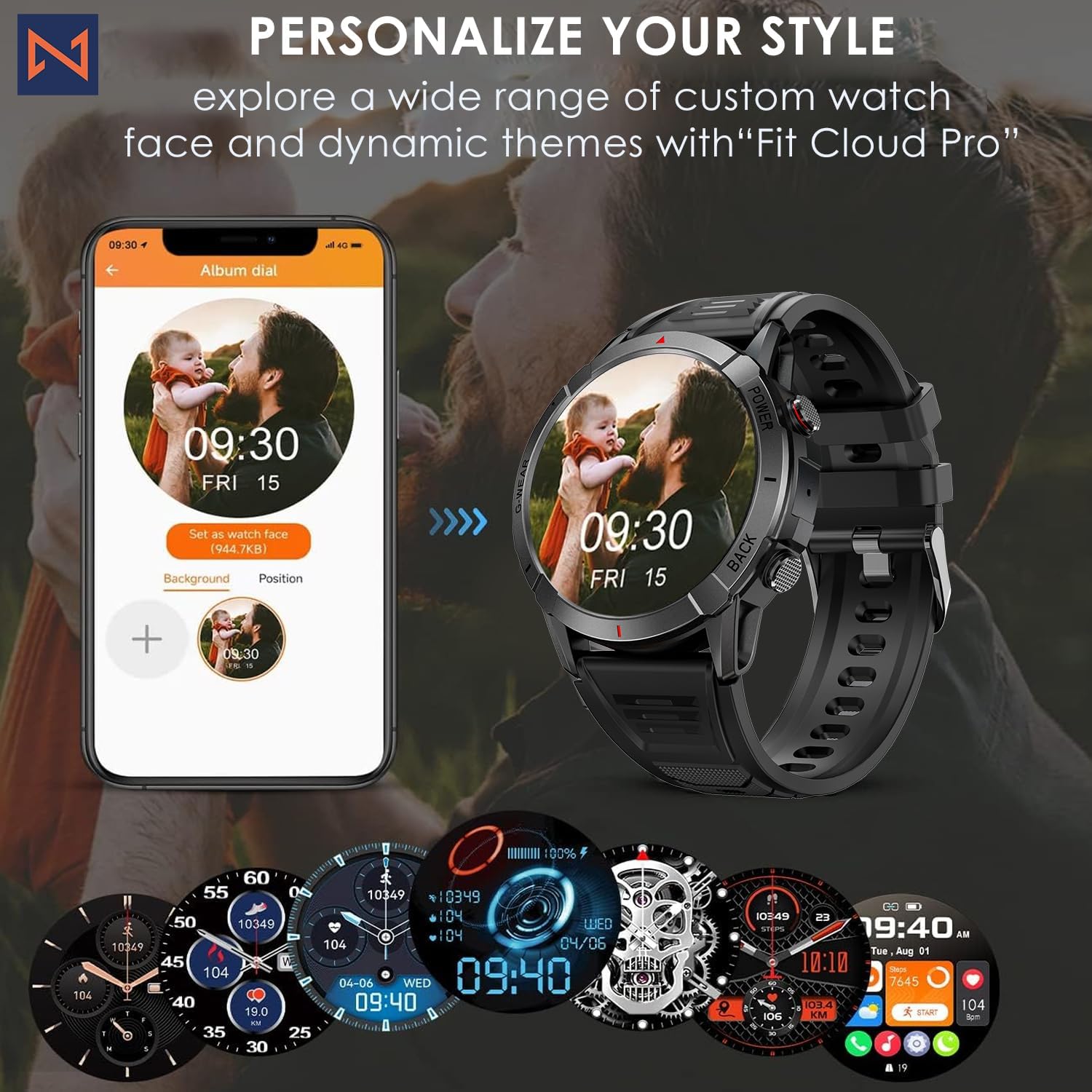
Figure 7: Personalize Your Style. This image demonstrates how to customize watch faces using the "Fit Cloud Pro" app, showing various digital and analog watch face options.
유지
1. 스마트워치 청소
정기적인 청소는 기기의 외관과 기능을 유지하는 데 도움이 됩니다.
- 부드럽고 보푸라기가 없는 천으로 화면과 본체를 닦으세요.
- 지우기 힘든 얼룩은, damp천에 물을 살짝 묻혀 닦으세요. 강한 화학 물질이나 연마재는 사용하지 마세요.
- 충전 접점을 주기적으로 청소하여 올바른 연결을 유지하십시오.
2. 방수 기능(IP68)
Your Infinity Smartwatch is rated IP68, meaning it is resistant to dust and can withstand immersion in water up to 1.5 meters for up to 30 minutes.
- 일상생활, 손세탁, 가벼운 비에 적합합니다.
- 장시간 물에 담그거나, 뜨거운 물, 증기 또는 고압의 물줄기(예: 샤워, 사우나, 다이빙)를 피하십시오.
- 시계가 젖었을 경우, 충전하거나 버튼을 조작하기 전에 완전히 말리십시오.

Figure 8: Engineered for Adventure. This image highlights the smartwatch's durability features, including waterproof, dustproof, anti-magnetic, and shockproof capabilities, with corresponding icons.
3. 배터리 관리
- 배터리 수명을 연장하려면 극한의 온도를 피하세요.
- 시계를 정기적으로 충전하세요. 배터리가 완전히 방전된 상태로 장시간 방치하지 마세요.
- 제공된 충전 케이블만 사용하세요.
문제 해결
| 문제 | 가능한 해결책 |
|---|---|
| 시계가 켜지지 않습니다 | 시계가 완전히 충전되었는지 확인하십시오. 충전기에 연결하고 몇 분 정도 기다린 후 전원을 켜십시오. |
| 스마트폰과 페어링이 안되네요 |
|
| 부정확한 건강 데이터 |
|
| 알림이 수신되지 않았습니다. |
|
| 배터리 수명이 짧음 |
|
명세서
| 특징 | 세부 사항 |
|---|---|
| 모델 번호 | NX10 |
| 표시하다 | 1.43" AMOLED Screen |
| 디스플레이 해상도 | 466x466 HD |
| 배터리 용량 | 400mAh 리튬 폴리머 |
| 방수성 | IP68 |
| 연결성 | 블루투스 |
| 운영 체제 | 안드로이드(iOS와 호환) |
| 스트랩 소재 | 22mm Silicon Belt |
| 디스플레이 재료 | 아연 합금 |
| 품목 무게 | 1.76 온스 |
| 메모리 저장 용량 | 128메가바이트 |
보증 및 지원
For warranty information and technical support, please refer to the documentation included with your purchase or visit the official Infinity web대지.
Manufacturer: Infiniity
For further assistance, you may contact Infiniity customer service through the contact information provided on their official website or within the Fit Cloud Pro application.
Ask a question about this manual
Ask about setup, troubleshooting, compatibility, parts, safety, or missing instructions. Manuals+ will review the question and use this page’s manual context to help answer it.