
소개
Thank you for choosing the Andoer Mini Photography Lamp. This portable LED light panel is designed to provide versatile and high-quality illumination for various applications, including vlogging, video conferencing, live broadcasting, and small product photography. This manual provides essential information for the safe and effective use of your device. Please read it thoroughly before operation and retain it for future reference.

Image: The Andoer Mini Photography Lamp in use, illustrating its professional lighting capabilities. It features 196 LED beads, 2500K-9000K color temperature, CRI ≥95, 20 lighting effects, and 1750LUX/0.5m illumination.

Image: The compact and portable design of the Andoer Mini Photography Lamp, shown alongside everyday items like a smartphone and wallet. The lamp measures approximately 15.1 x 10.1 x 2 cm and weighs 130g, making it easy to carry.
안전 정보
- 기기를 물이나 높은 습도에 노출시키지 마십시오.
- 기기를 직접 분해하거나 수리하려고 하지 마십시오. 모든 정비는 자격을 갖춘 기술자에게 맡기십시오.
- Use only NP-F series batteries as specified. Ensure correct battery polarity when inserting.
- Avoid direct eye exposure to the LED light, especially at high brightness settings.
- 기기를 어린이의 손이 닿지 않는 곳에 보관하세요.
- 지정된 온도 범위 내에서 장치를 작동하세요.
패키지 내용
모든 품목이 들어 있는지 확인하려면 패키지를 확인하세요.
- 1 x Andoer Mini Photography LED Lamp
- 1 x Hot Shoe Holder
- 1 x 사용자 설명서

Image: The Andoer Mini Photography Lamp, hot shoe holder, and the instruction manual as included in the product package.
제품 끝view
Familiarize yourself with the components of your Andoer Mini Photography Lamp:
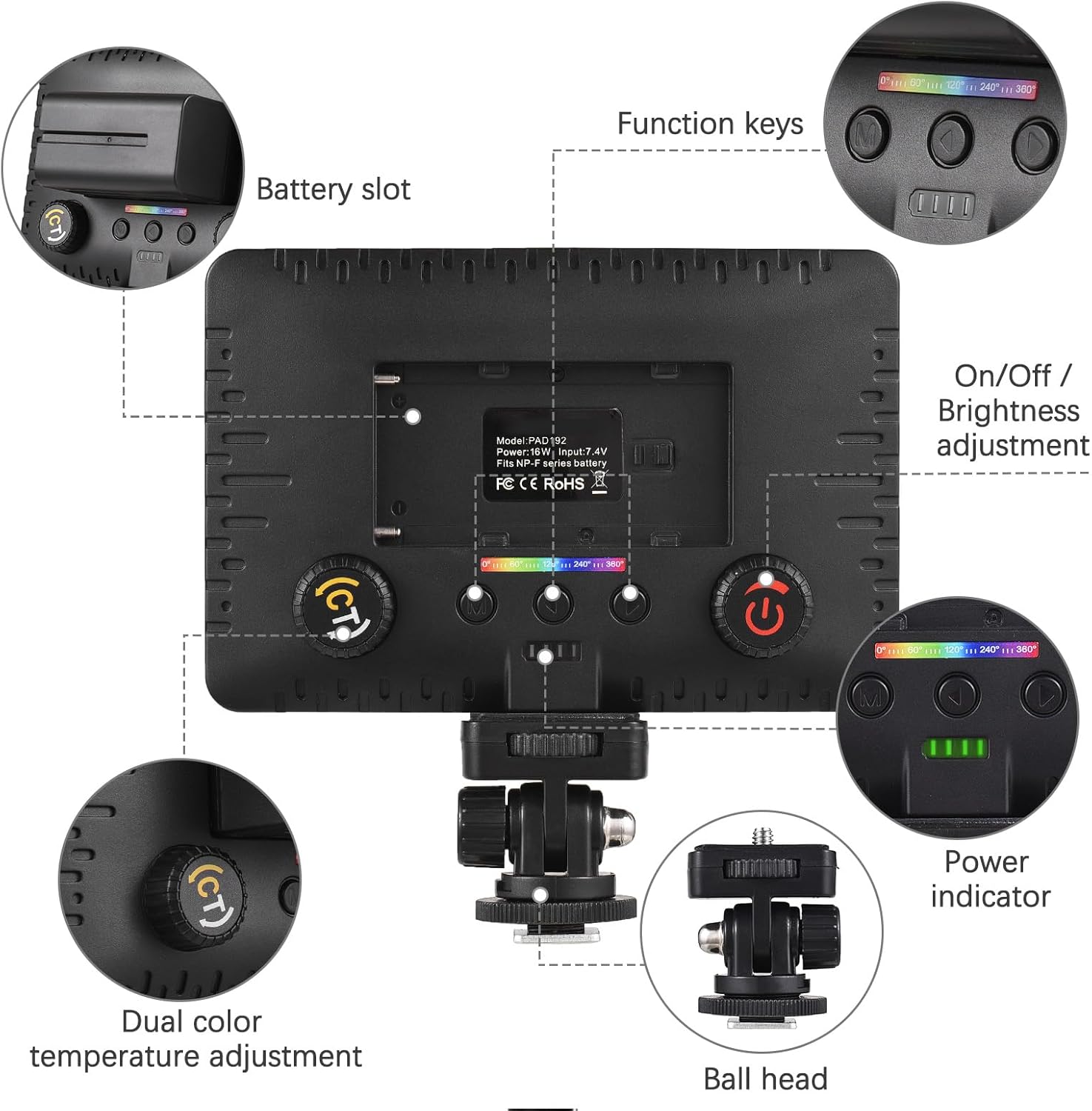
이미지: 자세한 view of the Andoer Mini Photography Lamp, highlighting key components such as the battery slot, function keys, On/Off and brightness adjustment dial, power indicator, dual color temperature adjustment dial, and the ball head mount.
- 배터리 슬롯: For inserting NP-F series batteries.
- 기능 키: Buttons for mode selection and special effects.
- On/Off / Brightness Adjustment: A dial to power the unit on/off and adjust light intensity.
- 전원 표시기: LEDs indicating battery level.
- Dual Color Temperature Adjustment: A dial (CT button) to change the color temperature from warm to cool.
- 볼 헤드: For mounting the light and adjusting its angle.
설정
- Attach Hot Shoe Holder: Secure the hot shoe holder to the 1/4-inch threaded hole at the bottom of the LED lamp.
- 배터리 삽입: Open the battery slot cover and insert a compatible NP-F series battery, ensuring correct orientation.
- 빛을 타고: Attach the hot shoe holder to your camera's hot shoe mount, a tripod, or other compatible devices. Tighten the locking ring to secure it.

Image: The Andoer Mini Photography Lamp securely mounted on top of a camera, demonstrating a typical setup for use.
작동 지침
- 전원 켜기/끄기: Rotate the On/Off / Brightness Adjustment dial to turn the light on or off.
- 밝기 조정: While the light is on, continue rotating the On/Off / Brightness Adjustment dial to increase or decrease the light intensity from 0% to 100%.
- 색온도 조절(CCT 모드): Press the CT button (Dual Color Temperature Adjustment dial) to enter CCT mode. Rotate the dial to adjust the color temperature between 2500K (warm) and 9000K (cool).
- Select Special Lighting Effects: Use the function keys to cycle through the 20 available special lighting effects. Refer to the on-screen display for effect names or numbers.

Image: Visual representation of the adjustable brightness and color temperature features. The lamp offers a wide range from 2500K (warm) to 9000K (cold) and brightness levels from 0% to 100%.
호환성
The Andoer Mini Photography Lamp is designed for wide compatibility:
- 핫슈 마운트: Easily attaches to most cameras with a standard hot shoe.
- 1/4-inch Threaded Hole: Allows mounting on tripods, light stands, phone holders, and other accessories with a 1/4-inch screw.

Image: The Andoer Mini Photography Lamp demonstrating its wide compatibility, showing it can be used with cameras, smartphones (via a phone holder), and tripods, thanks to its hot shoe mount and 1/4-inch threaded hole.
유지
- 청소: 부드럽고 마른 천을 사용하여 l을 청소하십시오.amp body. For the LED panel, use a microfiber cloth to gently wipe away dust or smudges. Do not use harsh chemicals or abrasive materials.
- 배터리 관리 : Remove the battery if the lamp will not be used for an extended period. Store batteries in a cool, dry place.
- 저장: L을 저장amp in a dry, dust-free environment, away from direct sunlight and extreme temperatures.
문제 해결
| 문제 | 가능한 원인 | 해결책 |
|---|---|---|
| 조명이 켜지지 않습니다. | 배터리가 제대로 삽입되지 않았거나 방전되었습니다. | Ensure battery is inserted with correct polarity. Charge or replace the battery. |
| 밝기나 색온도를 조절할 수 없습니다. | Incorrect mode selected or controls are not functioning. | Ensure you are in the correct mode (CCT for color temperature). Check if the dials are obstructed. |
| 빛이 깜빡이거나 불안정합니다. | Low battery power or faulty battery. | Charge or replace the battery. If the problem persists, contact support. |
명세서
| 특징 | 사양 |
|---|---|
| LED 비즈 | 196 (54 White, 54 Yellow, 88 RGB) |
| 특수 조명 효과 | 20 |
| 조명 | 1750 LUX / 0.5m |
| 빔 각도 | 120° |
| 힘 | 16와트 |
| 권tage | 7.4V(XNUMXV) |
| 전원 공급 장치 | NP-F Series Batteries |
| CRI(연색지수) | 95 |
| 색온도 | 2500K - 9000K |
| 품목 크기 | 15 x 10 x 1.5cm (약 5.9 x 3.9 x 0.6인치) |
| 품목 무게 | 81g(약 2.86온스) |
| 연결 기술 | USB (for potential charging/control, power via NP-F batteries) |
| 방수 레벨 | 방수가 되지 않음 |
| 모델 번호 | HXH7438494991380KD |
보증 및 지원
This product comes with a standard manufacturer's warranty. For specific warranty terms and conditions, please refer to the documentation provided with your purchase or contact the seller directly. For technical support or inquiries, please reach out to Andoer customer service through their official channels or the retailer where the product was purchased.