
1. 서론
The Leotec SENIOR SMART BAND 4G GPS is a smart bracelet designed for monitoring and communication, particularly for seniors. It features 4G connectivity, real-time GPS tracking, heart rate monitoring, a pedometer, and call functionality. This manual provides instructions for setting up, operating, and maintaining your device.
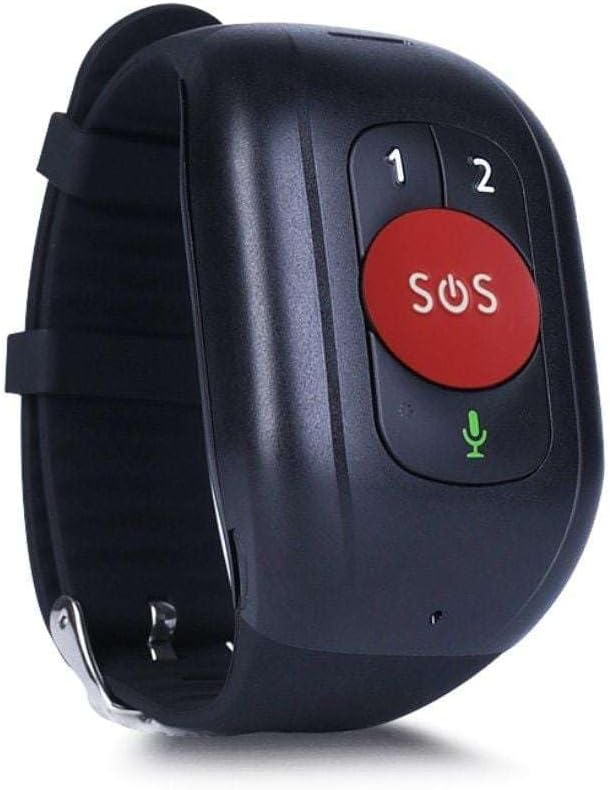
그림 1: Leotec SENIOR SMART BAND 4G GPS RED. The device features a large red SOS button, two smaller call buttons labeled '1' and '2', and a microphone icon.
2. 설정 가이드
2.1. 패키지 내용
- Leotec SENIOR SMART BAND 4G GPS
- 사용자 설명서
- Charging Cable/Connector
2.2. SIM 카드 설치
The device requires a nanoSIM card for 4G LTE and 2G GSM connectivity. Ensure the SIM card is from any mobile phone operator on the market.
- 장치에서 SIM 카드 슬롯을 찾습니다.
- Carefully insert the nanoSIM card into the slot, ensuring correct orientation.
- Close the SIM card slot cover securely to protect against dust and moisture.
2.3. 장치 충전
Before first use, fully charge the smart band.
- Connect the charging cable to the charging port on the smart band.
- 케이블의 다른 쪽 끝을 USB 전원 어댑터(포함되지 않음) 또는 컴퓨터 USB 포트에 연결합니다.
- The device will indicate charging status. A full charge typically takes approximately 2 hours.
2.4. Application Download and Pairing
To utilize all features, download the recommended application on your smartphone.
- The application is available for both Google Android and Apple iOS devices.
- 검색 "Leotec Senior" or the specified app name in your device's app store.
- Install the application and follow the on-screen instructions to create an account and pair your smart band.
- A web-based interface is also available for greater convenience.
3. 사용 설명서
3.1. 전원 켜기/끄기
- 전원 켜기: Press and hold the power button (if available, otherwise assume automatic power on after charging/SIM insertion) until the device vibrates or the screen illuminates.
- 전원 끄기 : Access the power off option through the device menu or the companion app, or press and hold the power button for several seconds.
3.2. Real-time Geolocation
The smart band incorporates a real GPS chip, 4G LTE, 2G GSM, WiFi, and LBS networks for accurate location tracking.
- Location can be viewed in real-time via the companion application or the web 인터페이스.
- The margin of error for GPS location is approximately 5 meters.
3.3. 전화 걸고 받기
With an installed nanoSIM card, the device supports two-way communication.
- 전화 걸기: Use the pre-configured buttons (labeled '1' and '2' on the device) to call authorized contacts. These contacts are set up through the companion application.
- 전화 받기: The device will ring for incoming calls from authorized numbers. Answer calls directly from the smart band.
3.4. SOS 기능
The large red SOS button is for emergency situations.
- Press and hold the SOS button for a few seconds to activate the emergency protocol.
- The device will automatically call pre-authorized emergency contacts and send location alerts.
3.5. 활동 추적
The smart band monitors various health and activity metrics.
- 보수계: Tracks steps taken throughout the day.
- 심박수 모니터: Measures heart rate. Consult the app for detailed readings and historical data.
- View all activity data and trends within the companion application.
4. 유지관리
4.1. 청소
- 부드러운 천으로 기기를 정기적으로 닦으세요.amp 옷감.
- 독한 화학 물질이나 연마성 세척제는 기기를 손상시킬 수 있으므로 사용하지 마십시오.
- Ensure the charging port and SIM card slot are free from debris.
4.2. 배터리 관리
- 배터리 수명을 최적화하려면 기기를 정기적으로 충전하십시오.
- Avoid extreme temperatures, as these can affect battery performance and lifespan.
- 장기간 기기를 사용하지 않을 경우, 보관하기 전에 약 50%까지 충전하세요.
4.3. 보관
Store the smart band in a cool, dry place away from direct sunlight and extreme temperatures.
5. 문제 해결
5.1. 장치 전원이 켜지지 않음
- 기기가 완전히 충전되었는지 확인하세요. 충전기에 연결하고 몇 분 정도 기다린 후 다시 전원을 켜보세요.
- 충전 케이블과 어댑터에 손상이 있는지 확인하세요.
5.2. No Network Connectivity (4G/2G)
- Verify that the nanoSIM card is correctly inserted and activated with a mobile network plan.
- 현재 위치의 네트워크 범위를 확인하세요.
- 장치를 다시 시작합니다.
- Ensure the SIM card has sufficient credit or data allowance.
5.3. Inaccurate GPS Location
- 장치에 명확한 내용이 있는지 확인하십시오. view 최적의 GPS 신호 수신을 위해 하늘의
- Location accuracy can be affected by dense urban areas, indoor environments, or adverse weather conditions.
- The device also uses WiFi and LBS for location, which may be less precise than GPS.
5.4. Calls Not Working
- Confirm that the SIM card is active and has calling capabilities.
- Ensure that the contact numbers are correctly configured as authorized contacts in the companion application.
- Check the device's volume settings.
5.5. 앱 연결 문제
- 스마트폰이 인터넷에 연결되어 있는지 확인하세요.
- Verify that Bluetooth (if applicable for initial pairing) is enabled on your smartphone.
- Restart both the smart band and your smartphone.
- Update the companion application to the latest version.
6. 사양
| 모델명 | LESB01R |
| 연결 기술 | 4G LTE, 2G GSM, GPS, WiFi, LBS, USB |
| Location Accuracy (GPS) | 약 5미터 |
| 배터리 유형 | AAAA 배터리 1개가 필요합니다. (포함) |
| 배터리 수명 | 최대 12시간 |
| 장착 유형 | 손목 마운트 |
| 포함된 구성 요소 | 사용 설명서, 케이블 또는 커넥터 |
| 제조업체 | 레오텍 |
| ASIN | B0CHYCX55N |
7. 보증 정보
This Leotec product comes with a 3년 보증 against manufacturing defects. Please retain your proof of purchase for warranty claims. The warranty does not cover damage caused by misuse, accidents, unauthorized modifications, or normal wear and tear.
8. 고객 지원
For technical assistance, troubleshooting beyond this manual, or warranty inquiries, please contact Leotec customer support. Refer to the official Leotec web최신 연락처 정보는 웹사이트 또는 제품 포장을 참조하십시오.
온라인 리소스: Visit the official Leotec web자주 묻는 질문(FAQ), 소프트웨어 업데이트 및 추가 지원 자료를 제공하는 사이트입니다.

