
1. 서론
This manual provides essential information for the safe and effective operation, installation, and maintenance of your VEVOR WX1320-1 1320lbs Wireless Electric Hoist. Please read all instructions carefully before use to ensure proper function and prevent injury or damage.
주요 특징:
- 무선 원격 제어: Operates up to 328 feet (100 meters) for enhanced safety and convenience. Includes an emergency stop button.
- Dual Lifting Modes: Supports single-line lifting up to 660 lbs (39.4 ft height, 32 ft/min speed) and double-line lifting up to 1320 lbs (19.7 ft height, 16 ft/min speed).
- 강력한 모터: Equipped with a 1150W motor and a large cooling fan to prevent overheating and ensure efficient operation.
- 내구성 있는 구조: Features an anti-deformation steel frame, 19-strand thickened steel wire rope, and a high-strength metal hook for long-term reliability.
- 간편한 설치: Designed for two-step hanging installation on ceilings or beams.
- 포함된 액세서리: Comes with a 13ft lifting sling strap and a 3.2ft shaft belt with metal ring.
2. 안전 정보
경고: 이러한 안전 지침을 따르지 않으면 심각한 부상이나 사망이 초래될 수 있습니다.
- Always wear appropriate personal protective equipment (PPE), including safety glasses, gloves, and hard hat.
- Ensure the hoist is securely mounted to a structure capable of supporting the maximum load capacity.
- 호이스트의 정격 부하 용량을 초과하지 마십시오.
- Inspect the hoist, wire rope, hooks, and slings for damage before each use. Do not use if any components are worn or damaged.
- Keep hands and body clear of moving parts, especially the wire rope and hook.
- Do not operate the hoist if the wire rope is twisted, kinked, or frayed.
- Ensure the load is balanced and securely attached before lifting.
- Avoid sudden starts or stops when lifting or lowering a load. Operate smoothly.
- Do not use the hoist to lift people or loads over people.
- 유지관리나 조정을 하기 전에 전원을 분리하세요.
- 작업 공간에 장애물이 없도록 하고 적절한 조명을 확보하십시오.
- The wireless remote control includes an emergency stop button. Familiarize yourself with its location and function.
3. 제품 구성품
The VEVOR WX1320-1 Electric Hoist package includes the following items:
- 1 x 전기 호이스트 장치
- 1 x 무선 원격 제어
- 1 x 1m (3.2ft) Strap with Metal Ring
- 1 x 4m (13ft) Strap
- 마운팅 브래킷 및 하드웨어
- Dual-line Pulley Hook (for double-line operation)
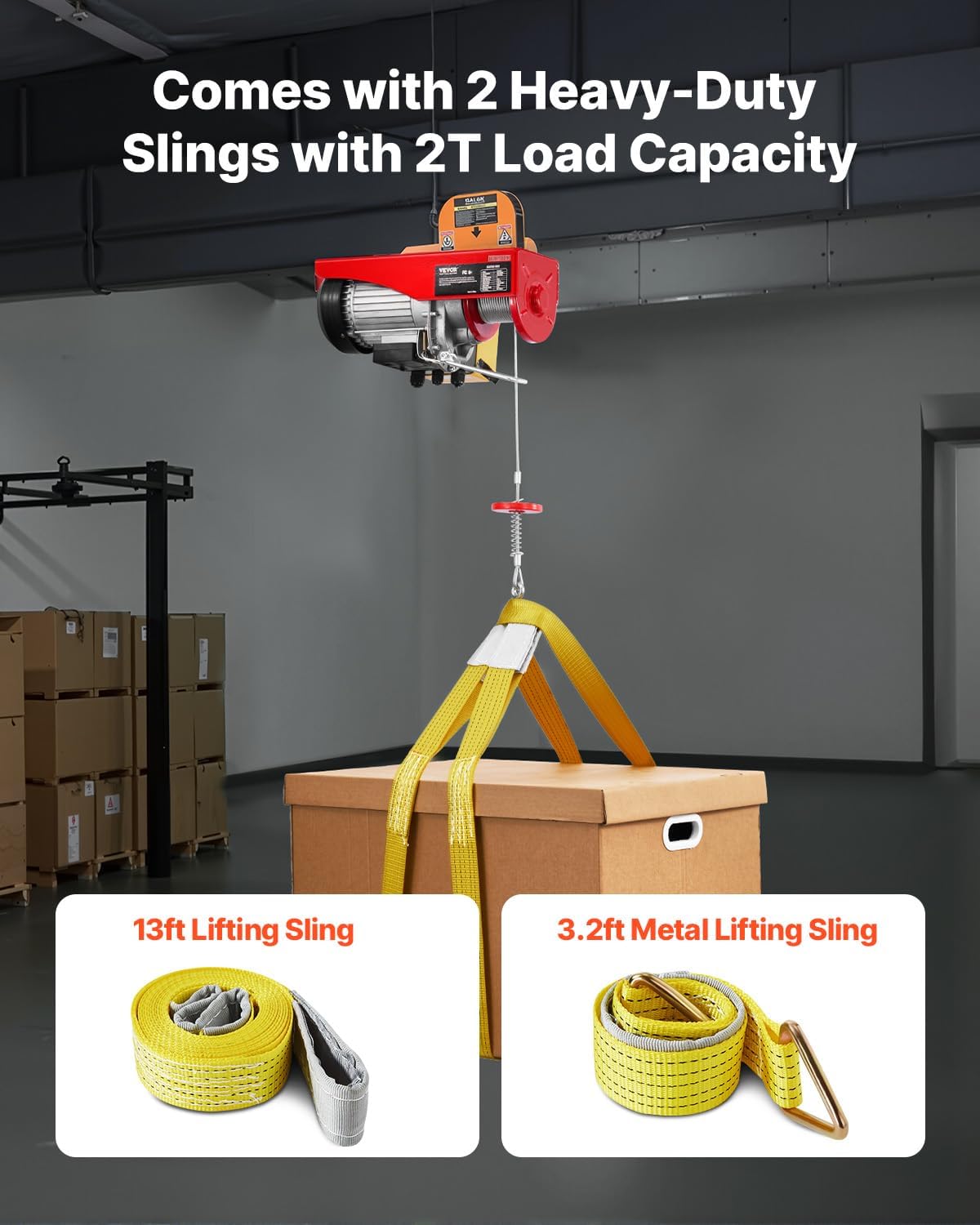
Figure 3.1: Hoist with included lifting slings.
4. 설정 및 설치
The VEVOR electric hoist is designed for straightforward hanging installation. Follow these steps carefully:
- 장착 위치를 선택하세요: Select a sturdy ceiling or beam capable of safely supporting the hoist's weight and the maximum intended load. Ensure the mounting surface is level and free from obstructions.
- 장착 브래킷 부착: Use the provided mounting brackets and hardware to securely fasten the hoist to the chosen location. The installation typically involves two main steps: attaching the U-shaped brackets to the hoist and then securing them to the overhead structure. Ensure all bolts are tightened to the manufacturer's specifications.
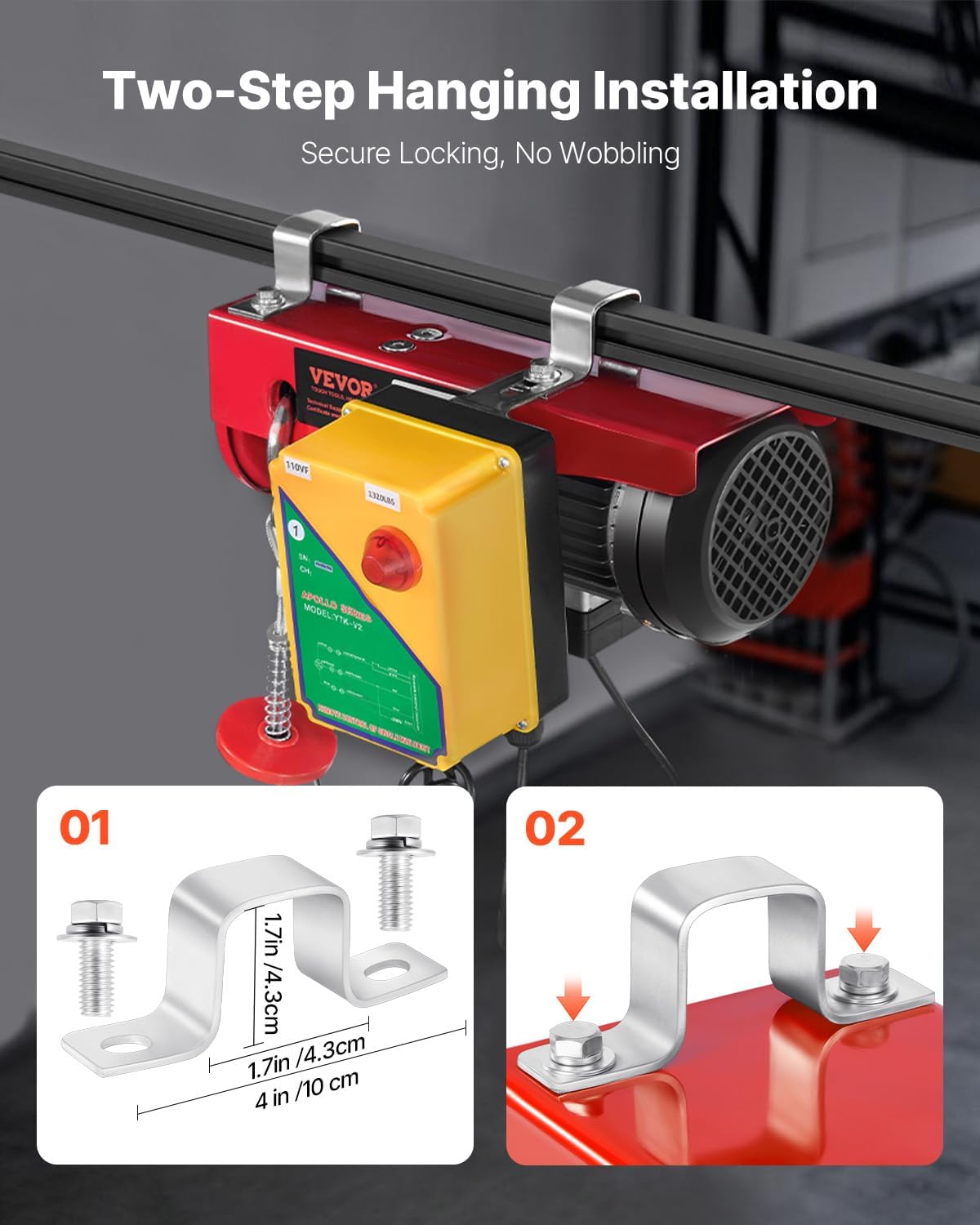
Figure 4.1: Two-step hanging installation process.
- 전원 연결: Plug the hoist into a compatible 110V power outlet. Ensure the power source meets the hoist's electrical requirements.
- 테스트 기능: Before lifting any loads, perform a test run with no load to ensure the hoist operates correctly, including the up/down functions and the emergency stop.
Unboxing and Initial Setup Video:
Video 4.1: An unboxing and initial setup guide for the electric hoist, demonstrating how to prepare the unit for use.
5. 사용 설명서
The VEVOR electric hoist offers two modes of operation: single-line and double-line lifting.
5.1. Single-Line Operation
For lighter loads, use the single-line configuration. The hoist will lift up to 660 lbs with a maximum height of 39.4 ft and a speed of 32 ft/min.
5.2. Double-Line Operation
For heavier loads, attach the pulley hook to create a double-line configuration. This mode allows lifting up to 1320 lbs, with a maximum height of 19.7 ft and a speed of 16 ft/min. The double-line setup effectively halves the lifting speed and height but doubles the capacity.

Figure 5.1: Comparison of single-line and dual-line lifting modes.
5.3. 무선 리모컨
The hoist is operated using a wireless remote control, providing a range of up to 328 feet. This allows for safe operation from a distance.
- 위로 버튼: Press to raise the load.
- 다운 버튼: 하중을 낮추려면 누르세요.
- 비상 정지 버튼: Press this red button immediately in case of an emergency or unexpected operation to cut power to the hoist.
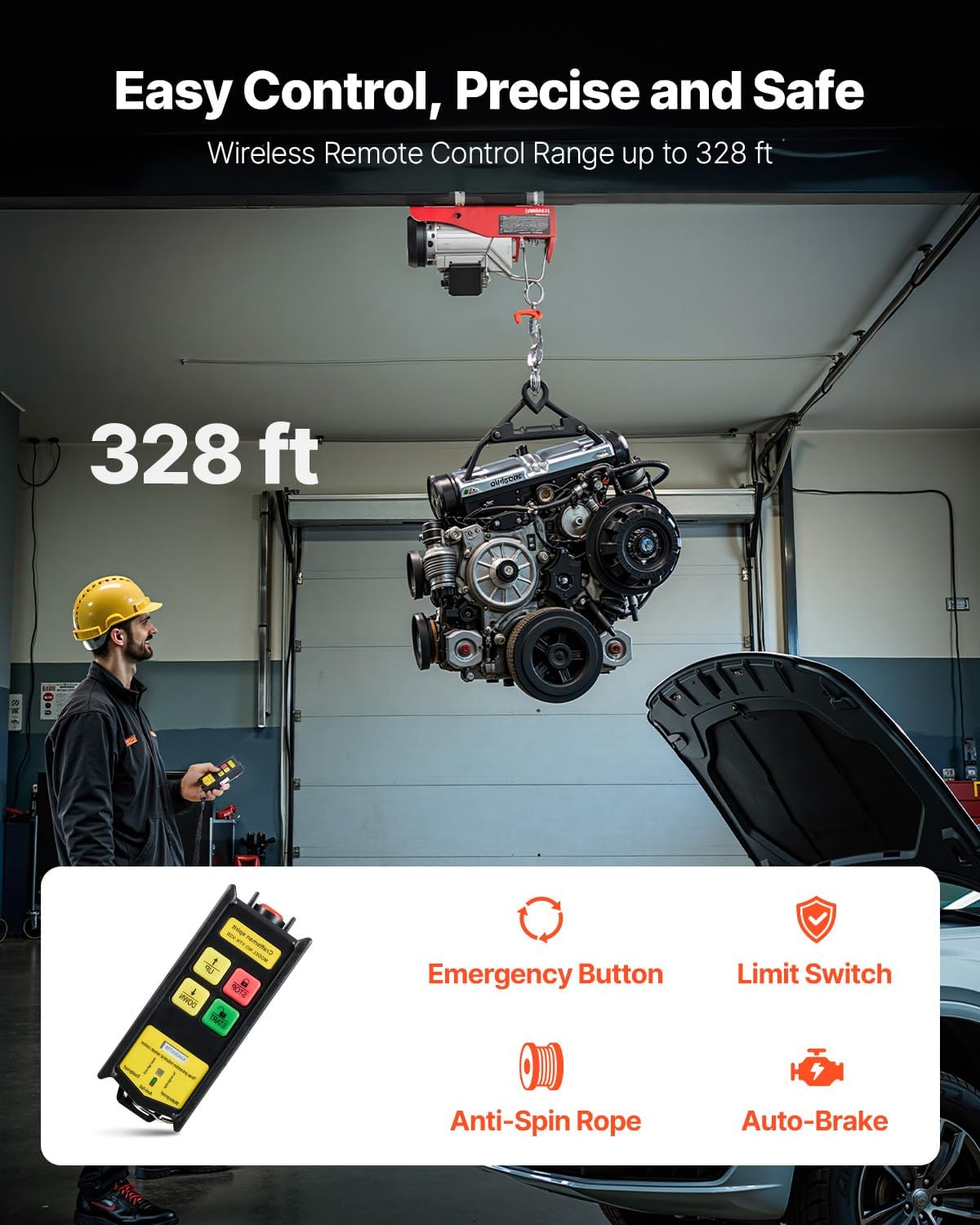
Figure 5.2: Wireless remote control operation and safety features.
Always ensure a clear line of sight to the hoist and load during operation. Avoid operating the hoist in adverse weather conditions or environments that could interfere with the wireless signal.
6. 유지관리
Regular maintenance ensures the longevity and safe operation of your VEVOR electric hoist.
- 와이어 로프 검사: Regularly check the steel wire rope for signs of wear, fraying, kinks, or corrosion. Replace the rope immediately if any damage is observed.
- Hook and Latch Inspection: Inspect the lifting hook and safety latch for deformation, cracks, or wear. Ensure the latch operates freely.
- Motor and Cooling System: Keep the motor housing and cooling fan free from dust and debris to ensure proper heat dissipation.
- 장착 하드웨어: Periodically check all mounting bolts and connections to ensure they remain tight and secure.
- 매끄럽게 하기: Consult a qualified technician for any lubrication requirements of internal components.
- 청소: Clean the exterior of the hoist with a damp 천으로 닦으세요. 강한 화학 물질을 사용하거나 기기를 물에 담그지 마세요.
Always disconnect power to the hoist before performing any maintenance or cleaning.
7. 문제 해결
If you encounter issues with your VEVOR electric hoist, refer to the following common troubleshooting steps:
| 문제 | 가능한 원인 | 해결책 |
|---|---|---|
| 호이스트가 작동하지 않습니다 | 전원 공급이 없습니다 비상 정지가 실행되었습니다 리모컨 배터리 부족 | 전원 연결 및 회로 차단기를 확인하세요 비상 정지 버튼 해제 리모컨 배터리 교체 |
| Motor runs but hoist does not lift | 초과 적재 와이어 로프가 걸렸습니다 | Reduce load to within capacity Inspect wire rope for obstructions or damage |
| Hoist stops during operation | 과열 보호 활성화됨 리미트 스위치 작동됨 | 모터를 냉각시키십시오 Check if load has reached upper or lower limit |
| 리모콘이 응답하지 않음 | 범위를 벗어남 간섭 배터리 문제 | Move closer to the hoist Reduce sources of interference 리모컨 배터리 교체 |
If the problem persists after attempting these solutions, contact VEVOR customer support or a qualified technician.
8. 사양
Detailed technical specifications for the VEVOR WX1320-1 Electric Hoist:
| 특징 | 사양 |
|---|---|
| 모델 번호 | WX1320-1 |
| Dual-line Lifting Capacity | 1320파운드 / 600킬로그램 |
| Single-line Lifting Capacity | 660파운드 / 300킬로그램 |
| Single-line Lifting Height | 39.4피트 / 12미터 |
| Double-line Lifting Height | 19.7피트 / 6미터 |
| Single-line Lifting Speed | 32피트/분 / 10m/분 |
| Double-line Lifting Speed | 16피트/분 / 5m/분 |
| 모터 파워 | 1150와트 |
| 권tage | 110V~, 60Hz |
| 정격 회전 속도 | 2800 분당 |
| 정격 토크 | 3.9Nm(XNUMXNm) |
| 제어 방법 | Wireless Remote Control (328 ft / 100 m range) |
| 제품 치수 | 15.4 x 6 x 7 인치 / 390 x 150 x 180mm |
| 품목 무게 | 40.7파운드/18.46kg |
| 재료 | 금속 |
| 색상 | 빨간색 |
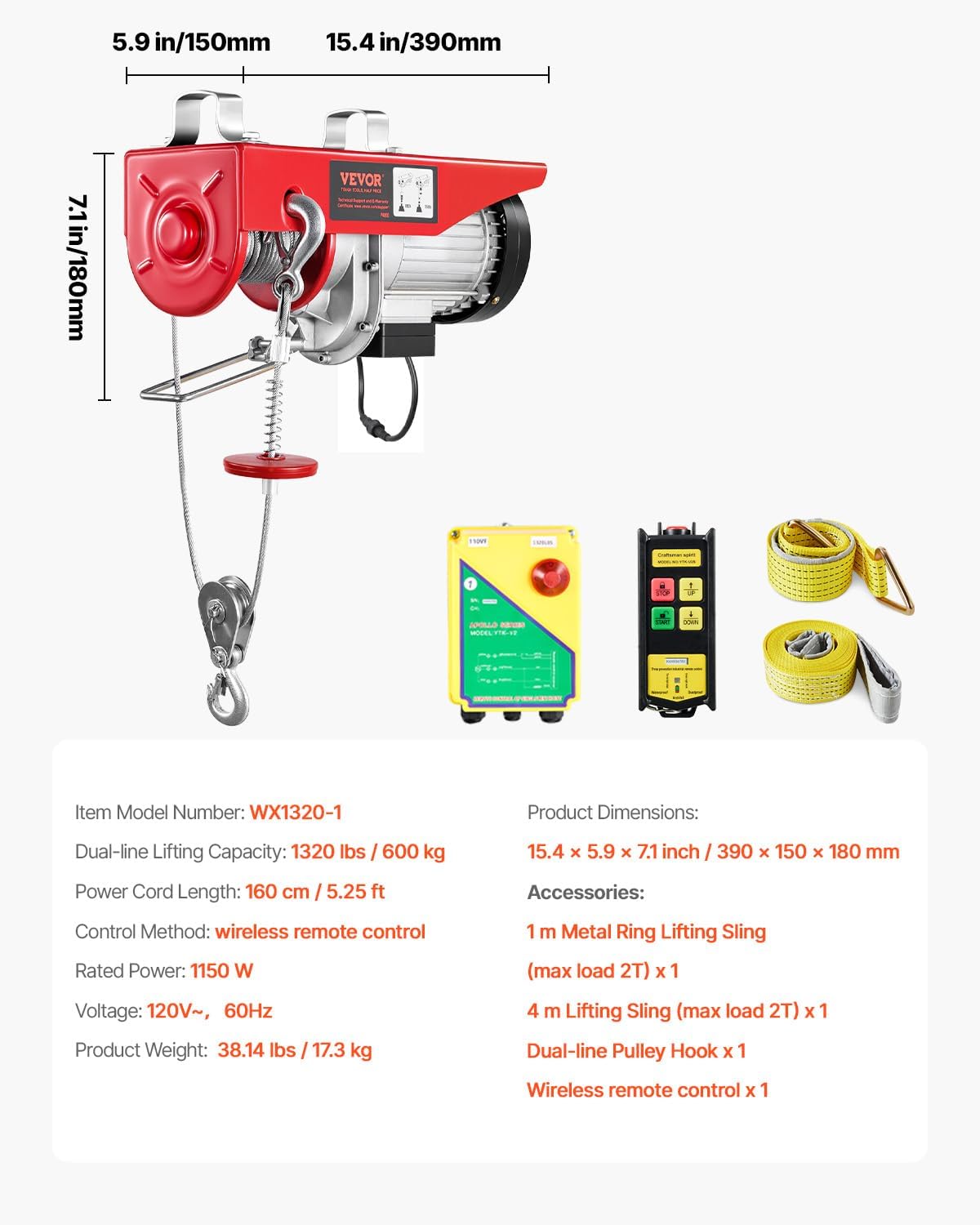
그림 8.1: 제품 크기 및 사양view.
9. 보증 및 지원
VEVOR 제품은 내구성과 성능을 고려하여 설계되었습니다. 자세한 보증 내용은 제품과 함께 제공된 보증서를 참조하시거나 VEVOR 공식 웹사이트를 방문하세요. web사이트. 보증 청구에 대비해 구매 증빙 자료로 구매 영수증을 보관하세요.
For technical support, troubleshooting assistance, or parts inquiries, please contact VEVOR customer service through their official channels. Provide your product model number (WX1320-1) and purchase date for faster service.