
1. 서론
The EPOS Impact 1061T is a double-sided Active Noise Cancelling (ANC) headset designed for modern open office environments. It integrates EPOS BrainAdapt™ technology to minimize brain fatigue, features industry-leading voice pickup powered by EPOS AI™, and adaptive ANC for clear communication. This headset offers all-day wearing comfort with its lightweight design, soft cushions, headband padding, and Super Wideband for natural listening. Enjoy total ease of use with a contactless charging stand, intuitive on-headset controls, and a suite of smart features.
2. 상자 안에 무엇이 들어있나요?
- IMPACT 1061T Headset
- IMPACT 1000 이어패드
- IMPACT 1000 ANC ear pads
- 배터리
- Contactless charging stand (CH 40)
- USB-C 케이블
3. 설정
3.1 초기 충전
Before first use, fully charge your headset using the provided USB-C cable or the contactless charging stand (CH 40). Connect the USB-C cable to the headset and a power source, or place the headset on the charging stand ensuring proper alignment.
3.2 장치에 연결하기
The EPOS Impact 1061T Headset offers versatile connectivity:
- 무선 연결 : The headset utilizes Bluetooth technology (Bluetooth Version 5.0) for wireless connection. Power on the headset and put it into pairing mode. 검색 "EPOS Impact 1061T" on your device's Bluetooth settings and select to pair.
- PC Connection via Dongle: For optimal performance with PCs and UC softphones, use the dedicated USB-C dongle. Plug the dongle into an available USB-C port on your computer. The headset will automatically connect to the dongle. If your PC only has USB-A ports, an adapter may be required (not included unless specified in the box contents).
- 다중 장치 연결: Stay connected wirelessly with up to three devices simultaneously, allowing seamless switching between your laptop, tablet, and smartphone.
3.3 Hot Desking Environments
This headset is designed to operate without a base station, making it ideal for hot desking. Simply connect your headset to the available device via Bluetooth or the USB dongle for immediate use.
4. 사용 설명서
4.1 기본 컨트롤
The headset features intuitive on-headset controls for managing calls and audio:
- 전화 받기/종료: Use the dedicated call button on the earcup or simply move the boom arm down to answer and up to end calls.
- 마이크 음소거: Mute calls by moving the boom arm up or using the mute button.
- 볼륨 조절: Adjust audio volume using the dedicated buttons on the earcup.
- 바쁨표시등: An intuitive busylight clearly signals when you are on a call and not to be disturbed.
4.2 고급 기능
- 능동형 소음 제거(ANC): Activate adaptive ANC to reduce background noise and enhance focus for both sides of the conversation.
- EPOS AI™ and BrainAdapt™ Technology: Benefit from industry-leading voice pickup and technology designed to reduce brain fatigue, ensuring clear speech in noisy environments.
- 설명회: Communicate easily with in-office colleagues without removing the headset, maintaining environmental awareness during calls.
- Super Wideband Audio: Enjoy clear speech and natural listening experience with super wideband audio and stereo sound.
5. 미디어
5.1 제품 이미지
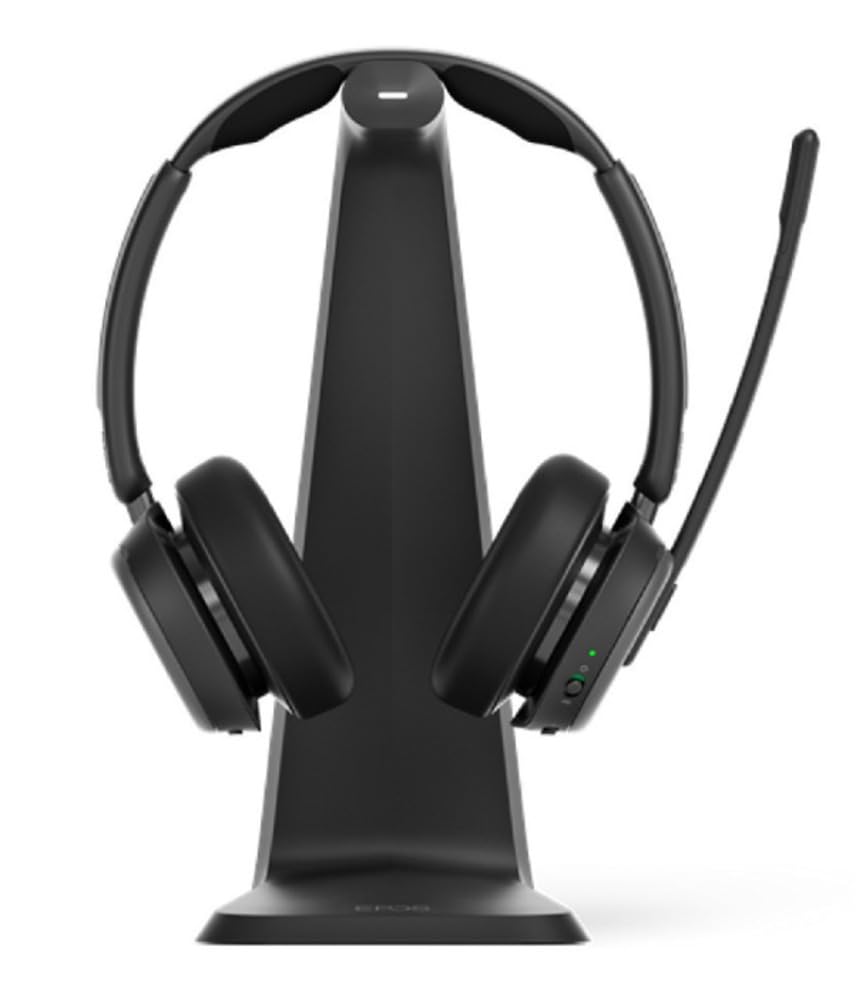
이미지 1: The EPOS Impact 1061T Headset, shown in black, featuring its over-ear design with a flexible microphone boom arm. The headset is designed for comfort and clear communication in professional settings.
6. 사양
| 특징 | 세부 사항 |
|---|---|
| 모델명 | 임팩트 1000 |
| 연결 기술 | 무선(블루투스 5.0) |
| 소음 제어 | 능동 소음 제거 |
| 이어피스 모양 | 온이어 |
| 품목 무게 | 6온스(0.17킬로그램) |
| 제품 치수 | 9.5 x 9.25 x 4.5 인치 |
| 배터리 | 1개의 리튬 이온 배터리(포함) |
| 특별 기능 | Ambient Noise, Breathable, Comfortable, Lightweight, Microphone Included, Mute Light Indicator, Noise Cancellation, Padded Headband, Talk-Through, USB Charging, Wideband Audio |
| 호환 장치 | Laptops, Desktops, Tablets, Smartphones, Smart Speakers, Gaming Consoles, Telephones |
7. 유지관리
7.1 청소
Regularly clean your headset to ensure hygiene and longevity. Use a soft, dry cloth to wipe the earcups and headband. For stubborn dirt, a slightly damp cloth with mild soap can be used, ensuring no moisture enters the electronic components. Do not use harsh chemicals or abrasive materials.
7.2 보관
When not in use, store the headset in its soft carry pouch to protect it from dust and damage. Avoid storing in extreme temperatures or high humidity.
7.3 이어패드 교체
The IMPACT 1000 ear pads and IMPACT 1000 ANC ear pads are replaceable. Refer to the EPOS support website for instructions on how to replace them if they become worn or damaged.
8. 문제 해결
- 오디오 없음/오디오 품질이 좋지 않음:
- 헤드셋이 완전히 충전되었는지 확인하세요.
- 헤드셋이 기기와 올바르게 페어링되고 연결되었는지 확인하십시오.
- 헤드셋과 연결된 기기의 볼륨 레벨을 확인하세요.
- If using a dongle, ensure it is securely plugged into the PC.
- 마이크가 작동하지 않음:
- 마이크 붐 암이 내려져 있고 음소거가 해제되어 있는지 확인하세요.
- Check microphone settings on your connected device/application.
- 연결 문제:
- 연결된 기기에 더 가까이 이동하여 연결 범위 내에 있는지 확인하십시오.
- 헤드셋과 기기의 연결을 해제한 후 다시 연결하세요.
- 연결된 장치를 다시 시작하세요.
- ANC가 작동하지 않음:
- Ensure ANC is activated via the headset controls.
- Check for any obstructions around the external microphones.
9. 보증 및 지원
The EPOS Impact 1061T Headset comes with a manufacturer's warranty. For detailed warranty information, product support, or to access additional resources, please visit the official EPOS web해당 사이트를 방문하거나 고객 서비스에 문의하세요. 보증 청구를 위해 구매 증빙 자료를 보관하세요.