
소개
The Havit Gamenote KB885L mechanical keyboard is engineered for precision, durability, and customization. It features a gasket structure design, providing a soft and stable typing experience while minimizing noise. The full key rollover with multi-key response ensures fast and accurate input, crucial for gaming. With customizable RGB backlighting, you can personalize your keyboard with various lighting modes and effects. The detachable USB-C cable enhances portability and simplifies cable management. This keyboard is built with mechanical switches rated for 50 million key presses, making it suitable for gamers, typists, and professionals who require long-lasting performance.
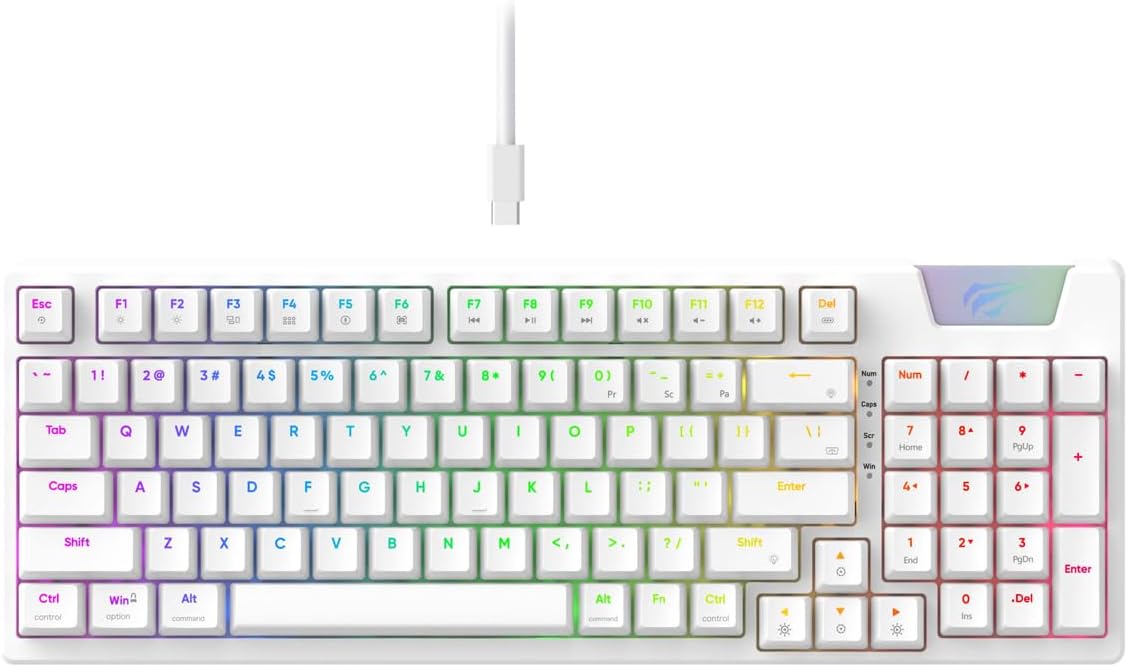
Image: The Havit Gamenote KB885L mechanical keyboard in white, showcasing its full layout and detachable USB-C cable.
설치 가이드
Follow these steps to set up your Havit Gamenote KB885L mechanical keyboard:
- 키보드 풀기: 키보드와 부속품을 포장에서 조심스럽게 꺼내십시오.
- USB-C 케이블을 연결합니다. Insert the detachable USB Type-C cable into the port on the keyboard.
- 컴퓨터에 연결: USB 케이블의 다른 쪽 끝을 컴퓨터의 사용 가능한 USB 포트에 연결합니다.
- 드라이버 설치: 이 키보드는 플러그 앤 플레이 방식이므로 일반적으로 추가 드라이버가 필요하지 않습니다. 운영 체제가 필요한 드라이버를 자동으로 감지하고 설치합니다.
- 테스트 기능: Open a text editor or browser to test key presses and ensure all functions are working correctly.

Image: A close-up of the Havit Gamenote KB885L keyboard highlighting its portable design and detachable cable for easy setup and transport.
작동 지침
The Havit Gamenote KB885L keyboard offers various features for an enhanced user experience:
RGB 백라이트 제어
키보드는 사용자 정의 가능한 RGB 백라이트 기능을 갖추고 있습니다. 다음 키 조합을 사용하여 조명 효과를 조정하세요.
- Fn + [키]: Cycle through different RGB lighting modes. (Specific key combinations may vary, refer to on-keyboard legends if available).
- Fn + 화살표 키: 조명 효과의 밝기와 속도를 조절하세요.

Image: The Havit Gamenote KB885L keyboard displaying its vibrant RGB backlighting, illustrating customizable lighting effects.
완전 키 롤오버(NKRO)
This keyboard supports Full Key Rollover, meaning every key press is registered independently, regardless of how many keys are pressed simultaneously. This feature is essential for fast-paced gaming and typing, preventing ghosting or missed inputs.
인체공학적 디자인
The keyboard is designed with ergonomics in mind to provide comfort during extended use. Its layout and keycap profile aim to reduce strain on your wrists and fingers.

이미지: A view of the Havit Gamenote KB885L keyboard highlighting its ergonomic design for comfortable use.
유지
적절한 유지관리는 키보드의 수명과 최적의 성능을 보장합니다.
- 청소: 키보드는 부드럽고 마른 천으로 정기적으로 닦아주세요. 더욱 깨끗하게 청소하려면 압축 공기를 사용하여 키캡 사이의 먼지와 이물질을 제거하십시오. 잘 지워지지 않는 얼룩은 약간 거친 천으로 닦아내세요.amp 순한 비누를 묻힌 천을 사용하면 액체가 키보드 안으로 들어가지 않도록 할 수 있습니다.
- 유출을 방지하세요: 키보드 내부 부품 손상을 방지하기 위해 액체가 키보드에 닿지 않도록 하십시오. 액체를 쏟았을 경우 즉시 키보드를 분리하고 완전히 건조시킨 후 다시 연결하십시오.
- 케이블 관리: Handle the detachable USB-C cable with care. Avoid sharp bends or excessive pulling to prevent damage to the cable or connectors.
- 저장: 사용하지 않을 때는 키보드를 극한의 온도를 피해 깨끗하고 건조한 곳에 보관하세요.
문제 해결
If you encounter issues with your Havit Gamenote KB885L keyboard, try the following solutions:
- 키보드가 응답하지 않음:
- USB-C 케이블이 키보드와 컴퓨터에 모두 단단히 연결되어 있는지 확인하세요.
- 키보드를 컴퓨터의 다른 USB 포트에 연결해 보세요.
- 다른 컴퓨터에서 키보드를 테스트하여 문제가 키보드에 있는지, 아니면 시스템에 있는지 확인하세요.
- RGB 조명이 작동하지 않음:
- Check if the lighting is turned off using the Fn key combinations.
- USB 연결을 통해 키보드에 적절한 전원이 공급되는지 확인하세요.
- 키가 등록되지 않거나 인식되지 않는 문제:
- Due to full key rollover, this is unlikely. However, ensure no debris is lodged under the keycap.
- If a specific key is consistently failing, it might indicate a switch issue. Contact support if the problem persists.
명세서
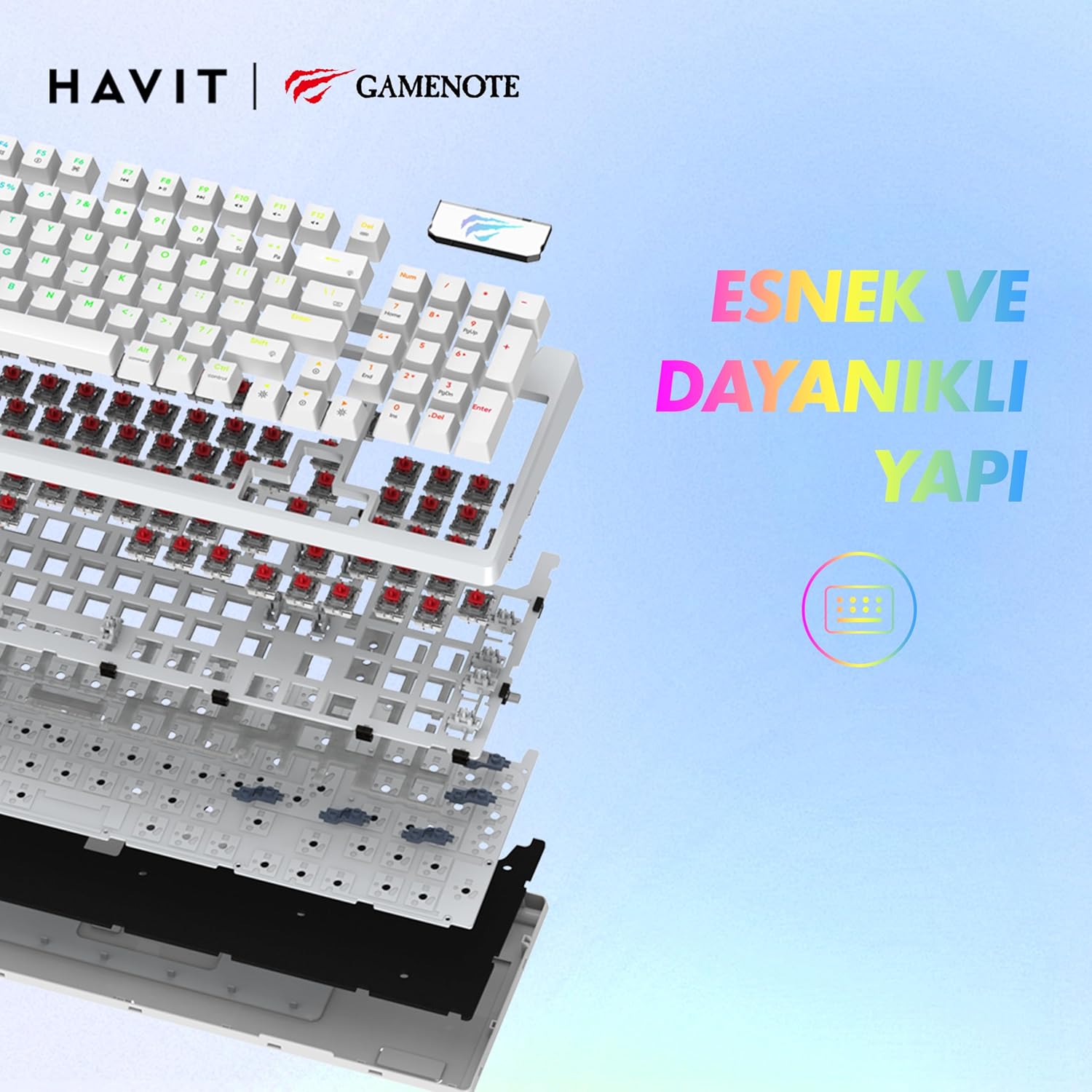
이미지: 폭발된 view of the Havit Gamenote KB885L keyboard, illustrating its internal gasket structure for enhanced stability and typing feel.
| 특징 | 세부 사항 |
|---|---|
| 상표 | 하빗 |
| 모델 번호 | KB885L |
| 호환 장치 | 컴퓨터 |
| 연결 기술 | USB |
| 키보드 설명 | 노름 |
| 추천 용도 | 노름 |
| 특징 | 가지고 다닐 수 있는 |
| 색상 | 하얀색 |
| 백라이트 색상 지원 | RGB (Red, Green, Blue model) |
| 스타일 | 현대의 |
| 제품 크기(L x W x H) | 38.7 x 14 x 4.5cm |
| 언어 | 영어 |
| 전원 | USB 전원 |
| 스위치 유형 | 촉각적 |
| 키보드 레이아웃 | 쿼티 |
| 손의 방향 | 양손잡이 |
| 키의 개수 | 95 |
| 버튼 수량 | 104 |
| 포함된 구성 요소 | USB 케이블 |
| 재료 | 플라스틱 |
| Key Press Lifespan | 50 Million (from description) |

Image: An illustration highlighting the Havit Gamenote KB885L's durable mechanical switches, rated for a 50 million key press lifespan.
보증 정보
Havit Gamenote KB885L 기계식 키보드에는 다음이 포함됩니다. 1년 보증 구매일로부터 유효합니다. 본 보증은 제조상의 결함 및 정상적인 사용으로 인해 발생하는 문제에 적용됩니다. 단, 오용, 사고, 무단 개조 또는 부적절한 유지보수로 인한 손상은 보증 대상에서 제외됩니다. 보증 청구를 위해 구매 증빙 자료를 보관해 주십시오.
고객 지원
For further assistance, technical support, or warranty inquiries, please contact Havit customer service through their official website or the retailer where you purchased the product. Have your model number (KB885L) and proof of purchase ready when contacting support.


