
1. 서론
This manual provides essential instructions for the safe and effective operation of your Andoer H8 Compact Digital Camera. Please read this manual thoroughly before using the camera and retain it for future reference.
2. 안전 정보
안전한 작동을 위해 다음 주의 사항을 준수하십시오.
- 카메라를 물이나 습기에 노출시키지 마십시오.
- 카메라를 떨어뜨리거나 강한 충격을 주지 마세요.
- 카메라를 극한 온도에 노출시키지 마십시오.
- 카메라를 직접 분해하거나 수리하려고 하지 마십시오. 자격을 갖춘 서비스 담당자에게 문의하십시오.
- 지정된 충전 케이블과 배터리만 사용하십시오.

이미지 설명: A red triangular warning symbol with an exclamation mark, accompanied by text in multiple languages warning to keep plastic bags away from babies and children to prevent suffocation.
3. 패키지 내용
패키지에 모든 품목이 들어 있는지 확인하세요.
- Andoer H8 Digital Camera
- C타입 케이블
- 매는 밧줄
- 사용자 설명서

이미지 설명: A pink Andoer H8 compact digital camera, displayed with its front and back sides visible, highlighting its compact design and screen.
4. 카메라 오버view
카메라의 구성 요소를 알아보세요.
- 렌즈: 이미지와 비디오를 캡처합니다.
- 플래시: 조명이 어두운 환경에서 조명을 제공합니다.
- 2.8인치 IPS 디스플레이: 을 위한 viewing menus, photos, and videos.
- 전원 버튼: 카메라를 켜거나 끕니다.
- 셔터 버튼: 사진을 찍습니다.
- 확대/축소 컨트롤: Adjusts 8x digital zoom.
- 탐색 버튼: 메뉴 탐색 및 선택을 위해.
- 모드 버튼: Switches between photo, video, game, and music modes.
- USB-C 포트: 충전 및 데이터 전송용입니다.
- TF 카드 슬롯 : 메모리 카드를 삽입합니다.

이미지 설명: An illustration showing the Andoer H8 camera in four different colors (Purple, Blue, Black, Pink) and icons representing its main functions: Photo, Video, Game, Music, and Flash lamp.
5. 설정
5.1. 배터리 충전
- Connect the supplied Type-C cable to the camera's USB-C port.
- 케이블의 다른 쪽 끝을 USB 전원 어댑터(포함되지 않음)나 컴퓨터의 USB 포트에 연결합니다.
- The charging indicator will illuminate. Charging typically takes 2-4 hours.
- 완전히 충전되면 표시등의 색상이 바뀌거나 꺼질 수 있습니다.
5.2. 메모리 카드(TF 카드) 삽입
The camera supports TF cards up to 32GB (not included).
- 카메라에서 TF 카드 슬롯을 찾으세요.
- Insert the TF card with the metal contacts facing down until it clicks into place.
- 제거하려면 카드가 튀어나올 때까지 부드럽게 누르세요.
6. 사용 설명서
6.1. 전원 켜기/끄기
- 전원을 켜려면 전원 버튼을 길게 누르세요.
- 전원을 끄려면 전원 버튼을 다시 길게 누르세요.
6.2. 사진 찍기
- Turn on the camera and ensure it is in Photo mode (indicated by an icon on the screen).
- 2.8인치 IPS 디스플레이를 사용하여 구도를 잡아보세요.
- Use the zoom controls to adjust the 8x digital zoom.
- 셔터 버튼을 눌러 이미지를 촬영하세요.

이미지 설명: A pink Andoer H8 camera showing a high-definition image on its screen, with text indicating "4800W shot in HD" and "8000x6000 HD resolution," demonstrating its photo capabilities.
6.3. 비디오 녹화
- Switch the camera to Video mode.
- 셔터 버튼을 눌러 녹화를 시작하세요. 화면에 녹화 표시등이 나타납니다.
- 녹화를 중지하려면 셔터 버튼을 다시 누르세요.

이미지 설명: A pink Andoer H8 camera displaying a live video recording on its screen, with "1080P Video recording" and "Recording the good times" text, illustrating its video capture function.
6.4. 재생
- In Photo or Video mode, press the Playback button (usually indicated by a triangle icon) to enter playback mode.
- Use the navigation buttons to browse through your photos and videos.
- OK/Enter 버튼을 눌러주세요 view 사진을 찍거나 비디오를 재생하세요.
6.5. Special Features: Stickers, Frames, and Filters
Enhance your photos with built-in creative options:
- Access these features through the camera's menu settings, typically found in Photo mode.
- Select from 40 kinds of head stickers, 26 photo frames, and 6 filters to customize your images before or after capture (depending on camera firmware).

이미지 설명: A collage demonstrating various creative options available on the camera, including 40 types of cute head stickers, 26 adorable photo frames, and 6 filters, applied to different child portraits.
6.6. 음악 재생
이 카메라는 MP3 음악 재생을 지원합니다.
- MP3 전송 fileTF 카드에 저장하세요.
- Switch the camera to Music mode.
- Use the navigation buttons to select and play music.
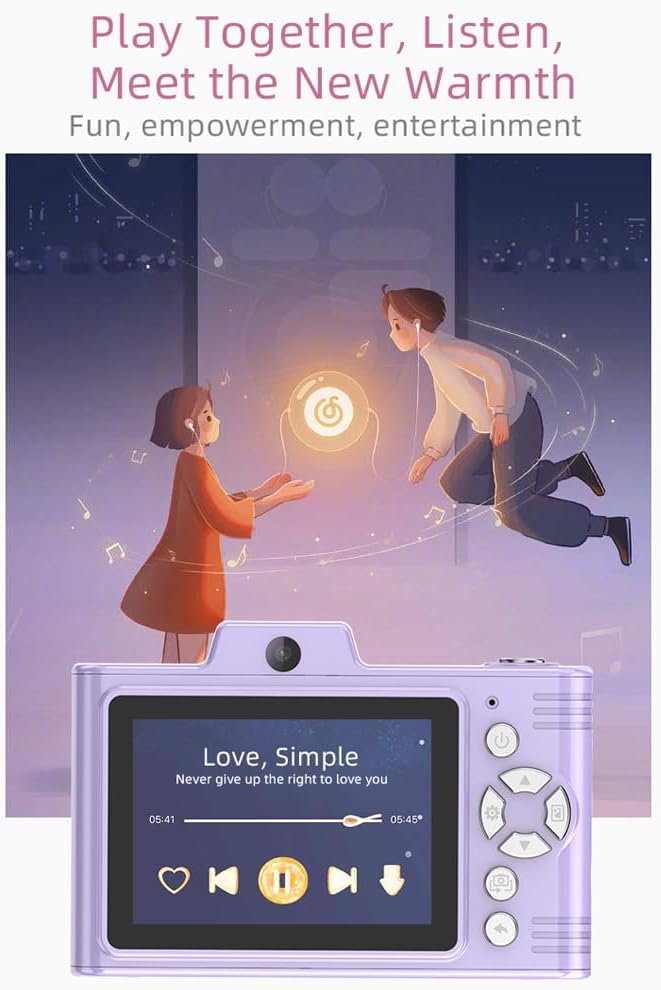
이미지 설명: A purple Andoer H8 camera showing a music player interface on its screen, with song title "Love, Simple" and playback controls, indicating its music playback capability.
6.7. Connecting to a Computer / Transferring Files
You can transfer photos and videos to a computer or phone.
- Connect the camera to your computer using the Type-C cable.
- The camera should appear as a removable disk.
- 드래그 앤 드롭 file컴퓨터에 연결하세요.
- For phone transfer, use an OTG adapter (not included) if your phone supports OTG functionality.
7. 유지관리
- 청소: Use a soft, dry cloth to clean the camera body. For the lens, use a specialized lens cleaning cloth.
- 저장: Store the camera in a cool, dry place away from direct sunlight and dust. Remove the battery if storing for extended periods.
8. 문제 해결
| 문제 | 가능한 해결책 |
|---|---|
| 카메라의 전원이 켜지지 않습니다. | Ensure the battery is charged. Reinsert the battery. |
| 사진/동영상 촬영이 불가능합니다. | Check if a TF card is inserted and has sufficient space. Ensure camera is in the correct mode. |
| 이미지가 흐릿합니다. | Clean the lens. Ensure adequate lighting. Hold the camera steady. |
| 카메라가 정지됩니다. | 카메라를 재설정하려면 배터리를 제거했다가 다시 삽입하세요. |
9. 사양
| 특징 | 세부 사항 |
|---|---|
| 제품 모델 | H8 |
| 디스플레이 화면 | 2.8 인치 IPS |
| 사진 픽셀 | 최대 48MP |
| 비디오 해상도 | 1080P HD |
| 디지털 줌 | 8x |
| File 체재 | JPG/AVI/MP3 |
| 충전 시간 | 약 2-4시간 |
| 배터리 용량 | 700mAh, 3.7V |
| 제품 무게 | 110g |
| 제품 크기 | 105.5 x 72 x 46mm |
| 충전량tage | 직류 5V 1A |
| 메모리 지원 | TF card (max 32GB) |
| 특별 기능 | 40 Head Stickers, 26 Photo Frames, 6 Filters |
| 연결성 | USB(타입-C) |
| 이미지 안정화 | 디지털 |
| 센서 유형 | CMOS |
| 기술 수준 | 초심자 |
10. 보증 및 지원
For warranty information and technical support, please refer to the documentation provided with your purchase or contact Andoer customer service directly. Keep your proof of purchase for warranty claims.