
1. 제품 오버view
The suptek MD01A Gas Spring Monitor Arm is designed to enhance your workspace ergonomics and free up desk space. This monitor arm offers full flexibility, allowing you to adjust your monitor's height, tilt, swivel, and rotation for optimal view편안함을.
- 인체공학적 디자인: Helps achieve a healthier working posture by allowing easy adjustment of monitor height up to 45 cm and horizontal extension up to 49.3 cm.
- 안정적인 구조: Features a gas spring mechanism for smooth, silent adjustments, made from high-strength steel and aluminum for durability and scratch resistance.
- Space Saving & Cable Management: Integrated cable management system keeps your workspace tidy and clutter-free.
- 보편적 인 호환성 : Supports LED/LCD monitors from 13 to 32 inches, weighing between 2-9 kg, with VESA mounting patterns of 75x75 mm and 100x100 mm.

Image 1.1: Product dimensions showing load capacity (2-9kg), VESA patterns (75x75/100x100mm), screen size (13"-32"), and height/extension ranges.

Image 1.2: Illustration of the monitor arm's full adjustability, including tilt (±90°), swivel (±180°), and 360° rotation.
영상 1.3: 간략한 사전 설명view demonstrating the general functionality and adjustability of the monitor arm.
2. 안전 정보
설치 및 사용 전에 모든 지침을 읽고 이해하십시오. 그렇지 않을 경우 부상이나 재산 피해가 발생할 수 있습니다.
- Ensure your monitor's weight and VESA pattern are within the specified limits (13-32 inches, 2-9 kg, VESA 75x75/100x100 mm).
- Do not overtighten screws during installation to avoid damaging the product or your desk.
- 어린이와 애완동물이 설치 장소에 접근하지 못하도록 하세요.
- Always adjust the gas spring tension carefully to match your monitor's weight.
- If you have any doubts about installation, consult a qualified professional.
3. 패키지 내용
설치를 진행하기 전에 모든 구성품이 있는지, 손상되지 않았는지 확인하십시오. 패키지에는 일반적으로 다음이 포함됩니다.
- 모니터 암 어셈블리
- 데스크 Clamp 베이스
- 그로밋 마운트 베이스
- VESA 플레이트
- 하드웨어 키트(나사, 와셔, 스페이서)
- Allen Keys for adjustment
- 사용 설명서
4. 설정 및 설치
The suptek MD01A monitor arm offers two installation methods: C-clamp 그리고 그로밋 마운트.

Image 4.1: Visual representation of the C-clamp and Grommet Mount options for desk attachment. Both support desk thickness from 10-70mm, with grommet hole diameter from 10-60mm.
4.1. 설치 방법을 선택하세요
C-Clamp 설치:
- C-cl을 부착하세요amp base to the edge of your desk. Ensure the desk thickness is between 10-70mm.
- cl을 조여주세요amp securely using the knob until the base is stable.
그로밋 마운트 설치:
- Insert the grommet base through an existing hole in your desk (diameter 10-60mm). Ensure the desk thickness is between 10-70mm.
- Secure the base from underneath the desk using the provided plate and nut.

이미지 4.2: 상세 view C-cl의amp attachment method, suitable for desk thicknesses of 10-70mm.

이미지 4.3: 상세 view of the Grommet mount attachment method, for desk thicknesses of 10-70mm and hole diameters of 10-60mm.
4.2. Attach VESA Plate to Monitor and Assemble Arm
- 모니터를 부드럽고 깨끗한 표면에 화면이 아래로 향하도록 조심스럽게 놓으십시오.
- VESA 플레이트를 모니터 뒷면의 장착 구멍(75x75mm 또는 100x100mm)에 맞춰 정렬하십시오.
- Secure the VESA plate to the monitor using the appropriate screws and washers from the hardware kit. Do not overtighten.
- Insert the lower arm into the desk mount base.
- 위쪽 팔을 아래쪽 팔에 연결합니다.
- Slide the monitor (with VESA plate attached) onto the end of the monitor arm. Ensure it clicks securely into place.

Image 4.4: A three-step visual guide illustrating the quick and easy installation process: fixing the clamp, assembling the arm, and connecting the monitor.
5. 작동 지침 및 조정
The suptek MD01A monitor arm offers various adjustments for optimal view주고받음.
5.1. 가스 스프링 장력 조절
The gas spring tension must be adjusted to match your monitor's weight for proper function. Use the provided Allen key.
- If the arm falls down: Turn the inside screw counter-clockwise (towards the "+" direction) to increase gas spring tension until the arm can stay as intended.
- If the arm rises up or cannot be pressed down: Turn the inside screw clockwise (towards the "-" direction) to decrease gas spring tension until the arm can stay as intended.
메모: Ensure the arm is in a horizontal position during adjustment.
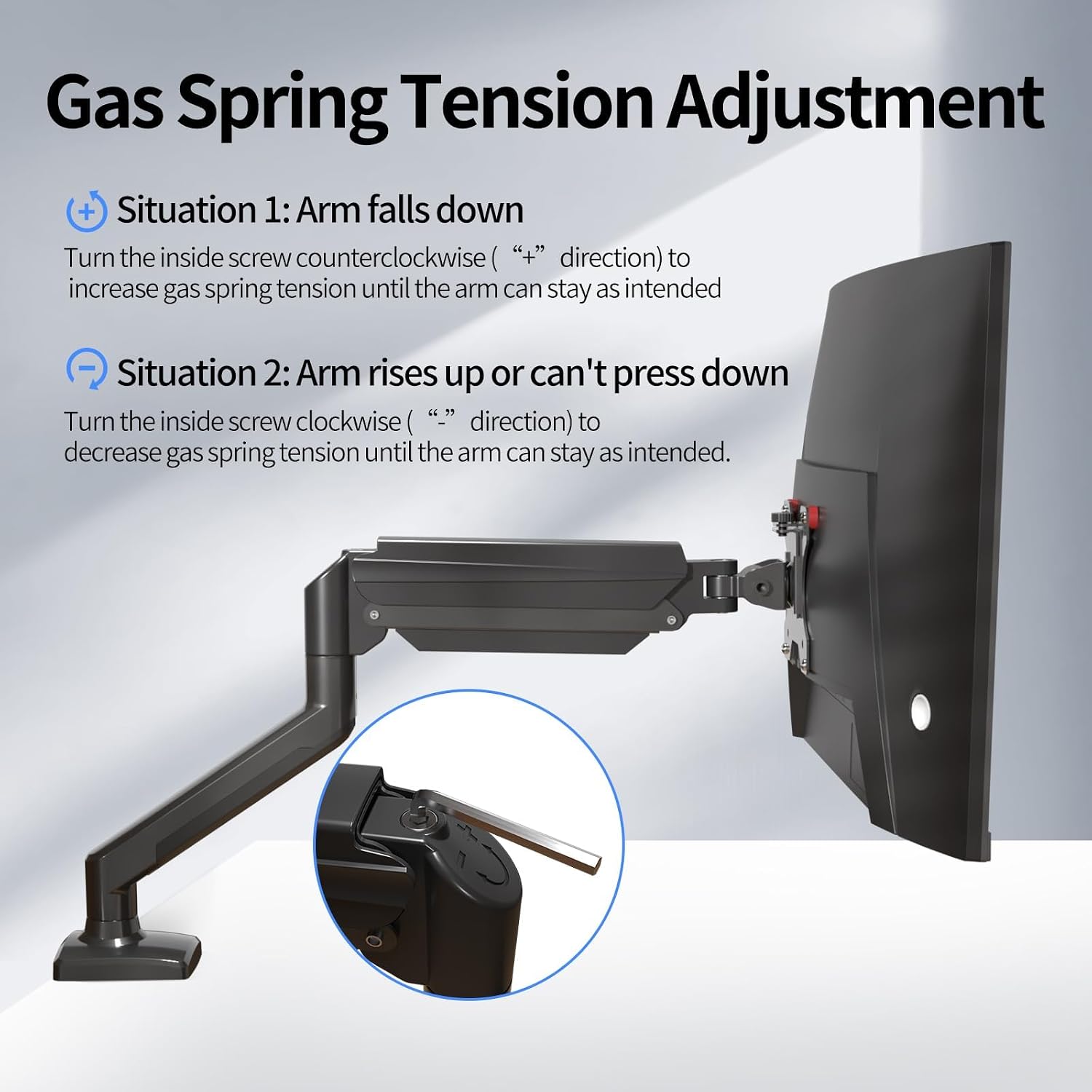
Image 5.1.1: Diagram showing how to adjust the gas spring tension using an Allen key to prevent the arm from falling or rising unintentionally.

Image 5.1.2: Detailed illustration of the gas spring adjustment mechanism, highlighting the plus and minus directions for increasing 또는 감소asing 장력.
5.2. Tilt Angle, Swivel, and Rotation Adjustment
To adjust the tilt angle of your monitor:
- Loosen the tilting bolt on the VESA plate using an Allen key.
- Adjust the monitor to your desired tilt angle. It's easier to adjust if you grab the top and bottom of the screen.
- Retighten the tilting bolt to fix the intended angle. Do not let go of the screen before locking the screw to prevent rebound.
- 높이 조정: Gently push or pull the monitor up or down. The gas spring will assist in holding the position.
- 받침: Rotate the monitor arm horizontally at the joints to change the view잉 방향.
- 회전: Rotate the monitor 360 degrees from landscape to portrait orientation.

Image 5.2.1: Technical diagrams illustrating the monitor arm's tilt (±90°), swivel (±90°), and 360° rotation capabilities.
6. 유지관리
정기적인 유지 관리는 모니터 암의 수명과 최적의 성능을 보장합니다.
- 청소: 부드러운 천으로 팔을 닦으세요.amp 천으로 닦으세요. 연마성 세제나 용제는 사용하지 마세요.
- 연결 확인: Periodically check all screws and bolts to ensure they are tight and secure. Retighten if necessary.
- 가스 스프링: If the arm's movement becomes stiff or loose over time, re-adjust the gas spring tension as described in Section 5.1.
7. 문제 해결
일반적으로 발생할 수 있는 문제에 대한 해결책은 다음과 같습니다.
| 문제 | 해결책 |
|---|---|
| Monitor arm falls down or cannot hold position. | The gas spring tension is too low. Turn the inside screw counter-clockwise (towards "+") to increase tension. Refer to Section 5.1. |
| Monitor arm rises up or cannot be pressed down. | The gas spring tension is too high. Turn the inside screw clockwise (towards "-") to decrease tension. Refer to Section 5.1. |
| Gap at the joint of the arm. | Tighten the nut at the joint using the provided Allen key until the gap is closed and the joint rotates smoothly. |
| Cannot insert the Allen key into the gas spring adjustment hole. | Press the upper arm down firmly until the tilting bolt is fully exposed, then insert the hex wrench. |
8. 사양
| 특징 | 세부 사항 |
|---|---|
| 모델 번호 | MD01A |
| 상표 | suptek |
| 호환 가능한 화면 크기 | 13~32인치 |
| 하중 용량 | 2 - 9 kg |
| VESA 호환성 | 75x75 mm, 100x100 mm |
| 장착 유형 | 데스크 Clamp, 그로밋 마운트 |
| 이동 유형 | Articulating (Tilt, Swivel, Rotation) |
| 기울기 각도 | ±90° |
| 회전 | 360° |
| 재료 | 합금강 |
| 데스크 Clamp 두께 | 10~70mm |
| 그로밋 구멍 직경 | 10~60mm |
9. 보증 및 지원
For warranty information, technical support, or to purchase replacement parts, please refer to the official suptek web사이트를 방문하거나 판매점에 문의하세요. 보증 청구를 위해 구매 영수증을 보관하세요.