
Star Micronics MCL32CBI
Star Micronics mC-Label3 MCL32CBI 직접 열전사 프린터 사용 설명서
Model: MCL32CBI
소개
This manual provides essential information for the setup, operation, maintenance, and troubleshooting of your Star Micronics mC-Label3 MCL32CBI Direct Thermal Printer. Please read this manual thoroughly before using the printer to ensure proper and safe operation.
패키지 내용
아래 나열된 모든 품목이 패키지에 포함되어 있는지 확인하세요.
- mC-Label3 Multifunctional Printer
- AC 어댑터
- 전원 케이블
- USB Cables (C-C 1.0m and C-A 1.8m)
- 랜케이블(1m)
- Simple Setup Sheet Safety Guide

이미지: 앞면 view of the Star Micronics mC-Label3 printer, showcasing its compact design and label output slot.
설정
1. 프린터 연결
The mC-Label3 MCL32CBI printer offers multiple connectivity options:
- USB-C : Connect the printer directly to your PC, Android, or iOS device using the provided USB-C to USB-C or USB-C to USB-A cables.
- 이더넷(LAN): For network connectivity, connect the printer to your router or network switch using the supplied LAN cable.
- 블루투스: The MCL32CBI model supports Bluetooth connectivity for iOS and Android devices. Ensure Bluetooth is enabled on your device and pair with the printer.

이미지: 후면 view of the mC-Label3 printer, highlighting the LAN, USB, and power ports for various connection types.
2. 미디어 로드
The printer supports various media types, including linerless labels, die-cut labels, continuous labels, and thermal receipt paper.
- Open the top cover of the printer by lifting the latch.
- Place the media roll into the media compartment, ensuring the leading edge feeds out from the top.
- Pull a small amount of media past the print head and close the top cover securely.
- Ensure the media is properly aligned within the guides.

이미지: 위에서 아래로 view of the mC-Label3 printer with its cover open, illustrating the internal mechanism for loading thermal paper or label rolls.
작동 지침
1. 전원 켜기 / 끄기
Connect the power cable to the printer and a power outlet. Press the power button located on the front of the printer to turn it on. The status indicator light will illuminate.
2. Printing Labels and Receipts
The mC-Label3 MCL32CBI printer is designed for efficient label and receipt printing. It supports various applications and cloud services.
- 소프트웨어 호환성 : Works seamlessly with PC, Android, and iOS applications.
- 클라우드 서비스 : Utilize Star Micronics Cloud Services to design and manage labels.
- One Touch Label: This feature allows storing pre-made receipts and labels for quick and easy printing directly from the printer.
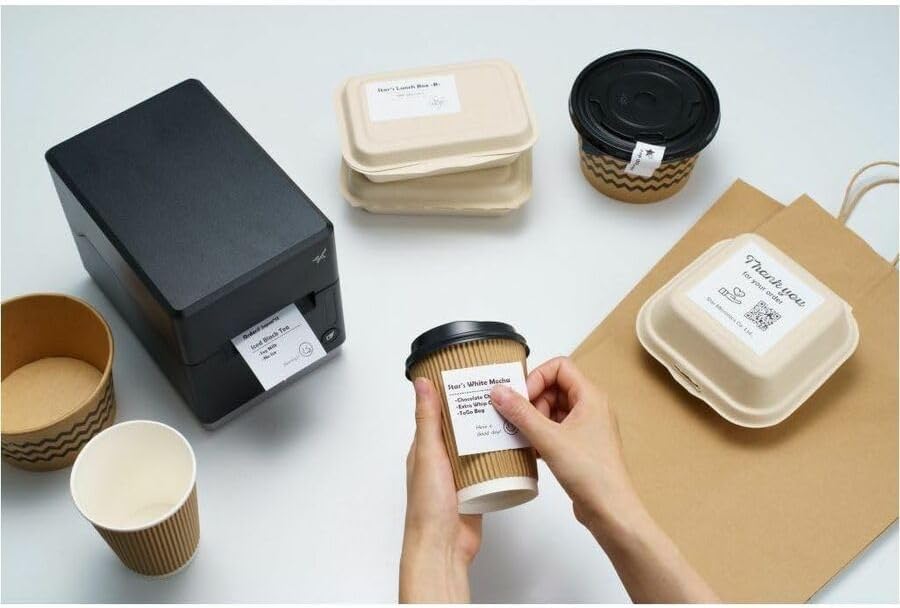
Image: A hand pressing the feed button on the mC-Label3 printer, demonstrating the printing of a 'Thank you' label.

Image: The mC-Label3 printer shown in a practical setting, printing labels for food containers and coffee cups, illustrating its versatility.
유지
1. 프린터 청소
Regular cleaning ensures optimal performance and extends the life of your printer.
- 부드럽고 보풀이 없는 천을 사용하십시오. dampened with isopropyl alcohol to clean the print head.
- Wipe down the exterior of the printer with a soft, dry cloth.
- 연마성 세척제나 용제를 사용하지 마십시오.
2. 미디어 교체
When the media roll is depleted, follow the media loading instructions in the Setup section to replace it.
3. Effortless Repairs
The mC-Label3 is designed for effortless, no-tools-required repairs with minimal upkeep, simplifying any necessary component replacements.
문제 해결
이 섹션에서는 일반적으로 발생할 수 있는 문제에 대한 해결책을 제공합니다.
| 문제 | 가능한 원인 | 해결책 |
|---|---|---|
| 프린터 전원이 켜지지 않습니다 | 전원 케이블이 연결되지 않음; 전원 콘센트 문제 | 전원 케이블이 제대로 연결되어 있는지 확인하세요. 다른 전원 콘센트를 사용해 보세요. |
| 출력 없음 | Out of media; Media loaded incorrectly; Driver issue | Load new media; Re-load media correctly; Reinstall printer drivers. |
| 인쇄 품질이 좋지 않음 | Dirty print head; Low quality media | Clean the print head; Use recommended thermal media. |
| 연결 문제 | Incorrect cable connection; Bluetooth not paired; Network configuration | Check USB/Ethernet cables; Re-pair Bluetooth; Verify network settings. |
명세서
| 특징 | 세부 사항 |
|---|---|
| 모델명 | mC-라벨3 |
| 품목 모델 번호 | MCL32CBI |
| 인쇄 기술 | 직접 열 |
| 프린터 출력 | 단색화 |
| 최대 인쇄 속도 흑백 | 23ppm(XNUMXppm) |
| 최대 흑백 인쇄 해상도 | 203 DPI (203 x 203 DPI) |
| 인쇄 매체 | Labels (Linerless, Die-Cut, Continuous), Thermal Receipt |
| 연결 기술 | Bluetooth, Wired (USB, Ethernet) |
| 하드웨어 인터페이스 | USB, 이더넷 |
| 호환 장치 | PC, 안드로이드, iOS |
| 컨트롤러 유형 | iOS, 안드로이드 |
| 제품 치수 | 6.7인치 깊이 x 5.6인치 너비 x 8.3인치 높이(17.0 x 14.2 x 21.1cm) |
| 품목 무게 | 7.2파운드(3.27kg) |
| 메모리 저장 용량 | 64메가바이트 |
| 색상 | 검은색 |
| 제조업체 | STAR MICRONICS |
| 원산지 | 중국 |
보증 정보
The Star Micronics mC-Label3 MCL32CBI printer comes with a manufacturer's warranty. For specific terms and conditions, please refer to the warranty card included in your package or visit the official Star Micronics web대지.
보증 유형: 제조업체
지원하다
For further assistance, technical support, or to download the latest drivers and firmware, please visit the official Star Micronics support web사이트를 방문하거나 고객 서비스에 문의하세요.
스타 마이크로닉스 공식 Web대지: www.스타마이크로닉스.com
Ask a question about this manual
Ask about setup, troubleshooting, compatibility, parts, safety, or missing instructions. Manuals+ will review the question and use this page’s manual context to help answer it.