
1. 서론
This manual provides essential information for the proper installation, operation, and maintenance of your Wathai 120mm x 32mm Dual Ball Brushless Blower Fan. This fan is designed for efficient cooling in various electronic applications, offering high airflow and reliable performance. Please read this manual thoroughly before use to ensure optimal functionality and longevity of the product.
2. 제품 오버view
The Wathai 120mm x 32mm Blower Fan is a high-performance cooling solution featuring dual ball bearings for extended lifespan and a 4-pin PWM connector for precise speed control. It is engineered to provide direct cooling to components that may not receive adequate airflow from standard case fans.

그림 2.1: 전면 view of the Wathai 120mm x 32mm Dual Ball Brushless Blower Fan, showing the air outlet, fan blades, and 4-pin connector.
주요 특징:
- 이중 볼 베어링: Ensures a long operational lifespan of up to 50,000 hours, suitable for continuous use.
- 높은 기류: Delivers up to 36 CFM for effective cooling of electronic components.
- PWM 제어: 4-pin connector allows for precise fan speed adjustment via Pulse Width Modulation.
- 컴팩트한 디자인: Measures 120 x 120 x 32 mm, fitting into spaces designed for standard 120mm case fans.
- 다양한 응용 프로그램: Ideal for cooling computer cases, amplifiers, hard drive slots, electronic motherboards, and server rooms.
3. 사양
Detailed technical specifications for the Wathai 120mm x 32mm Blower Fan:

Figure 3.1: Diagram illustrating the dimensions and performance characteristics of the Wathai blower fan at various PWM percentag에스.
| 매개변수 | 값 |
|---|---|
| 치수 | 120 x 120 x 32mm(4.72 x 4.72 x 1.26인치) |
| 정격 볼륨tage | 12V 직류 |
| 힘 | 8W |
| 공기 흐름 | 36 ±10% CFM |
| 속도 | 3000 RPM (최대) |
| 소음 수준 | 36 dB (Typical, up to 52 dBA at 100% speed) |
| 베어링 유형 | 듀얼 볼 베어링 |
| 수명 | 최대 50,000시간 |
| 커넥터 유형 | 4 핀 PWM |
| 재료 | 구리(내부 부품) |
4. 설정 및 설치
Follow these steps to properly install your Wathai blower fan:
- 장착 위치 식별: Choose a location within your system or project that requires direct cooling. The fan is designed to fit standard 120mm fan mounts.
- 팬 고정: Mount the fan securely using appropriate screws or fasteners. Ensure the airflow direction (indicated by an arrow on the fan housing) is aligned with your cooling needs.
- Connect the 4-Pin Cable: Locate a compatible 4-pin fan header on your motherboard or power supply. The 4-pin connector allows for PWM speed control.
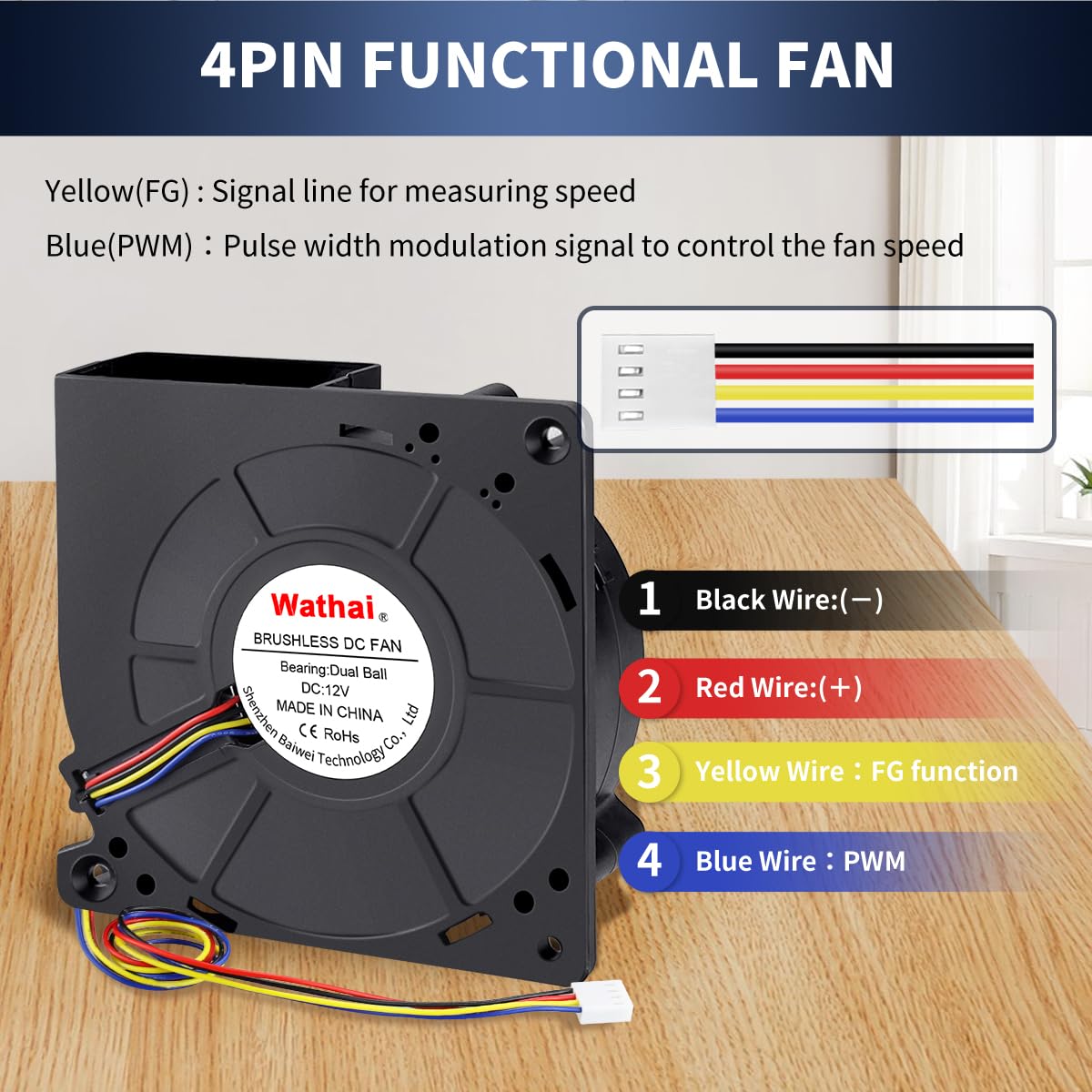
Figure 4.1: Diagram explaining the function of each wire in the 4-pin connector: Black (-) for Ground, Red (+) for 12V Power, Yellow (FG) for Speed Sensor Feedback, and Blue (PWM) for Speed Control.

그림 4.2: 예ample of connecting the 4-pin fan connector to a computer motherboard's SYS_FAN header.
배선 세부사항:
- 검은색 와이어: 지면 (-)
- 빨간색 선: 12V 전원(+)
- 노란색 와이어: FG (Sensor Signal Feedback for speed monitoring)
- 블루 와이어 : PWM (Pulse Width Modulation for fan speed control)
5. 사용 설명서
The Wathai blower fan operates by drawing air from one side and expelling it from the other, providing focused airflow. Its 4-pin PWM functionality allows for dynamic speed adjustment based on system requirements or manual control.
PWM 속도 제어:
The fan speed is controlled by the voltage signal on the blue PWM pin. When connected to a compatible 4-pin fan header on a motherboard or fan controller, the system can automatically adjust the fan speed based on temperature readings. This allows for efficient cooling when needed and quieter operation during lighter loads.

Figure 5.1: Illustration of the fan's centralized air supply, highlighting its maximum speed of 3000 RPM, airflow of 36.2 CFM, and noise level of 52 dBA.
응용 프로그램:
This blower fan is suitable for a wide range of cooling applications:
- Computer cases and gaming PCs
- Amplifiers and audio/video electronics
- Hard drive slots and storage systems
- Electronic motherboards and components
- Server rooms and network equipment
- DIY projects requiring focused airflow

그림 5.2: 시각적 예amples of the blower fan's applications, including cooling an amplifier, hard drive slots, car seats, motherboards, and for DIY inflatables.
6. 유지관리
Regular maintenance ensures optimal performance and extends the lifespan of your blower fan.
- 청소: Periodically inspect the fan blades and housing for dust accumulation. Use compressed air or a soft brush to gently remove dust. Ensure the fan is powered off and disconnected before cleaning.
- 점검: Check for any obstructions around the fan's intake and exhaust ports. Ensure cables are not interfering with fan operation.
- 베어링 관리: The dual ball bearings are designed for long-term, maintenance-free operation. Avoid applying lubricants unless specifically instructed by the manufacturer.
7. 문제 해결
If you encounter issues with your Wathai blower fan, refer to the following common problems and solutions:
- 팬이 회전하지 않음:
- Ensure the 4-pin connector is securely plugged into a powered fan header.
- 전원 공급장치가 올바르게 작동하는지 확인하세요.
- Check BIOS/UEFI settings or fan control software to ensure the fan is enabled and not set to 0 RPM at low temperatures.
- 과도한 소음:
- Inspect for any obstructions (cables, debris) hitting the fan blades.
- Ensure the fan is securely mounted and not vibrating against the chassis.
- If using PWM, adjust the fan speed to a lower percentage to reduce noise, if cooling requirements allow.
- 공기 흐름이 부족합니다.
- Check for dust buildup on fan blades or in the housing and clean as described in the Maintenance section.
- Verify the fan's airflow direction is appropriate for your cooling setup.
- Ensure the fan is operating at an adequate speed via PWM control.
8. 보증 및 지원
The Wathai 120mm x 32mm Dual Ball Brushless Blower Fan comes with a one-year quality assurance warranty. If the product experiences any quality problems within one year of purchase, it will be replaced.
지원팀에 문의:
For warranty claims, technical assistance, or further inquiries, please contact Wathai customer support through the retailer where the product was purchased or visit the official Wathai brand store online.
Wathai Brand Store: Visit Wathai Store on Amazon