
1. 서론
Thank you for choosing the ScopeAround M28 Digital Otoscope. This device is designed to provide a clear visual inspection of the ear canal, teeth, mouth, and other small areas. It features a 3.9mm ultra-thin HD camera with LED lights and a 2.8-inch IPS LCD screen for direct viewing. This manual provides essential information for safe and effective use, setup, operation, and maintenance of your otoscope.
2. 중요한 안전 정보
WARNING: Read all safety warnings and instructions before use. Failure to follow warnings and instructions may result in electrical shock, fire, and/or serious injury. Save all warnings and instructions for future reference.
- This device is intended for personal visual inspection and earwax removal. Consult a medical professional for diagnosis or treatment of ear conditions.
- Do not insert the otoscope too deeply into the ear canal. Use the included speculums to prevent excessive insertion and avoid injury.
- Always clean the camera lens and accessories with alcohol prep pads before and after each use to maintain hygiene and prevent cross-contamination.
- Keep the device out of reach of children. Adult supervision is required when used by children.
- 손상되었거나 오작동하는 경우 장치를 사용하지 마십시오.
- 장치를 극한의 온도나 직사광선에 노출시키지 마십시오.
- 최적의 성능을 위해 사용 전에 기기가 완전히 충전되었는지 확인하십시오.
3. 패키지 내용
패키지에 모든 품목이 들어 있는지 확인하세요.
- Otoscope Device (Main unit with 2.8" IPS LCD screen)
- Camera Cable with 3.9mm Ultra-Thin HD Camera Lens
- Ear Spoon attachment
- Specula (3 pieces)
- USB Type-C 충전 케이블
- 마그네틱 스탠드
- 면봉팩
- 알코올 준비 패드
- 사용자 설명서
- 안전 경고 카드

4. 제품 오버view
The ScopeAround M28 Digital Otoscope is a compact and user-friendly device designed for visual inspection. Key features include:
- 3.9mm Ultra-Thin Camera Lens: Allows easy entry into narrow ear canals.
- 720P HD Camera with 6 LED Lights: Provides clear, bright images and videos of the inspection area.
- 2.8인치 IPS LCD 화면: Offers direct, real-time viewing without external apps or devices.
- 플러그 앤 플레이 디자인: Simple operation, no Wi-Fi or app required.
- 자석 스탠드: Enables hands-free operation for convenience.
- 1200mAh 충전식 배터리: Provides 2-3 hours of continuous use.
- Fixed Focal Length: Optimized for sharp images at 0.4 to 0.8 inches.
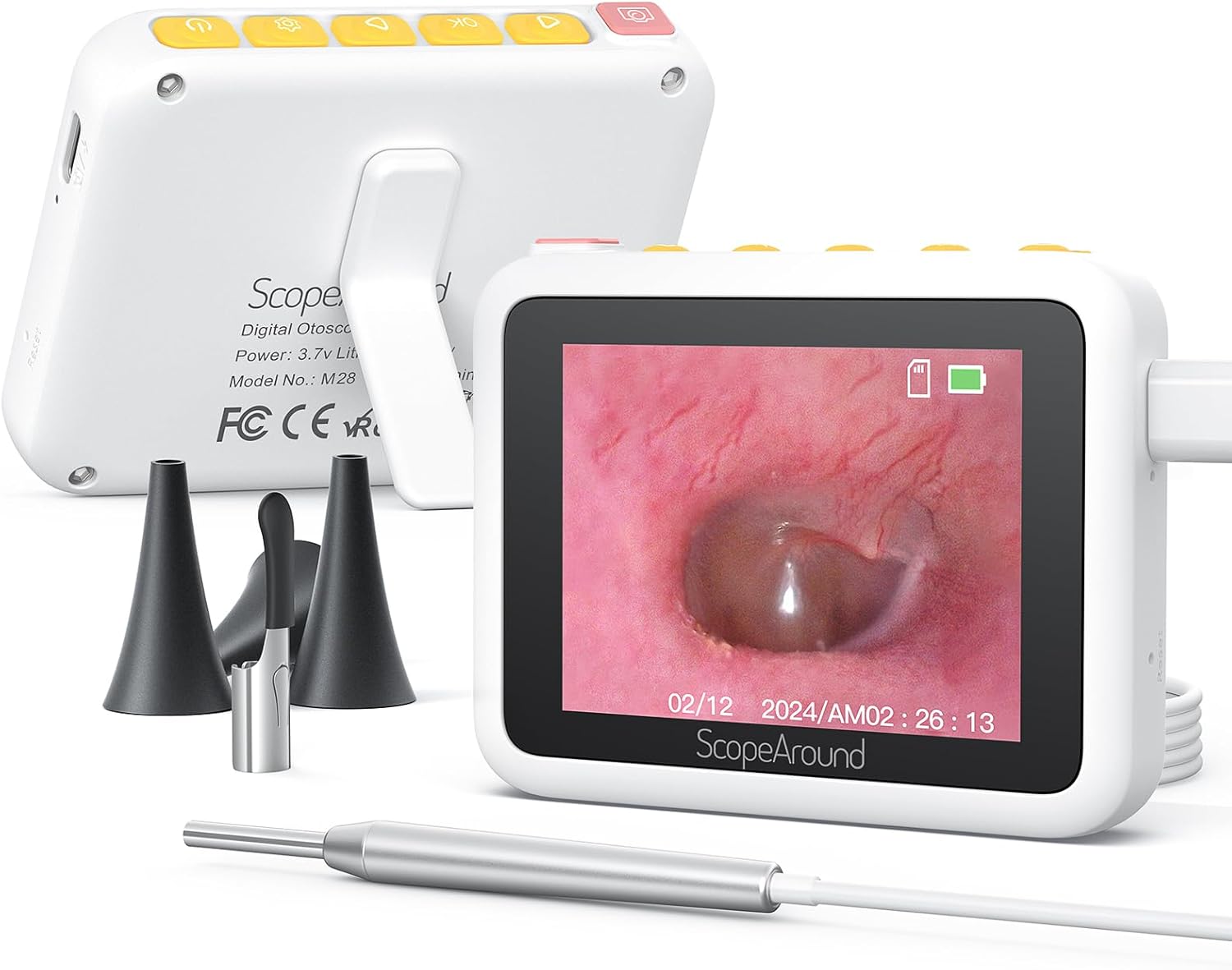


5. 설정 지침
Follow these steps to set up your ScopeAround M28 Digital Otoscope:
- 기기 충전: Before first use, fully charge the otoscope device using the provided USB Type-C charging cable. Connect the cable to the charging port on the device and a compatible USB power source. The battery indicator on the screen will show charging status.
- Attach Camera Probe: Plug the camera probe cable into the designated port on the otoscope device.
- 액세서리를 선택하고 부착하십시오: Depending on your intended use, attach either an ear spoon or a speculum to the tip of the camera probe. Ensure it is securely fitted.
- 전원 켜기: Long press the power button (usually located on the top right) to turn on the device. The screen will display the ScopeAround logo and then the live camera feed.
- Attach Magnetic Stand (Optional): 손을 자유롭게 사용하려면 viewing, attach the magnetic stand to the back of the main unit. It can be positioned to prop up the screen at a comfortable view잉 각도.


6. 사용 설명서
Once the device is set up, you can begin your inspection:
- 살다 View: The 2.8" IPS LCD screen will display a real-time view 카메라에서.
- 사진 찍기: Press the Photo/Video button (usually the leftmost button with a camera icon) to capture a still image.
- 비디오 녹화: Hold down the Photo/Video button to start recording a video. Press it again to stop recording.
- 줌 기능 : Use the Left/Zoom buttons to adjust the magnification of the image on the screen (up to 1.5X zoom).
- 이미지 회전: Use the Right/Image Rotate buttons to rotate the image 180 degrees for better view각도를 나타냅니다.
- 설정 접근: Press the Setting button to enter the device menu. Here you can adjust resolution, language, date/time, and other parameters.
- Review미디어: Navigate to the Playback option in the settings menu to view 캡처한 사진과 동영상.
- 전송 중 Files: Connect the device to a computer using the USB Type-C cable to transfer captured images and videos.


7. 유지관리 및 관리
Proper maintenance ensures the longevity and hygiene of your otoscope:
- 렌즈 청소: Use the provided alcohol prep pads or Q-tips to gently clean the camera lens before and after each use. Ensure no residue remains.
- 청소용 액세서리: The ear spoon and speculums should also be cleaned with alcohol prep pads after each use.
- 저장: 기기 및 부속품은 직사광선과 극한 온도 변화를 피해 깨끗하고 건조한 곳에 보관하십시오.
- 배터리 관리 : Charge the device regularly, even if not in frequent use, to maintain battery health. Avoid fully depleting the battery for extended periods.

8. 문제 해결
If you encounter issues with your ScopeAround M28 Digital Otoscope, try the following:
- 전원 없음: 기기가 완전히 충전되었는지 확인하세요. 전원에 연결하고 몇 분 정도 기다린 후 다시 전원을 켜보세요.
- 화면에 이미지가 없습니다: Verify that the camera probe is securely plugged into the device. If the issue persists, try unplugging and re-plugging the camera probe.
- 흐릿한 이미지: Ensure the camera lens is clean. The device has a fixed focal length, so adjust the distance between the camera tip and the object for optimal clarity (0.4-0.8 inches).
- 장치가 응답하지 않음: Use a thin pin to press the reset button (located near the charging port) to restart the device.
- 전송할 수 없습니다 Files: Ensure the device is properly connected to your computer via the USB Type-C cable. Check your computer's file explorer for the device.
9. 사양
| 특징 | 사양 |
|---|---|
| 제품 치수 | 3.94 x 3.94 x 3.94 인치 |
| 품목 무게 | 8.8 온스 |
| 카메라 렌즈 직경 | 3.9mm |
| 디스플레이 화면 | 2.8인치 IPS LCD |
| 비디오 해상도 | 1280 x 720 pixels (720P HD) |
| 배터리 용량 | 1200mAh 리튬 폴리머 |
| 근무시간 | 2-3 hours (continuous usage) |
| 저장 | Internal (8GB, not expandable) |
| 연결성 | USB Type-C (for charging and data transfer) |
| 제조업체 | 범위주변 |
10. 보증 및 지원
ScopeAround is committed to customer satisfaction. This product comes with a standard warranty as per the retailer's policy. For any questions, technical support, or warranty claims, please contact our US-based after-sales support team. Contact information can typically be found on our official web사이트나 구매 플랫폼을 통해서도 구매하실 수 있습니다.
We are dedicated to providing high-quality technology and support for your health and wellness needs.