
PLZ MP-902W
PLZ 7인치 무선 더블 DIN 차량용 스테레오 사용 설명서
Model: MP-902W | Brand: PLZ
소개
This manual provides detailed instructions for the installation, operation, and maintenance of your PLZ 7" Wireless Double Din Car Stereo. This advanced car audio receiver features wireless Apple CarPlay and Android Auto, Bluetooth 5.3 connectivity, a high-fidelity sound system with built-in DSP, an immersive IPS touchscreen, and support for a backup camera. Please read this manual thoroughly before use to ensure proper functionality and safety.
상자 안에 무엇이 들어있나요?
- 스테레오 유닛
- 백업 카메라
- 원격 제어
- 배선 마구
설정 및 설치
Proper installation is crucial for optimal performance and safety. It is highly recommended to have the unit installed by a professional car audio technician.
중요한 설치 팁
- Ensure your dashboard opening size is compatible with the car stereo. An additional dash kit may be required if the stereo size does not match.
- Some car models may require a wire harness adapter and a radio antenna adapter specific to your car model for complete installation.
- Verify all connections (power, ground, speakers, accessories) are secure and correctly wired according to the diagram.
배선도

Figure 1: Detailed wiring instructions for connecting the stereo to your vehicle's dashboard, including power, speaker, and steering wheel control connections.
작동 지침
무선 CarPlay 및 Android Auto
Connect your smartphone wirelessly to access navigation, music, calls, and voice commands (Siri/Google Assistant). The system connects automatically upon car startup after initial pairing.

Figure 2: Wireless CarPlay and Android Auto functionality with voice control for navigation and media playback.
블루투스 5.3 연결
The independent Bluetooth 5.3 module and extra antenna ensure stable, high-quality hands-free calling and audio streaming. The built-in microphone and external microphone interface provide clear communication.

Figure 3: Enhanced Bluetooth connectivity for calls and music streaming.
High Fidelity Sound with DSP
Experience superior sound quality with the built-in DSP, 4.2 channels pre-amplifier (max 240W output), and two subwoofer outputs. The 10-band EQ allows for personalized audio adjustments.

Figure 4: Audio output configuration and equalizer settings for optimized sound.
Immersive IPS Touchscreen & Mirror Link
The 7-inch IPS HD touchscreen (1024x600 resolution) provides stunning clarity and vivid colors. Wired Mirror Link allows you to display compatible device content directly on the screen.

Figure 5: High-resolution display with adjustable brightness for day and night driving.
스티어링 휠 컨트롤(SWC)
Control various functions directly from your steering wheel, including volume adjustment, track changes, and voice commands, enhancing convenience and safety.
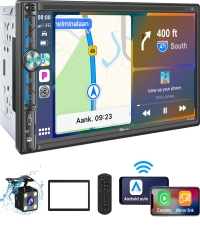
Figure 6: Steering Wheel Control integration for safe and convenient operation.
백업 카메라 지원
The stereo supports a backup camera, providing a clear view of the area behind your vehicle for safer parking and reversing. A rear camera is included in the package.

그림 7: 후방 카메라 view with parking guidelines for enhanced safety.
Radio and Media Playback
Enjoy FM/AM radio and playback media from USB drives or auxiliary input. The system supports various audio and video formats.
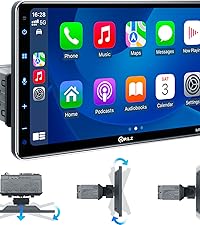
Figure 8: Multiple media playback options including radio, Bluetooth, USB, and AUX.
유지
To ensure the longevity and optimal performance of your PLZ car stereo, follow these simple maintenance guidelines:
- 청소: 터치스크린과 기기 외부를 닦을 때는 부드럽고 마른 천을 사용하세요. 연마성 세제나 용제는 사용하지 마세요.
- 온도: Avoid exposing the unit to extreme temperatures. The built-in heat sink helps dissipate heat, but prolonged exposure to direct sunlight or extreme cold can affect performance.
- 소프트웨어 업데이트: 제조사 확인해보세요 website periodically for any available software or firmware updates to ensure the best performance and compatibility.
문제 해결
If you encounter issues with your PLZ car stereo, refer to the following common problems and solutions:
Head Unit Powers On for a Few Seconds and Then Shuts Down Automatically
Some cars have ACC wires controlled by Canbus or feature a "delayed shut off" for radios. In such cases, the car may not output stable 12V power. Ensure the Red wire of your harness receives switched 12V power (car key must be turned on), the Yellow wire receives 12V power, and the Black ground wire is properly connected. If the ACC line (Red wire) and the B+ line (Yellow wire) are reversed, the product will lose its memory function after power is turned off.

Figure 9: Common power-on issues and their solutions.
How to Turn Off CarPlay Automatic Connection
If you wish to disable the automatic connection for Apple CarPlay:
- 방법 1: In your iPhone's settings menu, find the car stereo Bluetooth (CAR-KIT) and turn off CarPlay.
- 방법 2: Enter the Bluetooth interface of your iPhone, select "Forget Device". On the car stereo, select "PhoneLink" and shift "Auto Connect" to "off".

Figure 10: Steps to manage CarPlay automatic connection settings.
How to Turn Off Android Auto Automatic Connection
If you wish to disable the automatic connection for Android Auto:
- Turn off Wi-Fi on your Android phone.
- Select "PhoneLink" on the car stereo.
- On the car stereo, shift "Auto Connect" to "off".
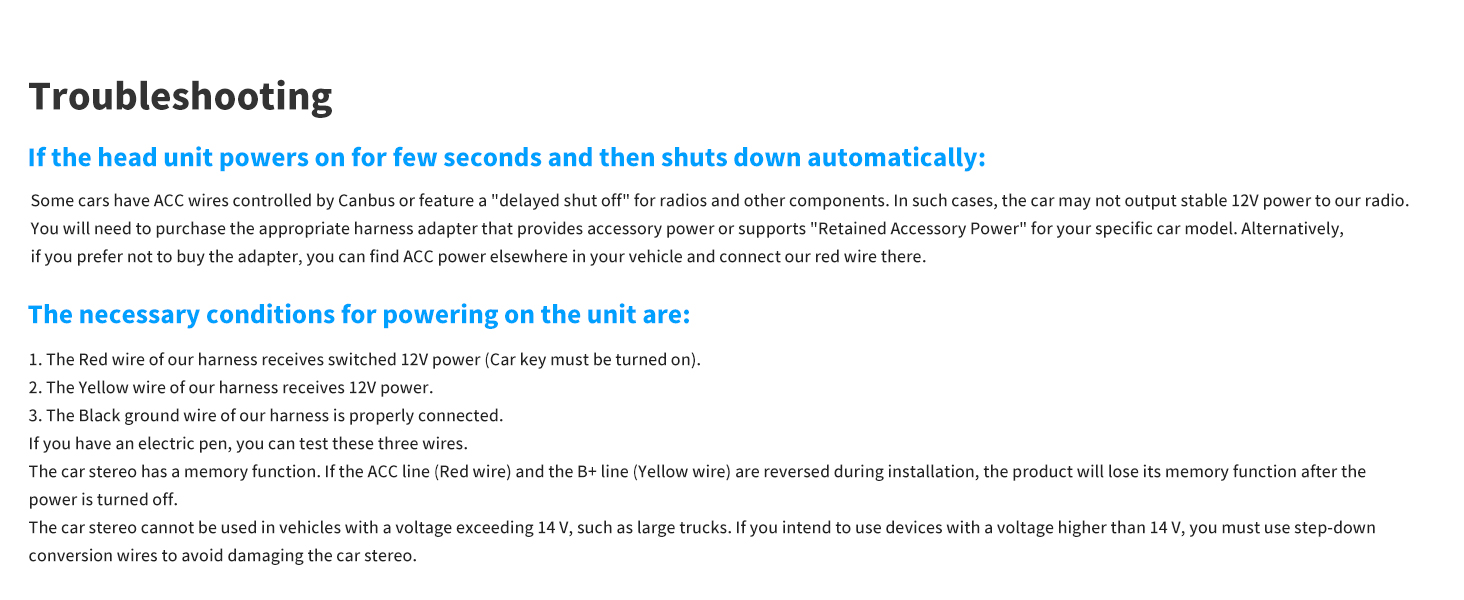
Figure 11: Steps to manage Android Auto automatic connection settings.
명세서
| 특징 | 세부 사항 |
|---|---|
| 모델 번호 | MP-902W |
| 화면 크기 | 7인치 |
| 디스플레이 유형 | IPS 터치스크린 |
| 해결 | 1024x600 |
| 연결 기술 | 블루투스, 보조, USB |
| 블루투스 버전 | 5.3 |
| 컨트롤러 유형 | 안드로이드 오토, 애플 카플레이 |
| 특별 기능 | DSP, Built-In Bluetooth, Android Auto, Apple CarPlay, Screen Mirroring |
| 오디오 출력 모드 | 스테레오 재생 |
| 서라운드 사운드 채널 구성 | 4.2 |
| 출력 전력 | 240 와트 |
| 품목 무게 | 2.7파운드 |
| 패키지 크기 | 9.17 x 6.54 x 5.94 인치 |
| 제조업체 | 제발요 |
| 원산지 | 중국 |
보증 및 지원
For warranty information and technical support, please refer to the documentation included with your product or contact PLZ customer service directly. Keep your purchase receipt for warranty claims.
Ask a question about this manual
Ask about setup, troubleshooting, compatibility, parts, safety, or missing instructions. Manuals+ will review the question and use this page’s manual context to help answer it.