
DinoFire X17
DinoFire 충전식 프레젠테이션 클릭커 X17 사용 설명서
모델 : X17
소개
Thank you for choosing the DinoFire Rechargeable Presentation Clicker, Model X17. This device is designed to enhance your presentations with its wireless control, integrated laser pointer, and user-friendly features. This manual provides detailed instructions for setup, operation, maintenance, and troubleshooting to ensure optimal performance.
패키지 내용
패키지에 모든 품목이 들어 있는지 확인하세요.
- DinoFire Rechargeable Presentation Clicker (X17)
- USB Receiver (stored inside the clicker)
- 마이크로 USB 충전 케이블
- 사용 설명서 (본 문서)
제품 끝view
The DinoFire X17 Presentation Clicker features an ergonomic design with intuitive controls for seamless presentation delivery. Familiarize yourself with the device's components and button functions.
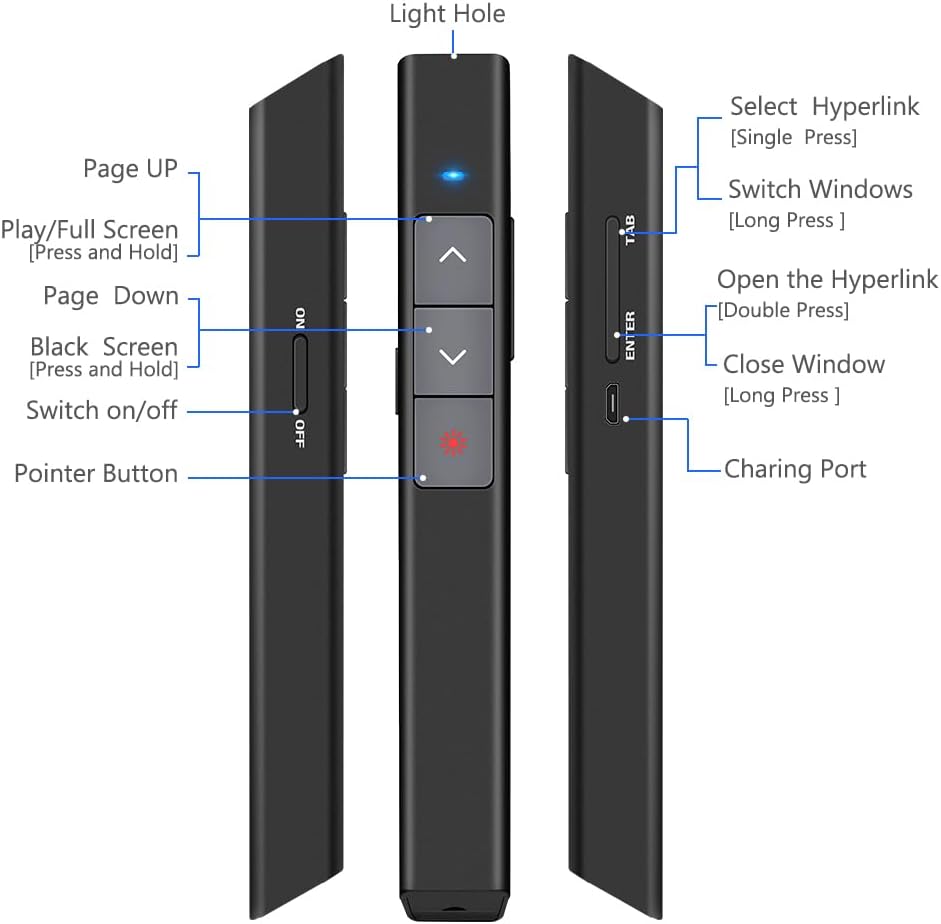
그림 1: 상세한 view of the DinoFire X17 Presentation Clicker showing button functions and port locations.
버튼 기능:
- Page Up (▲): Advances to the previous slide.
- Page Down (▼): Advances to the next slide.
- Pointer Button: 빨간색 레이저 포인터를 작동시킵니다.
- Play/Full Screen (Press and Hold): Initiates or exits full-screen presentation mode.
- Black Screen (Press and Hold): Toggles a black screen during presentation.
- 켜기/끄기: 기기의 전원 스위치입니다.
- Select Hyperlink (Single Press): Selects a hyperlink on the slide.
- Open the Hyperlink (Double Press): Opens the selected hyperlink.
- Switch Windows (Long Press): Cycles through open application windows.
- Close Window (Long Press): Closes the active window.
- 충전 포트: Micro USB port for recharging the device.
- Light Hole: Location of the laser emitter.
설치 가이드
1. Charging the Presenter
Before initial use, fully charge the presentation clicker. A full charge typically takes approximately one hour and provides power for over one week of use.
- Connect the provided Micro USB charging cable to the charging port on the side of the presenter.
- 케이블의 다른 쪽 끝을 USB 전원(예: 컴퓨터 USB 포트, USB 벽면 어댑터)에 연결합니다.
- The charging indicator light will illuminate (refer to "Low Power Indicator" section for details).
- 완전히 충전되면 케이블을 분리하세요.

그림 2: The presentation clicker being charged via its Micro USB port, connected to a laptop.
2. USB 수신기 연결
The USB receiver is stored magnetically within the presentation clicker for convenience and to prevent loss.
- Gently pull out the USB receiver from the bottom end of the presentation clicker.
- Insert the USB receiver into an available USB port on your computer (laptop or desktop).
- 시스템이 필요한 드라이버를 자동으로 감지하고 설치합니다. 수동으로 드라이버를 설치할 필요가 없습니다.

그림 3: The magnetic storage for the USB receiver, demonstrating its removal and insertion into a computer's USB port.
3. 전원 켜기 / 끄기
- Locate the "Switch on/off" button on the side of the clicker.
- 스위치를 "ON" 위치로 밀어 기기를 켜십시오.
- 배터리 수명을 절약하려면 사용하지 않을 때는 스위치를 "OFF" 위치로 밀어 두십시오.
4. 시스템 및 소프트웨어 호환성
The DinoFire X17 is widely compatible with various operating systems and presentation software.
- 지원되는 시스템: Windows 2003, XP, Windows Vista, Windows 7, 8, 10, Linux, Android, Mac OS.
- 지원 소프트웨어: Keynote, Prezi, MS Word, Excel, PowerPoint, ACD See, website browsers, iWork, Google Slides, etc.
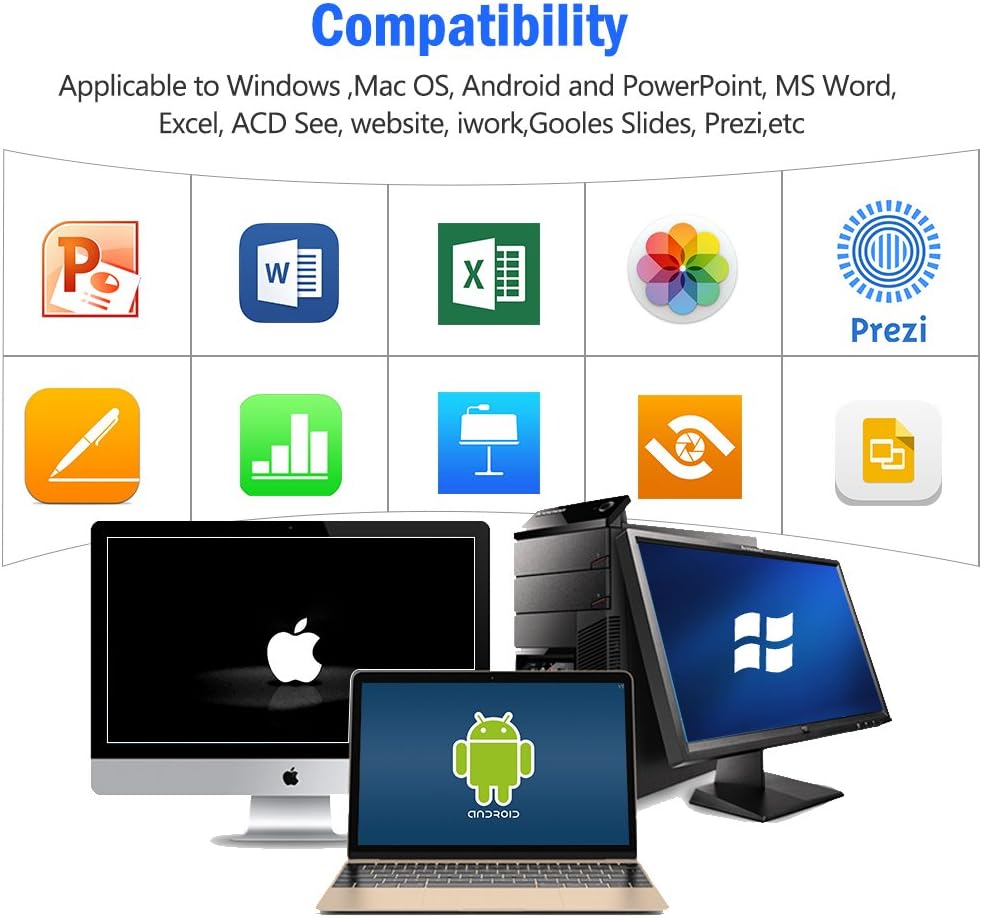
그림 4: Visual representation of the broad compatibility of the presentation clicker with different operating systems and presentation applications.
작동 지침
Basic Presentation Control
- 다음 슬라이드: Press the "Page Down" (▼) button.
- 이전 슬라이드: Press the "Page Up" (▲) button.
- Start/Exit Full Screen: Press and hold the "Page Up" (▲) button.
- 검은 화면: Press and hold the "Page Down" (▼) button to toggle a black screen.
레이저 포인터 사용
The integrated red laser pointer allows you to highlight specific content on your screen or projection.
- Press and hold the "Pointer Button" (red dot icon) to activate the laser.
- 레이저를 끄려면 버튼에서 손을 떼세요.
- The laser has a range of up to 300 feet (91 meters).
- 주의: Do not point the laser directly at people's eyes or at highly reflective surfaces.

그림 5: The red laser pointer in operation, highlighting its visibility and including a safety warning.
고급 기능
- Select Hyperlink: Single press the "ENTER" button.
- Open Hyperlink: Double press the "ENTER" button.
- 창 전환: Long press the "TAB" button to cycle through open applications.
- Close Window: Long press the "ENTER" button to close the active window.
무선 제어 범위
The DinoFire X17 offers a wireless control range of up to 100 feet (30 meters), allowing you freedom of movement during your presentation.

그림 6: Illustration of the presentation clicker's effective long control range in a presentation setting.
유지
충전 가이드라인
- Charge the device when the low power indicator flashes continuously.
- Avoid overcharging by disconnecting the cable once fully charged.
- Use the provided Micro USB cable or a certified equivalent for charging.
USB 수신기 보관함
Always store the USB receiver inside the magnetic compartment of the clicker when not in use to prevent loss and damage.
청소
부드럽고 마른 천으로 기기를 닦으세요. 액체 세척제나 연마재를 사용하지 마세요.
문제 해결
| 문제 | 가능한 원인 | 해결책 |
|---|---|---|
| 장치가 응답하지 않습니다. | Low battery; USB receiver not connected; Device is off. | Charge the device; Ensure USB receiver is securely plugged in; Turn on the device. |
| 레이저 포인터가 작동하지 않습니다. | Low battery; Laser button not pressed correctly. | Charge the device; Press and hold the laser button firmly. |
| 제어 범위가 짧음. | 장애물; 간섭; 배터리 부족. | Ensure clear line of sight to the receiver; Move away from sources of interference; Charge the device. |
| Hyperlink function not working. | Software specific issue; Hyperlink not properly selected. | Ensure the hyperlink is active and selected (single press ENTER) before attempting to open (double press ENTER). Check software settings. |
저전력 표시기
The device features a low power indicator to alert you when charging is needed. When the indicator flashes continuously, please charge the device. The device will enter auto-sleep mode after approximately 5 minutes of inactivity to save energy.

그림 7: Explanation of the indicator light states for working, charging, and fully charged conditions.
명세서
- 모델: X17
- 상표: 다이노파이어
- 무선 기술: 2.4GHz RF
- 제어 범위: 최대 100피트(30미터)
- 레이저 유형: 적색 레이저
- 레이저 범위: 최대 300피트(91미터)
- 배터리 유형: 1개의 리튬 폴리머 배터리(포함)
- 충전 시간: 약 1시간
- 사용 시간: Over one week (on a single charge)
- 치수: 6.42 x 1.61 x 1.14인치(16.3 x 4.1 x 2.9cm)
- 품목 무게: 1.6 온스(45그램)
- 호환 시스템 : Windows 2003/XP/Vista/7/8/10, Linux, Android, Mac OS
- 호환되는 소프트웨어 : Keynote, Prezi, MS Word, Excel, PowerPoint, ACD See, web browsers, iWork, Google Slides
보증 및 지원
보증 정보
The DinoFire Rechargeable Presentation Clicker X17 typically comes with a 3-year warranty. Please refer to your purchase documentation or the manufacturer's official web구체적인 보증 약관은 해당 사이트에서 확인하세요.
고객 지원
For technical assistance, troubleshooting beyond this manual, or warranty claims, please contact DinoFire customer support through their official website or the retailer where the product was purchased. Keep your purchase receipt or order number handy for faster service.
Ask a question about this manual
Ask about setup, troubleshooting, compatibility, parts, safety, or missing instructions. Manuals+ will review the question and use this page’s manual context to help answer it.