
소개
Thank you for choosing the Hodozzy A3475 Android Car Radio. This device is designed to enhance your driving experience with advanced features such as Android 13 operating system, wireless CarPlay and Android Auto, GPS navigation, Bluetooth connectivity, and a high-resolution touch screen. This manual provides essential information for the safe installation, proper operation, and effective maintenance of your new car stereo. Please read this manual thoroughly before installation and use, and keep it for future reference.
안전 정보
- 전문 설치 권장: 자동차 전기 시스템은 매우 복잡하기 때문에 장치 또는 차량 손상을 방지하려면 전문가에게 설치를 의뢰하는 것이 좋습니다.
- 전원 공급 장치: 기기가 네거티브 접지 방식의 12V DC 전원 공급 장치에 연결되어 있는지 확인하십시오. 볼륨 설정이 잘못되었습니다.tag손상을 초래할 수 있습니다.
- 배선: Carefully follow all wiring diagrams. Incorrect wiring can lead to malfunctions, electrical shorts, or fire.
- 운전 안전: 운전에 방해가 되는 방식으로 기기를 작동하지 마십시오. 항상 도로 안전을 최우선으로 생각하세요.
- 온도: 장시간 극한의 온도나 직사광선에 장치를 노출시키지 마십시오.
- 수분: 본 제품을 물과 과도한 습기로부터 멀리하십시오.
- 청소: 세척에는 부드럽고 마른 천을 사용하십시오. 연마성 세척제나 용매를 사용하지 마십시오.
패키지 내용
받으신 물품의 구성품을 아래 목록과 대조하여 확인해 주십시오. 누락되거나 손상된 품목이 있을 경우 판매점에 문의해 주십시오.

Image: The packaging list showing the main unit, power cable, RCA cable, rear camera input cable, GPS antenna, USB cable, mounting bracket, user manual, AHD rear camera, and microphone. Dimensions of the main unit are also shown: 178mm (7.0 inch) width, 102mm (4.0 inch) height, 70mm (2.7 inch) depth, and 25mm (0.9 inch) bezel depth.
- Hodozzy A3475 Main Unit
- 전원 케이블
- RCA 입/출력 케이블
- 후방 카메라 입력 케이블
- GPS 안테나
- USB 케이블(x2)
- 장착 브래킷
- 사용 설명서 (본 문서)
- AHD 후방 카메라
- 외부 마이크
제품 끝view
The Hodozzy A3475 is a 7-inch double din Android car stereo featuring an 8-core processor, 2GB RAM, and 64GB ROM for smooth performance. It runs on Android 13 and offers a high-resolution IPS touchscreen.

Image: Visual representation of the car stereo's core specifications: Android 13 operating system, 2GB RAM + 64GB ROM memory, 8-core processor, and integrated GPS navigation with WiFi connectivity.
주요 특징:
- 운영 체제: 안드로이드 13
- 프로세서: 8코어
- 메모리: 2GB 램 + 64GB 롬
- 표시하다: 7-inch IPS Capacitive Touch Screen (1280*720 resolution)
- 연결성: Wireless CarPlay, Wireless Android Auto, Mirror Link, Bluetooth 5.0, Wi-Fi, USB, AUX, TF Card
- 항해: Built-in GPS module with offline map support
- 오디오: 36밴드 DSP(디지털 사운드 프로세서), FM/RDS 라디오
- 입력: AHD Rear Camera input, Dash CAM input, 2 USB inputs
- 출력: Amplifier/Sub-woofer audio output
- 제어: 스티어링 휠 컨트롤 지원
후면 패널 연결:

Image: The rear panel of the Hodozzy A3475 unit, displaying various connection ports including power, RCA input/output, reversing camera input, USB, GPS antenna, and radio antenna ports.
- 전원 케이블 커넥터
- RCA Input/Output Connectors
- 카메라 입력 반전
- USB Cable Connectors (x2)
- GPS 안테나 입력
- 라디오 안테나 입력
설치
경고: Incorrect installation can cause damage to the unit or your vehicle. It is highly recommended to have this unit installed by a qualified professional.
설치 전 체크리스트:
- 전기 작업을 시작하기 전에 차량 배터리의 음극 단자를 분리하십시오.
- Ensure the mounting dimensions (178mm x 100mm) are compatible with your vehicle's double din opening.
- Gather all necessary tools (wire strippers, crimpers, screwdrivers, electrical tape, multimeter).
배선도 (일반):
Refer to the included wiring diagram for specific connections. The main connections typically include:
- 노란색 와이어: 상시 12V (배터리 +)
- 빨간색 선: ACC (Switched 12V, Ignition)
- 검은색 와이어: 접지(섀시 -)
- Orange/Illumination Wire: 차량의 조명 회로에 연결할 수 있습니다(선택 사항).
- 후진 기어 와이어: Connect to the vehicle's reverse light circuit for automatic camera display.
- 스피커 전선: Connect to your vehicle's speakers (Front Left +, Front Left -, etc.).
- GPS 안테나 : 시야가 트인 곳에 설치하세요 view 하늘의.
- 라디오 안테나: 차량의 라디오 안테나에 연결합니다.
- USB 케이블: Route to an accessible location for connecting USB devices.
- 후방 카메라: Install the AHD rear camera at the back of the vehicle and route its cable to the unit's reversing camera input.
설치:
Use the provided mounting brackets to secure the unit into your vehicle's double din opening. Ensure the unit is firmly seated and does not obstruct any vehicle controls or airbags.
초기 설정
- 전원 켜기: After installation, reconnect the vehicle's battery and turn on the ignition. The unit should power on automatically.
- 언어와 시간: Follow the on-screen prompts to select your preferred language, time zone, and date settings.
- Wi-Fi 연결: 이동하다 설정 > 네트워크 및 인터넷 > 와이파이 to connect to an available Wi-Fi network or your phone's hotspot. This is necessary for online maps, app downloads, and system updates.
- GPS 보정: Ensure the GPS antenna is properly connected and placed. The system will automatically acquire satellite signals for navigation.
작동 지침
디스플레이 및 사용자 인터페이스
The 7-inch IPS capacitive touch screen offers a clear and responsive interface. You can customize the look and feel of your stereo with various wallpapers and user interface themes.
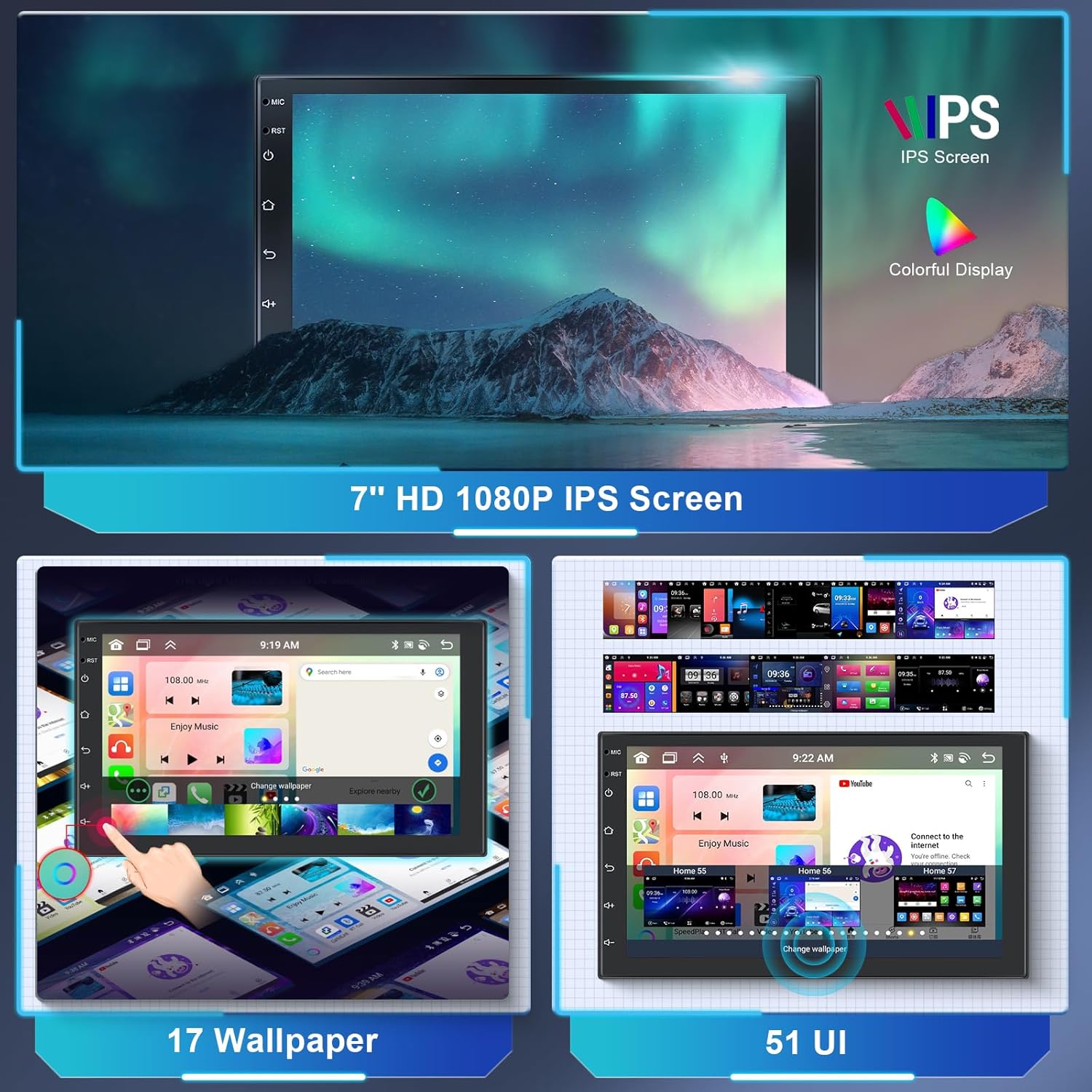
Image: The 7-inch HD 1080P IPS screen displaying various wallpaper options and different user interface layouts, highlighting customization capabilities.
- 홈 화면: Access frequently used apps and widgets.
- 앱 서랍: 위로 스와이프하거나 앱 아이콘을 탭하세요. view 설치된 모든 응용 프로그램.
- 설정: Access system settings for audio, display, network, and more.
- 사용자 정의: 로 이동 설정 > 표시하다 to change wallpapers and UI themes.
Wireless CarPlay & Android Auto & Mirror Link
Connect your smartphone wirelessly or via USB to access CarPlay or Android Auto for navigation, music, calls, and messages. The Mirror Link function allows you to display your phone's screen directly on the car stereo.

Image: The car stereo screen displaying the interfaces for Wireless CarPlay and Wireless Android Auto, showing phone applications like navigation, music, and communication.
- For Wireless CarPlay/Android Auto:
- 휴대폰의 Bluetooth와 Wi-Fi가 활성화되어 있는지 확인하세요.
- On the car stereo, open the "CarLink" or similar app.
- 블루투스를 통해 휴대폰을 차량용 스테레오와 연결하세요.
- Confirm the connection on both devices. CarPlay or Android Auto should launch automatically.
- For Mirror Link:
- 스테레오에서 "미러 링크" 앱을 엽니다.
- Follow the on-screen instructions to connect your Android or iOS device, typically involving a USB connection and enabling USB debugging (for Android) or trusting the device (for iOS).
GPS 내비게이션 및 Wi-Fi
The unit comes with a built-in GPS module and pre-installed offline map applications. Connect to Wi-Fi for online maps, traffic updates, and downloading additional apps from the Play Store.

Image: The car stereo displaying GPS navigation maps and icons for various navigation applications. Also shown is a graphic representing WiFi connectivity in a car.
- 오프라인 지도: Access the pre-installed map application. You may need to download specific regional map data via Wi-Fi for offline use.
- 온라인 지도: Connect to Wi-Fi or a mobile hotspot to use online navigation apps like Google Maps, Waze, etc.
- 와이파이 핫스팟: The unit supports 3G/4G hotspot connectivity from your smartphone.
블루투스 기능
The built-in Bluetooth 5.0 module allows for hands-free calling and wireless audio streaming.

Image: The car stereo screen displaying a phone dialer interface, indicating Bluetooth hands-free calling functionality. A smartphone is shown below, connected via Bluetooth.
- 편성: Go to the Bluetooth app on the stereo. Enable Bluetooth on your phone and search for the stereo (e.g., "Hodozzy A3475"). Pair the devices.
- 핸즈프리 통화: Once paired, you can make and receive calls directly from the stereo's screen. The external microphone ensures clear audio.
- 블루투스 음악 : 휴대폰에서 자동차 스테레오로 오디오를 스트리밍하세요.
FM/RDS 라디오
Tune into your favorite FM radio stations. The RDS (Radio Data System) function displays station information, song titles, and other data where available.

Image: The car stereo screen displaying the FM radio interface, showing frequency (87.50 MHz) and RDS information. A microphone is visible in the background, indicating audio input capabilities.
- 자동 스캔: 자동 스캔 기능을 사용하여 이용 가능한 방송국을 찾아 저장하세요.
- 수동 조정 : 특정 방송국을 찾으려면 주파수를 수동으로 조정하십시오.
- 사전 설정 : 즐겨 듣는 방송국을 사전 설정 버튼에 저장해 두면 빠르게 이용할 수 있습니다.
DSP Sound Adjustment
The integrated 36-band Digital Sound Processor (DSP) allows for precise audio customization, including equalization, balance, fader, and subwoofer control.

Image: The car stereo screen displaying a detailed graphic equalizer interface for DSP sound adjustment, showing multiple frequency bands and gain controls. A sound mixing board is in the background.
- Access the EQ app to adjust frequency bands, Q adjustments, and gain levels.
- Choose from preset equalizer curves (e.g., Classic, Pop, Rock) or create and save your own custom settings.
- Adjust subwoofer level and other audio parameters for optimal sound.
스티어링 휠 컨트롤(SWC)
The unit supports original steering wheel controls, allowing you to manage audio and other functions without taking your hands off the wheel.

Image: The car stereo screen showing the interface for programming steering wheel controls. A steering wheel with hands is depicted below, illustrating the use of these controls.
- 시스템 메뉴에서 SWC 설정을 이용할 수 있습니다.
- Follow the on-screen instructions to map your vehicle's steering wheel buttons to corresponding functions on the stereo (e.g., volume up/down, track skip, mode).
후방 카메라 기능
When connected to the reverse gear, the car stereo automatically displays the rear camera feed, assisting with parking and reversing maneuvers.

Image: The car stereo screen displaying a reverse camera view of a parking lot with dynamic parking guidelines. A small image of a car reversing with a camera icon is shown below.
- Ensure the AHD rear camera is properly installed and connected to the unit's "Reversing Camera Input" and the vehicle's reverse light power.
- 차량을 후진 기어로 바꾸면 디스플레이가 자동으로 카메라 화면으로 전환됩니다. view.
USB, AUX, and TF Card
The unit provides multiple options for media playback and connectivity.
- USB 입력: Connect USB drives for media playback (audio/video) or charging devices.
- AUX 오디오 입력: Connect external audio sources via the AUX input.
- TF 카드: Insert a TF (MicroSD) card for additional storage and media playback.
분할 화면 기능
The split-screen feature allows you to run two applications simultaneously on the 7-inch display, for examp한쪽에는 내비게이션, 다른 쪽에는 음악이 있습니다.
- To activate, open an app, then long-press the recent apps button or swipe up and hold (depending on UI) to enter split-screen mode.
- 첫 번째 앱 옆에 표시할 두 번째 앱을 선택하세요.
유지
- 화면 청소: 부드럽고 보풀이 없는 천을 사용하여 화면을 부드럽게 닦으세요. 잘 지워지지 않는 얼룩은 가볍게 닦아주세요.amp천에 물이나 화면에 안전한 세척제를 묻혀 닦아주세요. 강한 화학 물질은 피하세요.
- 소프트웨어 업데이트: Periodically check for system software updates via the settings menu when connected to Wi-Fi. Updates can improve performance and add new features.
- 극한의 환경을 피하세요: Protect the unit from extreme heat, cold, and direct prolonged sunlight, which can affect its lifespan and performance.
- 퓨즈 교체: If the unit loses power, check the fuse located on the power cable. Replace it with a fuse of the same amp평균 평점만 해당됩니다.
문제 해결
| 문제 | 가능한 원인 | 해결책 |
|---|---|---|
| 전원이 없습니다 | 전원 연결 불량; 퓨즈 단선; 배선 오류. | Check power cable connections (Yellow, Red, Black). Verify fuse integrity and replace if necessary. Consult wiring diagram. |
| 소리가 나지 않습니다 | Volume too low; Mute activated; Incorrect speaker wiring; DSP settings. | Increase volume. Check if mute is active. Verify speaker connections. Adjust DSP/EQ settings. |
| GPS가 작동하지 않습니다 | GPS antenna not connected or poorly placed; No satellite signal. | GPS 안테나가 단단히 연결되어 있고 시야가 확보된 위치에 설치되어 있는지 확인하십시오. view 하늘에서 신호를 수신할 때까지 기다리세요. |
| 블루투스가 연결되지 않음 | Bluetooth off on phone/stereo; Incorrect pairing process. | 두 기기 모두 블루투스가 활성화되어 있는지 확인하십시오. 이전 페어링을 삭제하고 다시 페어링하십시오. |
| 후방 카메라 화면이 표시되지 않음 | 카메라가 연결되지 않았습니다. 후진 감지선이 연결되지 않았습니다. 카메라가 고장났습니다. | Check camera input connection. Verify the reverse trigger wire is correctly connected to the vehicle's reverse light. Test camera if possible. |
| 터치 스크린이 반응하지 않음 | 일시적인 소프트웨어 오류; 화면 보호 필름 간섭. | Restart the unit (turn off ignition and restart). Remove any thick screen protectors. If issue persists, contact support. |
명세서

Image: The car stereo screen displaying a clear IPS touchscreen interface, highlighting its responsive touch and 2.5D curved glass design.
| 특징 | 세부 사항 |
|---|---|
| 상표 | 호도지 |
| 모델 번호 | A3475 |
| 운영 체제 | 안드로이드 13 |
| 프로세서 | 8코어 |
| 숫양 | 2GB |
| 집시 남자 | 64GB |
| 디스플레이 크기 | 7 인치 |
| 디스플레이 유형 | IPS 정전식 터치스크린 |
| 해결 | 1280*720 |
| 연결성 | Auxiliary, Bluetooth (5.0), RCA, USB, Wi-Fi |
| 특별 기능 | DAB (support), RDS, DSP (36-band EQ), GPS Navigation, Wireless CarPlay, Wireless Android Auto, Mirror Link, Steering Wheel Control, Reverse Camera Input |
| 출력 전력 | 4 x 45 Watts (RMS), 180 Watts (Peak) |
| 오디오 출력 모드 | 스테레오 재생 |
| 지원되는 오디오 형식 | WAV, WMA, MP3, etc. |
| 지원되는 비디오 형식 | MKV, AVI, MP4, MDV, etc. |
| 설치 크기 | 178mm x 100mm (더블 DIN) |
| FCC ID | 29149 - A2747 |
| IC아이디 | 29149 - A2747 |
보증 및 지원
For warranty information, please refer to the documentation provided at the time of purchase or contact your retailer. For technical support, troubleshooting assistance, or inquiries about replacement parts, please contact Hodozzy customer service through the retailer's platform or the official Hodozzy web대지.
고객 지원팀에 문의하실 때는 모델 번호(A3475)와 구매 정보를 준비해 주시기 바랍니다.