
1. 서론
The CALEX Smart Home Indoor Ambiance Aroma Diffuser 590100500 is designed to enhance your indoor environment by improving air quality, diffusing pleasant aromas, and providing ambient lighting. This smart device integrates seamlessly into your smart home ecosystem, offering control through the Calex app, voice commands, and programmable features.
주요 특징은 다음과 같습니다.
- Aroma diffusion with essential oils.
- Realistic flame effect for ambiance.
- Adjustable ambient lighting with 16 million color options.
- Smart control via Calex app (timers, programmable scenarios).
- Voice control compatibility with Google Assistant, Siri, and Amazon Alexa.
- 300ml water tank capacity with automatic shut-off.
2. 안전 정보
부상이나 기기 손상을 방지하기 위해 사용 전에 모든 안전 지침을 읽어 주십시오.
- Always place the diffuser on a stable, flat surface away from direct sunlight, heat sources, and electronic devices.
- Do not exceed the maximum water fill line (300ml) to prevent overflow.
- 깨끗한 수돗물이나 증류수만 사용하세요. 뜨거운 물은 사용하지 마세요.
- Only use 100% pure, water-soluble essential oils. Other oils or corrosive liquids may damage the device.
- 기기를 어린이와 애완동물이 닿지 않는 곳에 보관하세요.
- 작동 중에는 안개 배출구를 덮지 마십시오.
- Unplug the device from the power outlet before cleaning or refilling.
- The device features an automatic shut-off function when the water tank is empty, and sends a notification to your phone.
- A built-in safety configuration will cause the diffuser to flash if the remaining water in the tank needs to cool down after a maximum of 72 hours of continuous operation.
- 기기를 직접 수리하거나 개조하지 마십시오. 도움이 필요하시면 고객 지원팀에 문의하십시오.
3. 패키지 내용
패키지에 모든 품목이 들어 있는지 확인하세요.
- CALEX Smart Home Indoor Ambiance Aroma Diffuser (Model 5901000500)
- 전원 어댑터
- 사용자 설명서
4. 제품 오버view
Familiarize yourself with the components of your aroma diffuser.
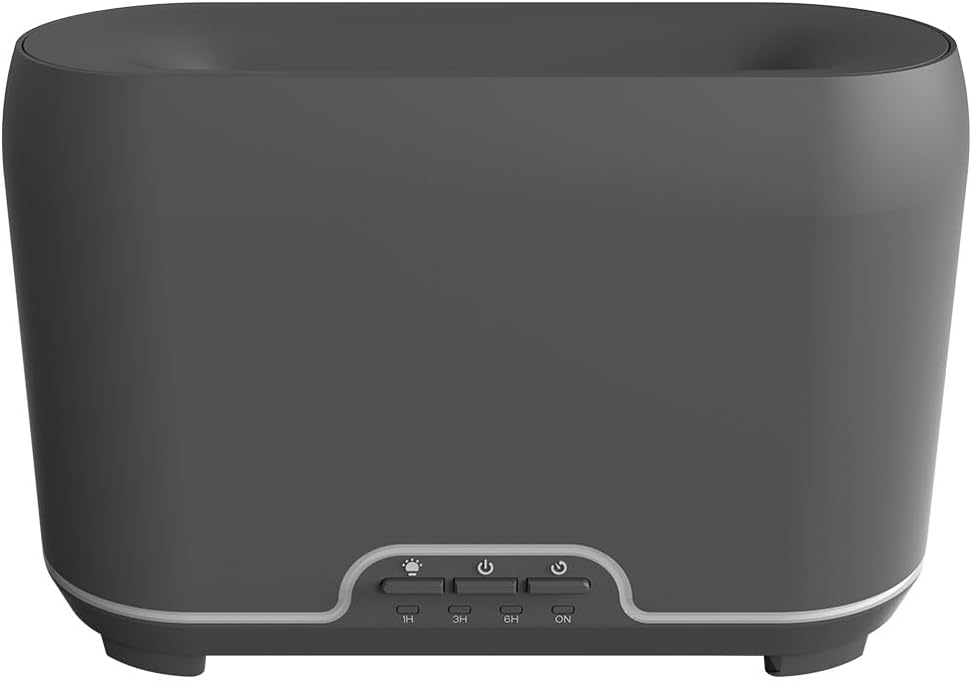
이미지: 앞면 view of the CALEX Smart Home Aroma Diffuser, showing the control panel with buttons for light, power, and timer settings (1H, 3H, 6H, ON).

Image: The CALEX Smart Home Aroma Diffuser operating on a wooden table, displaying its ambient flame effect and mist output.
The diffuser typically consists of a water tank, an ultrasonic plate, a mist outlet, and a control panel with buttons for power, light, and timer functions. The power input port is usually located at the back or bottom of the device.
5. 설정
초기 설정을 위해 다음 단계를 따르세요.
- 놓기: 디퓨저를 평평하고 안정된 표면에 놓으십시오.
- 뚜껑 열기: 디퓨저의 윗덮개를 조심스럽게 제거하세요.
- 물 탱크 채우기: Fill the water tank with clean water up to the 300ml maximum fill line. Do not overfill.
- 에센셜 오일 추가: Add a few drops of your preferred essential oil directly into the water tank.
- 뚜껑 닫기: 상단 커버를 안전하게 교체하세요.
- 전원 연결: Plug the power adapter into the diffuser's power input port, then plug the adapter into a wall outlet.
- Download Calex App: Download the free Calex Smart app from your smartphone's app store (available for iOS and Android).
- Wi-Fi에 연결: Follow the in-app instructions to connect your diffuser to your home WiFi network. Ensure your WiFi is 2.4GHz.
6. 사용 설명서
The CALEX Smart Home Aroma Diffuser can be operated via the Calex app or its integrated control buttons.
6.1 Using the Calex Smart App
The Calex app provides full control over your diffuser's functions:
- 전원 켜기/끄기: Turn the diffuser on or off remotely.
- 안개 제어: Adjust the mist output level.
- 조명 제어: Change the ambient light color from over 16 million options, adjust brightness, and select lighting modes.
- 화염 효과: Activate or deactivate the flame effect.
- 타이머: Set schedules for the diffuser to turn on or off automatically.
- Programmable Scenarios: Create custom scenarios based on time, weather, or other smart home triggers.
- 알림: Receive alerts when the water tank is empty.
6.2 음성 제어
Integrate your diffuser with voice assistants for hands-free control:
- 구글 어시스턴트: Link your Calex account in the Google Home app. Use commands like "Hey Google, turn on the diffuser."
- 시리: Create custom shortcuts in the Apple Home app or through the Calex app for Siri commands.
- 아마존 알렉사: Enable the Calex skill in the Alexa app. Use commands like "Alexa, set diffuser light to blue."
6.3 수동 제어 버튼
The control panel on the diffuser allows for basic operation:
- 전원 버튼: Press once to turn on/off the mist and flame effect.
- 라이트 버튼: Press to cycle through light colors or turn the light on/off.
- Timer Buttons (1H, 3H, 6H, ON): Select a desired operating duration. The diffuser will automatically shut off after the selected time. 'ON' typically means continuous operation until water runs out or manually turned off.
7. 유지관리
정기적으로 청소하면 디퓨저의 성능이 최적화되고 수명이 연장됩니다.
- 매일 청소: After each use, empty any remaining water from the tank. Wipe the inside of the tank with a clean, soft cloth.
- 주간 청소: For a more thorough clean, unplug the device. Add a small amount of white vinegar (about 10ml) to the water tank and let it sit for 10-15 minutes to dissolve mineral buildup. Gently wipe the ultrasonic plate with a cotton swab or soft brush. Rinse the tank thoroughly with clean water, avoiding the air outlet.
- 외부 청소: 디퓨저 외부를 부드러운 천으로 닦아주세요.amp 천. 연마성 세척제나 용매를 사용하지 마십시오.
- Ensure the device is completely dry before refilling or storing.
8. 문제 해결
문제가 발생하면 다음의 일반적인 문제와 해결 방법을 참조하세요.
| 문제 | 가능한 원인 | 해결책 |
|---|---|---|
| 안개가 없거나 약한 안개 | 낮은 수위 초음파 플레이트가 더러워졌습니다. 안개 배출구가 막혔습니다 | 적정 수위까지 물을 다시 채우십시오. 유지관리 지침에 따라 초음파 플레이트를 청소하세요. 분무구가 막히지 않았는지 확인하십시오. |
| 기기가 켜지지 않음 | 전원이 없습니다 물탱크가 비어있습니다 장치 오류 | 전원 연결 상태와 벽면 콘센트를 확인하십시오. 물탱크를 다시 채우세요. 문제가 지속되면 고객 지원에 문의하십시오. |
| 앱 연결 문제 | 잘못된 WiFi 비밀번호 라우터가 너무 멀리 있어요 2.4GHz vs 5GHz WiFi | WiFi 비밀번호를 확인하세요. Move diffuser closer to the router. Ensure your router is broadcasting a 2.4GHz network and connect to it. |
| 화염 효과가 작동하지 않습니다 | Feature deactivated in app 장치 오류 | Check app settings to ensure flame effect is enabled. 고객 지원팀에 문의하세요. |
9. 사양
| 특징 | 사양 |
|---|---|
| 모델 번호 | 5901000500 |
| 상표 | 칼렉스 |
| 용량 | 300밀리리터 |
| 재료 | 플라스틱 |
| 자동 종료 | 예 |
| 연결성 | 와이파이(2.4GHz) |
| 제어 방법 | Calex Smart App, Voice Control (Google Assistant, Siri, Amazon Alexa), Manual Buttons |
| 라이트 옵션 | 16 만 색상 |
| 권장 사용 영역 | Medium space |
| 국제 품목 코드(EAN/UPC) | 08712879157090 |
10. 보증 및 지원
보증 정보 또는 기술 지원이 필요하시면 구매 시 함께 제공된 설명서를 참조하시거나 판매점/제조업체에 직접 문의하십시오. 보증 청구를 위해 구매 증빙 자료를 보관해 주십시오.