
소개
구매해주셔서 감사합니다asing the HOMCOM Multi-purpose Cabinet, Model 838-077GY. This manual provides essential information for the safe assembly, operation, and maintenance of your new cabinet. Please read these instructions thoroughly before assembly and retain them for future reference.
This cabinet features a minimalist and elegant style, ideal for modern and contemporary interiors. It is a versatile storage unit suitable for various items, from dishes and cutlery to books and clothes, making it perfect for your living room, bedroom, bathroom, or office.
The unit provides generous storage with 2 drawers, 2 cabinets, and a top surface. The smaller cabinet includes 3 adjustable shelves, and the push-open mechanism ensures easy access to doors and drawers.
안전 정보
- Always secure the cabinet to the wall using the provided anti-tipping device to prevent tipping and potential injury.
- Exercise caution during assembly to avoid injuries. It is recommended to assemble with two people.
- Use the push-button system carefully to prevent pinching hazards when opening and closing doors and drawers.
- Do not overload the cabinet. The maximum weight capacity is 50 kg.
- 조립하는 동안 작은 부품은 어린이의 손이 닿지 않는 곳에 보관하세요.
패키지 내용
Before beginning assembly, ensure all components listed in the included manual are present and undamaged. If any parts are missing or damaged, please contact customer support.

The product is typically shipped in two packages. Please ensure both packages are received before starting assembly.
조립 설명서
Assembly is required for this product. Please follow the detailed step-by-step instructions provided in the physical manual included in your package. It is recommended to have two people for assembly.
주요 조립 단계:
- 부품 풀기 및 식별: Carefully unpack all components and hardware. Refer to the parts list in your manual to identify each piece.
- 프레임 조립: Connect the main panels according to the diagrams.
- 선반 설치: 조절 가능한 선반을 원하는 위치에 삽입하세요.
- 서랍 조립: 서랍 두 개를 조립하고 서랍 레일을 설치하세요.
- 문과 서랍을 부착하세요: Mount the doors and drawers, ensuring the push-open mechanisms are correctly aligned.
- 넘어짐 방지 장치 설치: Securely attach the anti-tipping device to the back of the cabinet and to a wall stud. This is a critical safety step.
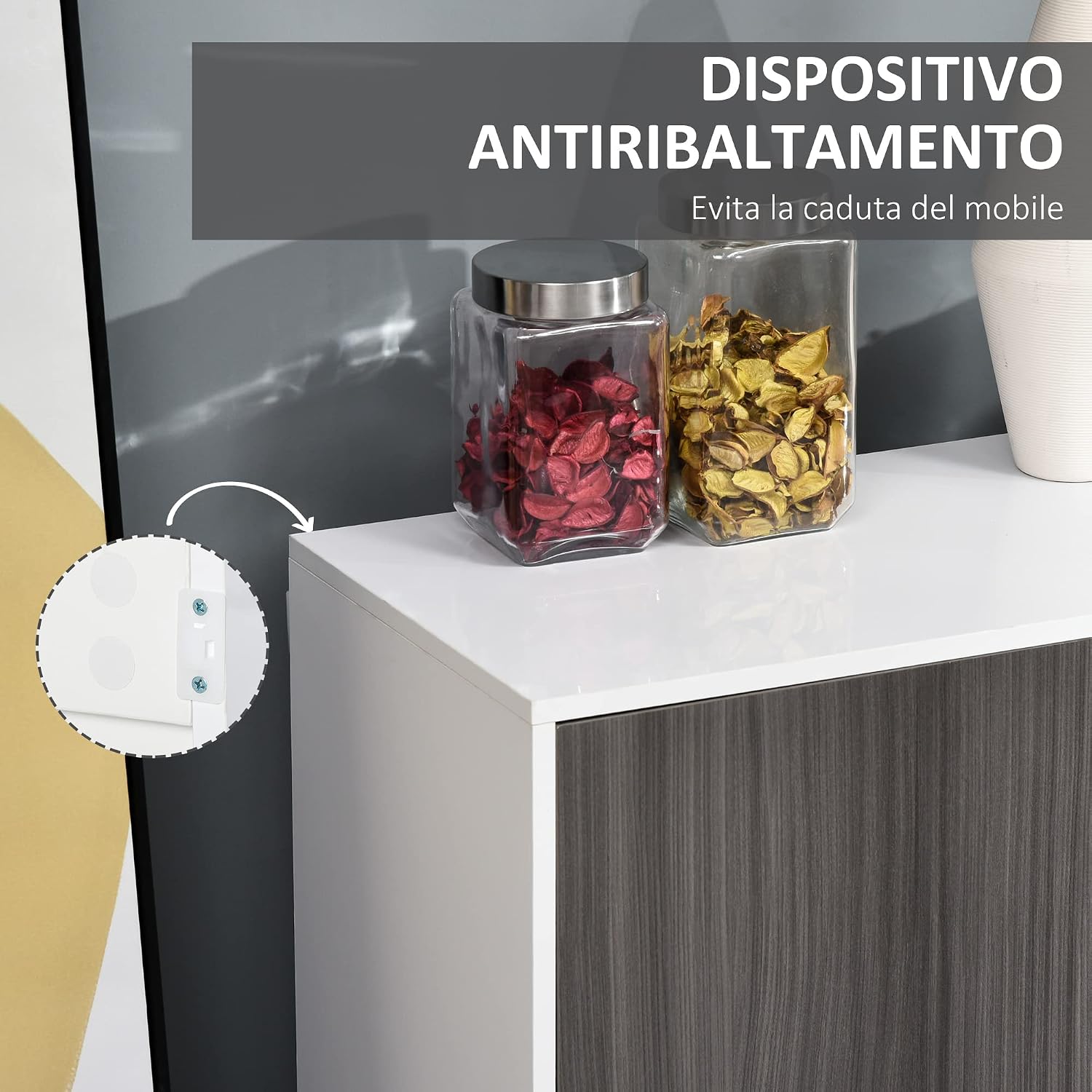
Image illustrating the anti-tipping device. Ensure it is properly installed to prevent accidents.
작동 지침
Push-Open Mechanism:
The cabinet doors and drawers are equipped with a push-open mechanism for easy access. To open, gently press the center of the door or drawer front. To close, push the door or drawer until it clicks into place.

Detail of the push-open mechanism for doors and drawers.

The push-open mechanism in action, allowing for handle-free design.
조절식 선반:
The smaller cabinet section includes 3 adjustable shelves. To adjust a shelf, remove all items from the shelf, lift the shelf, and reposition the shelf pins to the desired height. Ensure all four pins are securely in place before placing items back on the shelf.

Adjustable shelf inside the cabinet, demonstrating storage flexibility.

위에view of the cabinet's interior storage, including shelves and drawers.
유지
- 청소: 캐비닛 표면을 부드러운 천으로 닦으세요.amp 천으로 닦으세요. 강한 화학 물질이나 연마성 세제는 마감재를 손상시킬 수 있으므로 사용하지 마세요.
- 유출: 얼룩이 생기거나 가공 목재가 손상되는 것을 방지하기 위해 액체를 쏟았을 경우 즉시 닦아내십시오.
- 하드웨어: 모든 나사와 패스너가 단단히 조여져 있는지 정기적으로 점검하세요. 필요하면 다시 조이세요.
- 햇빛: 퇴색이나 변색을 방지하려면 직사광선에 장시간 노출시키지 마십시오.
- 수분: 캐비닛을 과도한 습기나 물기가 있는 곳에 두지 마십시오.

The polished side panel is designed for easy cleaning and an elegant look.
문제 해결
| 문제 | 가능한 원인 | 해결책 |
|---|---|---|
| Doors/Drawers do not close properly. | Push-open mechanism misaligned or damaged. | Check alignment of the push-open mechanism. Ensure no obstructions. If damaged, contact customer support. |
| 캐비닛이 흔들거려요. | Screws are loose; anti-tipping device not installed or loose. | Tighten all assembly screws. Ensure the anti-tipping device is securely fastened to both the cabinet and the wall. |
| 서랍을 열고 닫기가 어렵습니다. | 서랍 레일이 정렬되지 않았거나 막혀 있습니다. | Ensure drawer runners are correctly installed and free of debris. Check that the drawer is not overloaded. |
제품 사양
- 상표: 홈컴
- 모델 번호: 838-077GY
- 색상: 회색
- 재료: 엔지니어드 우드(E1 파티클 보드)
- 전체 치수(L x W x H): 117 x 36 x 74cm
- 품목 무게: 34.5kg
- 최대 중량 용량: 50kg
- 서랍 수 : 2
- 문 개수: 3
- 조절 가능한 선반의 수: 3 (in smaller cabinet section)
- 설치 유형: 독립형
- 필요한 조립: 예
- 특별 기능: Elegant design, Multi-purpose, Adjustable shelf, Push-open mechanism, Anti-tipping device
- 추천 용도: Files and folders, Books, Tableware, Utensils
- 객실 유형: Kitchen, Living Room, Study

Detailed dimensions of the HOMCOM Multi-purpose Cabinet.

The HOMCOM Multi-purpose Cabinet in a typical home environment.
보증 정보
For specific warranty details, please refer to the warranty card included with your product or contact the retailer where the product was purchased. Keep your proof of purchase for any warranty claims.
고객 지원
If you have any questions, require assistance with assembly, or need to report missing/damaged parts, please contact HOMCOM customer service or the retailer from whom you purchased this product. Please have your model number (838-077GY) and purchase information ready when contacting support.