
1. 서론
The SCHUBERTH SC2 communication system represents a new standard for motorcycle communication, designed for seamless integration with your Schuberth C5, E2, and S3 helmets. This advanced system offers superior connectivity and audio quality, enhancing your riding experience with reliable intercom and multimedia capabilities.
This manual provides essential information for the installation, operation, and maintenance of your SC2 system, ensuring optimal performance and user satisfaction.
2. 제품 오버view
The SCHUBERTH SC2 system consists of a main communication unit, a remote control, and a microphone, all designed for easy integration into compatible Schuberth helmets.
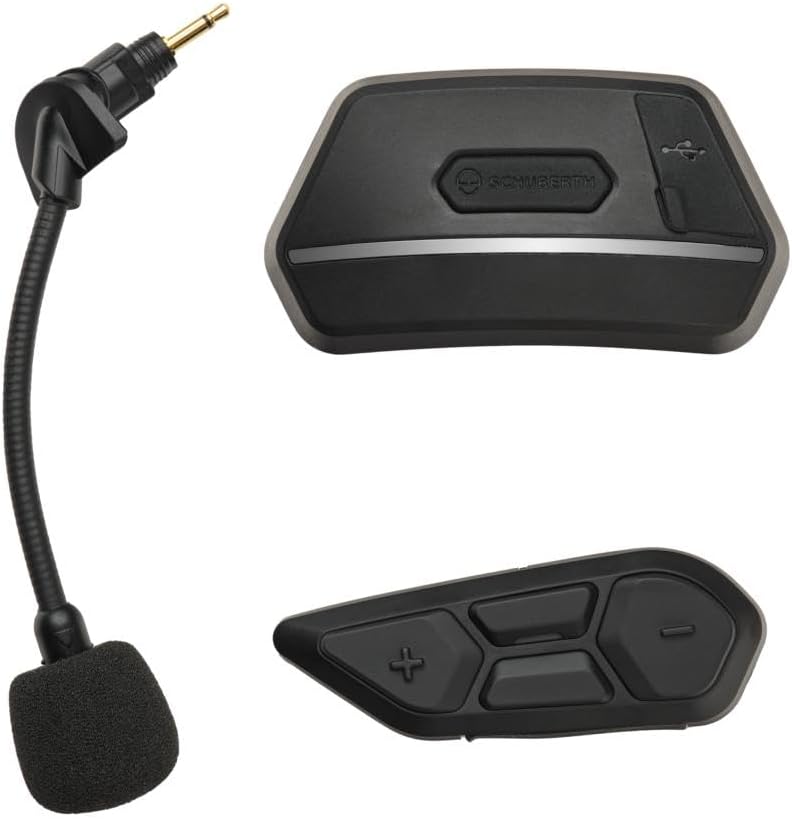
Figure 1: SCHUBERTH SC2 Communication System components. Shown are the main communication unit (top right), the remote control (bottom right), and the flexible boom microphone (left).
주요 특징:
- 블루투스 5.0 : 안정적이고 효율적인 무선 연결을 위해.
- 다중 인터콤: Connect with multiple riders.
- 메시 인터컴™: Supports up to 24 participants in Group Mesh mode, with multi-channel communication allowing users to switch between 9 communication channels in Open Mesh mode.
- 확장된 범위: Intercom range of up to 2 km in open terrain.
- 오디오 멀티태스킹: Listen to music or GPS instructions while communicating.
- 음성 명령: Multi-language voice command support for hands-free operation.
- 스마트 어시스턴트 연동: Siri와 Google Assistant를 지원합니다.
- 유니버설 인터콤: Connect with headsets from other brands.
3. 설정 및 설치
The SCHUBERTH SC2 is designed for extremely easy installation into compatible Schuberth C5, E2, and S3 helmets. These helmets come with pre-installed antennas for FM-Radio, Bluetooth Intercom, and Mesh Intercom, as well as HD speakers, simplifying the setup process.
설치 단계:
- 헬멧을 준비하세요: Locate the designated slots for the SC2 Main Unit and the remote control on your Schuberth C5, E2, or S3 helmet. Remove any pre-installed covers from these slots.
- 본체 삽입: Carefully insert the SC2 Main Unit into its designated receptacle in the helmet. Ensure it clicks securely into place.
- 리모컨을 삽입하세요: Insert the remote control into its corresponding slot. This unit typically requires a separate coin cell battery (not powered by the main system).
- 마이크 연결: Connect the flexible boom microphone to the appropriate port on the SC2 Main Unit. Position the microphone correctly inside the helmet for optimal voice pickup.
- 전원 켜기: Once both units are securely installed, power on the system according to the operating instructions.
Important Warning: Ensure that you install the device and its antennas correctly to ensure stable and reliable communication. Improper installation may affect performance.
4. Operating the SC2 System
The SCHUBERTH SC2 system is designed for intuitive operation, allowing riders to manage communication and audio functions easily while on the road.
기본 기능:
- 전원 켜기/끄기: Refer to the specific button combinations on the remote control for powering the system on or off.
- 볼륨 조절: Use the dedicated buttons on the remote control to adjust the audio volume.
- 인터콤 활성화: Initiate or end intercom conversations with other riders. The system supports Group Intercom for up to 4 SCHUBERTH communication systems and Universal Intercom for connecting with other brands.
- 메시 인터콤: Activate Mesh Intercom for large group communication. The system automatically adapts to the number of participants.
- 오디오 멀티태스킹: The system allows for simultaneous audio playback (e.g., music, GPS) while maintaining intercom communication.
- 음성 명령: Utilize multi-language voice commands to control various functions without taking your hands off the handlebars. Simply activate your preferred voice assistant (Siri or Google Assistant) and speak your command.
For detailed instructions on specific button functions and advanced features, please refer to the comprehensive digital manual available on the SCHUBERTH web대지.
5. 유지관리 및 관리
Proper maintenance ensures the longevity and optimal performance of your SCHUBERTH SC2 communication system.
- 청소: 부드러운 d를 사용하세요amp cloth to clean the exterior of the main unit and remote control. Avoid using harsh chemicals or abrasive cleaners.
- 저장: Store the system in a dry place, away from extreme temperatures and direct sunlight, when not in use for extended periods.
- 배터리 관리 : Ensure the remote control's coin cell battery is replaced as needed. For the main unit's rechargeable battery, avoid fully discharging it frequently to prolong its lifespan.
- 마이크 관리: Keep the microphone foam cover clean and free from debris.
6. 문제 해결
If you encounter issues with your SCHUBERTH SC2 system, try the following troubleshooting steps:
- 전원 없음:
- Ensure the main unit is fully charged.
- Check the remote control's coin cell battery and replace if necessary.
- Intercom Connection Issues:
- Verify that the device and its antennas are correctly installed and securely connected within the helmet.
- Ensure both devices are within range and properly paired.
- 기기를 다시 페어링해보세요.
- 낮은 오디오 품질:
- 마이크 위치를 확인하세요.
- Ensure speakers are correctly seated in the helmet.
- 볼륨 레벨을 조정합니다.
- 음성 명령이 응답하지 않음:
- 마이크가 제대로 연결되고 배치되었는지 확인하세요.
- 분명하게, 보통의 음량으로 말하세요.
- Check if the voice command feature is enabled.
If problems persist, please consult the full digital manual or contact SCHUBERTH customer support.
7. 사양
| 특징 | 세부 사항 |
|---|---|
| 상표 | 슈 베르 스 |
| 모델 번호 | SP127, SP106 |
| 연결 기술 | 블루투스 5.0 |
| 전원 | 배터리 구동 |
| 색상 | 검은색 |
| 특징 | 블루투스 FM 송신기 |
| 인터콤 범위 | Up to 2 km (in open terrain) |
| Mesh Intercom Participants | Up to 24 (Group Mesh) |
8. 보증 및 지원
Information regarding the product warranty is not provided within this manual. Please refer to the warranty card included with your product packaging or visit the official SCHUBERTH web자세한 보증 약관은 해당 사이트에서 확인하세요.
For technical support, troubleshooting assistance, or further inquiries, please contact SCHUBERTH customer service through their official web구매 시 제공된 사이트 또는 연락처 정보.