
소개
This instruction manual provides detailed guidance for the safe and proper installation and use of the MOUNTUP MU0041-B Wall Plate Mounting Kit and MU0041 TV Mounting Hardware Kit Bundle. This bundle includes essential components for securely mounting your television to a wall, offering versatility for various wall types and TV models. Please read all instructions carefully before beginning installation.
안전 정보
- 모든 지침을 읽으십시오. Ensure you understand all steps before installation. If you have any doubts, consult a qualified professional.
- 벽체 건전성: Verify that the wall structure can safely support the combined weight of the TV mount, TV, and all hardware.
- 도구: Use appropriate tools for the job. Ensure they are in good working condition.
- 개인 보호 장비: 설치 시에는 안전 안경과 장갑을 착용하세요.
- 어린이와 애완동물: 설치하는 동안 어린이와 애완동물이 작업 구역에 접근하지 못하도록 하세요.
- 과도하게 조임: Do not over-tighten screws, as this can damage the hardware or the wall.
- Electrical Wires/Pipes: Before drilling, check for hidden electrical wires, gas lines, or water pipes in the wall. Use a stud finder with wire detection if available.
Package Contents: MU0041-B Wall Plate Mounting Kit
This kit provides the necessary hardware for securing a TV wall mount to concrete or wood stud walls.

이미지: 이상view of the MU0041-B Wall Plate Mounting Kit components, including lag bolts, washers, concrete wall anchors, and a bubble level.

Image: Detailed breakdown of the 19 pieces included in the MU0041-B kit: 6 M8*65mm Lag Bolts, 6 M8 Washers, 6 Concrete Wall Anchors, and 1 Bubble Level.
구성 요소 목록:
- M8*65mm Lag Bolts (6 pcs): Used for securing the wall plate to wood studs or with concrete anchors.
- M8 Washers (6 pcs): Distribute the load of the lag bolts and prevent damage to the mounting surface.
- Concrete Wall Anchors (6 pcs): Designed for secure installation into solid concrete or brick walls.
- Bubble Level (1 pc): Assists in ensuring the wall plate is mounted perfectly horizontal.

Image: Close-up of an M8*65mm lag bolt, highlighting its rustproofed zinc layer and 2.56-inch length.

Image: Illustration demonstrating the compatibility and secure fit between a lag bolt and a concrete wall anchor.

Image: The included bubble level, featuring both vertical and horizontal indicators to ensure accurate and level mounting.
Package Contents: MU0041 TV Mounting Hardware Kit
This kit provides a comprehensive assortment of screws, washers, and spacers to attach your TV to a wall mount, ensuring compatibility with various TV models and VESA patterns.

Image: A comprehensive assortment of TV mounting hardware, including various sizes of M4, M5, M6, and M8 screws, washers, and spacers, neatly organized in a clear storage case.
구성 요소 목록:
- TV Screws: Includes M4, M5, M6, and M8 screws in various lengths (e.g., M4x10mm, M5x15mm, M6x20mm, M8x25mm) to fit different TV VESA mounting holes.
- 와셔: Various sizes of washers (e.g., M4/M5, M6/M8) to ensure a snug fit and protect the TV's mounting surface.
- 스페이서: Different lengths of spacers (e.g., H5mm, H15mm) to accommodate curved TVs, provide clearance for cables, or adjust screw length.
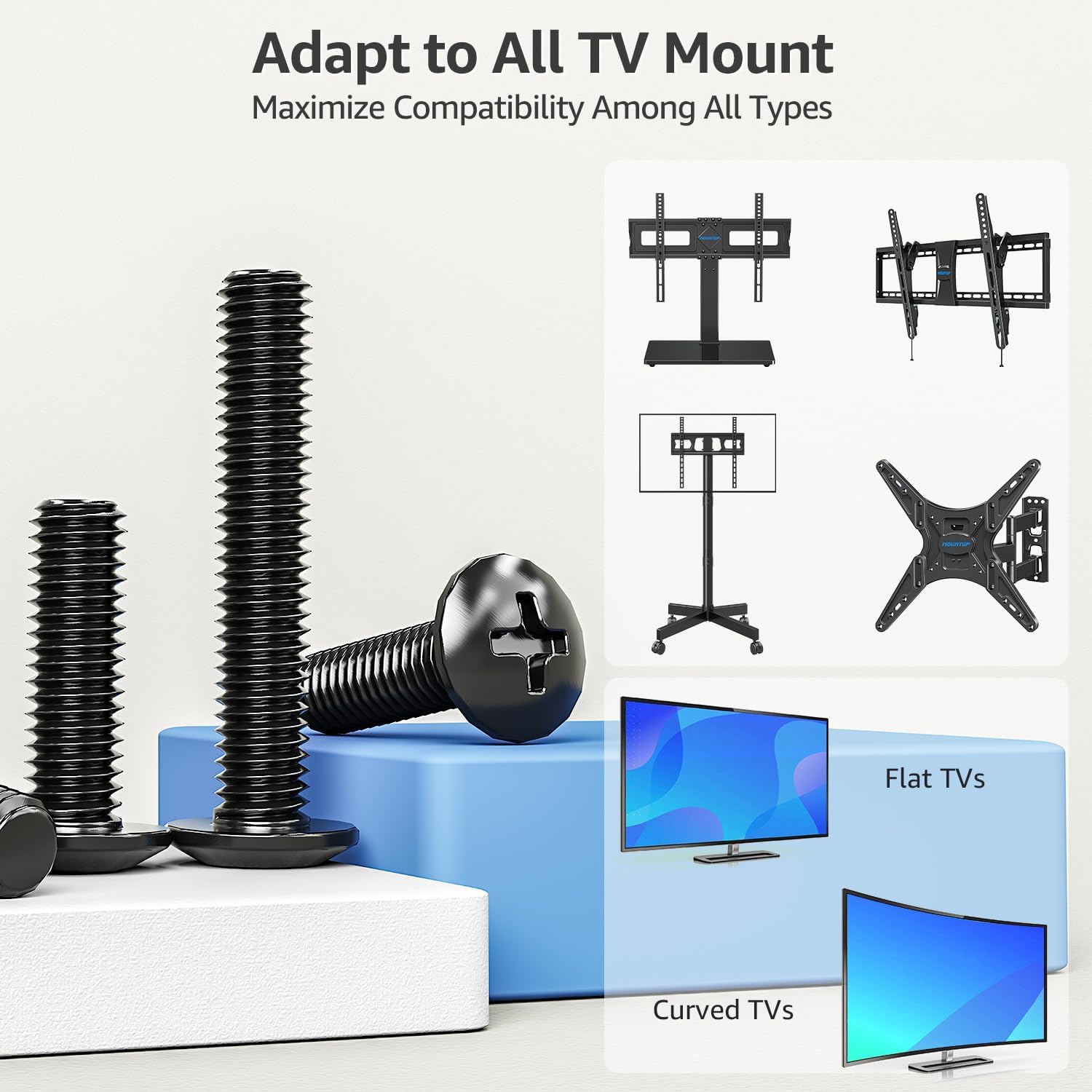
Image: This diagram illustrates how the hardware kit is designed to adapt to a wide range of TV mount types, including fixed, tilt, full-motion, and stand mounts, compatible with both flat and curved televisions.
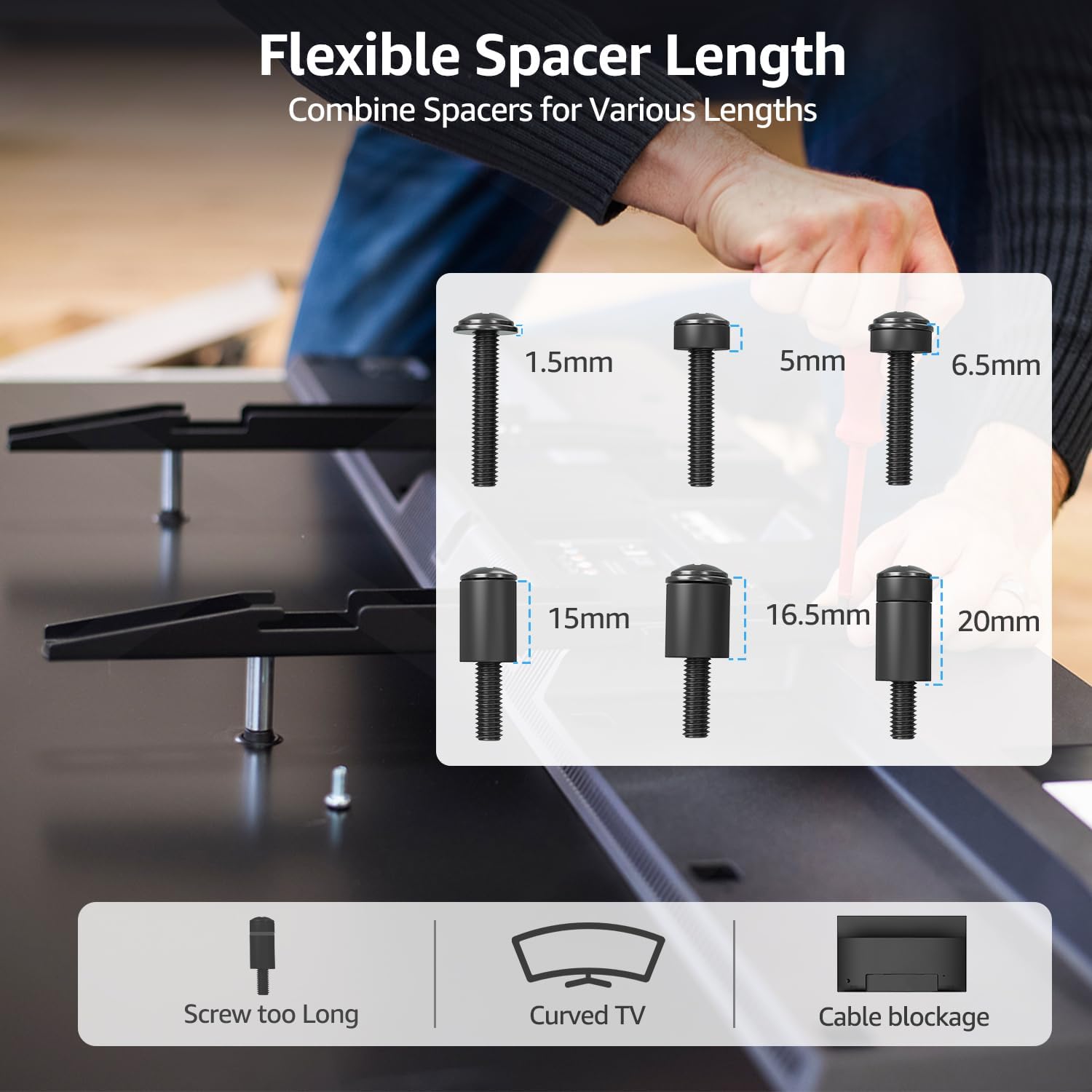
Image: This illustration demonstrates the utility of flexible spacer lengths (1.5mm, 5mm, 6.5mm, 15mm, 16.5mm, 20mm) for addressing common installation challenges such as screws being too long, mounting curved TVs, and preventing cable blockage.
설정 및 설치
This section outlines general steps for installing a TV wall mount using the provided hardware. Always refer to your specific TV mount's instructions for detailed steps, as this kit provides universal hardware components.
필요한 도구 (포함되지 않음):
- 연필
- 송곳
- Drill bits (appropriate size for anchors/lag bolts)
- Stud finder (for wood stud installation)
- 소켓 렌치 또는 조절식 렌치
- 십자 드라이버
- 줄자
설치 단계:
- 장착 위치 결정: 벽면의 적절한 위치를 선택할 때는 다음 사항을 고려하십시오. viewing height, power outlets, and potential obstructions.
- Locate Studs or Wall Type:
- 목재 스터드용: Use a stud finder to locate the center of two adjacent wood studs. Mark the drilling points.
- 콘크리트/벽돌 벽의 경우: Ensure the wall is solid concrete or brick. Mark the drilling points.
- 벽 플레이트 위치: Hold the TV mount's wall plate against the wall at the desired height. Use the included bubble level to ensure it is perfectly horizontal. Mark the drilling holes with a pencil.
- 드릴 파일럿 홀:
- 목재 스터드용: Drill pilot holes into the center of the marked stud locations using a drill bit slightly smaller than the lag bolts.
- 콘크리트/벽돌 벽의 경우: Drill pilot holes using a masonry drill bit of the size specified for the concrete wall anchors. Insert the concrete wall anchors flush with the wall surface.
- 벽면 플레이트 부착: Align the wall plate with the drilled holes. Insert the M8*65mm lag bolts through the wall plate, adding M8 washers, and tighten them securely into the wood studs or concrete anchors using a socket wrench. Do not overtighten.
- TV 브래킷을 TV에 부착하세요: Identify the correct screws (M4, M5, M6, or M8) and washers from the MU0041 TV Mounting Hardware Kit that fit your TV's VESA mounting holes. If needed, use the appropriate spacers to ensure proper clearance for curved TVs or cables. Attach the TV mounting brackets (from your TV mount, not included in this kit) to the back of your TV.
- 벽걸이형 TV 거치대: Carefully lift the TV and hook the TV brackets onto the wall plate according to your TV mount's specific instructions. Secure any safety locks or screws as directed by your TV mount manual.
- 최종 확인: Gently pull on the TV to ensure it is securely attached to the wall mount. Verify that the TV is level.
작업
Once installed, the MOUNTUP hardware ensures your TV is securely fixed to the wall. The "operation" primarily refers to the secure and stable positioning of your television.
- 안전한 첨부 파일: The lag bolts and anchors provide a strong connection to the wall, while the TV screws and spacers ensure the TV brackets are firmly attached to the television.
- 안정: The system is designed to hold your TV stably in place, preventing accidental dislodgement when properly installed.
유지
Regular maintenance helps ensure the long-term safety and stability of your TV mount.
- 정기 점검: Every 6-12 months, visually inspect all mounting points (lag bolts, TV screws) for any signs of loosening or wear.
- 연결을 강화하십시오: If any screws or bolts appear loose, gently re-tighten them. Do not overtighten.
- 청소: Dust the hardware components as needed. Avoid using harsh chemicals that could corrode the metal or damage finishes.
- 환경적 요인: Ensure the mounting area remains dry and free from extreme temperature fluctuations, which could affect wall integrity or hardware.
문제 해결
If you encounter issues during or after installation, refer to these common troubleshooting tips.
- TV 수평이 맞지 않음:
- Ensure the wall plate was installed perfectly level using the bubble level.
- Some TV mounts have fine-tuning adjustments for leveling the TV after it's hung. Consult your TV mount's manual.
- If the wall plate itself is not level, you may need to re-install it.
- Screws Don't Fit TV:
- Verify the correct screw diameter (M4, M5, M6, M8) for your TV's VESA holes. Consult your TV's manual.
- If screws are too long, use the appropriate spacers from the MU0041 kit to achieve the correct length.
- If screws are too short, ensure you are using the longest compatible screw provided in the kit. If still too short, you may need to acquire longer screws (ensure they are VESA compliant).
- Wall Anchors Not Holding:
- Ensure the pilot hole size was correct for the concrete anchors. Too large a hole will prevent a secure grip.
- Verify the wall material is solid concrete or brick. These anchors are not suitable for drywall alone.
- If installing into wood studs, ensure the lag bolts are driven into the center of the stud.
- TV Feels Unstable:
- Immediately remove the TV.
- Re-check all connections: wall plate to wall, and TV brackets to TV. Ensure all bolts and screws are tightened securely (but not overtightened).
- Verify that the wall can support the weight.
- Ensure all safety mechanisms on your TV mount are engaged.
명세서
| 특징 | 세부 사항 |
|---|---|
| 상표 | 마운트업 |
| 모델 번호 | MU0041-B (Wall Plate Mounting Kit), MU0041 (TV Mounting Hardware Kit) |
| Mounting Type (MU0041-B) | Wall Mount (for concrete/wood stud) |
| 이동 유형 | Stationary (hardware supports stationary mounts) |
| 재료 | Metal (for bolts, washers, screws) |
| 호환 장치 | Television (various sizes and VESA patterns) |
| Minimum Supported Screen Size | 22 Inches (general compatibility for TV mounts) |
| Lag Bolt Dimensions | M8 x 65mm (2.56 inches) |
| Screw Sizes Included | M4, M5, M6, M8 (길이는 다양함) |
| 앵커 유형 | 콘크리트 벽 앵커 |
보증 및 지원
MOUNTUP products are manufactured with quality and durability in mind. While specific warranty details are not provided in this document, please retain your proof of purchase for any warranty claims.
For technical assistance, missing parts, or any questions regarding the installation or use of your MOUNTUP MU0041-B Wall Plate Mounting Kit and MU0041 TV Mounting Hardware Kit, please contact MOUNTUP customer support through their official website or the retailer where the product was purchased. Always refer to the official MOUNTUP web최신 지원 정보는 사이트에서 확인하세요.
MOUNTUP Official Web대지: MOUNTUP 스토어 (아마존)