
1. 서론
Thank you for choosing the CHROX G96max Android 12.0 TV Box. This manual provides essential information for setting up, operating, and maintaining your device. The G96max TV Box is designed to deliver a high-performance multimedia experience with its Android 12.0 operating system, RK3318 Quad-Core processor, 4K/6K video support, dual-band Wi-Fi, and Bluetooth 5.0 connectivity.
Please read this manual thoroughly before using the product to ensure proper operation and to maximize your view경험.
2. 패키지 내용
아래 나열된 모든 품목이 패키지에 포함되어 있는지 확인하세요.
- 1 x G96 MAX Android 12.0 TV Box
- 1 x 전원 어댑터
- 1 x HDMI 케이블
- 1 x IR 리모컨
- 1 x 사용자 설명서
- 1 x Wireless Mini Keyboard (may vary by package)

Image: The CHROX G96max Android 12.0 TV Box with its included accessories, such as the remote control, power adapter, and cables.
3. 제품 오버view
The CHROX G96max TV Box features a compact design with various ports for connectivity. Understanding these interfaces is crucial for proper setup and usage.
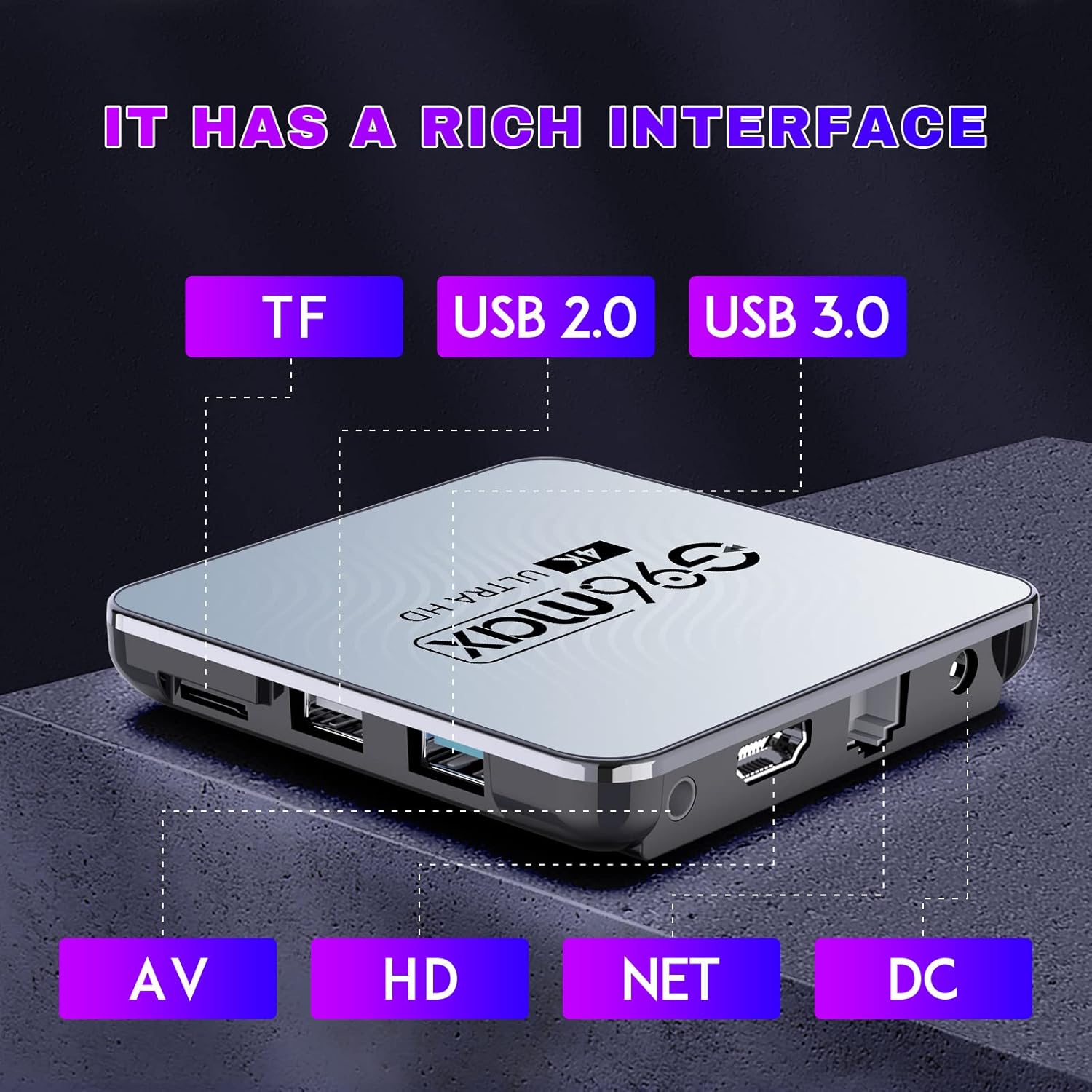
이미지: 자세한 view of the CHROX G96max TV Box, highlighting its various input/output ports including TF card slot, USB 2.0, USB 3.0, AV, HDMI, Ethernet (NET), and DC power input.
포트 설명:
- TF 카드 슬롯 : For inserting a MicroSD/TF memory card to expand storage.
- USB 2.0 포트 : For connecting USB devices such as flash drives, external hard drives, or a mouse.
- USB 3.0 포트 : Offers faster data transfer speeds for compatible USB devices.
- AV 포트: For connecting to older televisions using an AV cable (composite video and stereo audio).
- HDMI 포트 : For connecting to an HDTV or monitor using the provided HDMI cable for high-definition video and audio.
- NET (Ethernet) Port: 유선 인터넷 연결의 경우.
- DC 전원 입력: 전원 어댑터를 연결합니다.

Image: The CHROX G96max TV Box displaying its wireless capabilities, including 2.4GHz and 5.8GHz Wi-Fi, built-in Bluetooth 4.0 (note: product description states BT5.0), and a USB 3.0 port.
4. 설정 가이드
Follow these steps to set up your CHROX G96max TV Box:
- TV에 연결: Connect one end of the HDMI cable to the HDMI port on the TV Box and the other end to an available HDMI input on your television. If using an older TV, connect an AV cable to the AV port.
- 전원 연결: Plug the power adapter into the DC power input port on the TV Box, then plug the adapter into a wall outlet. The device should power on automatically, or you may need to press the power button on the remote control.
- 입력 선택: Turn on your television and use its remote control to select the correct HDMI or AV input source that corresponds to where you connected the TV Box.
- 초기 설정 마법사: Upon first boot, the TV Box will guide you through an initial setup wizard. This typically includes language selection, screen adjustment, and network connection.
- 네트워크 연결 :
- 와이파이: Select your Wi-Fi network from the list, enter the password, and connect. The device supports dual-band 2.4G/5.8G Wi-Fi.
- 이더넷: If you prefer a wired connection, connect an Ethernet cable from your router to the NET port on the TV Box.
- 구글 계정: Sign in with your Google account to access the Google Play Store and other Google services. If you don't have one, you can create one.
- Wireless Mini Keyboard: If included, connect the USB dongle for the wireless mini keyboard to an available USB port on the TV Box. The keyboard should be automatically recognized.
5. 사용 설명서
5.1 인터페이스 탐색
Use the provided IR remote control or the wireless mini keyboard to navigate the Android 12.0 interface. The remote typically includes directional buttons, an 'OK' button for selection, 'Back' button, 'Home' button, and volume controls.

Image: An illustration showing the progression of Android versions, highlighting Android 12.0 as the latest upgrade for the G96max TV Box.
5.2 애플리케이션 설치
The CHROX G96max TV Box comes with the Google Play Store pre-installed, allowing access to thousands of applications.

Image: A visual representation of the Google Play Store interface, surrounded by numerous popular application icons, indicating the wide range of apps available for download.
- From the home screen, select the 구글 플레이 스토어 상.
- 검색 your desired application using the search bar.
- 앱을 선택하고 클릭하세요 설치하다.
- 설치가 완료되면 앱은 홈 화면이나 앱 서랍에 나타납니다.
5.3 미디어 재생
The TV Box supports Ultra HD 4K/6K video playback, HLG Mode, and HDR10+ for enhanced visual quality.

Image: A visual comparison demonstrating the clarity and detail difference between 720p, 1080p, and 4K video resolutions, emphasizing the TV Box's 4K decoding capability.
- Use pre-installed media players or download preferred ones from the Google Play Store.
- Access local media file연결된 USB 드라이브 또는 TF 카드에서 가져온 이미지입니다.
- Stream content from various online services through their respective applications.
6. 유지관리
- 청소: 부드럽고 마른 천을 사용하여 기기를 닦으세요. 액체 세척제나 연마재는 사용하지 마세요.
- 소프트웨어 업데이트: 최적의 성능과 보안을 유지하려면 기기 설정에서 시스템 업데이트를 주기적으로 확인하십시오.
- 스토리지 관리: Regularly clear cache and uninstall unused applications to free up storage space and maintain system speed.
- 전원 주기: 기기가 응답하지 않으면 전원 어댑터를 몇 초간 분리했다가 다시 연결하여 전원을 껐다 켜십시오.
7. 문제 해결
If you encounter issues with your CHROX G96max TV Box, refer to the following common problems and solutions:
| 문제 | 해결책 |
|---|---|
| 전원이 들어오지 않습니다/기기가 켜지지 않습니다 |
|
| TV 화면에 신호가 없습니다 |
|
| Wi-Fi 연결 문제 |
|
| 리모컨이 작동하지 않습니다 |
|
| 애플리케이션이 충돌하거나 정지됨 |
|
8. 사양
Key technical specifications of the CHROX G96max Android 12.0 TV Box:

이미지: 클로즈업 view of the Rockchip RK3318 processor, highlighting its role as a high-performance chip within the TV Box.
- 운영 체제: 안드로이드 12.0
- CPU: RK3318 쿼드 코어 64비트 Cortex-A53
- 그래픽 카드: 말리 - 450 MP2
- 숫양: 4GB (현행 모델 기준)
- 플래시 스토리지: 64GB (현행 모델 기준)
- 와이파이: 2.4G/5G Dual Band, IEEE 802.11 a/b/g/n/ac/ax
- 블루투스: 비티 5.0
- USB 포트: 1 x Type-A USB 3.0, 1 x Type-A USB 2.0
- LAN : Ethernet 10/100M standard RJ-45
- Video Decoder Support: H.264/H.265/VP9 up to 8K@30fps, H.264/AVC BP/MP/HP profile @ level 5.1, H.265/HEVC Main/Main10 profile @ level 5.1 High-tier, VP9 P2 4KX2K @60fps, AVS2 4KX2K @60fps, MPEG-1, MPEG-2, MPEG-4
- 미디어 형식 지원: Avi / Ts / Vob / Mkv / Mov / ISO / wmv / asf / flv / dat / mpg / mpeg
- 음악 형식 지원: MP3/WMA/AAC/WAV/OGG/DDP/HD/FLAC/APE
- Photo Format Support: JPEG / BMP / GIF / PNG / TIFF
- 해결: Supports 1080p FW, 4k, 720p (up to 6K decoding)
- 특별 기능: Support Dual WiFi, HDR10+, HLG Mode, 3D Effect
- 호환 장치: 텔레비전
9. 보증 및 지원
CHROX provides 24-hour after-sales service for this product. If you have any questions, concerns, or require technical assistance, please contact our customer support. Your satisfaction is important to us.
Please refer to your purchase documentation or the seller's information for specific contact details and warranty terms.