
1. 제품 오버view
The Xoopar Octopus Gamma is a versatile 4-in-1 multi-connector USB hub with an integrated 3000mAh power bank. Designed for convenience and portability, it allows you to charge various devices simultaneously and provides a power boost when an external power source is unavailable. This product is made from recycled plastic and features a compact, lightweight design.

Image 1.1: The Xoopar Octopus Gamma with its four distinct connectors: Lightning, USB-C, Micro USB, and USB-A.

Image 1.2: Key features of the Octopus Gamma, including recycled plastic construction, readiness for use, dual charging capability, and its 4-in-1 multi-adapter functionality.
2. 설정
The Xoopar Octopus Gamma is designed for immediate use. No complex setup is required. Simply identify the appropriate connector for your device.
2.1 커넥터 식별
The device features four types of connectors:
- 번개: For Apple devices (iPhone, iPad, AirPods).
- USB-C : For modern Android phones, tablets, and other USB-C compatible devices.
- 마이크로 USB: For older Android phones, power banks, and various accessories.
- USB-A: The standard USB connector for connecting to power adapters, computers, or other USB-A ports.
이미지 2.1: 상세 view of the Octopus Gamma's connectors, clearly indicating Lightning, USB-C, Micro USB, and USB-A ports.
3. 사용 설명서
3.1 장치 충전
- Identify the correct connector for your device (Lightning, USB-C, or Micro USB).
- Plug the appropriate connector into your device's charging port.
- Connect the USB-A end of the Octopus Gamma to a power source. This can be a wall adapter, computer USB port, or car charger.
- Your device will begin charging. The Octopus Gamma can charge up to two devices simultaneously if connected to a sufficient power source.

Image 3.1: The Octopus Gamma actively charging a smartphone, illustrating its function as a portable power source.
3.2 내장형 보조 배터리 사용 방법
The Octopus Gamma includes a 3000mAh internal battery for portable charging when no external power source is available.
- Ensure the internal power bank is charged (see Section 3.3).
- Plug the appropriate connector (Lightning, USB-C, or Micro USB) into your device.
- The Octopus Gamma will automatically begin supplying power from its internal battery to your device.
- The power bank can provide a significant boost to your smartphone's battery, helping to prevent power loss during travel or emergencies.
3.3 Recharging the Octopus Gamma Power Bank
The internal power bank of the Octopus Gamma recharges automatically when the USB-A connector is plugged into an external power source and you are simultaneously charging another device. This ensures the power bank is always ready for use.
- Connect the USB-A end of the Octopus Gamma to a wall adapter, computer, or other USB-A power source.
- Connect one of the output connectors (Lightning, USB-C, or Micro USB) to a device you wish to charge.
- The Octopus Gamma will charge your device and its internal power bank simultaneously.
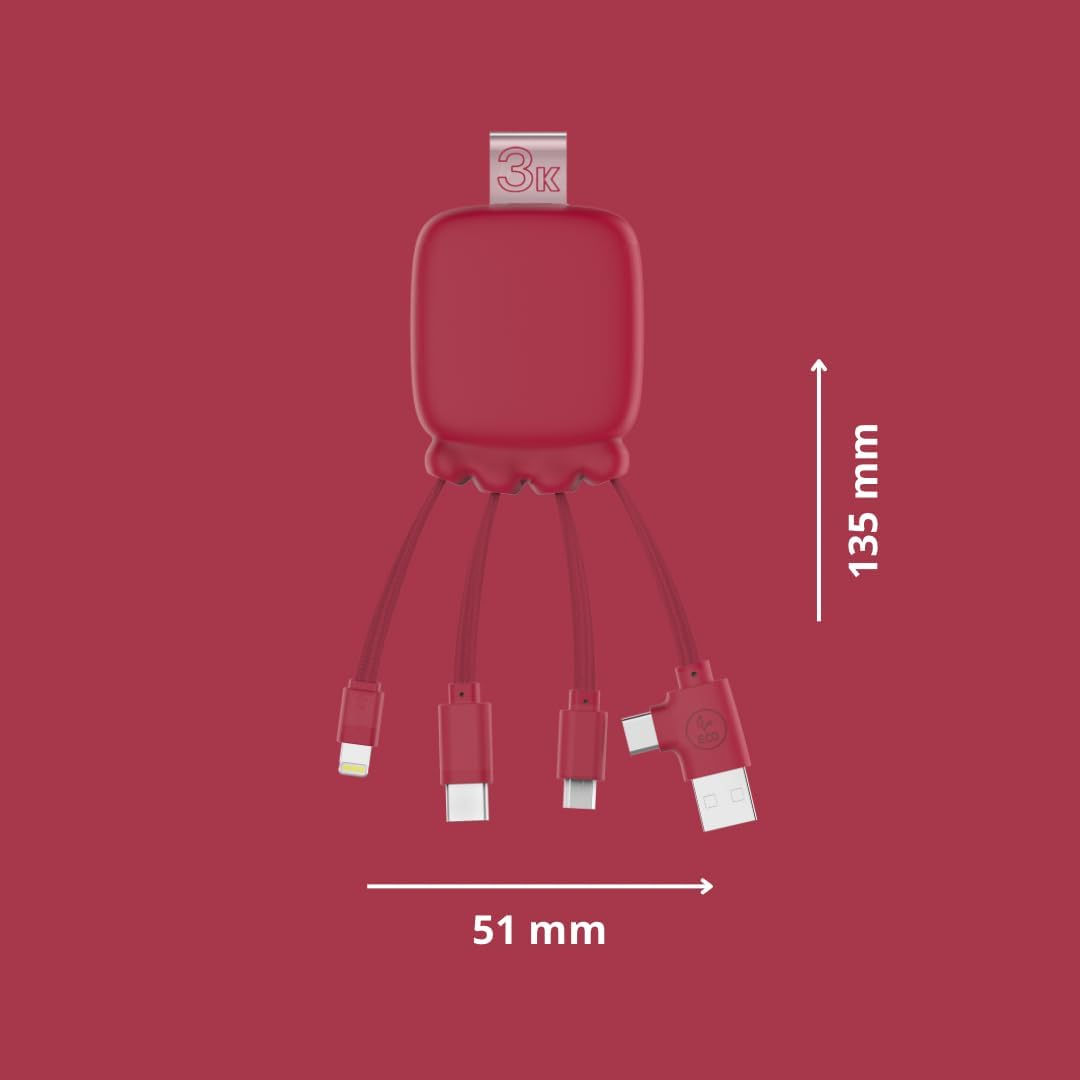
Image 3.2: The Octopus Gamma connected to a power strip, demonstrating simultaneous charging of both the connected device and the internal power bank.

Image 3.3: The Octopus Gamma in a typical use environment, connected to a laptop, alongside a keyboard and smartphone.
4. 유지관리
To ensure the longevity and optimal performance of your Xoopar Octopus Gamma, follow these maintenance guidelines:
- 청소: 부드럽고 마른 천으로 기기를 닦으십시오. 강한 화학 약품이나 연마성 재질은 사용하지 마십시오.
- 저장: 본 기기는 직사광선과 극한의 온도를 피해 시원하고 건조한 곳에 보관하세요.
- 손질: Avoid excessive bending or pulling of the cables to prevent damage to the connectors or internal wiring.
- 배터리 관리 : For optimal battery life, avoid fully discharging the internal power bank frequently. Recharge it regularly.
5. 문제 해결
| 문제 | 가능한 원인 | 해결책 |
|---|---|---|
| 장치가 충전되지 않습니다. | 잘못된 커넥터를 사용했습니다. 전원 문제. Internal power bank depleted. | Ensure the correct connector is firmly plugged into your device. Try a different USB-A port or wall adapter. Recharge the Octopus Gamma by connecting its USB-A end to a power source. |
| 느린 충전. | 전원 출력이 낮습니다. 여러 기기를 충전합니다. | 더 높은 와트를 사용하세요tag전자 전원 어댑터. 더 빠른 충전을 위해 기기를 한 번에 하나씩 충전하세요. |
| Octopus Gamma not recharging. | Faulty USB-A connection. 전원 문제. | Ensure the USB-A connector is securely plugged into a working power source. Try a different USB-A port or wall adapter. |
6. 사양
| 특징 | 세부 사항 |
|---|---|
| 모델명 | Gamma RP |
| 모델 번호 | XP61075 |
| 커넥터 | Lightning, Micro USB, USB Type A, USB Type C |
| 파워뱅크 용량 | 3000mAh |
| 배터리 유형 | 리튬폴리머 |
| 무게 | 70그램 |
| 치수(길이 x 너비 x 높이) | 13.5 x 5.1 x 1.7cm |
| 특별 기능 | Fast Charging, Lightweight, Recycled Plastic Construction |
| 호환 장치 | Smartphones, Tablets, Laptops, Speakers, Earphones (Universal compatibility) |
| 제조업체 | XOOPAR |
| 원산지 | 중국 |

Image 6.1: Dimensions of the Octopus Gamma, showing its compact size.
7. 보증 및 지원
7.1 보증 정보
The Xoopar Octopus Gamma (Model XP61075) comes with a 2년 제조사 보증. 본 보증은 정상적인 사용 환경에서 발생하는 재료 및 제조상의 결함에 적용됩니다. 보증 청구를 위해 구매 증빙 서류를 보관해 주십시오.
보증은 다음 사항을 포함하지 않습니다:
- 오용, 남용, 사고 또는 방치로 인해 발생한 손상.
- 무단 수리 또는 개조.
- 정상적인 마모 및 파손.
7.2 고객 지원
For technical assistance, warranty claims, or any questions regarding your Xoopar Octopus Gamma, please contact Xoopar customer support through their official web제품을 구매한 사이트 또는 소매업체.
You can visit the official Xoopar store for more information: Xoopar Official Store