
SEAFRONT SEAFRONToi9x6g5cus
SEAFRONT Mini VFD Inverter User Manual
Model: SEAFRONToi9x6g5cus
1. 서론
This manual provides detailed instructions for the installation, operation, and maintenance of the SEAFRONT Single-Phase to Three-Phase Variable Frequency Drive (VFD) Controller. This device is designed to convert single-phase power (176-264V) into three-phase power (0-220V) for controlling the speed and torque of various AC motors, fans, and pumps. Please read this manual thoroughly before operating the device to ensure safe and efficient use.
2. 안전 지침
To prevent personal injury and equipment damage, always observe the following safety precautions:
- 배선 작업이나 유지 보수를 하기 전에 반드시 전원 공급 장치를 차단하십시오.
- 자격을 갖춘 인력만이 설치 및 배선 작업을 수행해야 합니다.
- Do not operate the VFD with wet hands or in damp 환경.
- VFD와 모터의 적절한 접지를 확인하세요.
- Do not touch the terminals immediately after power-off, as residual voltage가 존재할 수도 있습니다.
- Protect the VFD from direct sunlight, dust, corrosive gases, and flammable materials.
- 입력 볼륨 확인tage matches the VFD's specifications (1PH 176-264V).
3. 제품 특징
The SEAFRONT Mini VFD Inverter offers the following key features:
- 다양한 제어 모드: Supports V/F control, vector control, and output torque control for versatile motor management.
- 고품질 부품: Utilizes an excellent copper core coil, ensuring strong resistance, superior performance, and robust load capacity.
- 컴팩트하고 휴대하기 편리한 디자인: Small size and lightweight construction make it highly flexible, convenient to move, transport, and energy-efficient.
- Clear LED Digital Display: Features an intuitive LED digital display panel for clear and convenient reading of operational parameters.
- 광범위한 적용 범위: Ideal for use with various equipment including motors, fans, pumps, automated machine tools, and engraving machines.
4. 구성 요소 및 제어

그림 4.1: 전면 패널view
This image shows the front panel of the VFD inverter. It features a digital LED display at the top, indicating operational status and values. Below the display are several control buttons: "PROG" (Program), "UP" arrow, "DOWN" arrow, and "OK". At the bottom, there is a rotary knob for frequency adjustment, marked from 0 to 10. Additionally, there are "RUN" and "STOP" buttons for direct motor control, and a "FWD/REV" indicator.

Figure 4.2: Wiring Terminals
This image displays the side of the VFD inverter, highlighting the wiring terminals. On the left, there are terminals labeled "U", "V", "W" for 3-phase output to the motor, and "FG" for frame ground. Below these are two "AC" terminals for single-phase input power (220V). On the right, a green terminal block provides control signal connections, including RS+, RS-, GND, V+, +5V, COM, X1, X2, X3, X4, and X5 for external control and communication.
4.1 전면 패널 컨트롤
- LED 디스플레이: Shows frequency, current, voltage 및 오류 코드.
- 프로그램 버튼: Enters/exits parameter setting mode.
- ▲ / ▼ Buttons: Adjusts parameters or frequency.
- 확인 버튼: Confirms selection or parameter setting.
- 실행 버튼: 모터 작동을 시작합니다.
- 정지 버튼: 모터 작동을 멈춥니다.
- 회전식 손잡이: Fine-tunes output frequency.
4.2 단자 설명
| 단말기 | 설명 |
|---|---|
| AC(입력) | Single-phase AC power input (176-264V). |
| U, V, W (Output) | Three-phase AC output to motor (0-220V). |
| FG | Frame Ground. Connect to earth ground. |
| RS+, RS- | RS485 통신 인터페이스. |
| GND, V+, +5V, COM | Control power supply and common terminals. |
| X1, X2, X3, X4, X5 | Multi-function input terminals for external control signals. |
5. 설정 및 설치
5.1 장착

그림 5.1: 제품 치수
This diagram provides the physical dimensions of the VFD inverter. The overall length is 147mm (5.79in). The front panel dimensions are 60mm (2.36in) wide and 102mm (4.02in) high, with a mounting hole spacing of 52mm (2.05in) horizontally and 90mm (3.54in) vertically. The depth of the unit is 80mm (3.15in). Mounting holes have a diameter of 4mm (0.16in). Ensure adequate ventilation space around the unit.
Mount the VFD in a well-ventilated area, away from direct heat sources, moisture, and vibrations. Use the provided mounting holes to secure the unit. Ensure sufficient clearance for air circulation, especially around the cooling fan.
5.2 배선
Refer to Figure 4.2 for terminal locations. Follow these steps for wiring:
- 전원 입력: Connect the single-phase AC power supply (176-264V) to the "AC" input terminals. Ensure correct polarity if specified, though for AC, it's typically not critical.
- 모터 출력: Connect the three-phase motor's U, V, W terminals to the VFD's "U", "V", "W" output terminals respectively.
- 접지: Connect the "FG" terminal to a reliable earth ground. This is crucial for safety and to prevent electromagnetic interference.
- 제어 배선(선택 사항): If using external control (e.g., potentiometer, external switches, PLC), connect them to the appropriate "X" terminals, "GND", "V+", or "COM" as per your application requirements and the VFD's programming parameters.
중요한: Double-check all wiring connections before applying power to prevent damage to the VFD or connected equipment.
6. 사용 설명서
6.1 기본 작업
- 전원 켜기: After completing all wiring, apply power to the VFD. The LED display will light up.
- 주파수 조정 : Use the rotary knob on the front panel to set the desired output frequency. The display will show the current frequency setting.
- 시동 모터: 를 누르세요 달리다 모터를 시동하는 버튼입니다. 모터는 설정된 주파수까지 가속됩니다.
- 정지 모터: 를 누르세요 멈추다 모터를 멈추려면 버튼을 누르세요. 모터가 감속하고 멈춥니다.
6.2 Parameter Setting (PROG Mode)
The VFD has various parameters that can be configured to optimize performance for specific applications. Refer to the detailed parameter list in the full product manual (if available) for specific codes and functions.
- 를 누르세요 음식물 button to enter parameter setting mode. The display will show a parameter code (e.g., P001).
- 사용하세요 ▲ 그리고 ▼ buttons to navigate through parameter codes.
- 를 누르세요 OK 버튼을 view or edit the value of the selected parameter.
- 사용하세요 ▲ 그리고 ▼ 매개변수 값을 변경하는 버튼입니다.
- 누르다 OK 새로운 값을 저장하려면 다시 한 번 클릭하세요.
- 누르다 음식물 to exit parameter setting mode.
7. 사양
| 매개변수 | 값 |
|---|---|
| 모델 번호 | SEAFRONToi9x6g5cus |
| 입력 Voltage | Single-Phase 176-264V AC |
| 출력 볼륨tage | Three-Phase 0-220V AC |
| 출력 전력 | 400 와트 |
| 출력 전류 | 2 Amp에레스 |
| 빈도 | 50 Hz (Input) |
| 능률 | 85%에서 98%까지 |
| 제어 모드 | V/F Control, Vector Control, Output Torque Control |
| 표시하다 | LED 디지털 디스플레이 |
| 인증 | CE |
| 치수(길이 x 너비 x 높이) | 약 147mm x 60mm x 102mm(5.79인치 x 2.36인치 x 4.02인치) |
| 작동 온도 | (Information not provided in source, typical range is 0-40°C) |
| 보관 온도 | (Information not provided in source, typical range is -20-60°C) |

그림 7.1: 적용 사례
This image illustrates common application scenarios for the VFD inverter. It shows a fan, a water pump, automated machine tools, and an engraving machine, demonstrating the versatility of the VFD in controlling various industrial and commercial equipment.
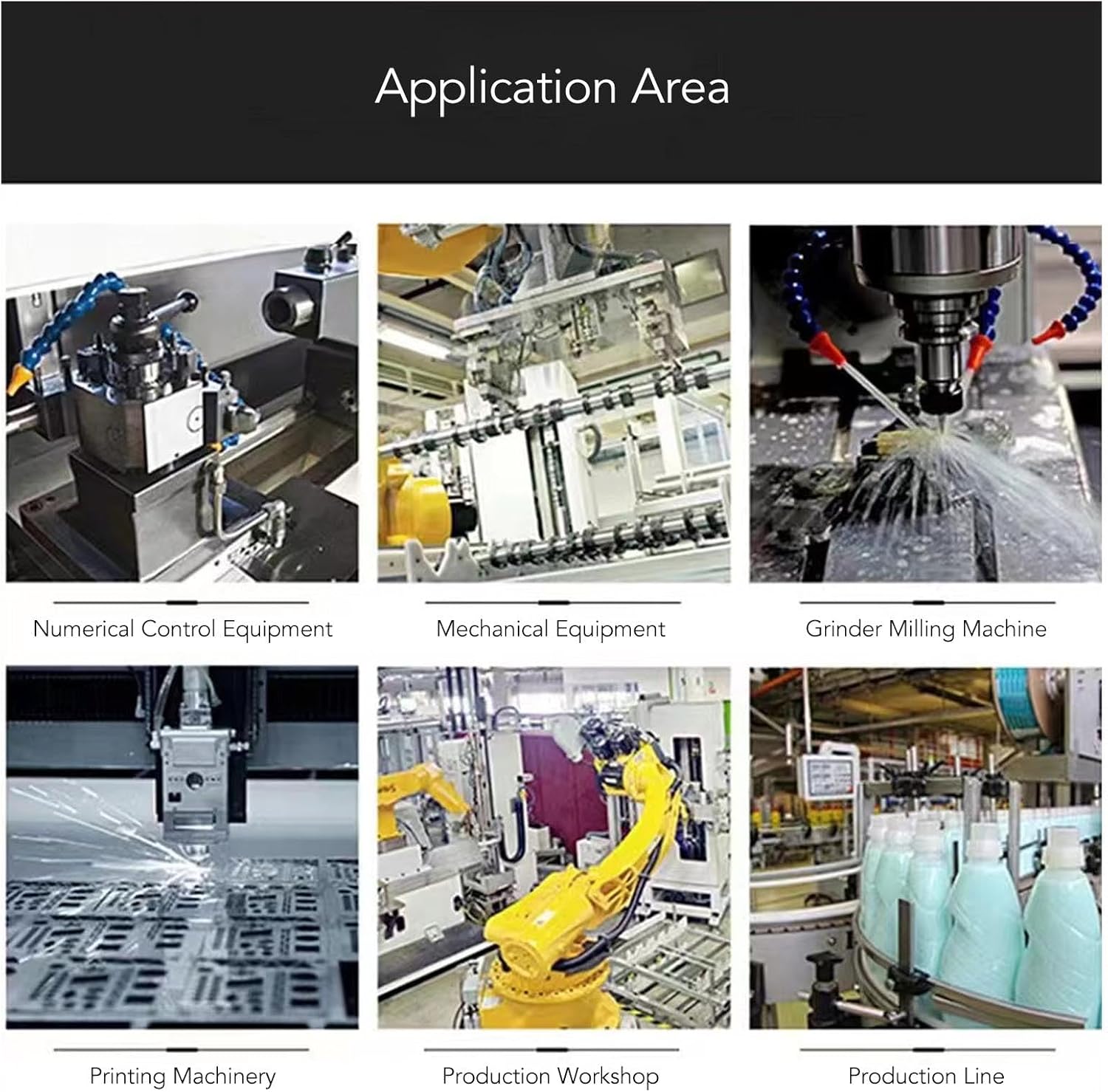
Figure 7.2: Broader Application Areas
This image expands on the application areas, showing the VFD's use in numerical control equipment, general mechanical equipment, grinder milling machines, printing machinery, production workshops, and integrated production lines. This highlights its adaptability across various industrial settings requiring precise motor control.
8. 문제 해결
If you encounter issues with your VFD, refer to the table below for common problems and solutions. If the problem persists, contact customer support.
| 문제 | 가능한 원인 | 해결책 |
|---|---|---|
| No Display / No Power | No input power; incorrect wiring; internal fuse blown. | Check power supply; verify AC input wiring; consult technician for fuse replacement. |
| 모터가 작동하지 않음 | Incorrect motor wiring (U, V, W); frequency set to 0; motor overload; VFD in fault state. | Check motor connections; increase frequency; reduce load; check for error codes on display. |
| 과전류 결함 | Motor short circuit; sudden load change; acceleration time too short. | Check motor and wiring; ensure stable load; increase acceleration time parameter. |
| 오버볼tag전자 결함 | 입력 볼륨tage too high; deceleration time too short. | 입력 볼륨 확인tage within range; increase deceleration time parameter. |
| Overheat Fault | Insufficient ventilation; ambient temperature too high; cooling fan blocked. | Ensure proper ventilation; reduce ambient temperature; clean cooling fan. |
9. 유지관리
Regular maintenance helps ensure the longevity and optimal performance of your VFD:
- 청소: 먼지가 쌓이지 않도록 VFD 외부와 통풍구를 정기적으로 청소하십시오. 부드럽고 마른 천을 사용하십시오. 액체 세제는 사용하지 마십시오.
- 점검: Regularly inspect wiring connections for looseness or damage. Check for any signs of overheating or discoloration.
- 환경: 작동 환경이 지정된 온도 및 습도 범위 내에 유지되도록 하세요.
- 저장: If storing the VFD for an extended period, keep it in a dry, dust-free environment, away from extreme temperatures.
10. 보증 및 지원
For technical assistance, warranty claims, or further inquiries, please contact SEAFRONT customer support through your point of purchase or the official SEAFRONT website. Please have your model number (SEAFRONToi9x6g5cus) and purchase details ready when contacting support.
Ask a question about this manual
Ask about setup, troubleshooting, compatibility, parts, safety, or missing instructions. Manuals+ will review the question and use this page’s manual context to help answer it.