
소개
This manual provides essential information for the safe and efficient use of your SANSUI JSW50GSUHD 50-inch 4K Ultra HD Smart Google LED TV. Please read these instructions thoroughly before operating the television and retain them for future reference.

이미지: 앞면 view of the SANSUI JSW50GSUHD 50-inch 4K Ultra HD Smart Google LED TV.
안전 정보
Always follow basic safety precautions when using this television to reduce the risk of fire, electric shock, and injury. Keep the TV away from water and moisture. Do not block ventilation openings. Use only attachments/accessories specified by the manufacturer. Refer all servicing to qualified service personnel.
상자 안에 무엇이 들어있나요?
상자를 조심스럽게 풀고 모든 품목이 들어 있는지 확인하세요.
- 1 x SANSUI JSW50GSUHD 50-inch TV
- 1 x 원격 제어
- 1 pair x AAA Batteries (for remote)
- 1 set x Base Stand
- 2 pairs x Screws (for stand)
- 1 set x Wall Mounting Kit (if included)
- 1 x 사용자 설명서 및 보증 카드
- 1 x 전원 케이블
- 1 x Mini AV cable
설정
1. TV 배치
Place the TV on a stable, flat surface using the provided base stand, or mount it on a wall using a compatible VESA 100 x 100 mm wall mount (sold separately). Ensure adequate ventilation around the TV.

Image: The SANSUI JSW50GSUHD TV placed on a media console with its stand.
2. 외부기기 연결하기
SANSUI TV는 다양한 연결 옵션을 제공합니다.
- HDMI 포트(3): 블루레이 플레이어, 게임 콘솔, 셋톱박스 등을 연결하세요.
- USB 포트(2): 미디어 재생을 위해 USB 드라이브를 연결하세요.
- AV (Mini) Port: 합성 비디오와 스테레오 오디오를 사용하는 오래된 장치의 경우.
- 이더넷(LAN) 포트: 유선 인터넷 연결의 경우.
- 안테나/RF 입력: 안테나나 케이블 TV를 연결하는 데 사용합니다.
- 광학 오디오 출력: 외부 오디오 시스템에 연결합니다.
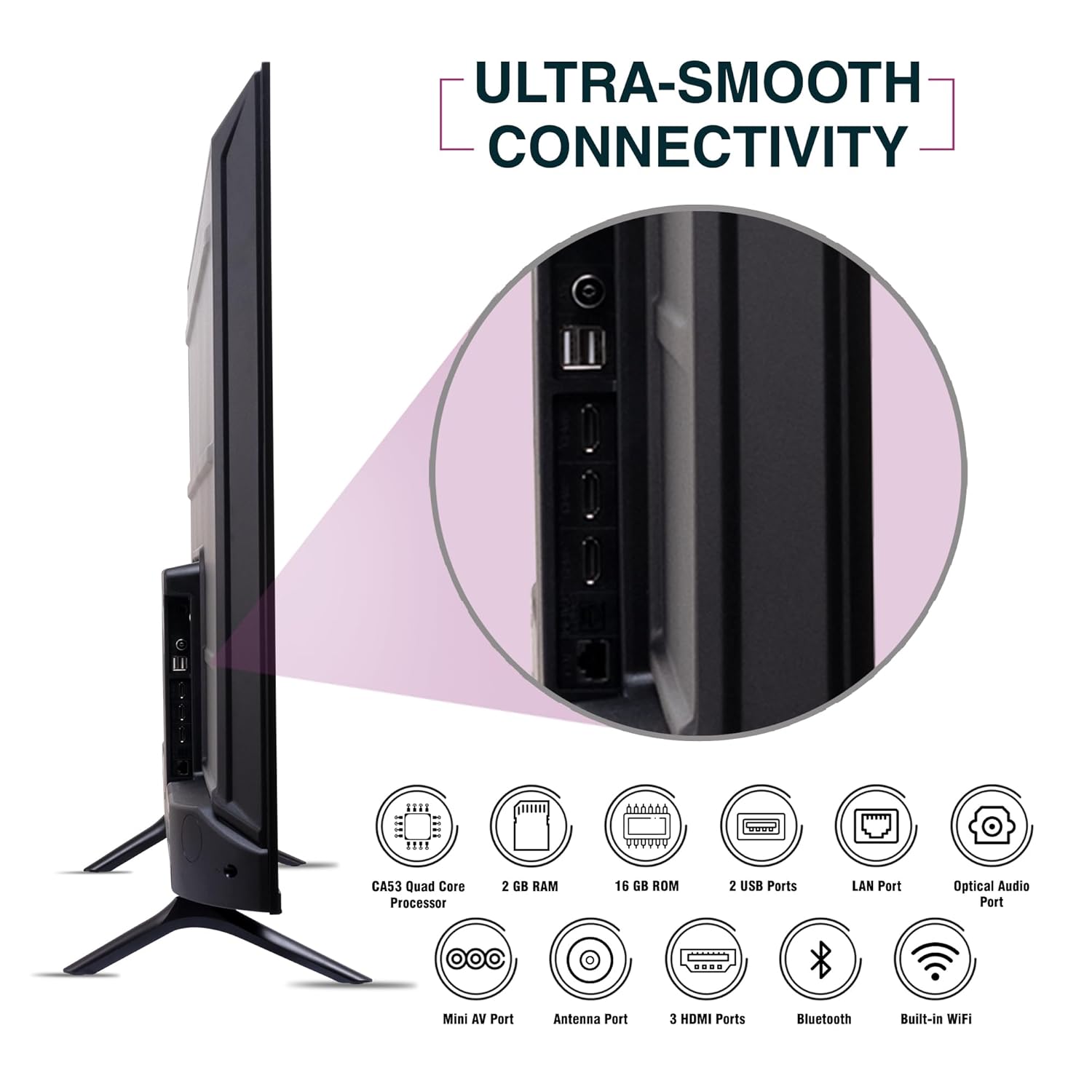
이미지: 측면 view of the SANSUI JSW50GSUHD TV highlighting the various input and output ports.
3. 전원 연결
Connect the power cable to the TV's power input and then to a wall outlet. The TV supports 100-240 VAC, 50-60 Hz.
4. 리모콘 설정
리모컨에 AAA 배터리 2개를 올바른 극성에 맞춰 삽입합니다.
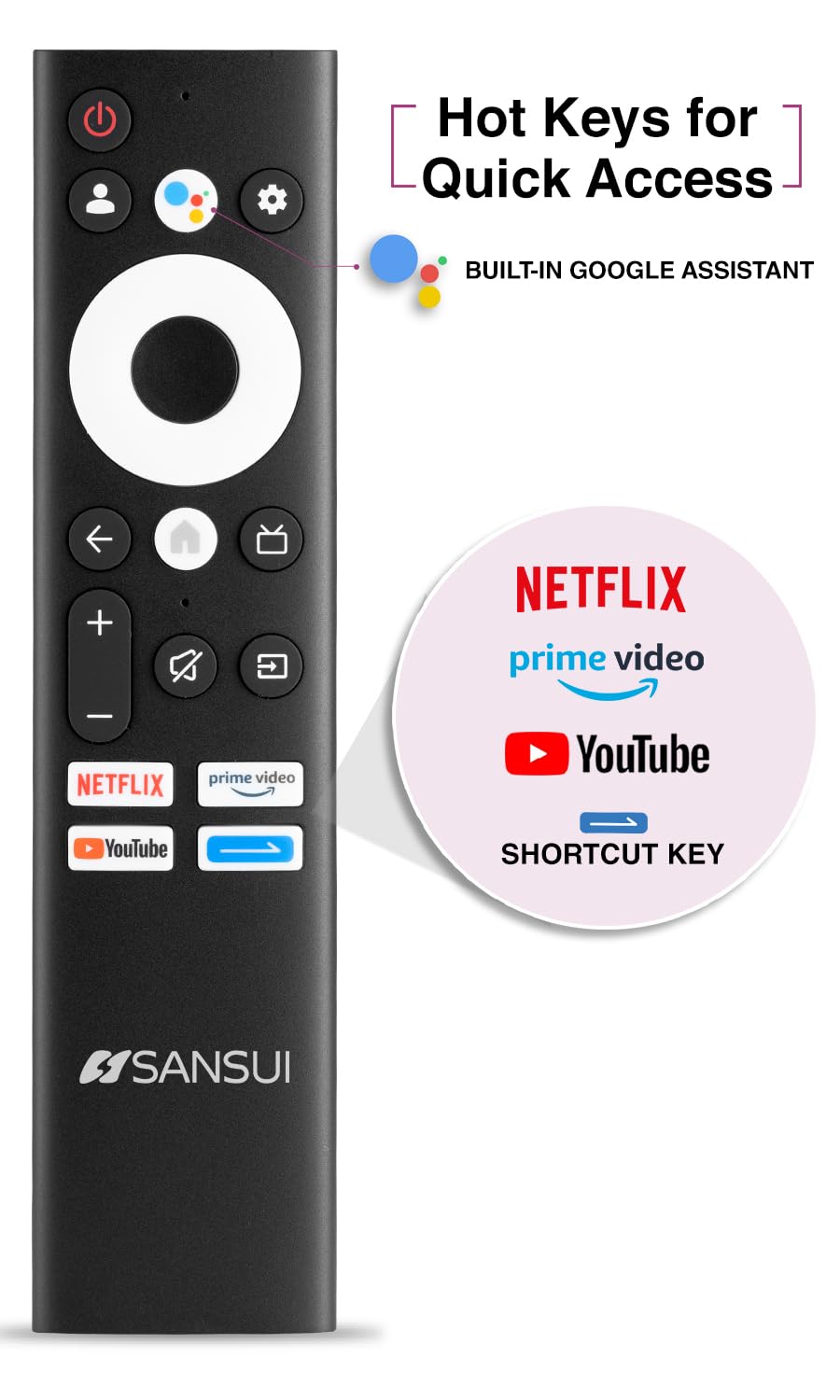
Image: The SANSUI JSW50GSUHD remote control, showing button layout and hot keys.
5. 초기 설정 (구글 TV)
Upon first power-on, the TV will guide you through the initial setup process. This includes selecting your language, connecting to Wi-Fi, signing in with your Google account, and configuring Google TV settings. Follow the on-screen prompts.
TV 작동하기
1. 기본 기능
- 힘: 리모컨의 전원 버튼을 눌러 TV를 켜거나 끄세요.
- 용량: 볼륨 높이기/낮추기 버튼을 사용하여 오디오 레벨을 조절하세요.
- 입력 소스: Press the Source button to select between HDMI, AV, TV, and other inputs.
- 항해: 방향 패드와 확인 버튼을 사용하여 메뉴를 탐색하세요.
2. 스마트 TV 기능 (구글 TV)
Your TV runs on Google TV, providing access to a wide range of streaming services and smart features.
- 구글 어시스턴트: Use the dedicated button on your remote for voice commands to search for content, control smart home devices, and get information.
- 내장 Chromecast: 호환되는 스마트폰, 태블릿 또는 컴퓨터의 콘텐츠를 TV로 바로 전송하세요.
- 앱: Access popular streaming apps like Netflix, Prime Video, Disney+ Hotstar, and YouTube directly from the Google TV interface. Download more apps from the Google Play Store.
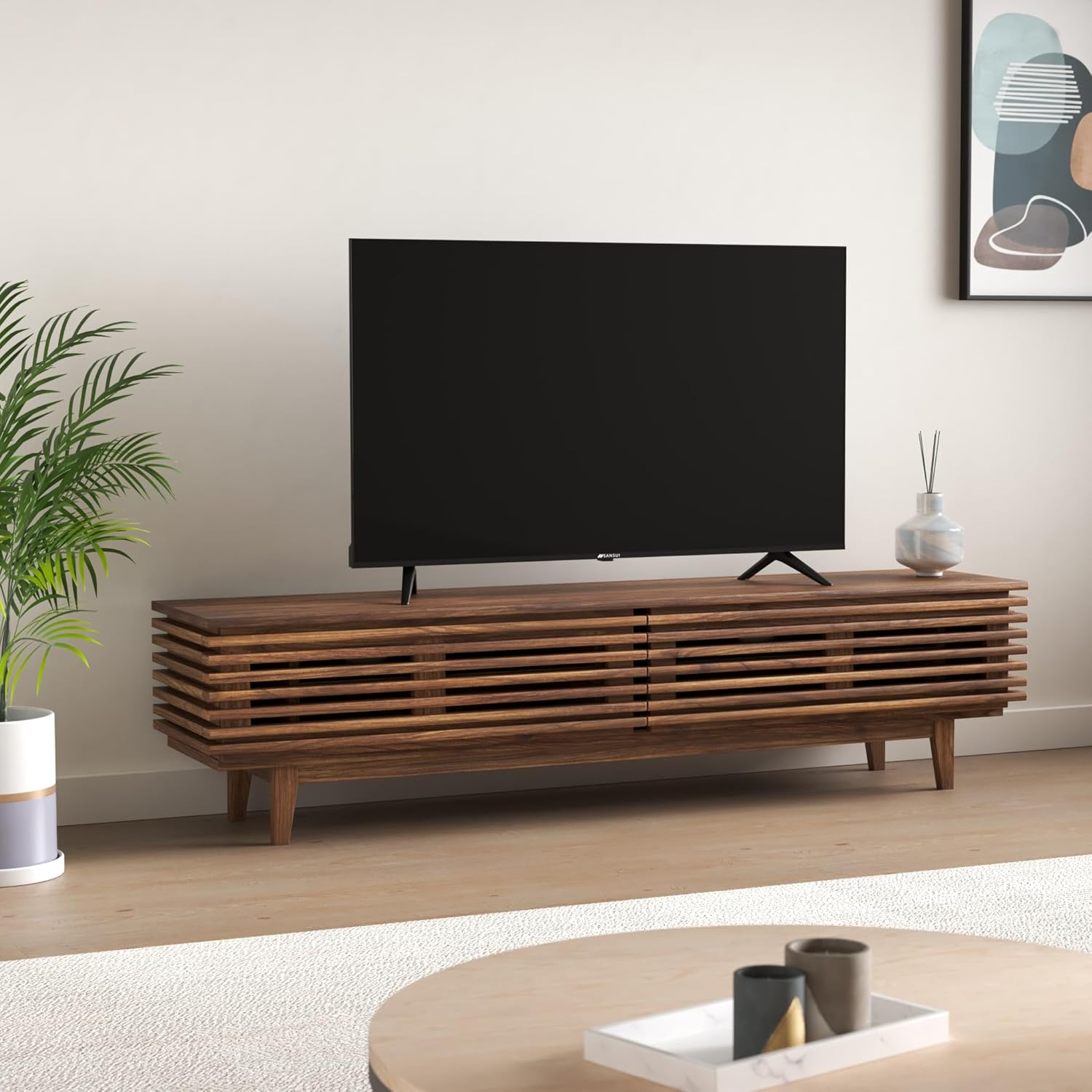
Image: The Google TV home screen displaying various streaming applications and content suggestions.
3. Display and Audio Enhancements
- 4K 울트라 HD: Enjoy stunning clarity and detail with 3840x2160 resolution.
- HDR10: Experience enhanced contrast and a wider range of colors with HDR10 content.
- Zen Panel: The A+ Zen panel dynamically enhances visual content with uniform light dispersal for improved picture quality.
- 베젤리스 디자인: 몰입감을 위해 화면 공간을 극대화합니다. view경험.
- 돌비 오디오 및 DTS 스튜디오 사운드: Delivers rich, clear, and immersive audio with 20W output.

이미지: 클로즈업 view of the SANSUI JSW50GSUHD TV showcasing its bezel-less design with a vibrant nature scene.

Image: An illustration demonstrating the advanced light dispersal technology of the Zen Panel for enhanced hues.
유지
1. 청소
화면을 청소하려면 부드럽고 보풀이 없는 천으로 부드럽게 닦으세요. 잘 지워지지 않는 얼룩은 가볍게 닦아주세요.ampen the cloth with water or a screen cleaner specifically designed for TVs. Do not spray liquid directly onto the screen. Clean the TV body with a soft, dry cloth.
2. 소프트웨어 업데이트
Google TV는 자동 소프트웨어 업데이트를 받을 수 있습니다. 성능 향상 및 새로운 기능 추가를 위해 TV가 인터넷에 연결되어 있는지 확인하세요.
문제 해결
TV에 문제가 발생하면 다음의 일반적인 해결책을 참조하세요.
| 문제 | 가능한 해결책 |
|---|---|
| 전원이 없습니다 | 전원 케이블이 TV와 벽면 콘센트에 단단히 연결되어 있는지 확인하세요. 콘센트가 제대로 작동하는지 확인하세요. |
| 화면/소리 없음 | Verify the correct input source is selected. Check cable connections to external devices. Try a different HDMI port. |
| 리모컨이 작동하지 않음 | Check and replace batteries. Ensure no obstructions between the remote and the TV's IR sensor. |
| Wi-Fi 연결 문제 | Restart your router and modem. Reconnect the TV to the Wi-Fi network in the settings. Ensure the TV is within range of your router. |
| 화질 문제 | TV 메뉴에서 화면 설정(밝기, 대비, 색상)을 조정하세요. 콘텐츠 소스가 고화질인지 확인하세요. |
If problems persist, perform a factory reset via the TV settings menu (Settings > System > About > Reset). Note that a factory reset will erase all personal data and settings.
명세서
Detailed technical specifications for the SANSUI JSW50GSUHD TV:
- 화면 크기: 127 Centimetres (50 Inches)
- 디스플레이 기술: 주도의
- 해결: 4K 울트라 HD (3840x2160)
- 새로 고침 빈도: 60Hz
- 특별 기능: Bezel-Less Design, Browser, Chromecast, Parental Controls, Sleep Timer, Google TV, Google Assistant, Voice Search Smart Remote
- 연결성: 3 HDMI ports, 2 USB ports, 1 AV (mini), Bluetooth, Wi-Fi, Ethernet (LAN), Optical Audio
- 오디오 출력: 20W with Dolby Audio and DTS Studio Sound
- 프로세서: CA53 Quad core Processor
- 메모리: RAM 2GB, ROM 16GB (FLASH)
- 운영 체제: 구글 티비
- 제품 크기(깊이 x 너비 x 높이): 9D x 111W x 71.7H 센티미터
- 품목 무게: 9300그램
- 전력 소비량: 130 와트
- VESA 마운트 표준: 100 x 100mm
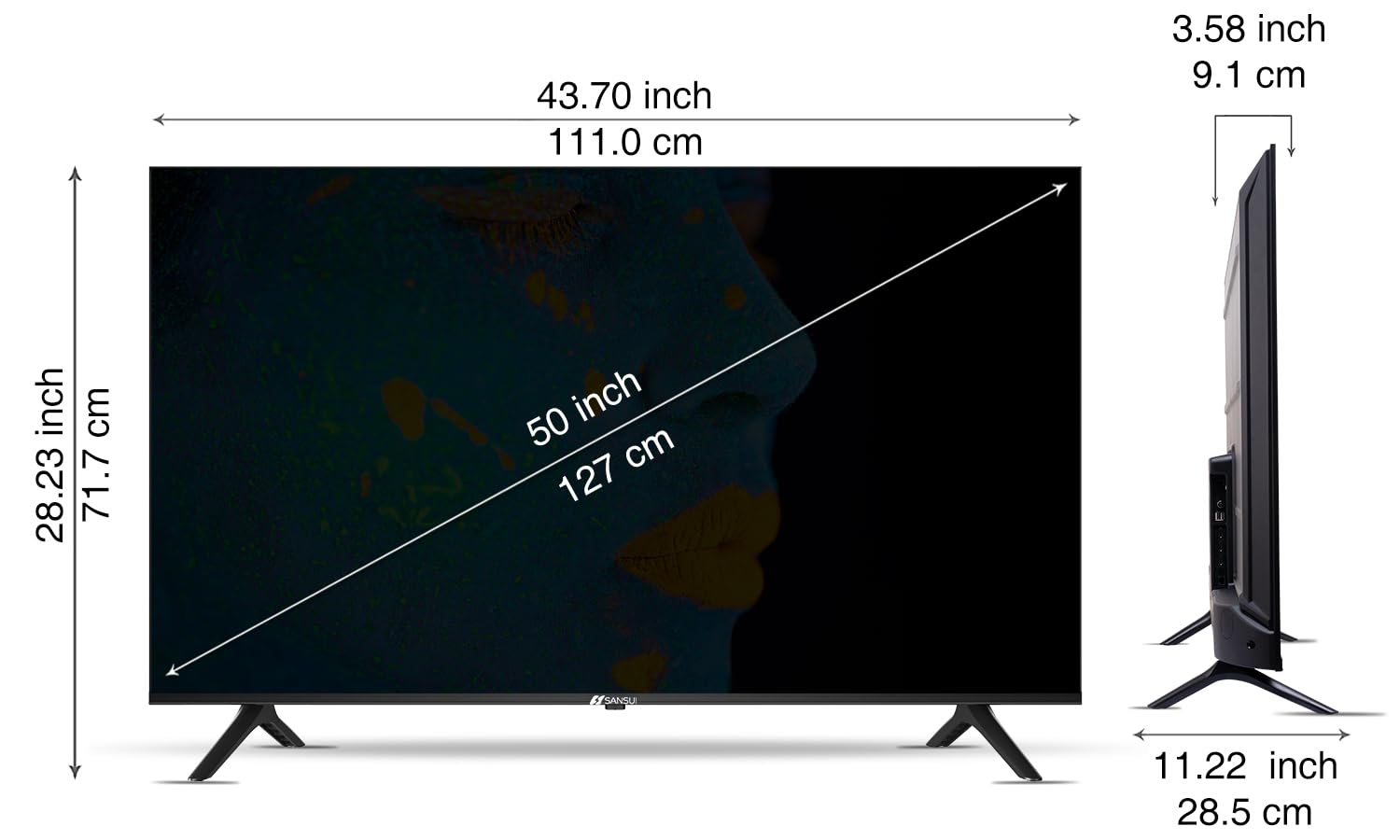
Image: Diagram illustrating the dimensions of the SANSUI JSW50GSUHD 50-inch TV.
보증 및 지원
Your SANSUI JSW50GSUHD TV comes with a 1-year comprehensive warranty, plus an additional 1-year warranty on the panel, provided by the brand from the date of purchase.
For warranty support or any technical assistance, please contact SANSUI customer care:
- 수신자 부담 전화 번호: 1800 419 3777
- 이메일: sansuicare@jainaindia.com
Manufacturer: PG Electroplast Limited
Importer: Jaina India Pvt Ltd.