1. 서론
This manual provides detailed instructions for the setup, operation, and maintenance of your new Generic Manta Smart TV Remote Control. Please read this manual thoroughly before using the remote to ensure proper functionality and to maximize your view경험.
2. 호환성
This remote control is designed for use with Manta Smart TVs. For optimal compatibility, ensure that the physical appearance of this remote matches your original Manta Smart TV remote. Additionally, verify that the remote includes a 'Fav' button in the last row of buttons, as this indicates full compatibility with specific Manta Smart TV models.
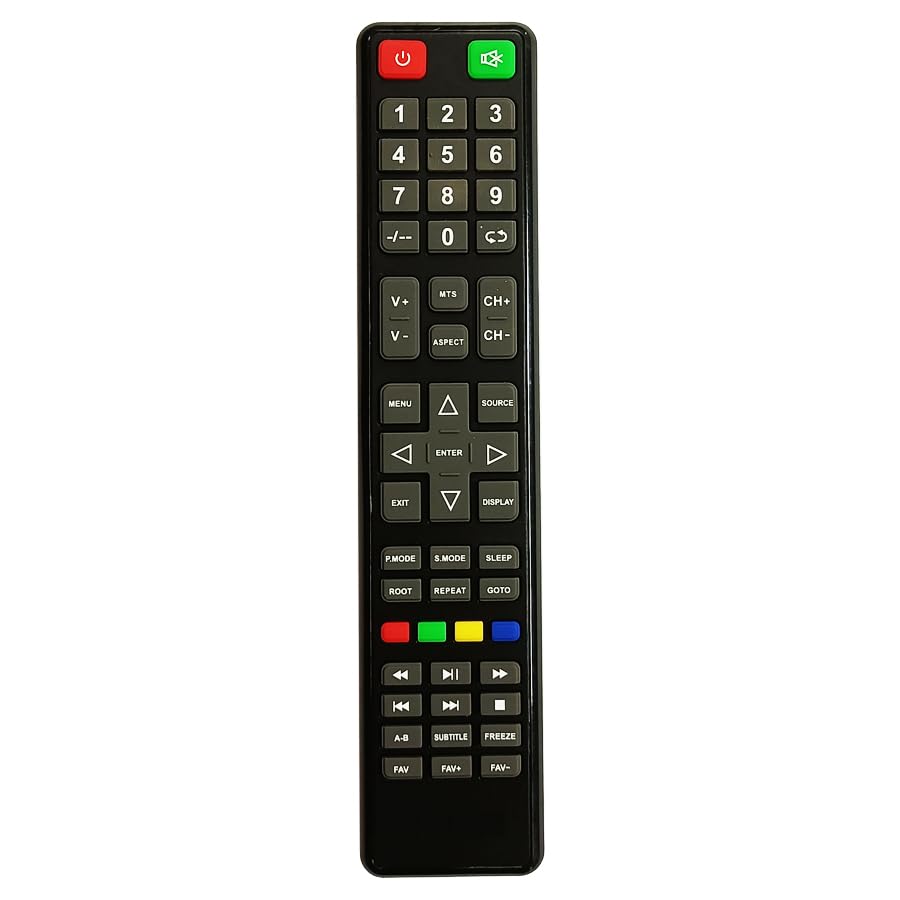
Figure 1: Manta Smart TV Remote Control. A black remote control with various buttons for TV operation, including a numeric keypad, navigation buttons, and dedicated smart TV function buttons.
3. 배터리 설치
The remote control requires Lithium Ion batteries (not typically included). Follow these steps to install the batteries:
- 리모콘 뒷면에 있는 배터리함 덮개를 찾으세요.
- 덮개를 아래로 밀거나 걸쇠를 눌러 수납 공간을 엽니다.
- Insert the Lithium Ion batteries, ensuring the positive (+) and negative (-) terminals align correctly with the markings inside the compartment.
- 배터리 칸 덮개를 제자리에 다시 밀어 넣어 딸깍 소리가 날 때까지 단단히 닫습니다.
메모: Always replace all batteries at the same time. Do not mix old and new batteries, or different types of batteries.
4. 설정 및 첫 사용
This remote control uses infrared (IR) technology and typically does not require complex pairing. Once batteries are installed, it should be ready for use with compatible Manta Smart TVs.
- Ensure your Manta Smart TV is powered on or in standby mode.
- Point the remote control directly at the IR receiver on your Manta Smart TV.
- 를 누르세요 힘 button to turn on or off the TV. If the TV responds, the remote is successfully set up.
If the TV does not respond, refer to the Troubleshooting section.
5. 사용 설명서
Familiarize yourself with the main functions of the remote control:
- 전원 버튼: TV를 켜거나 끕니다.
- 숫자 키패드(0-9): 채널 직접 입력에 사용됩니다.
- 볼륨 높이기/낮추기: 사운드 레벨을 조정합니다.
- 채널 위/아래: TV 채널을 순차적으로 변경합니다.
- 음소거 버튼: TV 소리를 음소거하거나 음소거 해제합니다.
- 탐색 버튼(위, 아래, 왼쪽, 오른쪽, 확인): Used to navigate menus and select options on the screen.
- 뒤로/종료 버튼: 이전 메뉴로 돌아가거나 현재 메뉴를 종료합니다.
- 스마트 TV/홈 버튼: Accesses the Smart TV interface or home screen.
- 즐겨찾기 버튼: Accesses your favorite channels list (if supported by your TV model).
- 색상 버튼(빨간색, 녹색, 노란색, 파란색): Perform specific functions within menus or applications, as indicated on screen.
6. 문제 해결
리모컨에 문제가 발생하면 다음의 일반적인 문제와 해결 방법을 참조하세요.
| 문제 | 해결책 |
|---|---|
| Remote is not responding to the TV. |
|
| 일부 버튼이 작동하지 않습니다. |
|
| 원격근무는 간헐적으로 진행됩니다. |
|
7. 유지관리
리모컨의 수명을 연장하려면 다음 사항을 준수하십시오.
- 부드럽고 마른 천으로 닦아 리모컨을 깨끗하게 유지하세요.
- 리모컨을 극한 온도, 직사광선 또는 습기에 노출시키지 마십시오.
- 리모컨을 떨어뜨리거나 강한 충격을 가하지 마십시오.
- 장기간 리모컨을 사용하지 않을 경우, 배터리 누출을 방지하기 위해 배터리를 제거하세요.
8. 사양
| 특징 | 세부 사항 |
|---|---|
| 상표 | 일반적인 |
| 제조업체 | cheops |
| 원산지 | 중국 |
| 연결 기술 | 적외선 |
| 컨트롤러 유형 | 버튼 제어 |
| 배터리 설명 | 리튬 이온 |
| ASIN | B0CC31JXM4 |
9. 보증 및 지원
For warranty information and customer support, please refer to the documentation provided with your purchase or contact the seller directly. Specific warranty terms and support channels may vary depending on your region and point of purchase.


