
GoodBaby FC-IR202-Green
GoodBaby Non-Contact Forehead Thermometer
Model: FC-IR202-Green
1. 서론
Thank you for choosing the GoodBaby Non-Contact Forehead Thermometer. This device is designed for safe and accurate temperature measurement of the human body (forehead) and objects. Its non-contact design ensures hygiene and ease of use, making it ideal for infants, children, and adults. Please read this manual thoroughly before use to ensure proper operation and to maintain the device's longevity.

Image: The GoodBaby Non-Contact Forehead Thermometer, displaying a temperature of 98.6°F, alongside visual representations of its color-coded fever indicator system (green, orange, red).
2. 중요한 안전 정보
Please observe the following safety precautions to ensure safe and effective use of the thermometer:
- This thermometer is intended for household use only. It is not a substitute for professional medical advice, diagnosis, or treatment. Always consult a healthcare professional for any health concerns.
- Keep the device out of reach of children and pets. Small parts may pose a choking hazard.
- Do not immerse the thermometer in water or other liquids. It is not waterproof.
- Do not expose the thermometer to direct sunlight, extreme temperatures, high humidity, or dust.
- Do not drop or subject the device to strong shocks.
- 배터리는 지역 규정에 따라 폐기하십시오. 배터리를 불 속에 버리지 마십시오.
- 식이 보충제에 대한 진술은 FDA에서 평가하지 않았으며, 어떠한 질병이나 건강 상태를 진단, 치료, 치유 또는 예방하기 위한 것이 아닙니다.
3. 제품 오버view
The GoodBaby Non-Contact Forehead Thermometer features a user-friendly design with a large display and intuitive controls.
3.1 주요 특징
- 위생을 위한 비접촉식 측정.
- Fast 1-second measurement.
- Large display with 3-color intelligent indicator (Green, Orange, Red) for easy interpretation.
- Forehead and Object measurement modes.
- Fever alarm function.
- 조용한 작동을 위한 무음 모드.
- 35-set memory recall.
- °C/°F conversion.
- 자동 종료.

Image: An illustrative diagram highlighting the key features of the thermometer, including Forehead/Object Mode, Mute/Unmute, Fever Alarm, °C/°F Convert, 35 Sets Memory Recall, Backlight Display, Carry Pouch Included, and Battery Included.

Image: A graphic emphasizing the thermometer's fast and accurate performance, detailing features like 1-second measurement, fever alert, automatic shutdown, high-precision infrared probe, smart calibration, and temperature compensation adjustment.
4. 설정
4.1 배터리 설치
이 온도계는 AAA 배터리 2개(포함)가 필요합니다. 배터리를 설치하거나 교체하려면 다음 단계를 따르세요.
- Open the battery cover located at the bottom of the handle.
- AAA 배터리 2개를 넣을 때, 극성(+와 -)을 정확히 맞춰주세요.
- 배터리 덮개를 단단히 닫으세요.
4.2 초기 설정
Upon first use or after battery replacement, you may need to set the temperature unit.
- With the device off, press and hold the 'Mem' button for a few seconds until the unit symbol (°C or °F) starts flashing.
- Press the measurement button to toggle between °C and °F.
- Once your desired unit is displayed, wait a few seconds for the setting to be saved automatically, or press the measurement button briefly to confirm.
5. 사용 설명서
5.1 이마 체온 측정
- Ensure the thermometer is in Forehead Mode (indicated by a person icon on the display). If not, press the mode button to switch.
- 체온계를 이마 중앙에서 약 1~4cm(0.3~1.5인치) 떨어진 위치에 대십시오.
- Press the measurement button once. The reading will appear on the display within 1 second, accompanied by a beep (if silent mode is off).
- Interpret the result using the color-coded backlight:
- 녹색: 정상 체온 (89.6°F ≤ T ≤ 99.2°F / 32.0°C ≤ T ≤ 37.3°C)
- 주황색: Slight fever (99.3°F ≤ T ≤ 100.3°F / 37.4°C ≤ T ≤ 37.9°C)
- 빨간색: 고열 (100.4°F ≤ T ≤ 109.2°F / 38.0°C ≤ T ≤ 42.9°C)

Image: The thermometer's intelligent indicator system, showing how the display color changes (green, orange, red) to signify different temperature ranges, from normal to high fever.
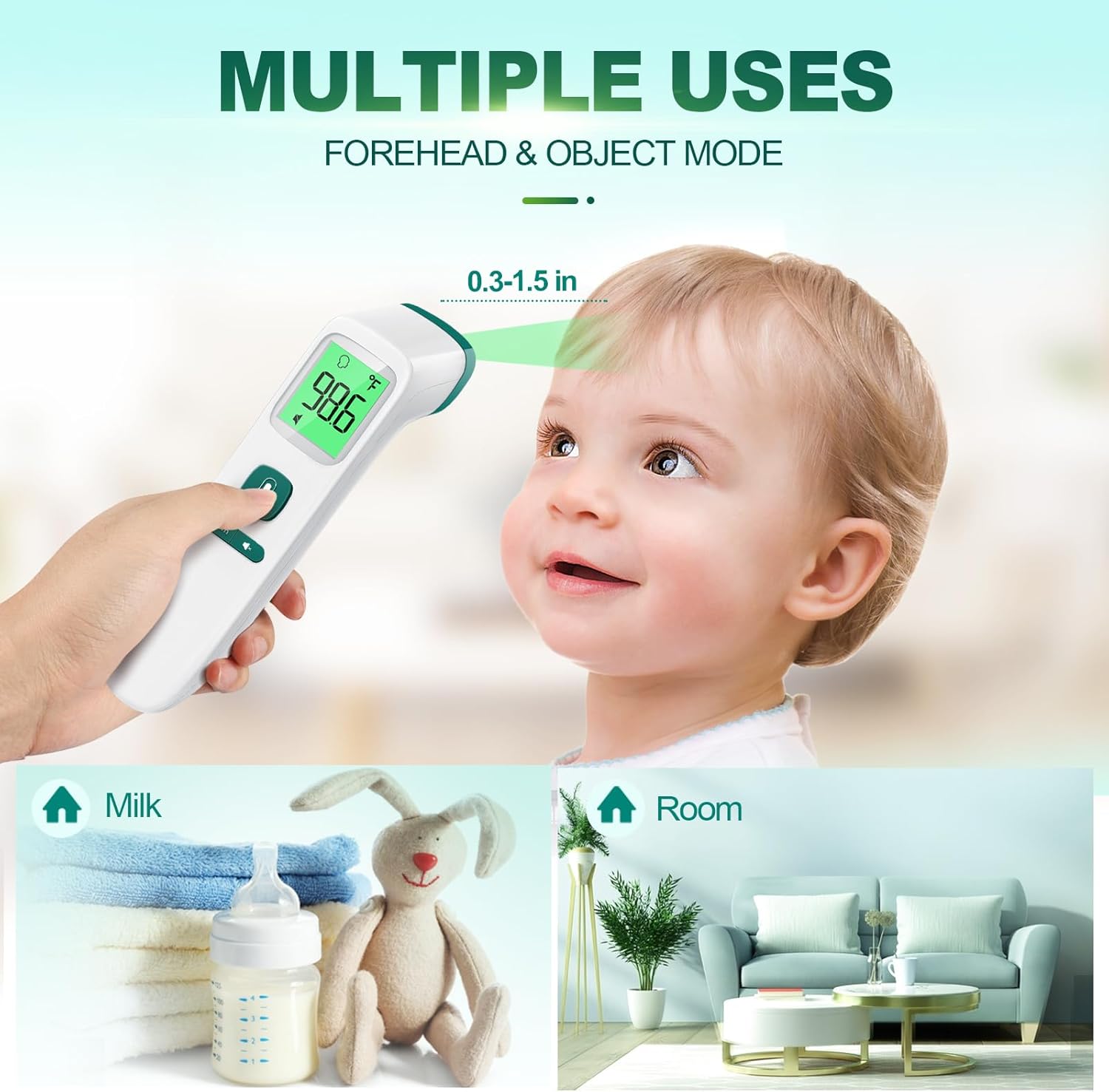
Image: Demonstrates the multiple uses of the thermometer, including forehead temperature measurement on a baby, and object temperature measurement for milk and room temperature.
5.2 Taking Object Temperature
- With the device on, press the mode button to switch to Object Mode (indicated by a house or object icon).
- Hold the thermometer approximately 0.3 to 1.5 inches (1-4 cm) from the object's surface.
- Press the measurement button. The temperature of the object will be displayed.
5.3 무음 모드
To activate or deactivate silent mode (mute/unmute the beep sound):
- With the thermometer on, locate the mute/unmute button (often combined with the memory button or a dedicated speaker icon button).
- Press this button briefly to toggle the sound on or off. A speaker icon with a cross through it will appear on the display when silent mode is active.

Image: The thermometer in use in a dimly lit environment, demonstrating its clear reading capabilities in the dark with a large backlit screen, intelligent color indicator, mute function, and auto shut-down.
5.4 메모리 리콜
The thermometer can store up to 35 previous temperature readings.
- With the thermometer on, press the 'Mem' button briefly.
- '메모리' 버튼을 누를 때마다 저장된 측정값이 가장 최근 값부터 가장 오래된 값 순으로 순환됩니다.
6. 유지관리
6.1 청소
- 알코올 솜이나 70% 알코올을 적신 면봉으로 체온계를 닦으십시오.asing and the measurement probe.
- Ensure no liquid enters the interior of the thermometer.
- 연마성 세척제나 희석제를 사용하지 마십시오.
- Allow the thermometer to dry completely before next use.
6.2 보관
- 온도계를 서늘하고 건조한 곳에 보관하고 직사광선과 극한 온도 변화를 피하십시오.
- If not in use for an extended period, remove the batteries to prevent leakage and damage to the device.
7. 문제 해결
| 문제 | 가능한 원인 | 해결책 |
|---|---|---|
| 디스플레이가 나오지 않거나 기기가 켜지지 않습니다 | 배터리가 소진되었거나 잘못 삽입되었습니다. | 올바른 극성을 확인하여 새 AAA 배터리로 교체하세요. |
| 부정확한 판독 | Sensor dirty; incorrect measurement distance; environmental factors (drafts, direct sunlight). | Clean the sensor with an alcohol swab. Ensure proper distance (0.3-1.5 inches). Measure in a stable environment. |
| Low beep volume | This is a characteristic of the device. | Ensure silent mode is off. If a louder beep is required, consider alternative models. |
| 디스플레이의 오류 메시지 | Measurement out of range; device malfunction. | Refer to the specific error code in the full manual (if available). Re-attempt measurement. If persistent, contact customer support. |
8. 사양
| 특징 | 세부 사항 |
|---|---|
| 모델 번호 | FC-IR202-Green |
| 모델명 | FC-IR2000 |
| 디스플레이 유형 | 디지털 |
| 겉감 소재 | 플라스틱 |
| 배터리 | AAA 배터리 2개 필요(포함) |
| 응답 시간 | 1000밀리초(1초) |
| 상한 온도 등급 | 화씨 109.2도(섭씨 42.9도) |
| 품목 길이 | 6.7 인치 |
| 단위 수 | 1.0 카운트 |
| 재사용성 | 재사용 가능 |
| 제조업체 | 좋은 아기 |
| 첫 번째 이용 가능 날짜 | 15년 2023월 XNUMX일 |
9. 보증 및 지원
GoodBaby products are manufactured to the highest quality standards. This product comes with a limited warranty against defects in materials and workmanship under normal use. For specific warranty terms, registration, or technical support, please refer to the warranty card included with your product or visit the official GoodBaby web해당 사이트에서 구매하세요. 구매 증빙을 위해 구매 영수증을 보관해 주세요.
For further assistance, you may contact GoodBaby customer support through their official channels.
Ask a question about this manual
Ask about setup, troubleshooting, compatibility, parts, safety, or missing instructions. Manuals+ will review the question and use this page’s manual context to help answer it.