
1. 서론
The HOCO EQ3 True Wireless Earbuds are designed to provide a high-quality audio experience with seamless connectivity and convenient features. This manual provides essential information for setting up, operating, maintaining, and troubleshooting your earbuds.
2. 상자 안에 무엇이 들어있나요?
Upon opening your HOCO EQ3 package, you should find the following items:
- HOCO EQ3 완전 무선 이어버드
- 충전 케이스
- USB-C 충전 케이블
- 이어쿠션(다양한 사이즈)
- 보호 케이스
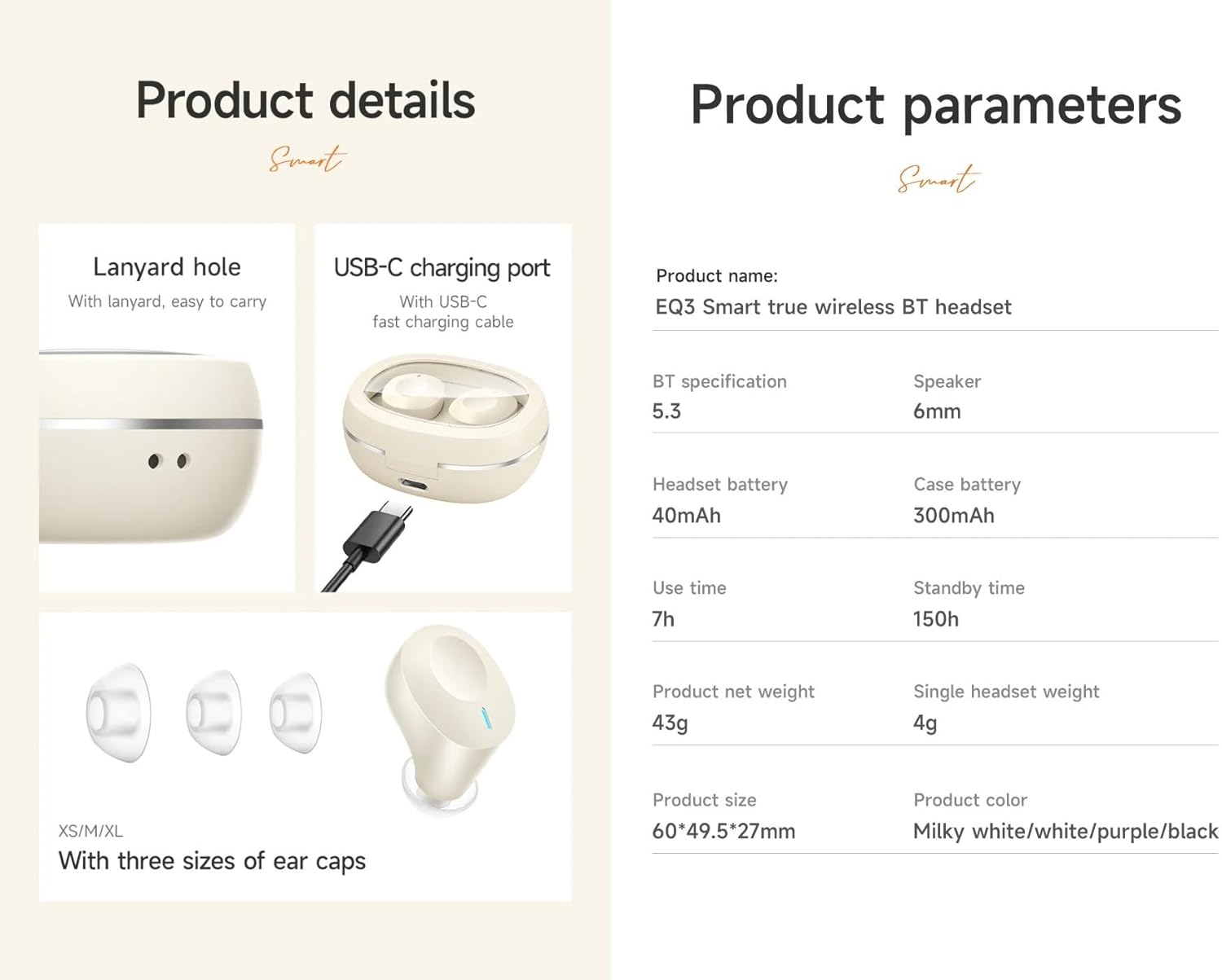
상세한 view of the HOCO EQ3 earbuds and charging case, showing the USB-C charging port, lanyard hole, and three sizes of ear caps (XS/M/XL).
3. 초기 설정
3.1 이어버드와 케이스 충전
Before first use, fully charge the earbuds and charging case. Connect the provided USB-C cable to the charging port on the case and to a compatible USB power source. The LED digital display on the case will indicate the charging status.

이미지 쇼casing the transparent design of the HOCO EQ3 charging case with an intelligent digital display, and emphasizing the 7-hour battery life of a single earbud for extended music enjoyment.
3.2 기기와 페어링
- 이어버드가 충전되어 있고 충전 케이스에 넣어져 있는지 확인하세요.
- 충전 케이스를 여세요. 이어버드가 자동으로 페어링 모드로 진입합니다.
- 기기(스마트폰, 태블릿, 노트북)에서 Bluetooth를 활성화하세요.
- 검색 사용 가능한 블루투스 장치를 찾고 목록에서 "HOCO EQ3"을 선택하세요.
- 연결되면 확인음이 들리고 이어버드를 사용할 준비가 됩니다.

An infographic showing the HOCO EQ3 earbuds and charging case, highlighting features like 7-hour single headset battery, 28-hour total working time, transparent capsule, Hi-Fi sound quality, Bluetooth 5.3, LED digital display, magnetic switch, lightweight design, TWS stereo, and touch control.
4. 사용 설명서
4.1 전원 켜기/끄기
- 전원 켜기: 충전 케이스를 열면 이어버드가 자동으로 켜지고 마지막으로 페어링된 장치에 연결됩니다.
- 전원 끄기 : 이어버드를 충전 케이스에 다시 넣고 뚜껑을 닫으세요. 자동으로 연결이 해제되고 전원이 꺼집니다.
4.2 터치 컨트롤
The HOCO EQ3 earbuds feature intuitive touch controls on each earbud:
- 재생/일시 중지: 양쪽 이어버드의 터치 영역을 한 번 탭합니다.
- 다음 트랙: 오른쪽 이어버드의 터치 영역을 두 번 탭하세요.
- 이전 트랙 : 왼쪽 이어버드의 터치 영역을 세 번 탭하세요.
- 전화 받기/종료: 양쪽 이어버드의 터치 영역을 한 번 탭합니다.
- 전화 거부: 이어버드 양쪽의 터치 영역을 2초 동안 길게 누르세요.
- 음성 지원(Siri/Google Assistant) 활성화: Long press the touch area on either earbud for 2 seconds (when not on a call).

This image illustrates the Bluetooth 5.3 high-speed connection with a smartphone and details the touch control functions: single tap for play/pause, double tap for next track, triple tap for previous track, and long press for voice assistant activation.
4.3 마스터-슬레이브 전환
The earbuds support master-slave switching, allowing you to use either earbud independently for calls or music. Simply remove one earbud from the case, and it will automatically connect. If you wish to switch to both, remove the second earbud.
5. 주요 특징
- 블루투스 5.3 : Ensures quick, stable, and low-latency connectivity with reduced power consumption.
- 고음질 사운드: Equipped with a 6mm dynamic coil unit, delivering solid and stable bass with translucent treble.
- 방수: Designed to withstand splashes and sweat, making them suitable for various activities.
- Transparent Charging Case: Features an intelligent digital power display for easy monitoring of battery levels.
- 가벼운 디자인: Each earbud weighs approximately 4g, providing a comfortable semi-in-ear fit for extended wear.
- 자동 페어링: Earbuds connect instantly to your device when the case is opened.

This image highlights the magnetic absorption feature for instant connection when opening the case, and illustrates the high-fidelity dynamic coil unit responsible for solid bass and translucent treble.
6. 배터리 및 충전
- 이어버드 배터리 용량: 40mAh(각 이어버드)
- 충전 케이스 배터리 용량 : 300mAh
- 이어폰 한쪽 사용 시간: 약 7시간
- Total Working Time (with charging case): 최대 28시간
- 대기 시간: 최대 150시간
- 충전 포트: USB-C

An image detailing the 28-hour total battery life with the 300mAh charging case, and the light, comfortable semi-in-ear design of the earbuds, weighing just 4g each, for pain-free long-term wear.
7. 기술 사양
| 특징 | 사양 |
|---|---|
| 상표 | 호코 |
| 모델 번호 | EQ3 |
| 블루투스 버전 | 5.3 (Chip: JL AC6983D2) |
| 이어 버드 배터리 | 40mAh |
| 충전 케이스 배터리 | 300mAh |
| 시간을 사용하세요 | 15 hours (Note: Product description states 15 hours, feature bullets state 15 hours, but images state 7 hours single headset battery and 28 hours total working time. We will use the more detailed breakdown from images/feature bullets for clarity.) |
| 헤드셋 단일 사용 시간 | 7시간 |
| 총 작업 시간 (케이스 포함) | 28시간 |
| 대기 시간 | 150시간 |
| 치수 (케이스) | 60*49.5*27mm |
| 총 중량 | 43g |
| 헤드셋 무게 (싱글) | 4g |
| 재료 | 플라스틱 |
| 방수 레벨 | 방수 |
| 제어 방법 | 만지다 |
| 호환 장치 | 휴대폰, 노트북, 스마트 스피커 |
8. 유지관리 및 관리
- 청소: 이어버드와 충전 케이스는 부드럽고 마른 천으로 닦아주세요. 거친 재질이나 독한 화학 약품은 사용하지 마세요.
- 저장: 이어버드를 사용하지 않을 때는 충전 케이스에 보관하여 보호하고 충전 상태를 유지하세요.
- 물 노출: While water-resistant, avoid submerging the earbuds in water. Dry them thoroughly if they get wet.
- 온도: Avoid exposing the earbuds to extreme temperatures (hot or cold) to prevent damage to the battery and internal components.
9. 문제 해결
- 이어버드가 페어링되지 않음:
- 양쪽 이어버드가 모두 충전되었는지 확인하세요. 이어버드를 케이스에 다시 넣고 뚜껑을 닫았다가 다시 열어 페어링 모드로 진입하세요. 기기의 블루투스 설정을 확인하고 다시 연결을 시도해 보세요.
- 이어버드가 하나만 작동합니다:
- Ensure both earbuds are charged. Try placing both earbuds back in the case, closing the lid, and then taking them out together. This often re-establishes the connection between them (master-slave switching).
- 소리가 나지 않거나 볼륨이 낮음:
- Check the volume levels on both your device and the earbuds. Ensure the earbuds are properly seated in your ears. Try disconnecting and reconnecting the Bluetooth connection.
- 충전 문제:
- USB-C 케이블이 케이스와 전원에 제대로 연결되어 있는지 확인하십시오. 이어버드와 케이스 내부의 충전 접점이 깨끗하고 이물질이 없는지 확인하십시오.
10. 보증 및 지원
The HOCO EQ3 True Wireless Earbuds come with a 1-year warranty. For warranty claims, technical support, or further assistance, please refer to the contact information provided with your purchase or visit the official HOCO web대지.
11. 제품 오버view 동영상
공식 제품 영상 쇼asing the key features and design of the HOCO EQ3 True Wireless Earbuds, including connectivity, sound quality, battery life, and touch controls.