
HOCO EQ1 이어버드
HOCO EQ1 Wireless Earbuds User Manual
Model: EQ1_EARBUDS
소개
The HOCO EQ1 Wireless Earbuds are designed to provide a superior audio experience with powerful deep bass and crystal-clear highs. Featuring Bluetooth 5.3 connectivity, intuitive touch controls, and a water-resistant design, these earbuds are suitable for various activities, from daily commutes to intense workouts. This manual provides detailed instructions for setup, operation, maintenance, and troubleshooting to ensure optimal performance of your EQ1 earbuds.
상자 안에 무엇이 들어있나요?
- HOCO EQ1 무선 이어버드 (좌우 세트)
- 충전 케이스
- USB 충전 케이블
- 이어쿠션(다양한 사이즈)
- 사용 설명서 (본 문서)
제품 끝view
Familiarize yourself with the components and features of your HOCO EQ1 Earbuds.
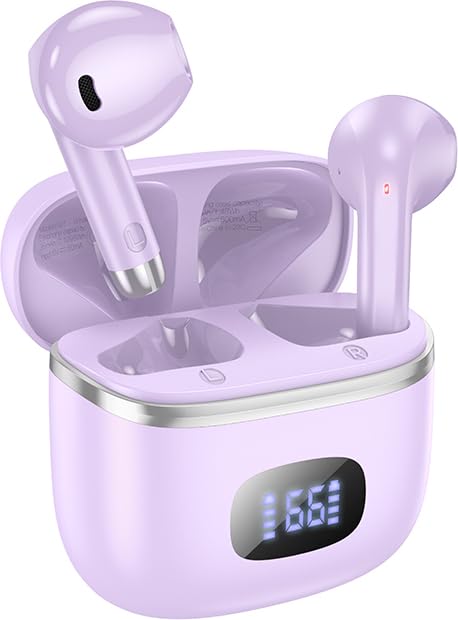
Image: The HOCO EQ1 purple earbuds are shown inside their matching charging case, which features a digital LED display indicating battery levels. The earbuds are partially visible, showcasin세련된 디자인이 특징입니다.

Image: This graphic highlights the lightweight and rounded design of the earbuds for comfortable wear, alongside a close-up of the charging case's LED digital display, which shows the visible power level.
주요 특징:
- 무선 블루투스 5.3 연결: Ensures stable and efficient connection with all Bluetooth-enabled devices.
- 깊은 저음: Delivers rich and powerful audio for an immersive listening experience.
- 터치 컨트롤: Intuitive touch-sensitive areas on the earbuds for easy management of music and calls.
- 방수: Designed to withstand sweat and light splashes, suitable for workouts and outdoor use.
- 긴 재생 시간: 충전 케이스를 사용하면 최대 50시간 동안 재생할 수 있습니다.
- 컴팩트하고 가벼운 디자인: Comfortable in-ear fit, weighing only 34g.
- TWS(진정한 무선 스테레오): Independent earbuds for true wireless freedom.
- 게임 모드: Low latency mode for enhanced gaming performance.
- LED 디지털 디스플레이: Shows battery status of the charging case and individual earbuds.
- 자기 스위치: Automatic pairing upon opening the case.
- Composite Diaphragm: 13mm moving coil unit for balanced three-band sound quality.
설정
1. 초기 충전
Before first use, fully charge the HOCO EQ1 earbuds and their charging case.
- 양쪽 이어버드를 충전 케이스에 넣습니다.
- USB 충전 케이블을 케이스의 충전 포트에 연결하고 다른 한쪽 끝을 USB 전원 어댑터(별도 구매) 또는 컴퓨터의 USB 포트에 꽂으세요.
- The LED digital display on the case will show the charging progress. Once fully charged, the display will indicate 100% or a full battery icon.
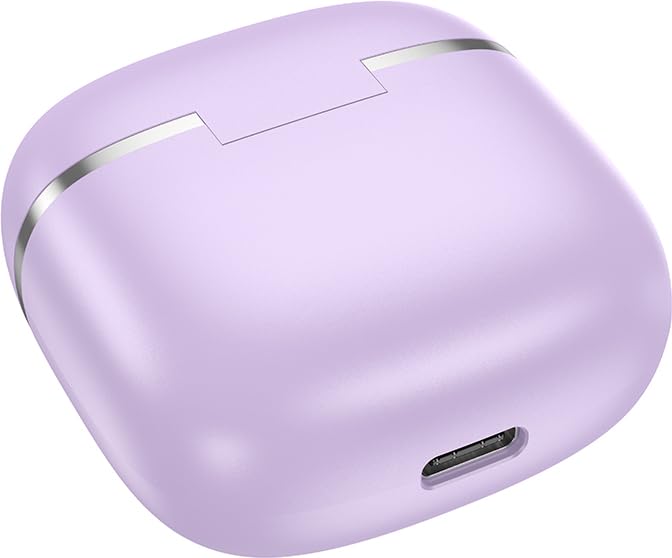
이미지: 클로즈업 view of the bottom of the HOCO EQ1 charging case, showing the USB charging port. This port is used to recharge the case and the earbuds.

Image: An infographic detailing the battery life of the HOCO EQ1 earbuds. It shows 35 hours of total working time with the charging case, 7 hours of single headset battery life, and 180 hours of standby time.
2. 블루투스 페어링
충전 케이스에서 이어버드를 꺼내면 자동으로 페어링 모드로 들어갑니다.
- 충전 케이스를 여세요. 이어버드가 자동으로 켜지고 페어링 모드로 진입합니다.
- 기기(스마트폰, 태블릿 등)에서 Bluetooth를 활성화하고 사용 가능한 기기를 검색하세요.
- Select "HOCO EQ1" from the list of found devices.
- 연결되면 확인음이 들리고 이어버드를 사용할 준비가 됩니다.
- The earbuds support automatic re-connection to the last paired device when removed from the case.

Image: This graphic illustrates the automatic pairing feature of the HOCO EQ1 earbuds, which activate upon opening the case. It also details the various touch controls for music playback and voice assistant activation.
작동 지침
터치 컨트롤:
The HOCO EQ1 earbuds feature intuitive touch controls on both the left (L) and right (R) earbuds.
| 행동 | 기능 |
|---|---|
| 터치 영역(좌/우)을 탭하세요. | 음악 재생/일시 중지 |
| 터치 영역(좌/우)을 두 번 탭하세요. | 다음 트랙 |
| 터치 영역(좌/우)을 세 번 탭하세요. | 이전 트랙 |
| Long press the touch area for 2 seconds (L/R) | 음성 지원 활성화 |
| 수신 전화 중에 터치 영역(좌/우)을 탭하세요. | 전화 받기/종료하기 |
| Long press the touch area for 2 seconds (L/R) during incoming call | 전화 거부 |
게임 모드:
The HOCO EQ1 earbuds feature a low latency gaming mode for an enhanced gaming experience. Refer to the product packaging or manufacturer's website for specific activation instructions, as this may vary.
유지
청소:
- 부드럽고 마른 보푸라기 없는 천으로 이어버드와 충전 케이스를 정기적으로 청소하세요.
- 연마성 세척제, 알코올, 화학 용제는 사용하지 마세요.
- 작고 부드러운 솔이나 면봉을 사용하여 이어팁과 스피커 메시에 묻은 귀지나 이물질을 조심스럽게 제거하세요.
저장:
- 사용하지 않을 때는 항상 이어버드를 충전 케이스에 보관하여 보호하고 충전 상태를 유지하세요.
- 직사광선 및 극한의 온도를 피해 서늘하고 건조한 곳에 보관하세요.
방수 기능:
The HOCO EQ1 earbuds are water-resistant and sweat-proof, making them suitable for workouts and light rain. However, they are not designed for submersion in water. Avoid exposing them to heavy rain, showering, swimming, or prolonged contact with water.
문제 해결
| 문제 | 가능한 원인 | 해결책 |
|---|---|---|
| 이어폰이 페어링되지 않음 | 배터리 부족; 페어링 모드가 아님; 기기 블루투스 꺼짐; 간섭. | Charge earbuds and case. Ensure earbuds are out of case. Turn device Bluetooth off/on. Move closer to device. |
| 하나의 이어폰만 작동 | 이어폰 한쪽이 충전되지 않았거나, 양쪽 이어폰이 제대로 연결되지 않았습니다. | Place both earbuds back in case, close, then reopen. Ensure both are charged. |
| 소리가 나지 않거나 볼륨이 작음 | Device volume too low; earbud volume too low; earbud dirty; not connected. | Increase volume on device and earbuds. Clean earbud speaker mesh. Re-pair earbuds. |
| 충전 케이스가 충전되지 않음 | 케이블/어댑터 불량; 충전 포트 오염. | 다른 USB 케이블과 전원 어댑터를 사용해 보세요. 충전 포트를 부드럽게 닦아주세요. |
| 연결이 자주 끊김 | 기기와의 거리가 너무 멀거나, 간섭이 발생하거나, 배터리가 부족한 경우. | Stay within 10 meters of your device. Avoid strong electromagnetic interference. Charge earbuds. |
명세서
| 특징 | 세부 사항 |
|---|---|
| 모델명 | EQ1 이어버드 |
| 연결 기술 | 무선(블루투스 5.3) |
| 무선 통신 기술 | 블루투스 |
| 헤드폰 잭 | USB (충전 케이스용) |
| 제어 유형 | 터치, 볼륨 조절 |
| 마이크 형식 | 핸즈프리 |
| 방수 레벨 | 방수 |
| 품목 무게 | 50그램(총) |
| 제품 치수 | 11 x 11 x 5cm |
| 재료 | 플라스틱 |
| 귀 위치 | 귀에 |
| 임피던스 | 140옴 |
| Battery Life (Single Headset) | 최대 7시간 |
| 총 재생 시간(케이스 포함) | 최대 35~50시간(사용량에 따라 다름) |
| 대기 시간 | 최대 180시간 |
보증 및 지원
The HOCO EQ1 Wireless Earbuds come with a 1년 보증 구매일로부터 유효합니다. 본 보증은 제조상의 결함에 적용됩니다. 보증 청구를 위해 구매 증빙 자료를 보관해 주십시오.
For technical support, warranty claims, or further assistance, please contact HOCO customer service through their official website or the retailer from whom you purchased the product. Refer to the product packaging for specific contact details.
메모: 보증은 잘못된 사용, 사고, 무단 개조 또는 정상적인 마모로 인한 손상에는 적용되지 않습니다.
Ask a question about this manual
Ask about setup, troubleshooting, compatibility, parts, safety, or missing instructions. Manuals+ will review the question and use this page’s manual context to help answer it.