
소개
Thank you for choosing the PETLIBRO 5L Automatic Pet Feeder with 1080P Camera. This device is designed to provide convenient and reliable feeding for your pets, ensuring they receive their meals on schedule while allowing you to monitor and interact with them remotely. This manual provides essential information for setting up, operating, and maintaining your feeder.

The PETLIBRO 5L Automatic Pet Feeder offers a range of features including a 1080p HD camera, night vision, two-way audio, remote feeding, in-app monitoring, and easy cleanup.
안전 지침
- 사료 급식기를 사용하기 전에 모든 지침을 주의 깊게 읽으십시오.
- 이 제품은 실내에서만 사용하세요.
- 본체를 물이나 기타 액체에 담그지 마십시오.
- 먹이통을 직사광선과 열원으로부터 멀리 두십시오.
- 전원 코드가 손상되지 않았는지 확인하고 반려동물이 씹을 수 없는 곳에 두십시오.
- 급식기와 함께 제공된 정품 전원 어댑터만 사용하십시오.
- Always supervise children around the feeder.
- 지름이 2~15mm인 건조 사료만 사용하십시오.
패키지 내용
패키지에 모든 구성 요소가 들어 있는지 확인하세요.
- PETLIBRO Automatic Pet Feeder (Main Unit)
- 스테인레스 스틸 식품 그릇
- 전원 어댑터
- 사용자 설명서
- Desiccant Bag (may be pre-installed)
제품 끝view
Familiarize yourself with the different parts of your PETLIBRO Automatic Pet Feeder.

The main unit of the feeder, featuring the food hopper, dispensing mechanism, 1080P camera, and control panel. A cat is shown eating from the stainless steel bowl, with a smartphone displaying the live camera feed.
- 푸드 호퍼: Stores dry pet food.
- Lid with Twist-Lock: Secures the food hopper and keeps food fresh.
- 제어판: Buttons for manual feeding and settings.
- 1080P HD 카메라 : 실시간 모니터링과 녹화를 위해.
- 적외선 센서: Detects low food levels and blockages.
- 스피커 및 마이크: 양방향 오디오 통신을 위해.
- 푸드 아울렛: 음식이 그릇에 담겨 나오는 곳.
- 스테인레스 스틸 그릇: 쉬운 청소를 위해 제거할 수 있습니다.
- 전원 포트: AC 어댑터를 연결합니다.
- 배터리 칸: For backup batteries (not included).
설정
1. 포장 풀기 및 조립
- 포장에서 모든 구성품을 꺼냅니다.
- 본체 급식기를 평평하고 안정적인 표면에 놓으십시오.
- Insert the stainless steel bowl into the designated slot at the base of the feeder.
2. 전원 공급
- 전원 어댑터를 피더의 전원 포트에 연결하고 벽면 콘센트에 꽂습니다.
- 전원을 위해tage protection, install 3 D-cell alkaline batteries (not included) into the battery compartment at the bottom of the feeder. This ensures continuous operation during power interruptions.
3. Filling the Food Hopper
- Open the Twist-Lock lid on top of the feeder.
- Pour dry pet food into the hopper. Ensure the food size is between 2-15mm.
- Close the lid securely by twisting it until it locks.
4. 앱 설치 및 Wi-Fi 연결
- App Store(iOS) 또는 Google Play Store(Android)에서 PETLIBRO 앱을 다운로드하세요.
- 계정을 만들고 로그인합니다.
- Follow the in-app instructions to add your feeder. Ensure your smartphone is connected to a 2.4GHz or 5GHz Wi-Fi network. The feeder supports both for a more stable connection.
- The app will guide you through connecting the feeder to your home Wi-Fi network.
5. 카메라 설정
- Once connected to Wi-Fi, the 1080P camera will automatically activate.
- For video recording, insert a Micro SD card (up to 256GB, not included) into the designated slot, usually located near the camera or at the bottom of the unit.
작동 지침
1. 수동 급지
- Press the manual feed button on the feeder's control panel to dispense one portion of food instantly.
- Alternatively, use the 'Feed Now' option in the PETLIBRO app for immediate dispensing.
2. Scheduling Meals via App
The PETLIBRO app allows you to customize your pet's feeding schedule.

The PETLIBRO app provides an intuitive interface to set custom feeding times and amounts, and to review feeding logs.
- Open the PETLIBRO app and select your feeder.
- Navigate to the 'Feeding Schedule' section.
- Set up to 10 meals per day. For each meal, specify the time and the number of portions (1-50 portions per meal).
- 일정을 저장하세요. 급식기가 프로그래밍된 시간에 자동으로 사료를 공급합니다.
- 당신은 할 수 있습니다 view feeding logs within the app to track your pet's meal history.
3. Two-Way Audio & Voice Recording
Communicate with your pet remotely using the two-way audio feature.

The feeder allows two-way audio communication, enabling you to speak to your pet and hear their responses through the app.
- 실시간 소통: 앱의 라이브에서 view, tap the microphone icon to speak to your pet. Your voice will be played through the feeder's speaker.
- 음성 녹음: Record a personalized voice message (up to 10 seconds) in the app. This message can be set to play at meal times (0-5 times per meal). A new recording will overwrite any previous one.
4. Monitoring with 1080P Camera and Night Vision
The integrated camera allows you to keep an eye on your pet at all times.

The 1080P camera provides clear vision, even at night, allowing you to monitor your pet's meals with high-definition infrared night vision.
- Access the live camera feed through the PETLIBRO app to view 귀하의 애완동물을 실시간으로 확인하세요.
- 145° 광각 렌즈는 넓은 화각을 제공합니다. view 먹이 공급 구역의.
- Infrared night vision ensures clear visibility even in dark conditions.
- Videos can be stored on a Micro SD card (up to 256GB, not included).
5. Smart Alerts and Notifications
- 동작 및 소리 감지: The feeder automatically records pet activity and saves video clips (SD card required). You will receive notifications on your phone for detected motion or sounds.
- Low Food Level Alert: The infrared sensor monitors the food level in the hopper. You will receive an alert on your phone when the food supply is low, prompting you to refill.
- Blockage Detection: The sensor also detects potential food blockages in the dispensing mechanism and will send an alert if an issue occurs.
- Wi-Fi Disconnection Alert: If the feeder loses its Wi-Fi connection, you will be notified via the app.
유지
1. 사료통 청소
정기적인 청소는 사료 공급기의 위생과 정상적인 작동을 보장합니다.
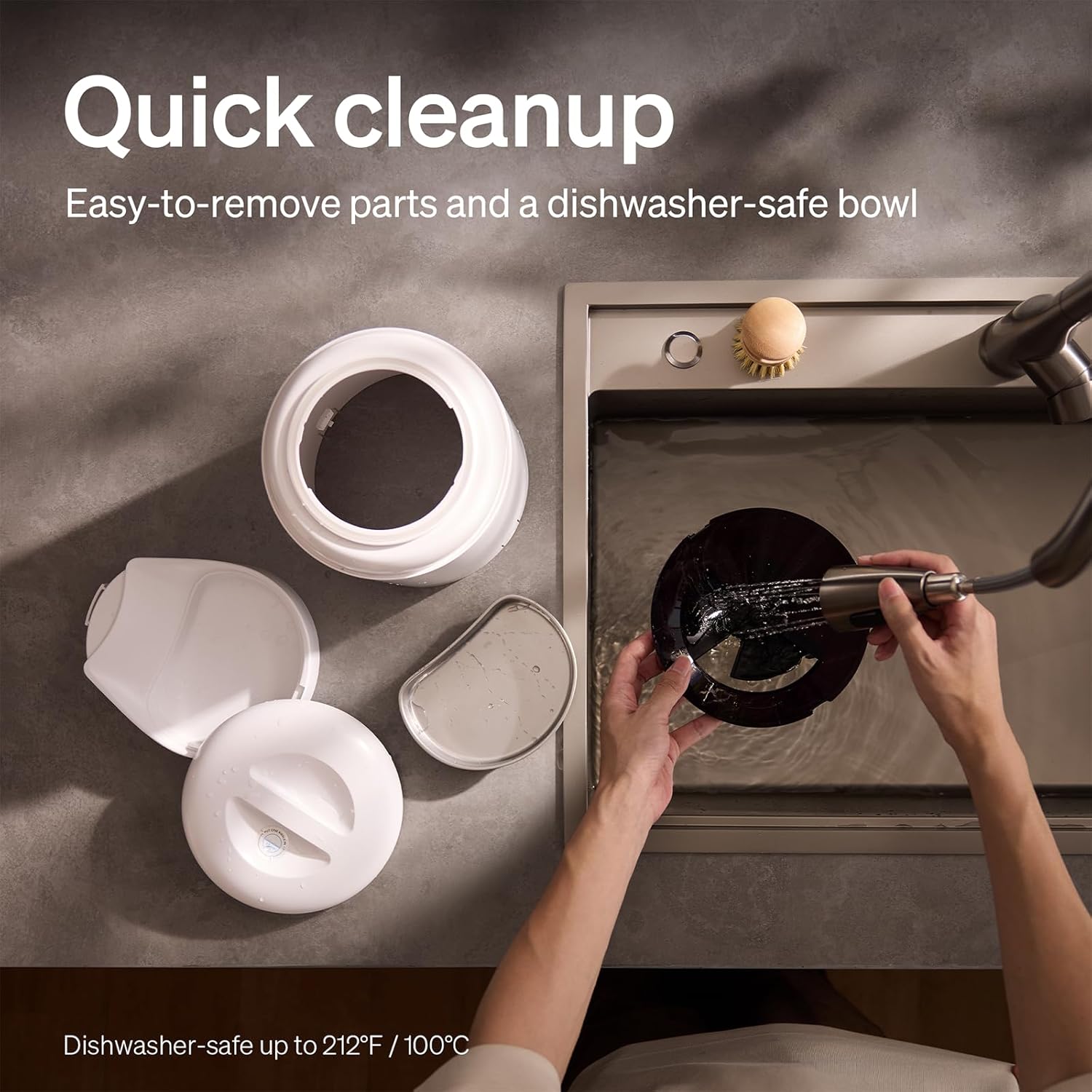
The feeder is designed for quick cleanup with easy-to-remove parts and a dishwasher-safe bowl.
- 전원 분리: 청소하기 전에는 항상 사료 급식기의 전원을 뽑으세요.
- 음식을 제거하세요: 사료통에 남아있는 음식물을 모두 비워주세요.
- 분해: Remove the food bowl, lid, and food hopper.
- 세척 가능한 부품: The stainless steel bowl and food hopper are dishwasher-safe (up to 100°C / 212°F) or can be hand-washed with mild soap and water.
- 메인 유닛: 부드러운 천으로 본체를 닦으세요.amp 천. 물에 담그지 마십시오.
- 완전히 말리세요: 다시 조립하고 음식을 다시 채우기 전에 모든 부품이 완전히 마르는지 확인하세요.
2. 건조제 교체
- The desiccant bag helps keep the food fresh. It is recommended to replace it every 15 days.
- Locate the desiccant compartment, usually under the lid.
- Remove the old desiccant bag and insert a new one.
문제 해결
| 문제 | 가능한 원인 | 해결책 |
|---|---|---|
| 급지기에서 음식이 나오지 않습니다. | Food blockage; empty hopper; dispensing mechanism issue. | Check for food blockages and clear them. Refill hopper if empty. Ensure food size is appropriate (2-15mm). |
| Wi-Fi 연결 끊김. | Weak Wi-Fi signal; router issues; incorrect password. | Ensure feeder is within Wi-Fi range. Restart your router. Reconnect the feeder to Wi-Fi via the app, verifying the password. |
| Camera not working or frequently disconnecting. | Poor Wi-Fi connection; app glitch; SD card issue. | Check Wi-Fi stability. Restart the feeder and the app. Ensure the SD card is properly inserted and not full. Consider a system reset if issues persist. |
| App shows "status unknown" or feeding errors. | Wi-Fi disconnection; app synchronization issue. | Verify Wi-Fi connection. Close and reopen the app. Restart the feeder. |
| 음성 녹음이 재생되지 않습니다. | No recording saved; volume too low; incorrect schedule. | Ensure a voice message is recorded and saved in the app. Check the playback settings for meal times. |
명세서
| 특징 | 세부 사항 |
|---|---|
| 모델 번호 | AF203 |
| 치수(길이 x 너비 x 높이) | 12 x 10 x 27cm |
| 무게 | 2.15kg |
| 재료 | 스테인리스 스틸(볼) |
| 용량 | 5리터 |
| 대상 종 | 고양이, 개 |
| 추천 용도 | Automatic indoor dog/cat feeding |
| 특별 기능 | 1080P Camera, Smart App, Two-way Audio |
| 색상 | 하얀색 |
| 연결 기술 | Wi-Fi(2.4GHz 및 5GHz) |
| 작동 모드 | 오토매틱 |
| 관리 지침 | Dishwasher safe (bowl) |
| 필요한 배터리 | No (for primary operation), Yes (for backup, 3 D-cell, not included) |
보증 및 지원
PETLIBRO products come with a standard manufacturer's warranty. For detailed warranty information, please refer to the warranty card included in your package or visit the official PETLIBRO web대지.
If you encounter any issues or have questions regarding your PETLIBRO Automatic Pet Feeder, please contact PETLIBRO customer support through the following channels:
- 이메일: 제품 포장 또는 PETLIBRO를 참조하십시오. web최신 지원 이메일 주소를 확인하려면 해당 사이트를 방문하세요.
- Web대지: PETLIBRO 공식 웹사이트를 방문하세요. webFAQ, 문제 해결 가이드, 문의 양식을 제공하는 사이트입니다.
- 앱 내 지원: The PETLIBRO app may offer a support section for direct assistance.
Please have your model number (AF203) and purchase information ready when contacting support.