
소개
This manual provides essential information for the safe and effective operation, maintenance, and troubleshooting of your DEWALT DCD794 20V Cordless 1/2" Drill Driver. The DCD794 is a compact and lightweight tool designed for drilling and fastening applications, delivering up to 1,650 RPMs with a 1/2" ratcheting chuck and an integrated LED work light.

이미지: 앞면 view of the DEWALT DCD794 20V Cordless 1/2" Drill Driver.
일반 안전 정보
Always observe basic safety precautions to reduce the risk of fire, electric shock, and personal injury. Keep your work area clean and well-lit. Do not operate power tools in explosive atmospheres, such as in the presence of flammable liquids, gases, or dust. Keep children and bystanders away while operating a power tool. Wear appropriate personal protective equipment, including eye protection, hearing protection, and gloves. Ensure the tool is switched off before making any adjustments, changing accessories, or storing it.
제품 끝view
The DEWALT DCD794 Drill Driver is engineered for performance and durability. Key features include:
- 1/2인치 라쳇식 척: Provides high bit retention for secure accessory gripping.
- 2단 변속기: Allows for versatile drilling and fastening applications.
- 15 Clutch Settings: Offers precise control for various torque requirements.
- LED 작업등: 작업 영역을 밝혀 가시성을 향상시킵니다.
- 컴팩트하고 가벼운 디자인: Enhances user comfort and maneuverability.
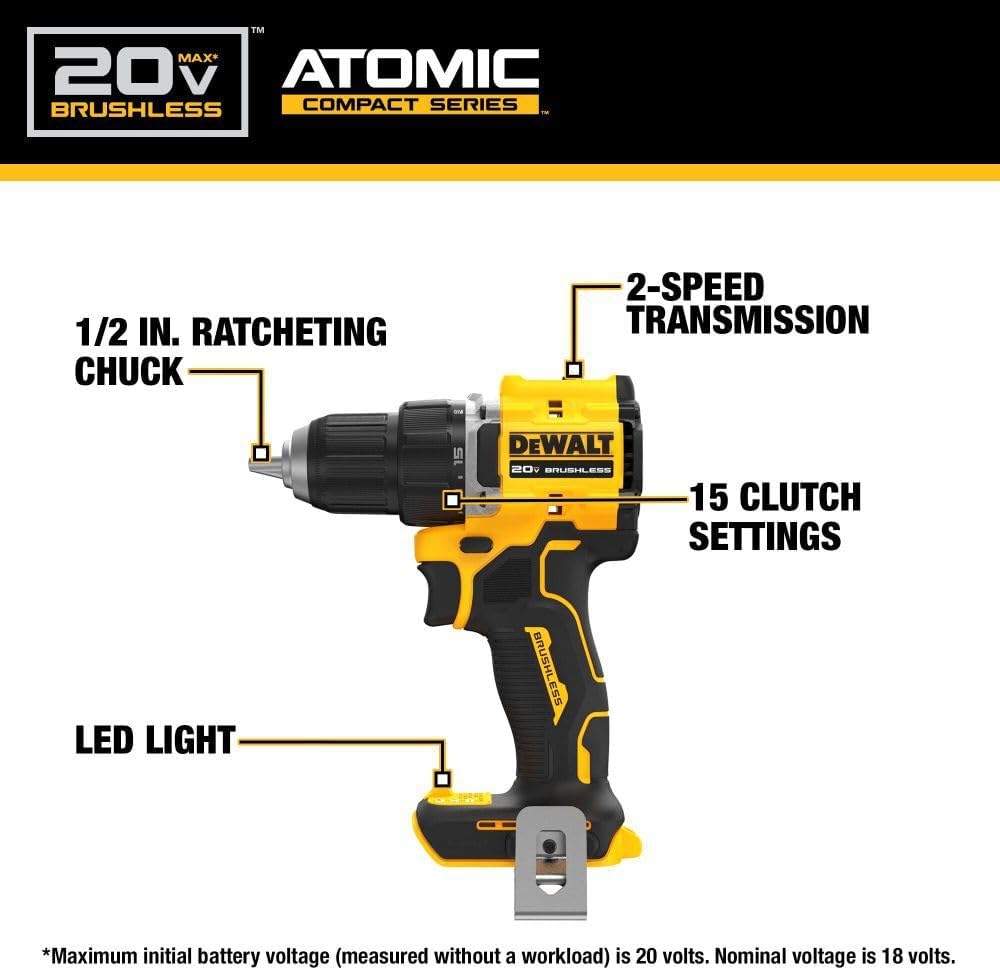
Image: Diagram highlighting the 1/2 inch ratcheting chuck, 2-speed transmission, 15 clutch settings, and LED light on the DEWALT DCD794 Drill Driver.
설정
배터리 설치 및 제거
- To install the battery, align the battery pack with the rails inside the tool's handle. Slide the pack firmly into the tool until it locks into place.
- To remove the battery, press the release button on the battery pack and pull the pack out of the handle.

Image: The DEWALT DCD794 Drill Driver with a 20V battery pack attached to the base.
비트 설치 및 제거
- To install a drill bit or driver accessory, grasp the rear half of the chuck and rotate the front half counter-clockwise until the chuck jaws open wide enough to accept the accessory.
- Insert the accessory fully into the chuck.
- Grasp the rear half of the chuck and rotate the front half clockwise until the accessory is firmly clamp편집.
- 제거하려면 과정을 반대로 진행하세요.
작동 지침
속도 선택
The drill driver features a 2-speed transmission for optimal performance across different applications. Use the speed selector switch located on top of the tool:
- 위치 1(저속): 나사 조이기나 대구경 구멍 뚫기 등 높은 토크가 필요한 작업에 적합합니다.
- 위치 2(고속): 더 작은 드릴 비트로 더 빠른 드릴링이 가능합니다.

Image: The DEWALT DCD794 Drill Driver being used to drill into wood, illustrating its 2-speed transmission capability.
클러치 설정
The adjustable clutch ring allows you to select the appropriate torque setting for your task. Rotate the ring to align the desired number with the indicator mark. Lower numbers are for driving small screws or into soft materials, while higher numbers are for driving larger screws or into harder materials. The drill symbol setting provides maximum torque for drilling applications.
Trigger Switch and LED Light
The variable speed trigger switch controls the tool's speed. Press the trigger to start the tool and vary the pressure to adjust the speed. The integrated LED work light activates when the trigger is pressed, illuminating the work surface. The light remains on for a short period after the trigger is released.
유지
정기적인 유지관리를 통해 최적의 성능을 보장하고 도구의 수명을 연장할 수 있습니다.
- 청소: 부드러운 d를 사용하세요amp cloth to clean the exterior of the tool. Do not use harsh chemicals or abrasive cleaners. Keep the ventilation slots clear of dust and debris.
- 척 유지관리: Periodically clean the chuck jaws to ensure proper gripping.
- 배터리 관리 : 배터리는 직사광선을 피해 서늘하고 건조한 곳에 보관하십시오. 방전된 배터리를 장기간 보관하지 마십시오.
- 점검: Regularly inspect the tool for any damaged parts, loose screws, or worn components. Have any damaged parts repaired by a qualified service technician.
문제 해결
| 문제 | 가능한 원인 | 해결책 |
|---|---|---|
| 도구가 시작되지 않음 | 배터리가 충전되지 않았거나 잘못 설치되었습니다. | 배터리를 완전히 충전하세요. 배터리가 단단히 삽입되었는지 확인하세요. |
| 작동 중 전원 손실 | 배터리 충전 부족 | 배터리를 충전하세요. |
| 척에서 비트가 미끄러짐 | Chuck not tightened sufficiently or jaws are dirty | Tighten chuck firmly; clean chuck jaws. |
| 과도한 진동 | Bent drill bit or accessory | Replace with a straight, undamaged accessory. |
명세서
| 특징 | 사양 |
|---|---|
| 상표 | 듀얼 |
| 모델 번호 | DCD794B-NBX |
| 전원 | 배터리 구동(20볼트) |
| 최대 회전 속도 | 1650 RPM |
| 최대 척 크기 | 0.5 인치 |
| 최대 토크 | 1.5 뉴턴 미터 |
| 최대 전력 | 300 와트 |
| 재료 유형 | 플라스틱 |
| 품목 치수(L x W x H) | 6인치 길이 x 3인치 너비 x 8인치 높이 |
| 품목 무게 | 2.54 파운드 |
보증 정보
DEWALT provides a limited warranty for its products. For specific details regarding the warranty period, coverage, and terms for your DCD794 Drill Driver, please refer to the warranty card included with your purchase or visit the official DEWALT web사이트. 보증 청구를 위해 구매 증빙 자료를 보관하세요.
지원하다
추가적인 도움이나 기술 지원이 필요하시거나 공인 서비스 센터를 찾으시려면 DEWALT 공식 웹사이트를 방문하십시오. web해당 웹사이트를 방문하거나 고객 서비스 센터에 문의하세요. 더 많은 정보와 자료는 다음에서 찾아보실 수 있습니다. Amazon의 DEWALT 매장 or the main DEWALT corporate web대지.