
1. 서론
The NUFEBS Mini 1080P Security Camera Q26 is a compact, plug-in wired security camera designed for indoor use. It offers 1080p high-definition video, 2.4G WiFi connectivity, night vision capabilities, two-way audio communication, and motion detection with tracking. This manual provides detailed instructions for setting up, operating, and maintaining your camera to ensure optimal performance and home security.

Image 1.1: The NUFEBS Mini 1080P Security Camera Q26, a compact device for home monitoring.
2. 패키지 내용
다음 품목이 패키지에 포함되어 있는지 확인하세요.
- NUFEBS Mini 1080P Security Camera (Q26)
- 사용 설명서
- 전원 충전기
- 자성베이스
3. 제품 특징
The NUFEBS Q26 camera offers a range of features to enhance your home security:
- 1080P HD 해상도: 선명하고 자세한 비디오 제공tage.
- 2.4G WiFi 연결: Easy connection to your home network for remote access.
- 야간 투시경: Equipped with color night vision for monitoring in low-light conditions.
- 양방향 오디오 : 카메라를 통해 실시간 통신이 가능합니다.
- 동작 감지 및 추적: Automatically detects movement, tracks subjects, and sends alerts.
- 로컬 및 클라우드 스토리지: Supports Micro SD cards (16-128GB) and cloud storage services for recording playback.
- IP65 방수 등급: While primarily designed for indoor use, the IP65 rating provides protection against dust and low-pressure water jets, enhancing durability.
- 자석베이스: Offers flexible mounting options on various surfaces.
- 컴팩트한 디자인: Small footprint (4x4x2 CM) allows for discreet placement.
- Amazon Alexa 호환성: Integrates with Amazon Alexa for smart home control.

Image 3.1: Key features of the NUFEBS Q26 security camera.

이미지 3.2: Example of 1080P HD video quality from the camera.

Image 3.3: The camera's IP65 waterproof design for enhanced durability.
4. 설정 가이드
4.1. 앱 설치
To control your NUFEBS Q26 camera, download the 'Tris Home' application:
- 검색 'Tris Home' in your mobile device's app store (iOS App Store or Google Play Store).
- 응용 프로그램을 다운로드하여 설치하십시오.
- 새 계정을 등록하거나 이미 계정이 있는 경우 로그인하세요.
4.2. 카메라 재설정
Before connecting the camera for the first time, or if you are switching to a new mobile device or WiFi network, it is recommended to reset the camera:
- Locate the reset button on the camera (refer to the camera's physical design for exact placement).
- Press and hold the reset button for approximately 5-10 seconds until you hear a prompt or see an indicator light change.
4.3. Connect to 2.4G WiFi
The NUFEBS Q26 camera operates on a 2.4G WiFi network. Follow these steps to connect:
- Ensure your mobile phone is connected to your home's 2.4G WiFi network.
- Open the 'Tris Home' app and select the option to 'Add Device' or 'Add Camera'.
- Follow the on-screen instructions in the app, which typically involve scanning a QR code displayed on your phone with the camera lens.
- Once connected, the camera will indicate successful pairing, and you can begin live view주고받음.
4.4. 장착 옵션
The camera comes with a magnetic base, offering versatile placement:
- 자기 표면: Attach the camera directly to any metallic surface using its magnetic base.
- 벽/천장 마운트: The magnetic base can also be affixed to a wall or ceiling using screws (not included) for a more permanent installation.
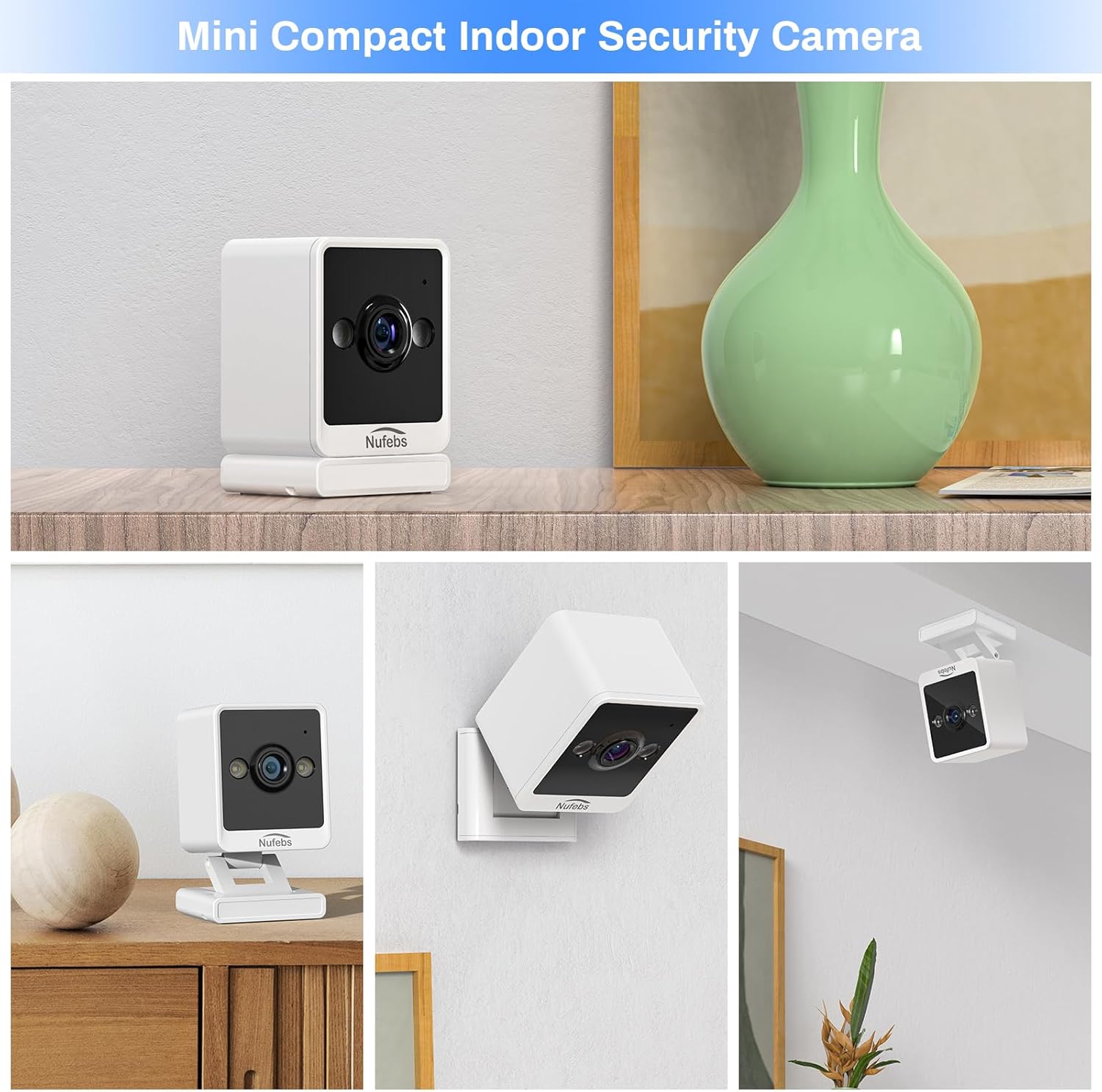
이미지 4.1: Examples of flexible mounting options for the NUFEBS Q26 camera.

Image 4.2: The camera's magnetic base allows for easy attachment to metallic surfaces.
5. 사용 설명서
5.1. 라이브 View
Once connected, open the 'Tris Home' app to access the live video feed from your camera. You can monitor your space in real-time from anywhere.

Image 5.1: Remote live preview of the camera feed on a mobile device.
5.2. 양방향 오디오
The camera features a built-in microphone and speaker. In the 'Tris Home' app, tap the microphone icon to speak through the camera and the speaker icon to listen to audio from the camera's location.
5.3. 동작 감지 및 알림
Enable motion detection in the app settings to receive instant notifications on your phone when movement is detected. The camera can also activate a spotlight and an alarm sound to deter intruders.

Image 5.2: The camera's intelligent alarm system with motion detection and spotlight.
5.4. 녹음 및 저장
이 카메라는 녹화된 영상을 저장하는 두 가지 주요 방식을 지원합니다.tage:
- 마이크로 SD 카드 : Insert a Micro SD card (16GB to 128GB, not included) into the camera's designated slot for local storage. Recordings are typically triggered by motion events.
- 클라우드 서비스 : Subscribe to the optional cloud storage service through the 'Tris Home' app for secure, off-site storage of your video recordings.

Image 5.3: Continuous recording and storage options via SD card and cloud service.
5.5. 야간 투시경
The NUFEBS Q26 camera automatically switches to color night vision in low-light conditions, providing clear surveillance around the clock.

Image 5.4: The camera's spotlight feature for enhanced night vision.
5.6. Smart Home Integration (Amazon Alexa)
The camera is compatible with Amazon Alexa. You can integrate it into your smart home system to view 음성 명령을 사용하여 호환되는 Alexa 지원 기기에서 실시간 영상을 시청할 수 있습니다.

Image 5.5: Integration with Amazon Alexa for smart home control.
6. 유지관리
6.1. 청소
To maintain optimal image quality, regularly clean the camera lens and body:
- Gently wipe the lens with a soft, lint-free cloth. Avoid abrasive materials.
- 카메라 본체를 마른 천이나 약간 젖은 천으로 닦으세요.amp cloth. Do not use harsh chemicals or liquid cleaners directly on the camera.
6.2. 펌웨어 업데이트
Periodically check the 'Tris Home' app for available firmware updates. Keeping your camera's firmware updated ensures access to the latest features, security enhancements, and performance improvements.
7. 문제 해결
If you encounter issues with your NUFEBS Q26 camera, refer to the following common solutions:
- 카메라가 WiFi에 연결되지 않음:
- Ensure your router is broadcasting a 2.4G WiFi signal. The camera does not support 5G WiFi.
- Verify that your mobile phone is connected to the same 2.4G WiFi network during setup.
- 앱에 입력한 와이파이 비밀번호를 다시 한번 확인하세요.
- 카메라를 재설정하고 연결 과정을 다시 시도해 보세요.
- 카메라가 WiFi 라우터 범위 내에 있는지 확인하세요.
- 낮은 비디오 품질:
- 인터넷 연결 속도를 확인하세요. 최적의 스트리밍을 위해서는 안정적이고 빠른 연결이 필요합니다.
- 카메라 렌즈를 닦아 먼지나 얼룩을 제거하세요.
- Ensure there are no obstructions directly in front of the camera lens.
- 동작 감지 알림 없음:
- Confirm that motion detection is enabled in the 'Tris Home' app settings.
- 앱에서 동작 감지 민감도 설정을 조정하세요.
- 카메라의 시야각을 확인하십시오 view covers the area you wish to monitor for motion.
- Camera Overheating:
- Ensure the camera has adequate ventilation and is not placed in an enclosed space or direct sunlight.
- If the camera feels excessively warm, disconnect it from power and allow it to cool down. If the issue persists, contact customer support.
8. 사양
| 상표 | NUFEBS |
| 모델 | Q26 |
| 비디오 캡처 해상도 | 1080p |
| 연결 기술 | 무선(Wi-Fi 2.4G) |
| 전원 | 코드식 전기 |
| 실내/실외 사용 | Indoor (IP65 rated for durability) |
| 특징 | Easy to Install, Night Vision, 2-Way Talk, Motion Tracking |
| 스토리지 지원 | 16-128GB Micro SD card, Cloud Service |
| 스마트 홈 호환성 | 아마존 알렉사 |
| 품목 치수(L x W x H) | 2.7 x 2.4 x 2.1 inches (approx. 4 x 4 x 2 CM) |
| 품목 무게 | 5.9 온스 |
9. 안전 정보
- Use only the provided power adapter to prevent damage or fire.
- Do not expose the camera to extreme temperatures, humidity, or direct water immersion.
- 카메라와 액세서리는 어린이와 반려동물의 손이 닿지 않는 곳에 보관하십시오.
- Avoid placing the camera near heat sources or in areas with poor ventilation.
- 카메라를 분해하거나 개조하지 마십시오. 그렇게 하면 보증이 무효화되고 손상이 발생할 수 있습니다.
10. 보증 및 지원
For warranty information, technical support, or any questions not covered in this manual, please refer to the contact information provided with your purchase or visit the official NUFEBS web사이트. 보증 청구를 위해 구매 증빙 자료를 보관하세요.
비디오 10.1: 오버view video demonstrating the features and functionality of the NUFEBS Mini 1080P Security Camera Q26.