
소개
This manual provides detailed instructions for the installation, operation, and maintenance of your DB Drive WDX200.4 4-Channel Speaker Amplifier. 설치 또는 작동을 시도하기 전에 이 설명서를 자세히 읽으십시오. amplifier to ensure proper function and safety. The WDX200.4 is a versatile 4-channel amplifier designed to deliver high-quality audio performance for various applications.
설정 및 설치
최적의 성능과 긴 수명을 위해서는 올바른 설치가 매우 중요합니다. amp증폭기. 자격을 갖춘 전문가가 설치하는 것이 좋습니다.
설치
그만큼 amplifier features a surface mount design. Ensure the mounting location provides adequate ventilation to prevent overheating. Avoid mounting in direct sunlight or near heat sources.
전원 연결
The WDX200.4 operates within a voltage range of 9V to 16V DC. Connect the power and ground cables securely to the robust power and output connectors. Ensure proper gauge wiring is used for power and ground connections to handle the amp앰프의 전류 소모량.
입력 연결
그만큼 amplifier supports both RCA (low-level) and high-level inputs. This allows for compatibility with both aftermarket and factory head units without the need for additional adapters.
- RCA 입력: Use RCA cables to connect your head unit's pre-amp 출력 amplifier의 RCA 입력.
- 상위 수준 입력: If your head unit does not have RCA outputs, use the high-level input. This input typically connects directly to your head unit's speaker outputs.
스피커 연결
The WDX200.4 is a 4-channel amplifier, providing 200 Watts RMS per channel at 2 ohms. It also supports bridging, allowing for 2 channels of 400 Watts RMS at 4 ohms. Connect your speakers to the appropriate output terminals, ensuring correct polarity.

이미지: 상단 및 하단 view of the DB Drive WDX200.4 4-Channel Speaker Amplifier, illustrating the various input and output terminals for connection.
크로스오버 조정
그만큼 amplifier features integrated crossovers with High-Pass Filter (HPF), Low-Pass Filter (LPF), and Full-Range adjustments. These allow you to tailor the frequency response for your specific speaker setup (subwoofers, woofers, midranges, tweeters).
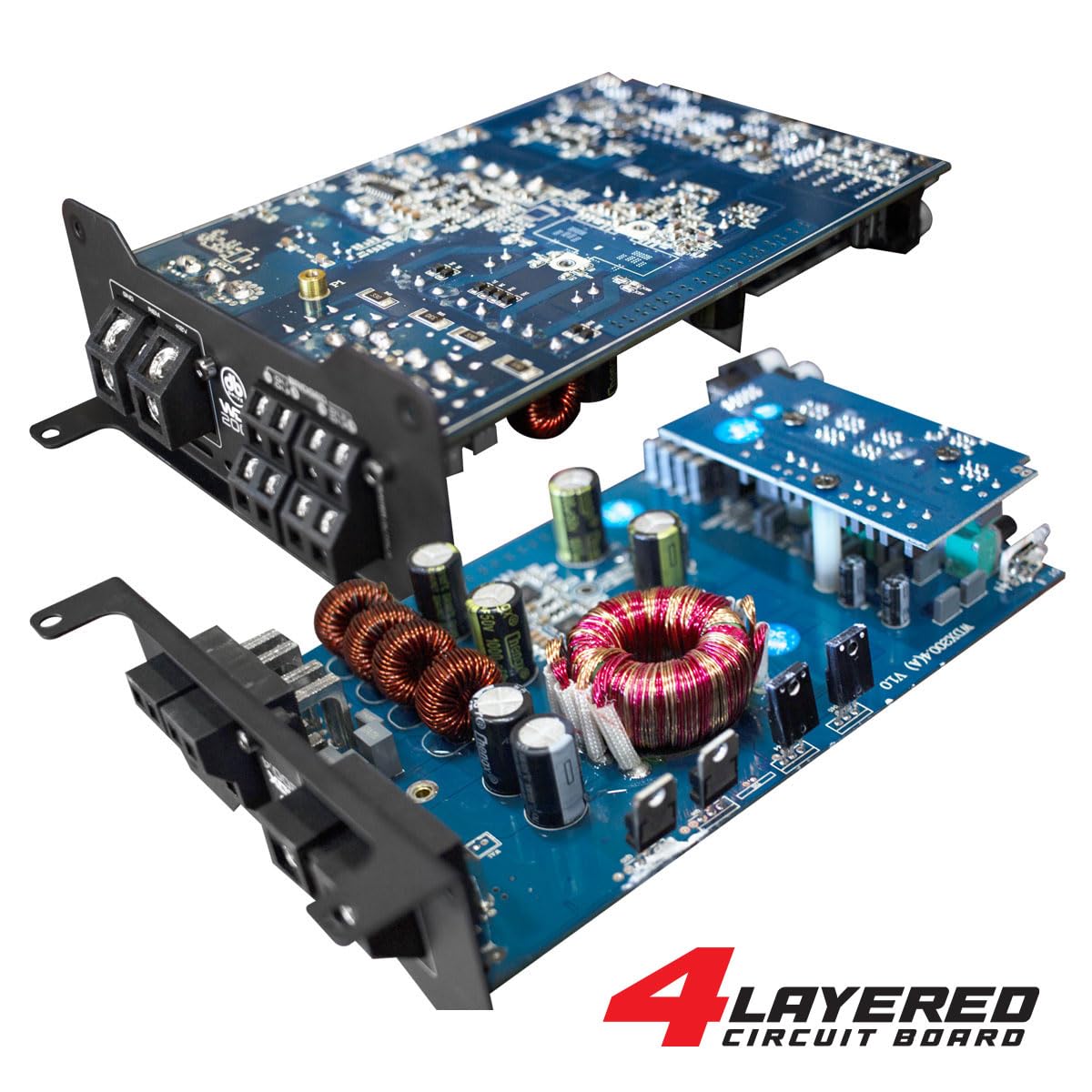
이미지: 내부 view of the DB Drive WDX200.4 amplifier, highlighting its 4-layered circuit board design for enhanced performance and durability.
작동 지침
설치되면 amplifier requires minimal user interaction for daily operation. The primary adjustments are for input level and crossover settings.
레벨 조정
Adjust the input level controls to match the output voltage of your head unit. Start with the amplifier's level control at minimum and slowly increase it until the desired volume is achieved without distortion.
크로스오버 설정
- HPF(하이패스필터): Use this setting for speakers that should only reproduce high frequencies (e.g., tweeters, mid-range speakers). This filters out low bass frequencies.
- LPF(저역통과필터): Use this setting for speakers that should only reproduce low frequencies (e.g., subwoofers). This filters out high frequencies.
- FULL (Full-Range): Use this setting for speakers that should reproduce the entire frequency spectrum.
Adjust these settings according to the specifications of your speakers and your desired audio output.
유지
To ensure the longevity and optimal performance of your DB Drive WDX200.4 amplifier의 경우 다음 유지 관리 지침을 따르세요.
- 청소: 주기적으로 외부를 청소하십시오. amplifier with a soft, dry cloth. Do not use harsh chemicals or abrasive cleaners. Ensure all ventilation openings are free from dust and debris.
- 사이: Regularly check all power, ground, and speaker connections to ensure they are secure and free from corrosion. Loose connections can lead to poor performance or damage.
- 통풍: 확인하십시오 amplifier always has adequate airflow around it. Blocked vents can lead to overheating and thermal shutdown.
문제 해결
문제가 발생하는 경우 amplifier의 경우, 다음의 일반적인 문제와 해결책을 참조하세요.
- 전원 없음: Check the main fuse, power and ground connections, and the remote turn-on wire. Ensure the vehicle's battery has sufficient charge.
- 소리 없음: Verify all input and output connections. Check speaker wires for shorts or open circuits. Ensure the head unit is functioning correctly and sending an audio signal. Check crossover settings.
- 왜곡된 소리: Reduce the input level (gain) on the amplifier. Check for proper crossover settings. Ensure speakers are not overdriven or damaged.
- Amp리파이어 과열: 주변에 적절한 환기가 되도록 하십시오. amp앰프. 스피커 임피던스가 앰프와 일치하는지 확인하십시오. amplifier's capabilities. Reduce the volume or gain settings.
- 보호 모드: 만약 amplifier enters protection mode (indicated by a specific LED), it usually signifies an issue such as overheating, a short circuit in the speaker wiring, or an impedance mismatch. Disconnect power, inspect all connections and speaker wiring, and allow the amplifier to cool before reconnecting.
이러한 해결 방법을 시도한 후에도 문제가 지속되면 자격을 갖춘 차량 오디오 기술자에게 문의하십시오.
명세서
| 특징 | 사양 |
|---|---|
| 모델 번호 | WDX200.4 |
| 상표 | DB 드라이브 |
| 채널 수 | 4 |
| 출력 전력(스테레오) | 200 Watts RMS per channel at 2 Ohms |
| Output Power (Bridged) | 400 Watts RMS per channel at 4 Ohms (2 channels) |
| 권tage | 9~16볼트(직류) |
| 장착 유형 | 표면 실장 |
| 크로스오버 | Integrated HPF, LPF, Full-Range |
| 입력 | RCA (Low-Level), High-Level with Automatic Turn-On |
| 인증 | 연방통신위원회(FCC) |
보증 및 지원
For warranty information and technical support, please refer to the documentation included with your purchase or visit the official DB Drive web사이트. 보증 청구를 위해 구매 증빙 자료를 보관하세요.