
Hoco WE-1005004459784466-002
Hoco Smart Ear 무선 블루투스 5.3 이어버드 사용 설명서
Model: WE-1005004459784466-002
제품 끝view
The Hoco Smart Ear Wireless Bluetooth 5.3 Earbuds offer a seamless audio experience with advanced features. These smart touch stereo earbuds come with a digital LED display charging case, providing convenience and clear battery status at a glance. Designed for comfort and high-quality sound, they are ideal for daily use with mobile phones and other compatible devices.
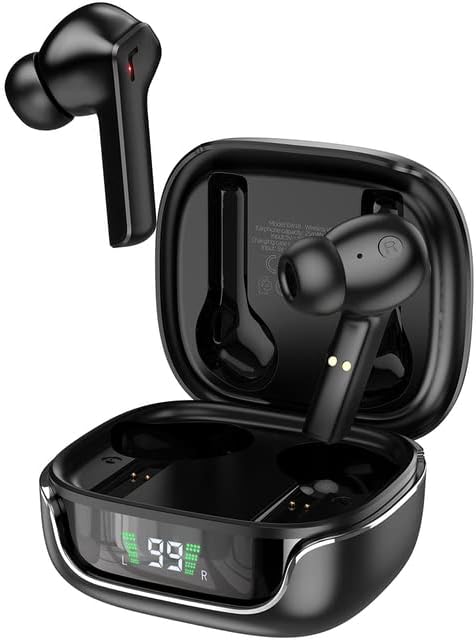
Image: The Hoco Smart Ear Wireless Bluetooth 5.3 Earbuds, showcasing both earbuds and their sleek charging case with a digital LED display.
패키지 내용
- Hoco Smart Ear Wireless Bluetooth 5.3 Earbuds
- 충전 케이스
- 사용자 설명서
- 충전 케이블
설정
초기 페어링
To pair your Hoco Smart Ear Earbuds for the first time, ensure they are fully charged. Open the charging case; the earbuds will automatically enter pairing mode. On your device (e.g., smartphone), navigate to Bluetooth settings and select 'Hoco EW18' or a similar name from the list of available devices. Once connected, the earbuds are ready for use.

Image: A visual representation of the Hoco earbuds establishing a wireless connection using Bluetooth 5.3 technology, highlighting stable and low-power consumption.

Image: The earbuds and charging case next to a smartphone, illustrating the automatic pairing feature and the ability to switch between devices seamlessly.
다시 연결
After initial pairing, the earbuds will automatically reconnect to the last paired device when taken out of the charging case and Bluetooth is enabled on the device.
작동 지침
The Hoco Smart Ear Earbuds feature intuitive touch controls for various functions:

Image: A detailed diagram illustrating the touch control functions of the Hoco earbuds, including playback, track navigation, call management, power, and voice assistant activation.
- 재생/일시 중지: Click the touch area once.
- 다음 트랙: 터치 영역을 두 번 클릭하세요.
- 이전 트랙 : Triple click the touch area.
- 전화 받기: Click the touch area once.
- 전화 끊기: 터치 영역을 두 번 클릭하세요.
- 전화 거부: 터치 영역을 2초 동안 길게 누르세요.
- 켜기: Open the cover of the charging case (automatic boot).
- Siri/음성 도우미 깨우기: 터치 영역을 2초 동안 길게 누르세요.
유지
이어버드의 수명과 최적의 성능을 보장하려면 다음 유지 관리 지침을 따르세요.
- 청소: 부드럽고 마른 보풀 없는 천으로 이어버드와 충전 케이스를 정기적으로 닦으세요. 강한 화학 물질이나 연마재는 사용하지 마세요.
- 충전 연락처: Periodically clean the charging contacts on both the earbuds and inside the case to ensure a proper connection.
- 저장: 사용하지 않을 때는 이어버드를 충전 케이스에 보관하여 먼지와 손상으로부터 보호하세요.
- 습기를 피하세요: Keep the earbuds and case away from water and excessive moisture.
- 온도: 제품을 극한의 온도에 노출시키지 마십시오.
문제 해결
If you encounter issues with your Hoco Smart Ear Earbuds, refer to the following common solutions:
- 소리 없음:
- 이어폰이 충전되어 있는지 확인하세요.
- 기기의 볼륨과 이어버드의 볼륨을 확인하세요.
- Verify Bluetooth connection. Try disconnecting and reconnecting.
- 이어버드가 페어링되지 않음:
- 이어버드가 페어링 모드(케이스 열기)인지 확인하세요.
- 기기의 Bluetooth를 껐다가 켜세요.
- 휴대폰의 Bluetooth 설정에서 해당 기기를 삭제하고 다시 페어링하세요.
- 이어버드에 다른 장치가 연결되어 있지 않은지 확인하세요.
- 충전 문제:
- 충전 케이블이 제대로 연결되어 있는지 확인하십시오.
- 이어버드와 케이스의 충전 접점이 깨끗한지 확인하십시오.
- 다른 충전 케이블이나 전원 어댑터를 사용해 보세요.
- 간헐적인 연결:
- Ensure you are within the effective Bluetooth range.
- 다른 무선 장치의 간섭을 최소화하세요.
명세서
Detailed technical specifications for the Hoco Smart Ear Wireless Bluetooth 5.3 Earbuds:
| 특징 | 사양 |
|---|---|
| 모델 | WE-1005004459784466-002 |
| 블루투스 버전 | 5.3 |
| 운전자 수 | 2 |
| 드라이버 직경 | 13mm |
| 총 고조파 왜곡률 | 15% |
| 임피던스 | 32옴 |
| 헤드폰 폼 팩터 | 인이어 |
| 연결 기술 | 블루투스 |
| 무선 통신 기술 | 블루투스 |
| 호환 장치 | 모바일 폰 |
| 케이블 기능 | Cable-free (Wireless) |
| 색상 | 검은색 |
| 첫 번째 가능한 날짜 | 6년 2023월 XNUMX일 |

이미지: 폭발된 view illustrating the 13mm moving coil driver and bio-carbon fiber composite diaphragm, designed for immersive sound quality.

Image: A person wearing the Hoco earbuds, highlighting the soft silicone ear caps and in-ear ergonomic design for comfortable wear and pure sound enjoyment.
보증 및 지원
Hoco is committed to customer satisfaction and product quality. We offer the following:
- 12 월 보증 : 모든 제품에는 12개월 보증이 제공됩니다.
- 고객 서비스: If you experience any issues with defective or incorrect products, please contact us through the Amazon platform. We are dedicated to providing the best solution, including full refunds or product replacements, to ensure 100% customer satisfaction.
- 배송 보장: We ensure product delivery within the specified timeframe on our sales page.
Ask a question about this manual
Ask about setup, troubleshooting, compatibility, parts, safety, or missing instructions. Manuals+ will review the question and use this page’s manual context to help answer it.