
1. 서론
Thank you for choosing the Docreate LCD 99 Gear Adjustable Handheld Spot Welder. This portable device is designed for efficient and precise spot welding of nickel-plated sheets, ideal for 18650 lithium battery assembly, cell phone repair, and electric car repair. Featuring an intuitive LCD display and both automatic and manual operating modes, it offers versatility and ease of use for both professional and amateur users.
2. 안전 지침
Please read and understand all safety instructions before operating the spot welder to prevent injury or damage to the device.
- Always wear appropriate personal protective equipment, including safety glasses, to protect your eyes from sparks.
- 작업 공간에 적절한 환기 시설을 설치하여 유해 가스가 분산되도록 하십시오.
- 습기가 많은 환경이나 인화성 물질 근처에서 기기를 작동하지 마십시오.
- 기기를 어린이와 애완동물이 닿지 않는 곳에 보관하세요.
- Handle batteries with care. Do not short-circuit batteries or attempt to weld damaged batteries.
- Disconnect the device from power when not in use or during maintenance.
3. 패키지 내용
패키지에 모든 품목이 들어 있는지 확인하세요.
- 1 x Docreate Handheld Spot Welder
- 1 x 2-meter Nickel Roll
- 사포 1장
- 1 x Type-C 충전 케이블
- 1 x Pen Cap
- 2 x Copper Pins (Welding Needles)

4. 제품 오버view
The Docreate Spot Welder is a compact and powerful tool designed for precision welding tasks.
4.1. 주요 특징
- 휴대성 있는 디자인: Lightweight and compact, ideal for both indoor and outdoor use.
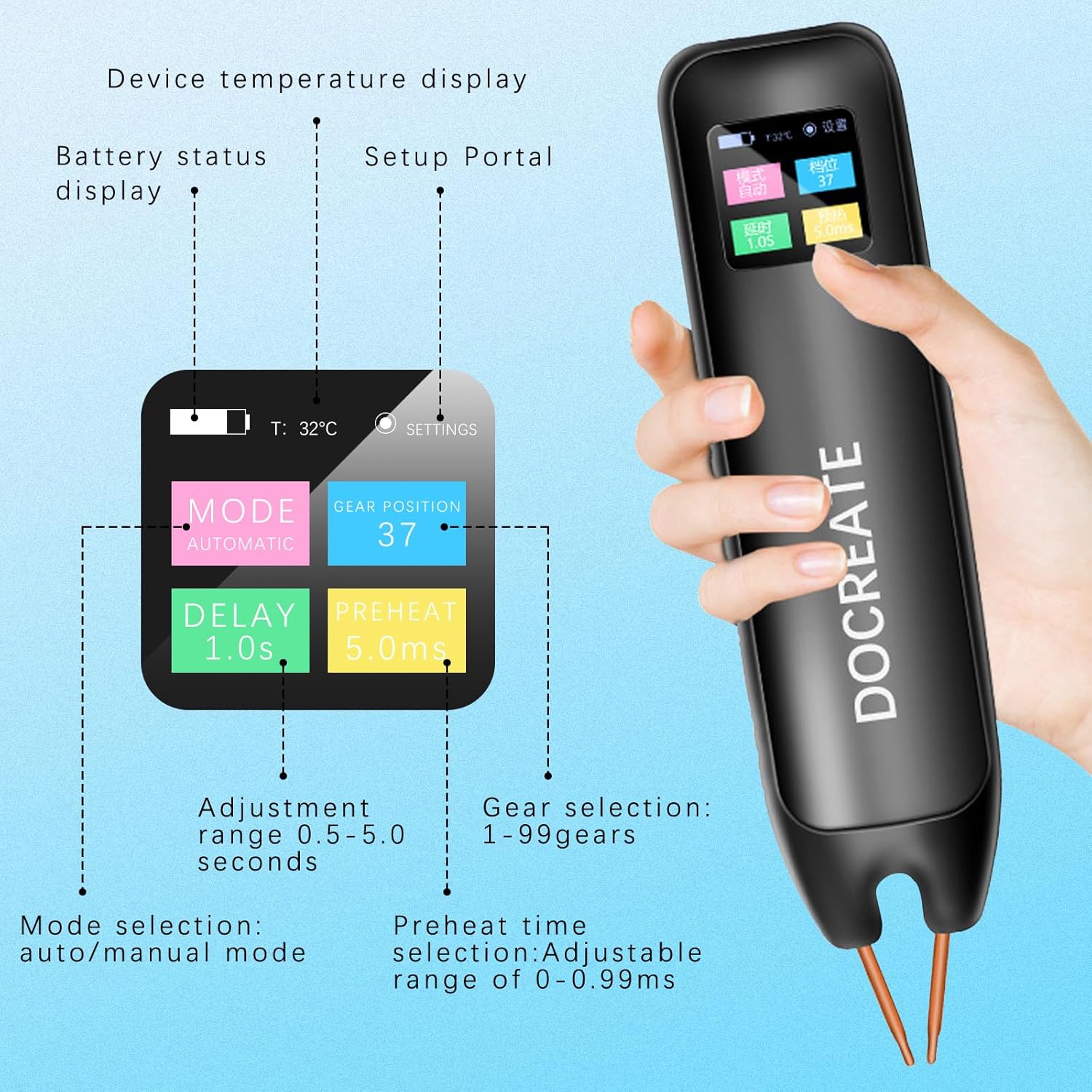
- LCD 디스플레이: Provides real-time information including temperature, mode, preheat time, trigger time, power level, and battery status.
- 99 Adjustable Gears: Allows for precise control over welding parameters to suit various materials and thicknesses.
- Dual Pulse Technology: Ensures strong and reliable welds.
- 자동/수동 모드: 운영에 유연성을 제공합니다.

5. 설정
5.1. 장치 충전
Before first use, fully charge the spot welder using the provided Type-C charging cable. Connect the cable to the device's Type-C port and a compatible USB power adapter (not included).

5.2. 전원 켜기/끄기
Press and hold the power button on the side of the device to turn it on or off. The LCD screen will illuminate upon power-on.
6. 사용 설명서
The spot welder offers both automatic and manual modes for different welding preferences.
6.1. 모드 선택
The device allows switching between Automatic and Manual modes. Use the controls on the device to navigate the LCD menu and select your desired mode.
6.2. 자동 모드
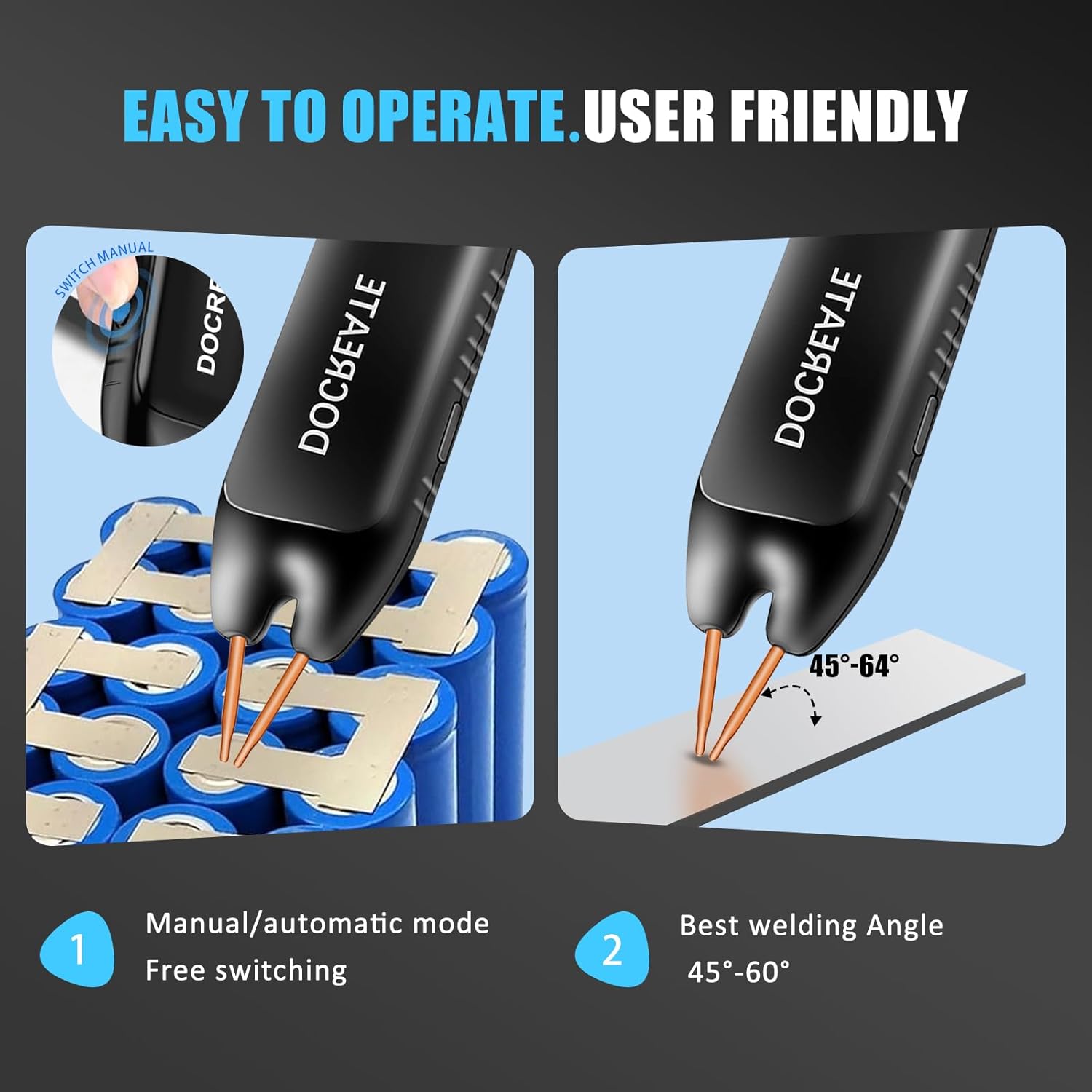
In Automatic Mode, simply place both welding pins firmly on the desired welding position. The device will automatically detect contact and initiate the weld after a set delay time. Ensure the welding pins are inclined at an angle of 45°-60° to the welding surface for optimal results.
6.3. 수동 모드
In Manual Mode, you have direct control over the welding trigger. Adjust parameters via the LCD display. Place both welding pins firmly on the desired welding position, ensuring a 45°-60° inclination. Then, press the welding button on the side of the device to initiate the weld.
6.4. Adjusting Welding Gears (Power Level)
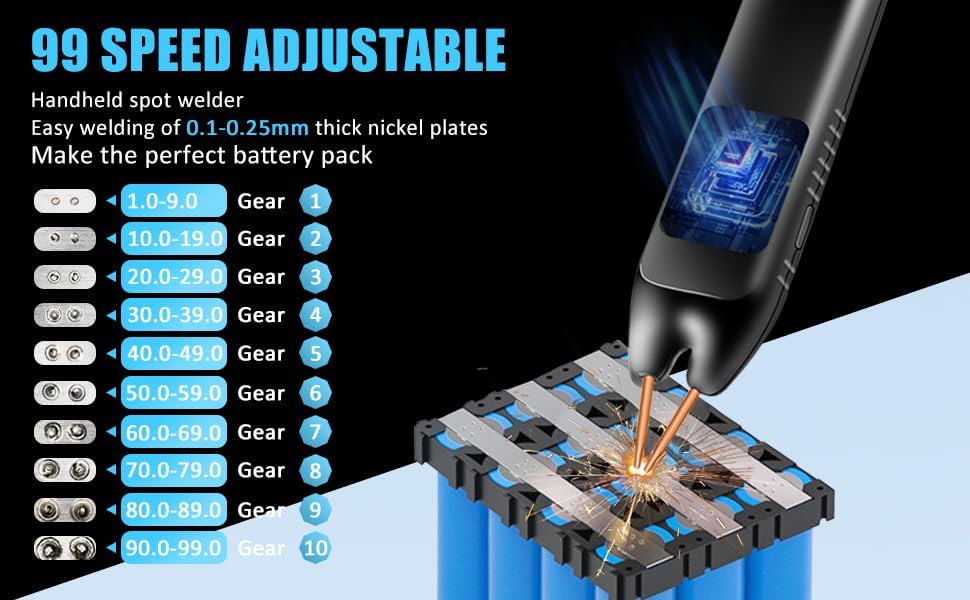
The spot welder features 99 adjustable gears to control the welding power. Higher gear numbers correspond to higher power. Adjust the gear setting via the LCD display to match the thickness of the nickel-plated sheets you are welding (0.1mm to 0.25mm).
7. 유지관리
적절한 유지 관리는 스폿 용접기의 수명과 최적의 성능을 보장합니다.
- 청소: 기기를 정기적으로 마른 부드러운 천으로 닦아주세요. 연마성 세척제나 용제를 사용하지 마세요.
- 전극 관리: The copper pins (electrodes) are replaceable. If they become worn or oxidized, gently sand them with the provided sandpaper or replace them to ensure good electrical contact.
- 저장: Store the spot welder in a cool, dry place away from direct sunlight and moisture.
- 배터리: For long-term storage, ensure the battery is partially charged (around 50%) to preserve its lifespan.
8. 문제 해결
If you encounter issues with your spot welder, refer to the following common problems and solutions:
- 장치가 켜지지 않음: 배터리가 충전되었는지 확인하십시오. Type-C 충전 케이블을 연결하고 전원을 다시 켜기 전에 잠시 충전하십시오.
- Weak or inconsistent welds:
- Check the battery level; a low battery can affect welding power.
- Increase the gear (power) setting.
- Ensure the welding pins are clean and have good contact with the nickel sheet and battery terminal. Sand the tips if necessary.
- Verify the welding angle (45°-60°) and apply firm, even pressure.
- 과열: The device has an intelligent internal temperature detection system. If it overheats, it may temporarily shut down. Allow it to cool down before resuming operation.
- LCD 디스플레이 문제: If the display is not functioning correctly, try restarting the device. If the problem persists, contact customer support.
9. 사양
| 특징 | 사양 |
|---|---|
| 상표 | 도크리에이트 |
| 모델 번호 | 도크리에이트-757 |
| 품목 무게 | 9.9 온스 |
| 제품 치수 | 7.72 x 1.62 x 1.62 인치 |
| 색상 | Spot Welder, 99 Gears |
| 전원 | 배터리 구동 |
| 왓tage | 4.2밀리와트 |
| 용접 두께 | 0.1-0.25mm (nickel-plated sheets) |
| 조절 가능한 기어 | 99 |
10. 보증 및 지원
Docreate products are manufactured to the highest quality standards. For warranty information, technical support, or any inquiries regarding your spot welder, please contact Docreate customer service through the retailer's platform or the official Docreate website. Please have your model number (Docreate-757) and purchase details ready when contacting support.