
에일리언웨어 AW520H
Alienware AW520H 유선 게이밍 헤드셋 사용 설명서
모델: AW520H
소개
This manual provides instructions for the Alienware AW520H Wired Gaming Headset. It covers setup, operation, maintenance, and troubleshooting to ensure optimal performance and longevity of your device.
The Alienware AW520H headset is designed to deliver precision audio with Hi-Res certified drivers and Dolby Atmos spatial audio support, integrated into a comfortable and adjustable design.
상자 안에 무엇이 들어있나요?
패키지에 모든 구성 요소가 들어 있는지 확인하세요.
- Alienware AW520H Wired Gaming Headset
- 문서 (사용자 설명서, 보증 정보)
제품 끝view
Familiarize yourself with the key components and features of your Alienware AW520H headset.
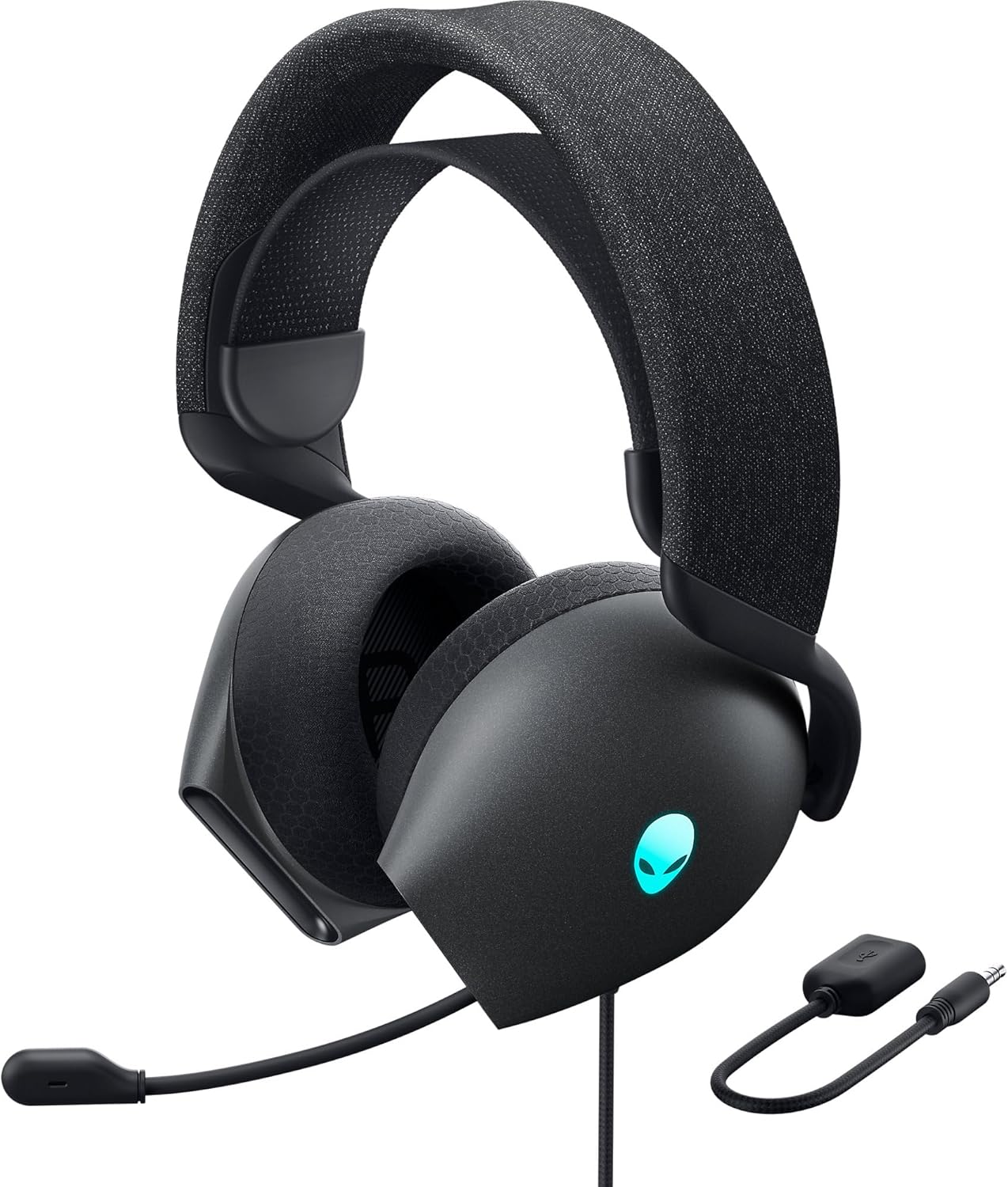

주요 특징:
- Hi-Res Certified Drivers: Delivers clear and rich sound across a wide frequency range.
- Dolby Atmos Spatial Audio: Provides precise positional audio for an immersive experience.
- AI-Driven Noise Cancellation Microphone: Retractable boom mic focuses on your voice, reducing ambient noise.
- 편안한 디자인: Features soft memory foam ear pads with breathable fabric and an adjustable suspension headband for extended wear.
- AlienFX RGB 조명: Customizable RGB lighting on the earcups, controllable via Alienware Command Center.
- 다양한 연결성: Supports both USB and 3.5mm connections for broad compatibility.
설정
Follow these steps to set up your Alienware AW520H headset.
1. 헤드셋 연결하기
The AW520H offers flexible connectivity options:
- 3.5mm 오디오 잭: Connect the 3.5mm cable directly to your PC, gaming console controller, or any other compatible device with a 3.5mm audio port. This provides basic audio and microphone functionality.
- USB 연결: For full functionality, including Dolby Atmos spatial audio and AlienFX RGB lighting customization, connect the headset via USB to your PC. This typically involves using a 3.5mm to USB adapter if your PC does not have a combined audio jack.


2. Software Installation (Optional, for full features)
To unlock the full potential of your headset, including Dolby Atmos and AlienFX RGB lighting customization, install the Alienware Command Center software on your PC. This software allows for personalized audio profile및 조명 효과.
- Download the latest version of Alienware Command Center from the official Alienware support web대지.
- 화면의 지시에 따라 설치를 완료하세요.
- Connect your headset via USB to ensure it is recognized by the software.
작동 지침
오디오 컨트롤
The headset features integrated controls for convenient audio management:
- 볼륨 휠: Located on the earcup, rotate the wheel to increase or decrease the audio volume.
- 마이크 음소거 버튼: Press the button on the earcup to mute or unmute the microphone.

마이크 사용
The AW520H features an AI-driven noise-canceling retractable boom microphone:
- 확장/수축: Gently pull the microphone boom out from the earcup to extend it for use. Push it back into the earcup to retract it when not needed.
- 위치: 최적의 음성 선명도를 위해 마이크를 입에서 약 1~2cm 정도 떨어뜨려 놓으십시오.
- 소음 제거 : The AI-driven noise cancellation automatically works to filter out ambient sounds, focusing on your voice.

편안함을 위한 조정
The headset is designed for comfort during long gaming sessions:
- Suspension Headband: Slide the suspension headband up or down to find the ideal fit for your head size.
- 이어컵 회전: The earcups can slightly pivot to conform to the shape of your ears.
- Memory Foam Ear Pads: The soft memory foam ear pads with breathable fabric provide cushioning and ventilation.

AlienFX RGB 조명
Customize the RGB lighting on your headset using the Alienware Command Center software:
- Alienware 명령 센터를 엽니다.
- Navigate to the lighting settings for your AW520H headset.
- Select desired colors, effects, and brightness levels.
- Ensure the headset is connected via USB for lighting customization.
유지
적절한 유지관리는 헤드셋의 수명과 성능을 보장합니다.
- 청소: 부드럽고 마른 천을 사용하여 이어컵과 헤드밴드를 닦으세요. 잘 지워지지 않는 먼지는 가볍게 닦아주세요.amp 천을 사용할 수 있지만 과도한 습기는 피하십시오. 독한 화학 약품이나 연마성 세척제를 사용하지 마십시오.
- 저장: Store the headset in a clean, dry place away from extreme temperatures and direct sunlight. Retract the microphone when not in use to protect it.
- 케이블 관리: Avoid sharp bends or kinks in the audio cable. Do not pull on the cable to disconnect the headset.
- 이어 패드: The ear pads are made of breathable fabric and memory foam. While durable, they are not designed for frequent removal. If replacement is needed, consult Alienware support.
문제 해결
If you encounter issues with your Alienware AW520H headset, refer to the following common solutions:
소리가 안 나거나 소리가 너무 작습니다.
- 연결 확인: Ensure the 3.5mm cable or USB connection is securely plugged into both the headset and your device.
- 볼륨 레벨: Verify that the volume wheel on the headset is turned up. Check the audio output settings on your PC or console to ensure the headset is selected as the default output device and volume is not muted.
- 소프트웨어/드라이버: If connected via USB, ensure Alienware Command Center is installed and updated. Check your operating system's sound settings for driver issues.
- 다른 장치에서 테스트: Connect the headset to a different device (e.g., smartphone, another PC) to determine if the issue is with the headset or the original device.
마이크가 작동하지 않음
- 음소거 버튼을 확인하세요: 헤드셋의 마이크 음소거 버튼이 활성화되어 있지 않은지 확인하세요.
- 마이크 위치: Verify the microphone boom is fully extended and positioned correctly.
- 입력 설정 : Check your PC or console's sound input settings to ensure the headset microphone is selected as the default input device. Adjust microphone volume levels.
- 응용 프로그램 설정: Some applications (e.g., Discord, Zoom) have their own microphone settings. Verify the correct microphone is selected within these applications.
- 소프트웨어/드라이버: If connected via USB, ensure Alienware Command Center is installed and updated.
AlienFX RGB Lighting Not Working
- USB 연결: Ensure the headset is connected via USB to your PC. RGB lighting functionality requires a USB connection.
- 에일리언웨어 커맨드 센터: Verify that Alienware Command Center is installed and running. Check the lighting settings within the software for the headset.
- 소프트웨어 업데이트: Ensure Alienware Command Center and headset firmware are up to date.
명세서
| 특징 | 세부 사항 |
|---|---|
| 모델명 | AW520H |
| 연결 기술 | Wired (USB, 3.5 mm Jack) |
| 오디오 드라이버 유형 | 동적 드라이버 |
| 주파수 응답 | 40 KHz (40,000 Hz) |
| 임피던스 | 32옴 |
| 소음 제어 | Active Noise Cancellation (AI-driven for mic) |
| 마이크로폰 | Retractable, Unidirectional |
| 통제 수단 | Volume Control, Microphone Mute (On-headset) |
| 귀 위치 | 귀 위 |
| 폼 팩터 | 귀에 |
| 재료 | Memory foam, breathable fabric |
| 색상 | 달의 어두운 면 |
| 제품 치수 | 7.28 x 4.35 x 8.46 인치 |
| 품목 무게 | 11.8 온스 |
| 제조업체 | 작은 골짜기 |
| 호환 장치 | Windows, wired devices |
보증 및 지원
For warranty information and technical support, please refer to the documentation included with your product or visit the official Alienware support web대지.
제조업체: 작은 골짜기
모델 번호: AW520H
첫 이용 가능 날짜: 30년 2023월 XNUMX일
For further assistance, please contact Alienware customer support through their official channels.
Ask a question about this manual
Ask about setup, troubleshooting, compatibility, parts, safety, or missing instructions. Manuals+ will review the question and use this page’s manual context to help answer it.