
1. 서론
구매해주셔서 감사합니다asing the TTArtisan 500mm F6.3 Telephoto Lens. This manual provides essential information for the safe and effective use of your new lens. Please read it thoroughly before use and keep it for future reference.

Figure 1: TTArtisan 500mm F6.3 Telephoto Lens. This image shows the full length of the black telephoto lens with its various rings and markings.
주요 특징:
- 500mm 초점 거리: A powerful telephoto lens designed for capturing distant subjects.
- F6.3 대구경 조리개: Allows for good light gathering capabilities, suitable for various lighting conditions.
- Full Frame Compatibility: Designed for full-frame mirrorless cameras, compatible with Sony E-Mount.
- ED(초저분산) 유리: Incorporates two ED glass elements to reduce chromatic aberration and enhance image quality.
- 수동 초점: Provides precise control over focusing.
- Tripod Mount Ring: Integrated for stable mounting on tripods, essential for a lens of this size and focal length.
- Multi-Layer Coatings: Features MC Multi-Layer Coatings for improved light transmission and reduced flares.
2. 패키지 내용
사용하시기 전에 패키지 안에 모든 구성품이 있는지 확인하십시오.
- TTArtisan 500mm F6.3 Telephoto Lens
- 전면 렌즈 캡
- 후면 렌즈 캡
- Lens Hood (Metal)
- 사용 설명서

Figure 2: Package contents including the lens, caps, and hood. The image displays the lens, front and rear caps, a metal lens hood, and a small instruction booklet next to a grey product box.
3. 설정
카메라에 렌즈 장착하기:
- 카메라가 꺼져 있는지 확인하세요.
- 렌즈에서 뒷면 캡을 제거하고 카메라에서 바디 캡을 제거하세요.
- Align the mounting index on the lens with the corresponding index on your camera body.
- 렌즈를 카메라 마운트에 조심스럽게 끼우고 딸깍 소리가 나면서 제자리에 고정될 때까지 시계 방향으로 돌리십시오. 렌즈를 억지로 끼우지 마십시오.
- Attach the lens hood by aligning it with the front of the lens and twisting until secure.
Using the Tripod Mount Ring:
The TTArtisan 500mm F6.3 lens is equipped with a tripod mount ring for enhanced stability, especially given its size and weight. This ring helps balance the camera and lens assembly on a tripod or monopod.
- Loosen the locking knob on the tripod mount ring to rotate the lens for optimal positioning.
- Attach your tripod or monopod quick-release plate to the tripod mount ring's screw hole.
- Securely fasten the quick-release plate.
- Tighten the locking knob on the tripod mount ring once the desired orientation is achieved.

Figure 3: The 500mm F6.3 lens attached to a camera body, resting on a tripod via its integrated tripod mount ring. This illustrates the proper way to support the lens for stability.
4. 렌즈 작동
수동 초점:
This is a manual focus lens. To achieve sharp images:
- Set your camera to manual focus (MF) mode.
- 살펴보세요 viewfinder or use your camera's live view 화면.
- Rotate the focus ring on the lens until your subject appears sharp. Utilize your camera's focus peaking or magnification features for precise focusing.
조리개 제어:
The lens features a manual aperture ring. Rotate the aperture ring to select your desired f-stop (from F6.3 to F32). A wider aperture (smaller f-number) allows more light and creates shallower depth of field, while a narrower aperture (larger f-number) allows less light and creates greater depth of field.
Photography Applications:
- Deep-Sky Astrophotography: The F6.3 aperture and ED glass elements are beneficial for capturing celestial objects.
- Distant Subjects: Ideal for photographing subjects that are far away, such as wildlife, sports, and airplanes.
- Humanist Photography: Allows photographers to maintain a comfortable distance from subjects while capturing candid moments.
- Simplified Composition: The telephoto compression helps isolate subjects and simplify backgrounds.

그림 4: 이상view of lens features including ED glass, multi-layer coatings, focus gear ring, and tripod mount ring. This collage highlights key optical and mechanical aspects of the lens.
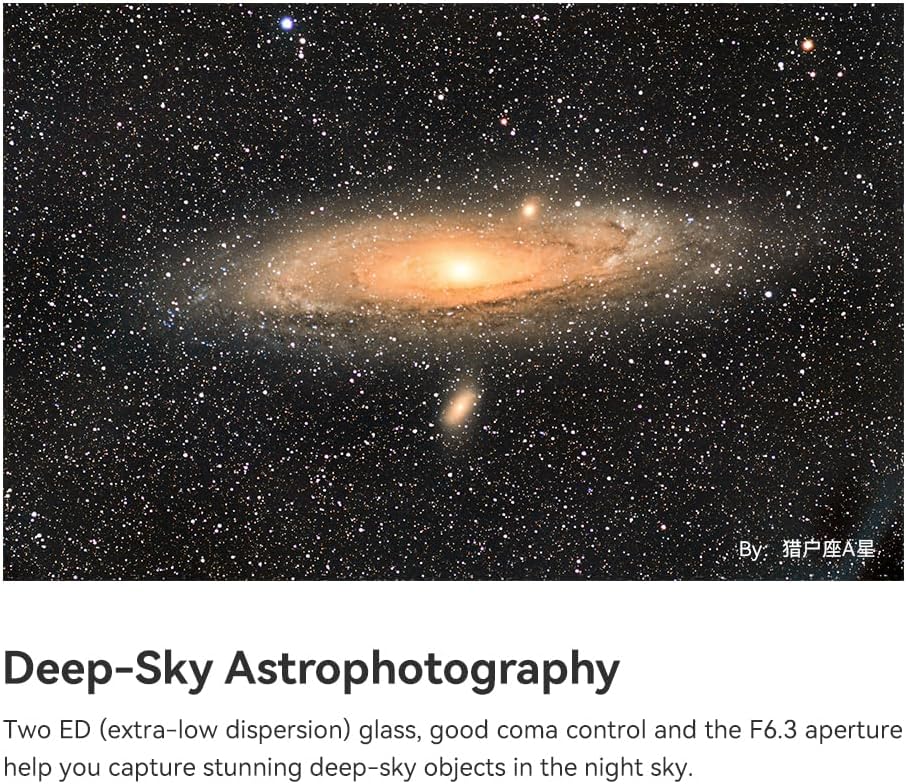
그림 5: example of deep-sky astrophotography, showcasing a galaxy captured with the 500mm F6.3 lens. The image demonstrates the lens's capability for capturing distant celestial objects.

Figure 6: A telephoto shot of an airplane taking off, illustrating the lens's ability to 'get closer' to distant subjects. This image highlights the lens's utility for capturing subjects from afar.

Figure 7: A photograph of a person riding a motorcycle on a winding road, demonstrating the lens's suitability for humanist photography by maintaining distance. This image shows how the lens can capture subjects without intrusion.

Figure 8: Two images demonstrating simplified composition: one of the sun behind a ferris wheel, and another of the sun behind a pagoda. These examples illustrate how the telephoto lens can isolate subjects and create impactful compositions.
비네팅:
The E-mount version of this lens may exhibit slight vignetting on full-frame cameras at F6.3. Vignetting is typically reduced or eliminated at narrower apertures (e.g., F22). No vignetting is expected for Z, RF, and L-mount versions.

Figure 9: A comparison showing slight vignetting at F6.3 on an E-mount camera versus no vignetting at F22. The image displays two identical scenes, one with darker corners (vignetting) and one without, illustrating the effect of aperture on vignetting.
5. 유지관리
Proper care and maintenance will ensure the longevity and performance of your lens.
- 렌즈 청소: Use a soft, lint-free cloth or a lens brush to remove dust. For smudges, use a specialized lens cleaning solution and a microfiber cloth. Avoid touching the lens elements directly with your fingers.
- 저장: Store the lens in a cool, dry place away from direct sunlight and extreme temperatures. Use the front and rear lens caps when not in use to protect the elements.
- 손질: 렌즈는 항상 조심스럽게 다루십시오. 떨어뜨리거나 강한 충격을 가하지 마십시오.
- 방수 기능: This lens is 방수가 안 됨. Avoid exposure to rain, splashes, or high humidity.

그림 10: 클로즈업 view of the lens's front element, highlighting the large ED glass. This image emphasizes the optical quality and the importance of keeping the lens elements clean.
6. 문제 해결
렌즈에 문제가 발생하면 다음 사항을 고려하십시오.
- 흐릿한 이미지: Ensure your camera is set to manual focus (MF) mode and that you are carefully rotating the focus ring to achieve critical focus. Use focus peaking or magnification aids on your camera.
- 어두운 모서리(비네팅): This is normal at wider apertures (F6.3) on full-frame E-mount cameras. Try stopping down the aperture (e.g., to F11 or F22) to reduce or eliminate vignetting.
- 렌즈 장착 불가: Ensure the lens is correctly aligned with the camera mount and rotated until it clicks. Do not force it. Check for any obstructions on the mount.
- Dust on Images: Clean the front and rear elements of the lens as described in the Maintenance section. If dust persists, it may be on your camera's sensor, which requires professional cleaning.
7. 사양
| 상표 | 타티산 |
| 모델명 | TTARTISAN 500mm F6.3 Full Frame Telephoto Manual Focus Lens |
| 초점거리 | 500mm |
| 최대 조리개 | F6.3 |
| 최소 조리개 | F32 |
| 렌즈 디자인 | 초기 |
| 광학 설계 | 8 Elements in 5 Groups (including 2 ED glass elements) |
| 다이어프램 블레이드 | 12 |
| 초점 유형 | 수동 초점 |
| 가장 가까운 초점 거리 | 3.3m |
| 필터 크기 | 82mm |
| 호환 가능한 마운팅 | Sony E (also available for R/Z/L/XF/EF/F/GFX mounts) |
| 각도 View | 5° |
| 렌즈 코팅 | Nano Crystal Coating |
| 무게 | 약 1603-1617g |
| 색상 | 검은색 |
8. 보증 및 지원
보증 정보:
This TTArtisan lens comes with a 1년 보증 from the date of purchase. This warranty covers manufacturing defects and workmanship. It does not cover damage caused by misuse, accident, unauthorized modification, or normal wear and tear.
보증 청구를 위해 구매 증명서를 보관하십시오.
고객 지원:
For technical assistance, warranty service, or any questions regarding your TTArtisan 500mm F6.3 lens, please contact your retailer or visit the official TTArtisan web지원 정보를 제공하는 사이트입니다.