
소개
The XTUGA EV6 is a versatile 6-channel audio mixer designed for various applications, including recording studios, DJ stages, parties, and home recording. It features 4 MIC mono inputs and 1 stereo input, each with selectable +48V phantom power for condenser microphones. The mixer also includes a built-in 16DSP effect processor, 7-band EQ control, Bluetooth playback, and USB connectivity for recording and playback.

앞쪽 view of the XTUGA EV6 6-channel audio mixer, showing all controls and inputs.
설치 가이드
- 전원 연결: Connect the included power adapter to the mixer's power input (19) and then to a suitable power outlet.
- 마이크 연결: Connect your microphones to the MIC/LINE inputs (1-4) using XLR cables. If using condenser microphones, activate the +48V phantom power switch (2) for the respective channel.
- Line Input Connection: Connect line-level devices (e.g., keyboards, guitars, CD players) to the LINE/MIC inputs (1-4) using 1/4" TRS cables or to the stereo input (10) using RCA cables.
- 주 출력 연결: Connect the MAIN OUTPUTS (13) to your amplifier or powered speakers using XLR or 1/4" TRS cables.
- 헤드폰 연결: Plug your headphones into the PHONES jack (12) for monitoring.
- USB/컴퓨터 연결: For recording or playback via computer, connect a USB cable from the mixer's USB port (14) to your computer.
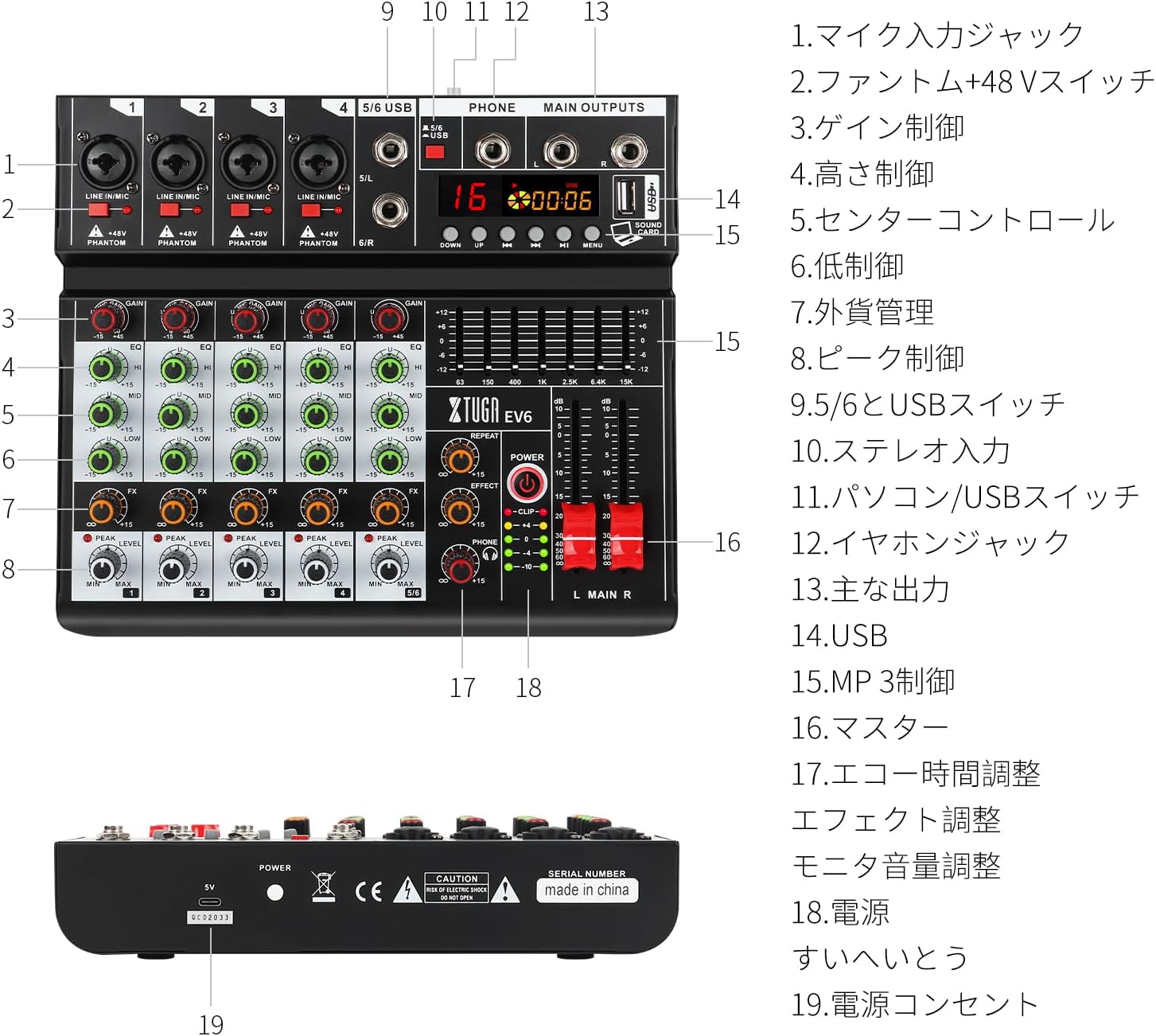
A detailed diagram of the XTUGA EV6 mixer with numbered labels pointing to each control and input/output, along with a corresponding legend.

Close-up of the input channels showing the individual +48V phantom power switches for each microphone input.

A close-up of the USB port on the mixer connected to a laptop, demonstrating direct computer connectivity.
작동 지침
채널 제어
- GAIN (3): Adjusts the input sensitivity for each channel. Set it to an appropriate level to avoid clipping (indicated by the PEAK LED).
- EQ (4, 5, 6): Three-band equalizer controls (HI, MID, LOW) to shape the tone of each channel.
- FX (7): Controls the amount of effect sent from each channel to the built-in DSP processor.
- 레벨(8): Adjusts the output level of each channel to the main mix.
- PEAK (8): An indicator light that illuminates when the input signal is too high, indicating potential clipping. Reduce the GAIN if this light stays on.
DSP Effects (16DSP)
The mixer features a high-quality 16DSP effect processor. Use the EFFECT control (17) to select and adjust the desired effect. The REPEAT knob fine-tunes the effect's characteristics.
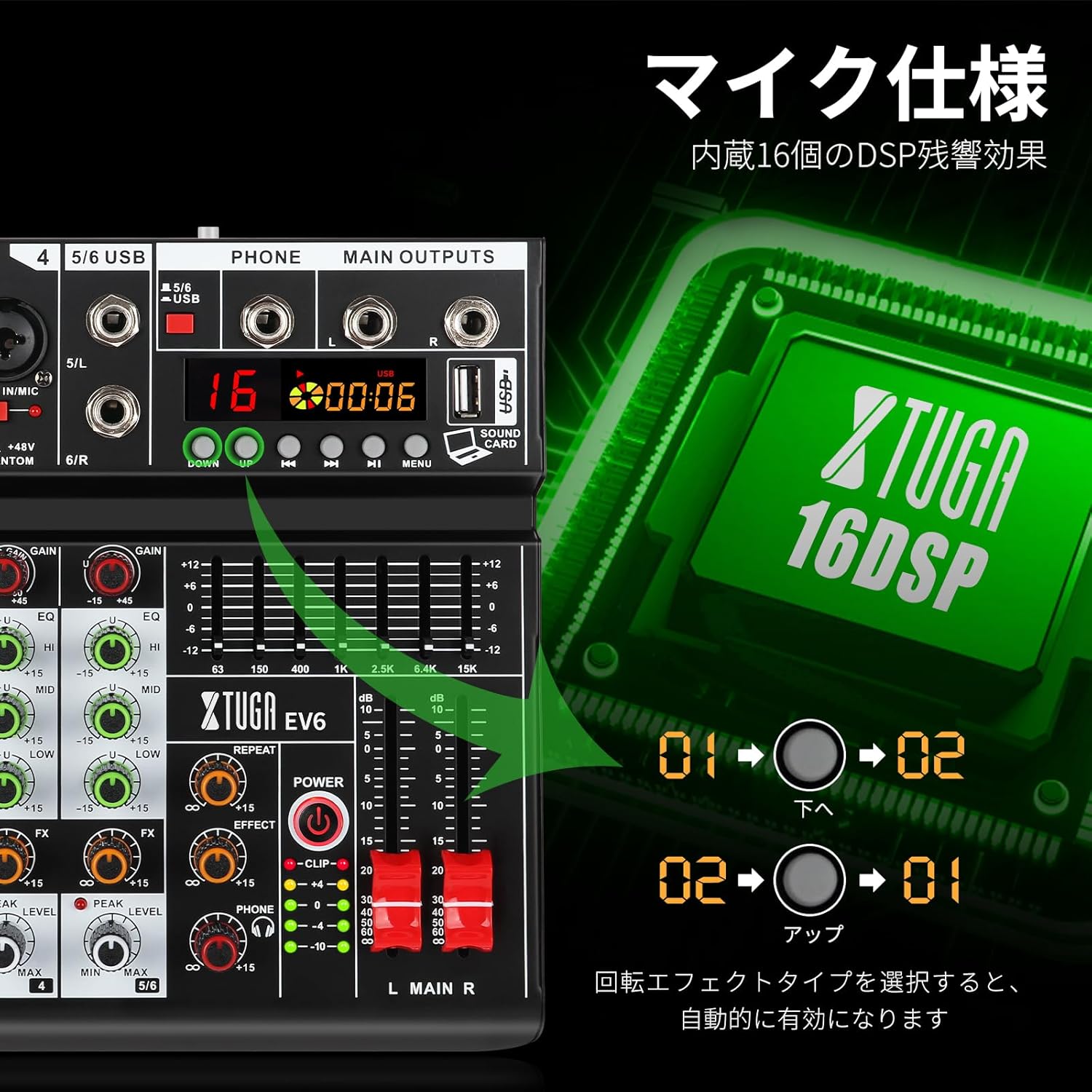
Close-up of the mixer's display and controls, illustrating the 16 built-in DSP effects.
7-Band EQ Control
The master section includes a 7-band graphic equalizer for overall tone shaping of the main mix. Adjust the sliders to boost or cut specific frequency ranges for a more creative and precise sound.
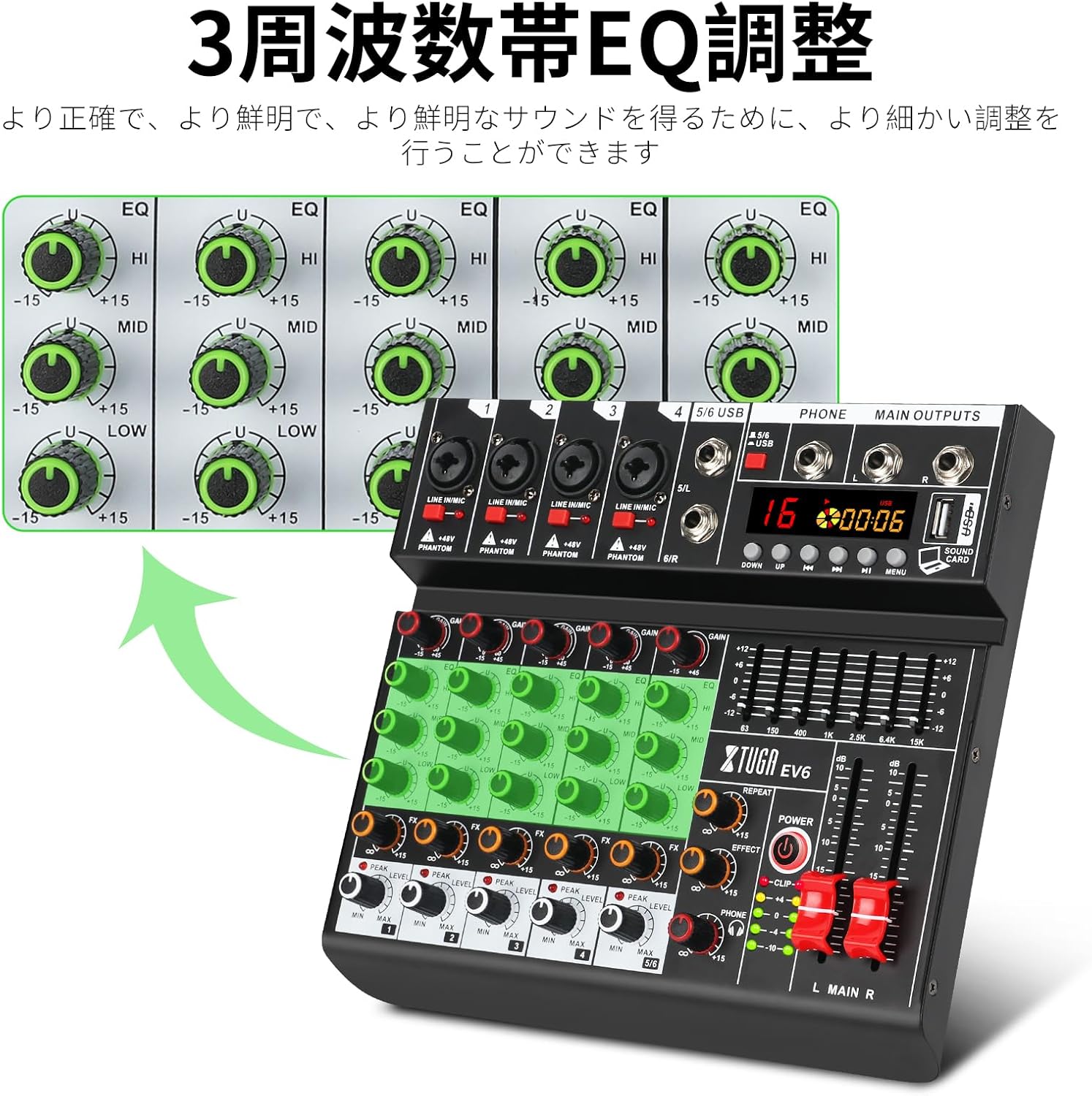
상세한 view of the 3-band EQ controls for each channel on the XTUGA EV6 mixer.
블루투스 재생
Activate the Bluetooth function on the mixer. 검색 "SHERIFF" on your mobile device (phone, tablet, etc.) and pair with the mixer. You can then wirelessly stream audio from your device to the mixer.

The XTUGA EV6 mixer next to a smartphone, indicating its wireless Bluetooth connectivity for audio streaming.
USB 재생 및 녹음
Insert a USB flash drive into the USB port (14) for MP3 playback. Use the REC function to record your mixed audio directly to the USB memory. When connected to a computer via USB, the mixer acts as an audio interface for recording and playback with your digital audio workstation (DAW).

A user connecting the XTUGA EV6 mixer to a laptop via USB, illustrating its recording and playback capabilities with a computer.
주요 출력 및 모니터링
- MAIN OUTPUTS (13): Control the overall volume of the main mix using the master faders (16).
- PHONES (12): Adjust the headphone volume using the dedicated PHONES knob.
유지
- 청소: Use a soft, dry cloth to clean the exterior of the mixer. Avoid using abrasive cleaners or solvents. For stubborn dirt, a slightly damp cloth can be used, ensuring no moisture enters the unit.
- 저장: 믹서기는 직사광선, 극한 온도, 높은 습도를 피해 서늘하고 건조한 곳에 보관하세요.
- 손질: 믹서를 다룰 때는 항상 조심하십시오. 떨어뜨리거나 강한 충격을 가하지 마십시오.
- 통풍: 과열을 방지하기 위해 믹서 주변의 환기가 잘 되도록 하세요. 환기구를 막지 마세요.
- 전원 끄기 : Always power off the mixer and disconnect it from the power source when not in use for extended periods or before cleaning.
문제 해결
소리가 출력되지 않음
- Check if the mixer is powered on and the power indicator light is illuminated.
- 모든 케이블(입력, 출력, 전원)이 단단히 연결되어 있는지 확인하십시오.
- Verify that channel LEVEL knobs and master faders are turned up.
- Check the volume levels on connected amplifiers 또는 전원 스피커.
- If using microphones, ensure +48V phantom power is enabled for condenser mics.
왜곡된 소리
- Reduce the GAIN control for the input channel if the PEAK LED is frequently lighting up.
- Lower the channel LEVEL or master fader if the main output meters are consistently in the red.
- 믹서에 도달하기 전에 입력 소스의 왜곡 여부를 확인하십시오.
블루투스 연결 문제
- Ensure Bluetooth is enabled on both the mixer and your mobile device.
- 믹서에 다른 장치가 페어링되어 있지 않은지 확인하십시오.
- 기기의 페어링을 해제한 후 다시 페어링해 보세요.
- 신호 강도를 높이려면 기기를 믹서에 더 가까이 이동하세요.
USB Recording/Playback Problems
- USB 드라이브가 올바르게 포맷되었는지, 그리고 충분한 여유 공간이 있는지 확인하십시오.
- Check if the USB drive is compatible (e.g., MP3 format for playback).
- If connecting to a computer, ensure the mixer is selected as the audio input/output device in your computer's sound settings and DAW.
명세서
| 특징 | 세부 사항 |
|---|---|
| 제품 모델 번호 | EV6 |
| 상표 | 엑스투가 |
| 채널 수 | 6 |
| 출력 커넥터 유형 | XLR |
| 오디오 입력 | MIC, LINE, BLUETOOTH, USB |
| 제조업체 | xtuga |
| Amazon.co.jp에서 처음 판매되는 날짜 | 14년 2023월 XNUMX일 |
보증 및 지원
XTUGA is committed to providing excellent customer service. If your XTUGA EV6 audio mixer does not meet your expectations or has any defects, please do not hesitate to contact the seller for assistance. We will strive to provide good customer service and help resolve any issues you may encounter.
For support, please contact the seller: Xtuga Electronic Technology Co., Ltd.