
1. 서론
Welcome to your WOOXGEHM 4-in-1 Wired Arcade Fight Stick Joystick. This manual provides essential information for setting up, operating, and maintaining your new arcade controller. Designed for compatibility with Nintendo Switch, PC, PlayStation 3, and Android devices, this joystick enhances your gaming experience with precise control and turbo functions.
2. 안전 정보
안전 지침
- 장치를 물과 습기로부터 멀리하십시오.
- 장치를 극한의 온도에 노출시키지 마십시오.
- 장치를 직접 분해하거나 수리하려고 하지 마십시오.
- 제공된 케이블과 액세서리만 사용하세요.
- 어린아이의 손이 닿지 않는 곳에 보관하세요.
3. 패키지 내용
무엇이 포함됩니까?
- 1 x Universal Arcade Fight Stick
- 1 x Remote Lever Handle (Joystick)
- 1 x Fixed Small Parts (e.g., suction cups)
- 1 x 사용 설명서
4. 제품 오버view
The WOOXGEHM Arcade Fight Stick is designed for comfort and precision, featuring a spherical metal joystick and six round control buttons. It also includes additional buttons for various functions and platform compatibility.

그림 1: WOOXGEHM 4-in-1 Wired Arcade Fight Stick Joystick, top view. A black arcade fight stick with a red spherical joystick on the left and six red circular action buttons on the right. Smaller function buttons are located above the main action buttons. The surface features a racing car graphic.
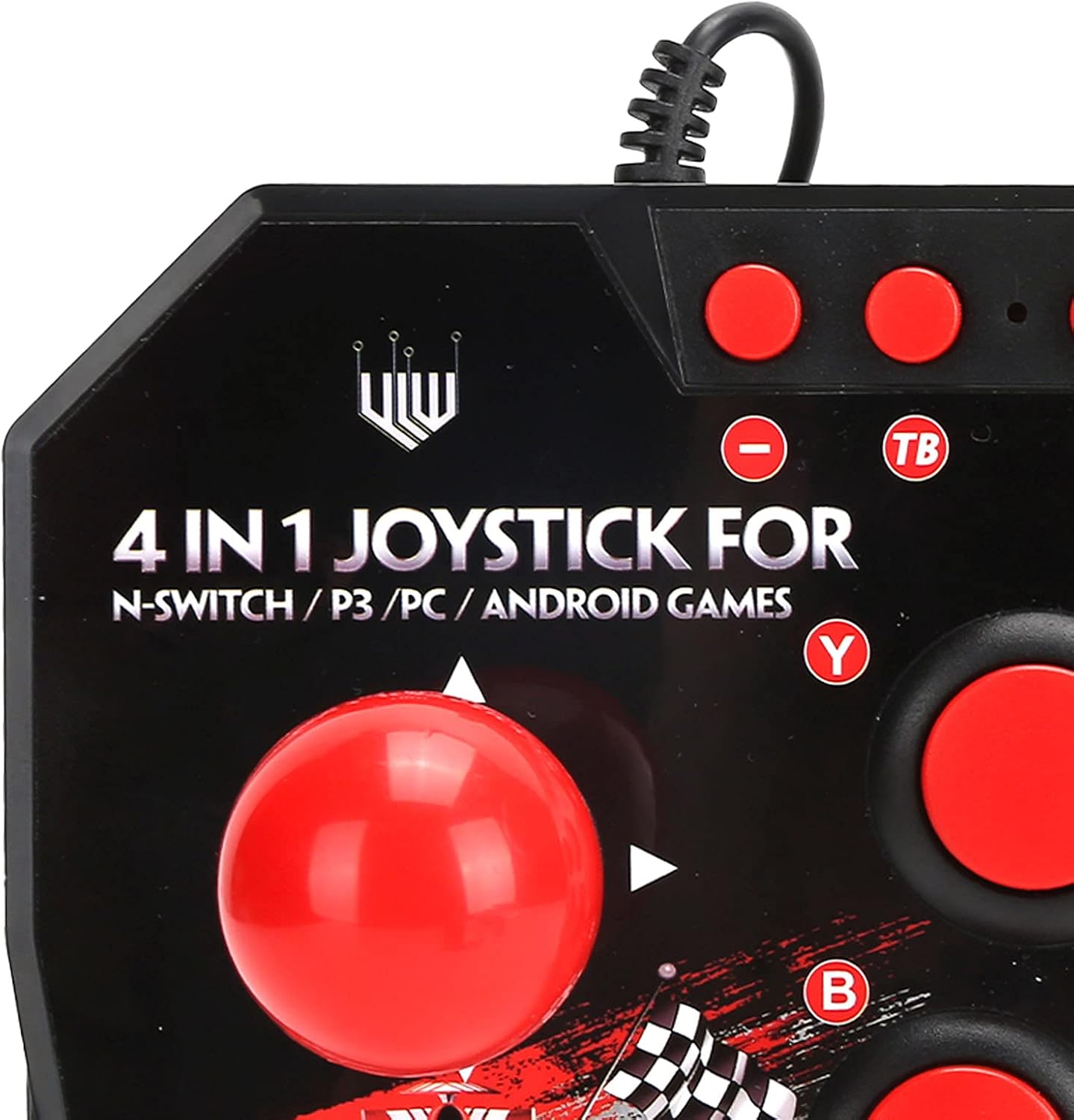
그림 2: Close-up of WOOXGEHM 4-in-1 Wired Arcade Fight Stick Joystick buttons. A detailed view of the joystick's top panel, showing the "4 IN 1 JOYSTICK FOR N-SWITCH / P3 / PC / ANDROID GAMES" text, along with the red spherical joystick and several red action buttons labeled Y, B, X, A, L, R, and smaller buttons for Turbo functions.

그림 3: 맨 아래 view of WOOXGEHM 4-in-1 Wired Arcade Fight Stick Joystick with suction cups. The underside of the arcade fight stick, showing four clear suction cups designed to secure the device to a flat surface during use. The label indicates "Input: DC5V / 500mA", "Working current: 20mA", and "MADE IN CHINA".
5. 설정 및 연결
The arcade fight stick connects via a wired USB cable. Ensure your console or device is powered on before connecting.
5.1 닌텐도 스위치 연결
- Connect the USB cable from the arcade fight stick to an available USB port on your Nintendo Switch dock.
- Ensure "Pro Controller Wired Communication" is enabled in your Switch System Settings.
- 컨트롤러는 자동으로 인식되어야 합니다.
5.2 PC 연결
- Connect the USB cable from the arcade fight stick to an available USB port on your PC.
- The system should automatically install the necessary drivers. If not, manual driver installation may be required (refer to your PC's operating system documentation).
- The controller will be recognized as a standard USB gamepad.
5.3 PlayStation 3(PS3) 연결
- Connect the USB cable from the arcade fight stick to an available USB port on your PS3 console.
- 컨트롤러는 자동으로 인식되어 사용할 준비가 되어야 합니다.
5.4 안드로이드 기기 연결
- Connect the USB cable from the arcade fight stick to your Android device using an OTG (On-The-Go) adapter (not included).
- 안드로이드 기기가 OTG 기능을 지원하는지 확인하세요.
- The controller should be recognized as an external gamepad.

그림 4: Multi-platform compatibility. This image illustrates the multi-platform compatibility of the arcade fight stick, showing it connected to a Nintendo Switch console, a PlayStation 3, a PC monitor, and an Android device, highlighting its versatility.

그림 5: Plug-and-Play functionality. This image highlights the plug-and-play nature of the arcade fight stick, showing it connected to a PlayStation console, a Nintendo Switch, and a monitor displaying game content, emphasizing ease of use across platforms.
6. 사용 설명서
6.1 기본 컨트롤
- 조종간: Use the spherical metal joystick for directional movement.
- 작업 버튼: The six large round buttons (A, B, X, Y, L, R) are for primary game actions.
- 기능 버튼: Smaller buttons above the main action buttons provide additional controls (e.g., Home, Select, Start).
6.2 터보 기능
The controller features turbo functions for rapid button presses.
- To activate Turbo for a button, press and hold the desired action button, then press the "TB" (Turbo) button. The button will now rapidly repeat its input when held down.
- To deactivate Turbo, press and hold the same action button, then press the "TB" button again.
6.3 모드 전환
The joystick may have a mode switch to toggle between different input modes (e.g., D-Pad, Left Analog Stick, Right Analog Stick) for specific games or platforms. Refer to the small buttons near the top left of the controller for these options.
7. 유지관리 및 관리
제품 관리
- 청소: Wipe the surface of the joystick with a soft, dry cloth. Do not use abrasive cleaners or solvents.
- 저장: 사용하지 않을 때에는 직사광선이 닿지 않는 서늘하고 건조한 곳에 장치를 보관하십시오.
- 케이블 관리 : 손상을 방지하려면 USB 케이블을 급격하게 구부리거나 과도하게 당기지 마세요.
8. 문제 해결
일반적인 문제 및 솔루션
- 컨트롤러를 인식할 수 없습니다.
해결책: Ensure the USB cable is securely connected to both the joystick and the device/console.
해결책: 닌텐도 스위치의 경우 시스템 설정에서 "프로 컨트롤러 유선 통신"이 활성화되어 있는지 확인하십시오.
해결책: 다른 USB 포트에 연결해 보십시오.
해결책: Restart your console/PC/Android device. - 버튼이나 조이스틱이 작동하지 않음:
해결책: Disconnect and reconnect the joystick.
해결책: Test the joystick on another compatible device to determine if the issue is with the controller or the device. - 터보 기능이 작동하지 않습니다:
해결책: Ensure you are correctly activating/deactivating the turbo mode as described in the Operating Instructions.
9. 사양
기술 사양
| 특징 | 세부 사항 |
|---|---|
| 모델 | B0C7GYXMLZ |
| 상표 | WOOXGEHM |
| 컨트롤러 유형 | 버튼 제어, 조이스틱 |
| 하드웨어 인터페이스 | USB |
| 재료 | 아크릴로니트릴 부타디엔 스티렌(ABS) |
| 품목 무게 | 0.52킬로그램(1.14파운드) |
| 크기 (약) | 21 x 15 x 6cm(8.3 x 5.9 x 2.4인치) |
| 작업 볼륨tag전자/현재 | 직류5V/20mA |
| USB 케이블 길이 | 3m / 9.8피트 |
| 호환성 | Nintendo Switch, PC, PS3, Android Games |

그림 6: Technical specifications overview. An image displaying the technical specifications of the arcade fight stick, including item type, material (ABS), size (21 x 15 x 6 cm), working voltage/current (DC5V/20mA), and USB cable length (3m/9.8ft), along with a list of package contents.
10. 보증 및 지원
보증 정보
This WOOXGEHM product comes with a standard manufacturer's warranty. For specific warranty terms and conditions, please refer to the warranty card included in your package or contact WOOXGEHM customer support.
고객 지원
If you encounter any issues or have questions regarding your Arcade Fight Stick, please visit the official WOOXGEHM web사이트를 방문하거나 고객 서비스에 도움을 요청하십시오.