
1. 서론
This manual provides essential information for the safe and effective operation of your VOLTCRAFT DSO-2202H + AFG Handheld Oscilloscope. This versatile device combines the functions of an oscilloscope, a multimeter, and an arbitrary function generator (AFG) into a single portable unit. Please read this manual thoroughly before using the device to ensure proper handling and to prevent damage or injury.
2. 안전 정보
Always observe the following safety precautions to avoid personal injury and prevent damage to the instrument or other equipment.
- 모든 지침을 읽으십시오. 기기를 작동하기 전에 모든 안전 및 작동 지침을 읽고 이해하십시오.
- Use proper probes: Use only probes and accessories rated for the voltage and current of the measurement.
- 젖은 상태를 피하십시오: 물기가 있거나 습기가 있는 곳에서 장치를 작동하지 마십시오.amp 환경.
- 접지: Ensure proper grounding when connecting to mains power or high-voltag전자 회로.
- c를 열지 마세요asing: Refer all servicing to qualified service personnel. Opening the casing는 당신을 위험한 볼륨에 노출시킬 수 있습니다.tag에스.
- Observe all ratings: 기기의 최대 입력 정격을 초과하지 마십시오.
3. 제품 오버view
The VOLTCRAFT DSO-2202H + AFG is a compact, multi-functional test instrument designed for various electrical measurement tasks. It features a clear color LCD display and intuitive controls.
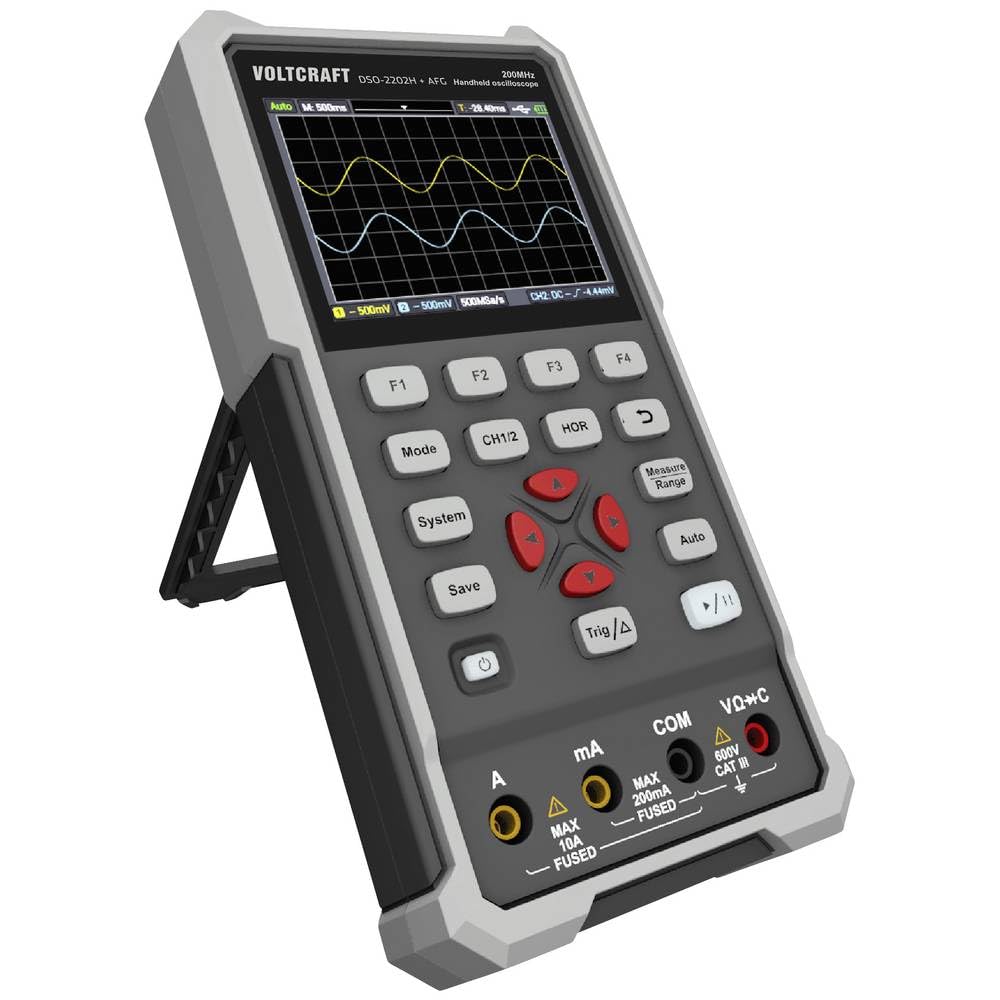
그림 1: 전면 view of the VOLTCRAFT DSO-2202H + AFG Handheld Oscilloscope with connected test probes. The display shows a voltage reading, and the control panel with function buttons and navigation keys is visible below.
주요 특징:
- 3-in-1 Oscilloscope, Multimeter, and Waveform Generator
- 3.5-inch (8.89 cm) Color LCD Screen (320 x 240 pixels)
- USB Type-C Interface for connectivity and data storage
- 내구성과 견고성이 뛰어난 디자인
4. 설정
Follow these steps for initial setup of your device.
4.1 전원 켜기/끄기
- 장치의 전원을 켜려면 버튼을 길게 누르세요. 힘 button located on the side/top panel.
- The color LCD screen will illuminate, displaying the startup sequence.
- 전원을 끄려면 힘 장치가 종료될 때까지 버튼을 다시 누르세요.
4.2 프로브 연결
For oscilloscope functions, connect the oscilloscope probes to the BNC connectors. For multimeter functions, connect the test leads to the appropriate input jacks (VΩ+C, mA, A, COM) at the bottom of the device.
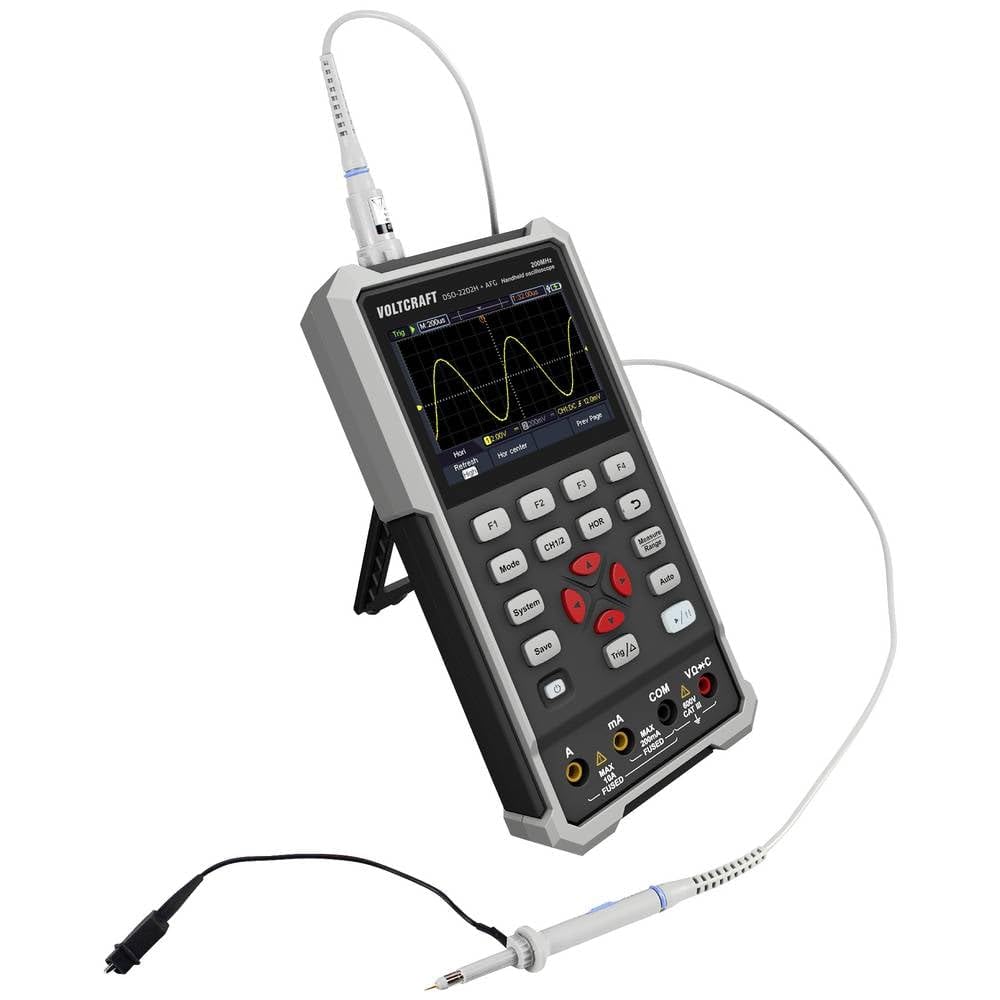
그림 2: 측면 view of the device showing the kickstand extended for desktop use and an oscilloscope probe connected to the BNC input. The multimeter input jacks are visible at the bottom.
5. 사용 설명서
The DSO-2202H + AFG offers three primary modes of operation: Oscilloscope, Multimeter, and Arbitrary Function Generator.
5.1 오실로스코프 모드
This mode allows you to visualize and analyze electrical signals. The device features 2 channels and a 200MHz bandwidth.
- 를 누르세요 방법 오실로스코프 모드를 선택하는 버튼입니다.
- Connect the oscilloscope probe(s) to the circuit under test.
- 사용하세요 CH1/2 button to switch between channels or view 둘 다.
- Adjust the vertical sensitivity (V/div) and horizontal time base (s/div) using the navigation buttons.
- 사용하세요 삼각함수/Δ 안정적인 파형 표시를 위한 트리거 조건을 설정하는 버튼입니다.
- 그만큼 자동차 button can automatically adjust settings for a stable waveform.

Figure 3: The device displaying a waveform in oscilloscope mode. The screen shows voltage and time divisions, indicating a signal measurement.
5.2 멀티미터 모드
The multimeter function allows for precise measurements of voltage, current, resistance, capacitance, and continuity.
- 를 누르세요 방법 멀티미터 모드를 선택하는 버튼입니다.
- Connect the test leads to the appropriate input jacks (e.g., VΩ+C for voltage/resistance/capacitance, A or mA for current, COM for common).
- Select the desired measurement function (e.g., DC Voltage, AC 볼륨tage, Resistance) using the function buttons (F1-F4) or navigation keys.
- 디스플레이에서 측정값을 읽습니다.
5.3 Arbitrary Function Generator (AFG) Mode
The AFG allows you to generate various waveforms for testing circuits.
- 를 누르세요 방법 button to select AFG mode.
- Connect the output of the AFG to the circuit requiring a signal input.
- Use the function buttons (F1-F4) and navigation keys to select waveform type (sine, square, triangle, etc.), frequency, amp경도와 오프셋.
- Adjust parameters as needed for your application.
5.4 데이터 저장
The USB Type-C port can be used for data storage. Connect the device to a computer using a USB Type-C cable to transfer saved waveforms or measurement data.
6. 유지관리
적절한 유지 관리는 기기의 수명과 정확성을 보장합니다.
- 청소: 부드럽고 마른 천으로 기기를 정기적으로 닦아주세요. 연마성 세척제나 용제를 사용하지 마세요.
- 저장: 본 기기는 직사광선과 극한의 온도를 피해 시원하고 건조한 곳에 보관하세요.
- 배터리 관리 : If the device has an internal rechargeable battery, ensure it is charged periodically if stored for long periods to maintain battery health.
- 프로브 관리: Inspect probes and test leads for damage before each use. Replace any damaged accessories immediately.
7. 문제 해결
기기 사용 중 문제가 발생하면 다음의 일반적인 문제 해결 단계를 참조하십시오.
- 기기의 전원이 켜지지 않습니다: Ensure the device is charged or connected to a power source. Check the power button for proper engagement.
- 디스플레이 없음: If the device powers on but the screen is blank, try adjusting the display brightness (if available) or restarting the device.
- 잘못된 판독: Verify that probes and test leads are correctly connected and not damaged. Ensure the correct measurement mode and range are selected. Calibrate the device if necessary (refer to advanced settings or contact support).
- 불안정한 파형: In oscilloscope mode, adjust the trigger level, trigger source, and time base settings. Use the Auto button for initial setup.
For persistent issues, contact VOLTCRAFT customer support or your retailer.
8. 사양
| 사양 | 값 |
|---|---|
| 제조업체 | 볼트크래프트 |
| 모델 번호 | VC-13438620 (DSO-2202H + AFG) |
| 제품 크기(L x W x H) | 17 x 12 x 40cm |
| 무게 | 600그램 |
| 재료 | 플라스틱 |
| 오실로스코프 대역폭 | 200MHz |
| 채널 | 2채널 |
| Samp르 레이트 | 1 GSa/초 |
| 기억의 깊이 | 8kpts |
| 해결 | 8비트 |
| 표시하다 | 3.5-inch (8.89 cm) Color LCD (320 x 240 pixels) |
| 인터페이스 | USB 타입-C |
| 측정 시스템 | 미터법 |
| 배터리 포함 | 아니요 |
| 필요한 배터리 | 아니요 |
9. 보증 및 지원
For warranty information, please refer to the documentation provided with your purchase or contact your retailer. For technical support, visit the official VOLTCRAFT web사이트 또는 고객 서비스 부서에 문의하십시오.