
1. 서론
This manual provides detailed instructions for the setup, operation, and maintenance of your LOKMAT APPLLP Max 4G Smart Watch. This device combines advanced smartwatch features with 4G cellular capabilities, running on Android 9.0. Please read this manual thoroughly to ensure proper usage and to maximize your experience with the product.
2. 패키지 내용
패키지를 열면 모든 품목이 들어 있는지 확인하세요.
- LOKMAT APPLLP Max Smart Watch
- 충전 케이블
- 사용자 설명서
- SIM Card Ejector Tool (if applicable)
3. 디바이스 오버view
Familiarize yourself with the physical components of your smartwatch.

이미지 3.1: 앞쪽 view of the LOKMAT APPLLP Max Smart Watch, displaying an active video call. The large rectangular screen is prominent, showing a contact's image and call controls.

이미지 3.2: 측면과 상단 views illustrating the dimensions of the LOKMAT APPLLP Max Smart Watch. The watch measures approximately 77.2mm in length, 53.6mm in width, and 15mm in thickness.
- 표시하다: 2.88-inch LCD touchscreen (480 x 640 resolution).
- 측면 버튼: Typically for power on/off, screen wake, and back functions.
- 카메라: Dual cameras for video calls and photography.
- SIM 카드 슬롯: 4G 셀룰러 연결을 위해.
- 충전 포트: 뒷면에 자석식 충전 핀이 있습니다.
- 심박수 센서: 건강 상태 모니터링을 위해 뒷면에 위치해 있습니다.
4. 설정
4.1. SIM 카드 설치
The LOKMAT APPLLP Max supports 4G cellular connectivity via a Nano SIM card. Follow these steps to install your SIM card:
- 스마트워치를 완전히 끄세요.
- 시계 측면에 있는 SIM 카드 슬롯을 찾으세요.
- Use the provided SIM ejector tool (or a small pin) to open the SIM tray.
- 나노 SIM 카드를 올바른 방향으로 트레이에 조심스럽게 넣어주세요.
- Insert the SIM tray back into the watch until it clicks into place.

이미지 4.1: Illustration of a Nano SIM card being inserted into the LOKMAT APPLLP Max Smart Watch. The image highlights the SIM card slot and the 4G network capability.
4.2. 초기 전원 켜기 및 구성
Press and hold the power button (usually on the side) until the LOKMAT logo appears. Follow the on-screen prompts to select your language, connect to a Wi-Fi network, and set up your Google account. Adjust date, time, and other personal preferences as guided by the Android 9.0 operating system.
5. 사용 설명서
5.1. 기본 탐색
- 위/아래/좌/우로 스와이프하세요: 메뉴, 알림 및 빠른 설정을 탐색하세요.
- 수도꼭지: 항목을 선택하거나 애플리케이션을 엽니다.
- 길게 누르기 : 추가 옵션에 액세스하거나 시계 화면을 맞춤 설정하세요.
- 측면 버튼: Typically acts as a 'back' button or returns to the home screen.
5.2. 전화 걸고 받기
With the installed Nano SIM card, your smartwatch can make and receive 4G calls, including video calls.
- 음성 통화: '전화' 앱을 열고, 전화번호를 누르거나, 연락처를 선택하세요.
- 영상 통화: Utilize compatible video calling applications (e.g., Google Duo, WhatsApp) through the watch's dual cameras.
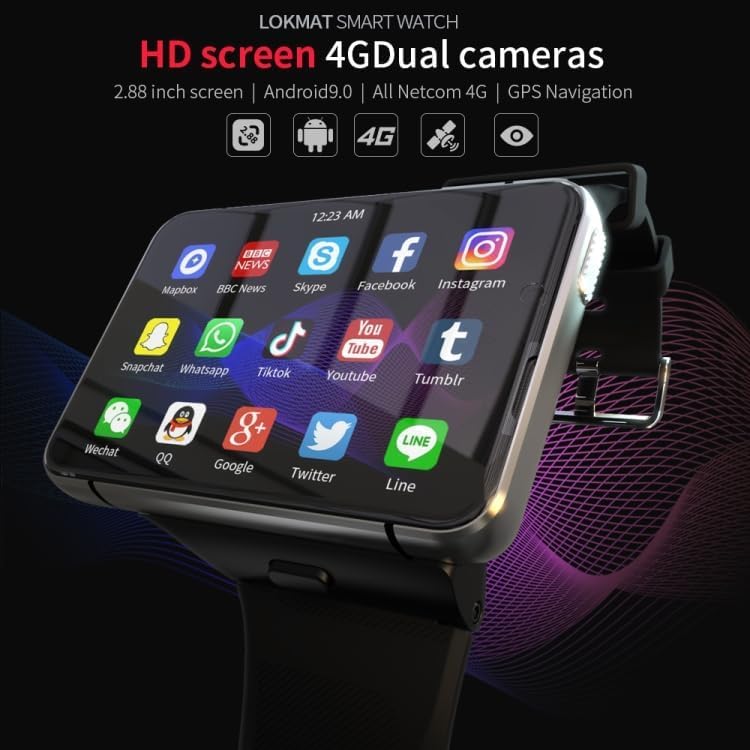
이미지 5.1: The LOKMAT APPLLP Max Smart Watch screen showing a grid of application icons, including social media, news, and communication apps, demonstrating its Android 9.0 capabilities.
5.3. 피트니스 추적
The smartwatch includes sensors for monitoring various fitness activities and health metrics.
- 심박수 모니터링 : Access the heart rate app to measure your pulse.
- 움직임 패턴: Track activities such as outdoor running, indoor running, walking, hiking, and mountaineering.
- 걸음 수 카운터: Monitor your daily steps, distance, and calories burned.

이미지 5.2: A visual representation of the smartwatch's fitness tracking capabilities, showing options for various movement patterns like running and hiking, along with real-time display of heart rate, duration, and steps.
5.4. GPS 내비게이션
The built-in GPS allows for accurate location tracking and navigation. Use compatible mapping applications available on the Android 9.0 platform.
5.5. 카메라 기능
The LOKMAT APPLLP Max features dual cameras for various photographic and video functions.
- 사진을 찍다: Open the camera app to capture photos.
- 비디오 채팅: Engage in video conversations using supported applications.
- 비디오 재생: View recorded videos directly on the watch.

이미지 5.3: 클로즈업 view of the smartwatch's camera lens, highlighting its capabilities for video chat, video replay, and taking pictures.
6. 유지관리
6.1. 충전
To charge your smartwatch, connect the provided charging cable to the magnetic charging pins on the back of the watch and a compatible USB power source. Ensure the pins are clean and dry before charging.
6.2. 청소
부드럽고 보풀 없는 천으로 시계 화면과 본체를 닦으세요. 잘 지워지지 않는 얼룩은 살짝 두드려 닦아내세요.amp천에 물을 묻혀 닦으세요. 강한 화학 물질이나 연마재는 사용하지 마세요.
6.3. 보관
When not in use for extended periods, store the smartwatch in a cool, dry place. It is recommended to charge the device to about 50% before long-term storage to preserve battery health.
7. 문제 해결
- 시계 전원이 켜지지 않습니다. 시계가 완전히 충전되었는지 확인하십시오. 최소 30분 동안 충전기에 연결해 보세요.
- 4G 신호 없음: Check if the SIM card is correctly inserted and activated. Verify network coverage in your area.
- 터치스크린이 반응하지 않음: 시계를 다시 시작하세요. 문제가 지속되면 화면이 깨끗하고 건조한지 확인하세요.
- 앱이 충돌하거나 성능이 느립니다. Close background applications. Clear app cache or consider a factory reset if problems continue (back up data first).
- GPS 정확도가 떨어집니다. 당신이 깨끗한 열린 공간에 있는지 확인하십시오 view of the sky. Check if location services are enabled in settings.
8. 사양
| 모델 | APPLLP Max |
| 운영 체제 | 안드로이드 9.0 |
| 프로세서 | MTK6761 쿼드 코어 |
| 메모리 | 4GB RAM + 64GB 스토리지 |
| 표시하다 | 2.88 inches LCD, 480 x 640 resolution |
| 연결성 | 4G (Nano SIM), Wi-Fi, Bluetooth |
| GPS | 내장형 GPS |
| 카메라 | Dual Cameras (1300W + 500W) |
| 특별 기능 | Video Call, Heart Rate Monitor, Multiple Movement Patterns |
| 배터리 용량 | 2300mAh |
| 치수 | 약 77.2 x 53.6 x 15mm |
| 무게 | 320g |
참고: 사양은 사전 통지 없이 변경될 수 있습니다.
9. 보증 및 지원
For warranty information and technical support, please refer to the warranty card included in your product packaging or visit the official LOKMAT web사이트. 보증 청구를 위해 구매 증빙 자료로 구매 영수증을 보관하세요.