
j5create JCC157-1N
J5create JCC157 USB-C to HDMI 2.1 8K 케이블 사용 설명서
Model: JCC157-1N
소개
The J5create JCC157 USB-C to HDMI 2.1 8K Cable is designed to provide high-quality video and audio transmission from your USB-C enabled device to an HDMI display. Supporting resolutions up to 8K, this cable is ideal for gaming, professional presentations, and high-definition media consumption. It features a unique RGB indicator light, enhancing your setup's aesthetics and providing visual feedback.

그림 1: The J5create JCC157 USB-C to HDMI 2.1 8K Cable, showcasing its sleek design and RGB indicator.
특징
- 8K 해상도 지원: Experience stunning visuals with support for resolutions up to 8K, ensuring crisp and clear images.
- USB-C to HDMI 2.1: Connects modern USB-C devices to HDMI 2.1 compatible displays for high-bandwidth video and audio.
- 폭넓은 호환성: Fully compatible with Windows, MacOS, and Chrome OS operating systems.
- RGB 표시등: Features an integrated RGB light, providing visual flair and status indication, especially suited for gaming setups.
- 플러그 앤 플레이: No drivers required for most operating systems, allowing for easy setup and immediate use.
- 다양한 디스플레이 모드: Supports both Extended and Mirror display modes for various productivity and entertainment needs.

그림 2: The RGB indicator light on the JCC157 cable, capable of displaying various colors.
설치 지침
- USB-C 끝 연결: Insert the USB-C connector of the JCC157 cable into a compatible USB-C port on your source device (e.g., laptop, computer). Ensure the port supports video output (DisplayPort Alternate Mode).
- HDMI 끝 연결: Insert the HDMI connector of the JCC157 cable into an available HDMI input port on your display device (e.g., monitor, TV, projector).
- 전원 켜기 장치: 소스 장치와 디스플레이 장치가 모두 켜져 있는지 확인하세요.
- 입력 선택: On your display device, select the correct HDMI input source that the cable is connected to.
- 연결 확인: The RGB indicator light on the cable will illuminate, indicating a successful connection and active signal. Your display should show the output from your source device.

그림 3: 클로즈업 view of the JCC157 cable's connectors and the illuminated RGB indicator, demonstrating a ready state.
작동 지침
Once connected, your operating system will typically detect the external display automatically. You can configure the display settings to suit your needs.
- 확장 모드: This mode allows you to extend your desktop across multiple screens, providing more workspace. To enable, go to your operating system's display settings and select "Extend these displays."
- 미러 모드(복제 모드): This mode duplicates your primary display onto the external monitor, showing the same content on both screens. To enable, go to your operating system's display settings and select "Duplicate these displays."

그림 4: Visual representation of Extended Mode (left) and Mirror Mode (right) display configurations, illustrating how the JCC157 cable facilitates both.
The RGB indicator light will remain illuminated when a signal is active. Its color may vary based on the device's status or specific J5create software settings, if applicable.
유지
To ensure the longevity and optimal performance of your J5create JCC157 cable, follow these maintenance guidelines:
- 조심스럽게 다루십시오: Avoid bending the cable sharply or pulling it by the cord. Always grasp the connector ends when plugging or unplugging.
- 깨끗하게 유지하십시오: 부드럽고 마른 천을 사용하여 케이블과 커넥터를 부드럽게 닦으세요. 액체 세척제나 연마재를 사용하지 마세요.
- 올바르게 보관하세요: 사용하지 않을 때는 케이블을 느슨하게 감아서 직사광선과 극한 온도 변화를 피해 서늘하고 건조한 곳에 보관하십시오.
- 습기를 피하세요: Do not expose the cable to water or high humidity, as this can damage the internal components.
문제 해결
| 문제 | 가능한 원인 | 해결책 |
|---|---|---|
| 모니터에 표시되지 않습니다. |
|
|
| Low resolution or flickering display. |
|
|
| RGB indicator not lighting up. |
|
|
명세서
| 특징 | 세부 사항 |
|---|---|
| 모델 번호 | JCC157-1N |
| 커넥터 유형 | USB-C Male to HDMI 2.1 Male |
| 최대 해상도 지원 | 최대 8K(7680x4320) 해상도 지원 |
| 케이블 길이 | 1.8미터(6피트) |
| 호환되는 운영 체제 | 윈도우, 맥OS, 크롬 OS |
| 특별 기능 | RGB 표시등 |
| 호환 장치 | 컴퓨터, 노트북 |
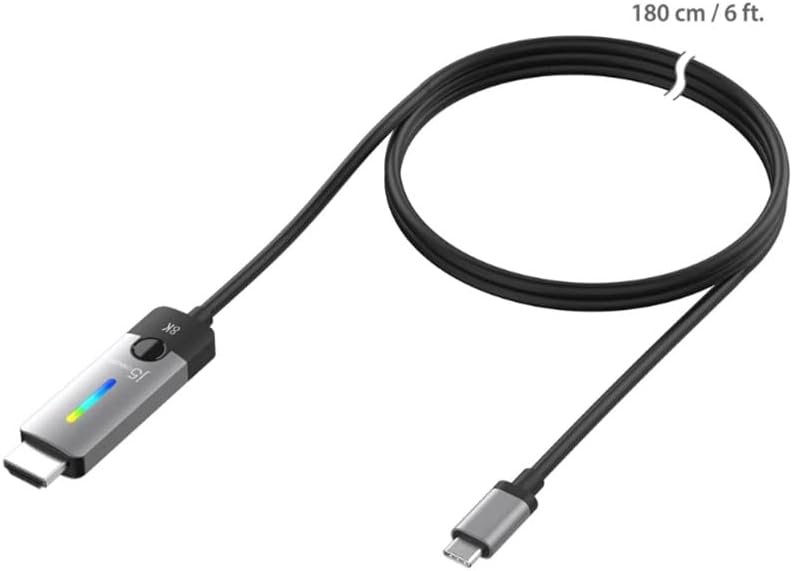
그림 5: The JCC157 cable, illustrating its 180 cm (6 ft) length.
보증 및 지원
For warranty information and technical support, please refer to the documentation included with your purchase or visit the official j5create web사이트. 보증 약관은 지역 및 소매업체에 따라 다를 수 있습니다.
제조업체: J5CREATE
Ask a question about this manual
Ask about setup, troubleshooting, compatibility, parts, safety, or missing instructions. Manuals+ will review the question and use this page’s manual context to help answer it.