
WYRESTORM HALO-COM-MIC
User Manual for WYRESTORM Halo-COM-MIC
360° Omnidirectional Stereo Conference USB Microphone
1. 서론
The WYRESTORM Halo-COM-MIC is an advanced 360° omnidirectional stereo conference USB microphone designed to enhance audio pickup in various meeting environments. It features Acoustic Echo Cancellation (AEC), Automatic Gain Control (AGC), and noise suppression technologies to deliver clear and consistent audio. This microphone can also be cascaded up to three times with the APO-60-UC for extended voice pickup range in larger spaces. This manual provides essential information for setting up, operating, maintaining, and troubleshooting your Halo-COM-MIC.
2. 제품 오버view
2.1 주요 특징
- Built-in MEMS Microphone Array: Incorporates AEC (Acoustic Echo Cancellation), AGC (Automatic Gain Control), and noise-cancelling for superior sound pickup.
- Cascade Functionality: Allows cascading up to 3 units for extended voice pickup range when used with the APO-60-UC.
- 간편하고 유연한 설치: Compact design with minimal footprint, supporting various cable routing options.
- One-button Mute: Convenient mute toggle button with an LED indicator for quick control.
- 360° 음성 수음: Round design with 4 microphones ensures comprehensive sound capture within a 10-16ft radius.
2.2 제품 구성품
The Halo-COM-MIC package includes the microphone unit and a 3M USB cable.
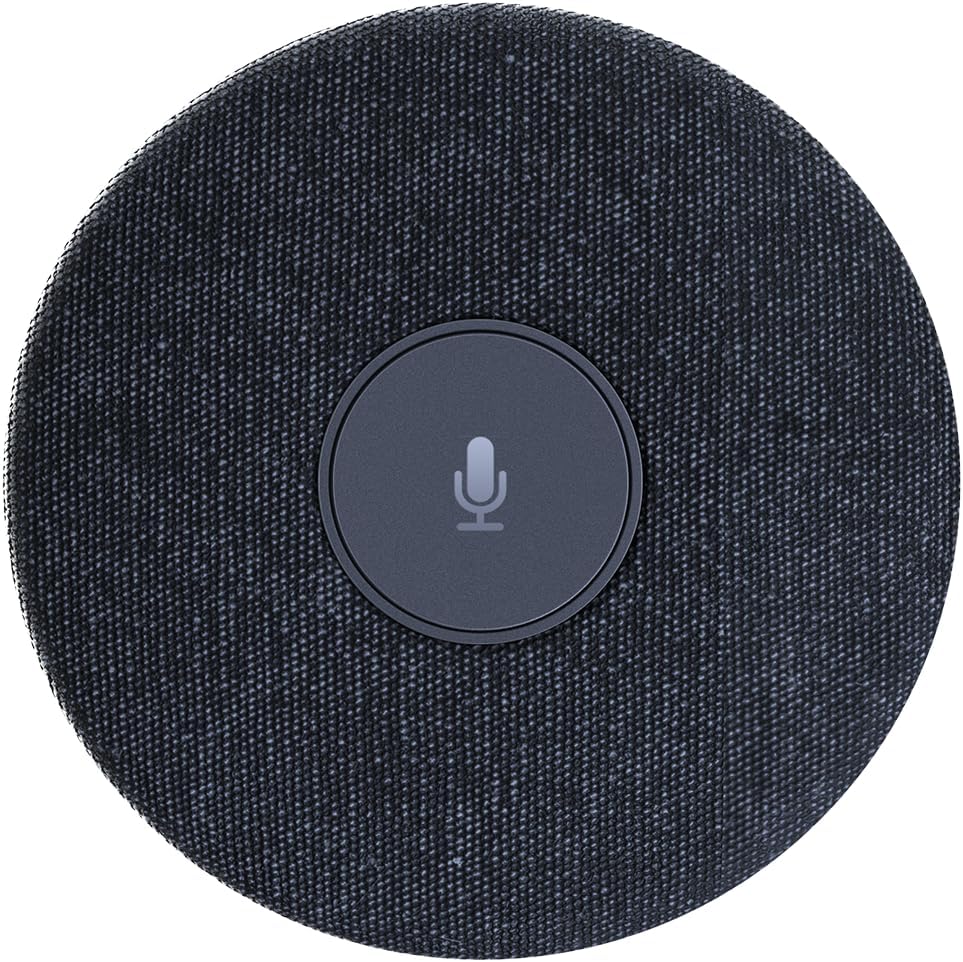
그림 2.2.1: 상향식 view of the WYRESTORM Halo-COM-MIC microphone, showing its compact, circular design with a central mute button.

Figure 2.2.2: Illustration demonstrating the 360-degree voice pickup capability of the Halo-COM-MIC, covering a 16.4ft (approximately 5-meter) radius in a conference setting.

그림 2.2.3: 클로즈업 view of a finger pressing the central mute/unmute button on the Halo-COM-MIC, which features an LED indicator.
3. 설정
3.1 마이크 연결
- Place the Halo-COM-MIC on a flat surface in the center of your meeting area for optimal 360° voice pickup.
- Connect the provided 3M USB cable to the USB Type-A port on the Halo-COM-MIC.
- Plug the other end of the USB cable into an available USB port on your computer (laptop or personal computer).
- 마이크는 플러그 앤 플레이 방식이므로 운영 체제에서 자동으로 인식됩니다.
3.2 Daisy-Chaining Multiple Microphones
For larger conference rooms or extended voice pickup, multiple Halo-COM-MIC units can be daisy-chained using the WyreStorm APO-60-UC. Up to three Halo-COM-MIC units can be connected in a cascade configuration.
- Connect the first Halo-COM-MIC to the APO-60-UC using a USB cable.
- Connect subsequent Halo-COM-MIC units to each other using their respective USB ports, forming a chain.
- Ensure proper cable routing to avoid interference and maintain a tidy setup. The microphone supports both same-direction and opposite-direction cable output.

Figure 3.2.1: Schematic diagram illustrating various configurations for daisy-chaining multiple Halo-COM-MIC units with an APO-60-UC for expanded coverage in large conference rooms.
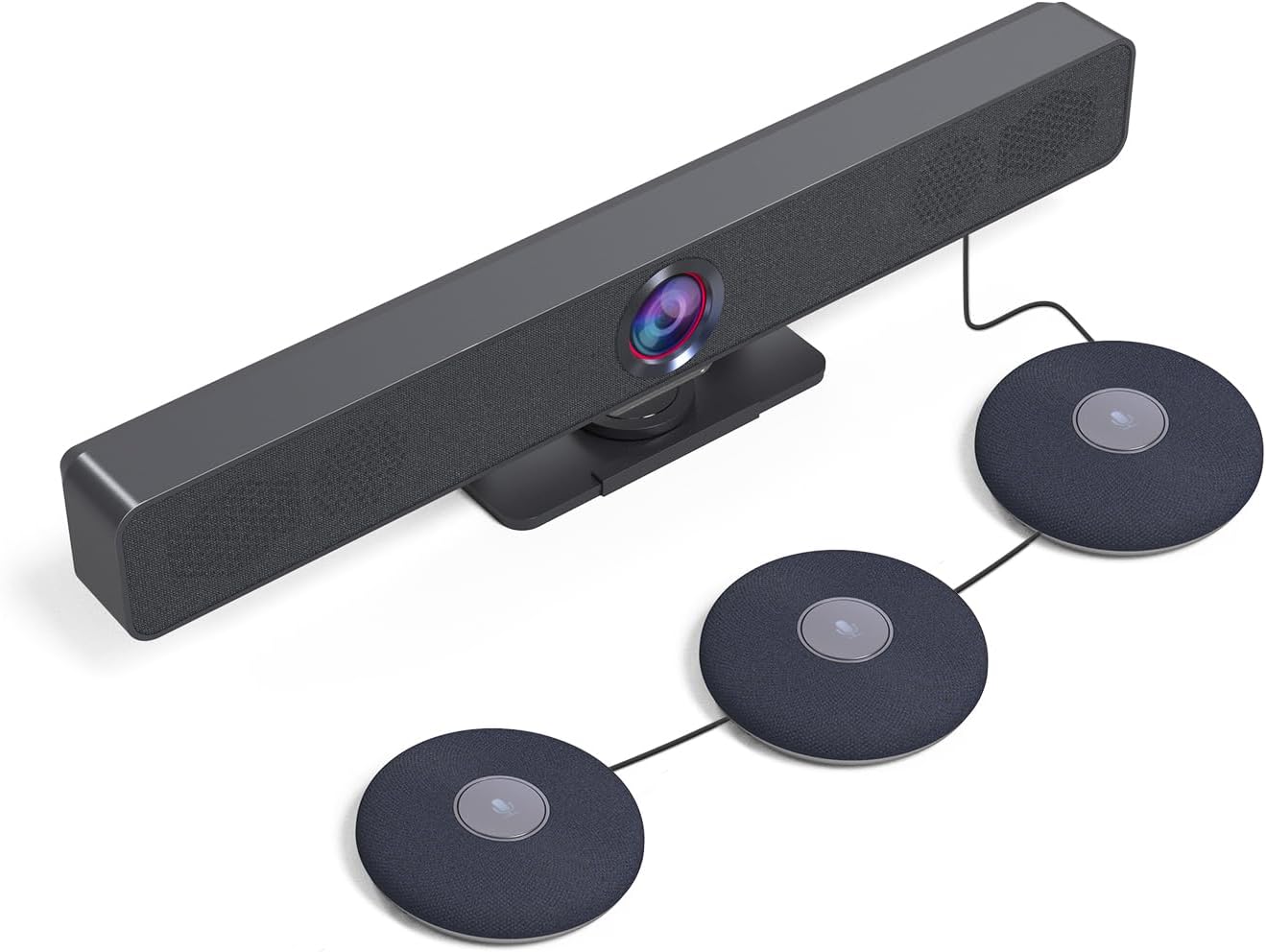
그림 3.2.2: example setup showing a WyreStorm video bar connected to three cascaded Halo-COM-MIC microphones, demonstrating a typical conference room integration.
4. 운영
4.1 기본 사용
Once connected to your computer, the Halo-COM-MIC functions as a standard USB audio input device. Select it as your primary microphone in your communication software (e.g., Zoom, Microsoft Teams, Google Meet) settings.
4.2 음소거 기능
The central button on the microphone serves as a mute toggle. Press the button once to mute the microphone. The LED indicator will change color (typically red) to indicate that the microphone is muted. Press the button again to unmute the microphone, and the LED will return to its active state (typically blue or green).
4.3 Audio Enhancement Technologies
- 음향 반향 제거(AEC): Eliminates echoes that can occur when microphone picks up audio from speakers in the same room, ensuring clear two-way communication.
- 자동 게인 제어(AGC): Automatically adjusts the microphone's sensitivity to ensure consistent volume levels for all participants, regardless of their distance from the microphone.
- 소음 억제: Reduces background noise, such as keyboard clicks, air conditioning hum, or general room ambiance, to focus on speech.
5. 유지관리
5.1 청소
To maintain the appearance and functionality of your Halo-COM-MIC, follow these cleaning guidelines:
- Disconnect the microphone from the power source (USB port) before cleaning.
- 부드럽고, 건조하고, 보푸라기가 없는 천을 사용하여 외부 표면을 닦으세요.
- 완고한 자국의 경우 약간 damp천에 물을 묻혀 닦아주세요. 강한 화학 물질, 연마성 세제 또는 용제는 사용하지 마세요.
- 액체가 어떠한 구멍에도 들어가지 않도록 하세요.
5.2 보관
When not in use for extended periods, store the microphone in a cool, dry place, away from direct sunlight and extreme temperatures. Protect it from dust and physical damage.
6. 문제 해결
6.1 일반적인 문제 및 해결 방법
| 문제 | 가능한 원인 | 해결책 |
|---|---|---|
| No sound pickup / Microphone not detected | USB cable loose or disconnected; Incorrect audio input selected; Driver issue. |
|
| 음질이 좋지 않음 / 배경 소음 | Microphone too far from speakers; Excessive ambient noise; Software settings. |
|
| Mute button LED not responding | 일시적인 소프트웨어 오류; 전원 문제. |
|
| 데이지 체이닝이 작동하지 않습니다 | Incorrect connection order; Faulty cable; APO-60-UC not detected. |
|
7. 사양
| 특징 | 세부 사항 |
|---|---|
| 모델명 | HALO-COM-MIC |
| 마이크 폼 팩터 | Table Array, Boundary |
| 극성 패턴 | 전방위 |
| 음성 픽업 범위 | 10-16 feet (360°) |
| 특별 기능 | 4 Noise-canceling Mics, Acoustic Echo Cancellation (AEC), Automatic Gain Control (AGC), Built-in Microphone |
| 연결 기술 | USB |
| 커넥터 유형 | USB 타입 A |
| 호환 장치 | 노트북, 개인용 컴퓨터 |
| 전원 | 유선 전기 (USB 전원) |
| 채널 수 | 2 |
| 품목 치수(L x W x H) | 4 x 4 x 0.86인치(10.16 x 10.16 x 2.18cm) |
| 품목 무게 | 1.1파운드(0.5kg) |
| 포함된 구성 요소 | 3M USB 케이블 |
| 제조업체 | 와이어스톰 |
| 원산지 | 홍콩 |
8. 보증 및 지원
8.1 제품 보증
WYRESTORM products are manufactured to high standards and are designed for reliable performance. Specific warranty terms and conditions may vary by region and retailer. Please refer to the warranty information provided at the time of purchase or visit the official WYRESTORM web자세한 보증 정책 정보는 사이트를 참조하세요.
8.2 기술 지원
For technical assistance, troubleshooting beyond this manual, or inquiries regarding your WYRESTORM Halo-COM-MIC, please contact WYRESTORM customer support. Contact information can typically be found on the official WYRESTORM web사이트 또는 제품 포장에 표시하세요.
Ask a question about this manual
Ask about setup, troubleshooting, compatibility, parts, safety, or missing instructions. Manuals+ will review the question and use this page’s manual context to help answer it.