
1. 서론
Thank you for choosing the Rettru Q18 4K Wireless WiFi IP Camera. This manual provides detailed instructions for setting up, operating, and maintaining your camera to ensure optimal performance and security. Please read this manual thoroughly before use and retain it for future reference.
패키지 내용
아래 나열된 모든 품목이 패키지에 포함되어 있는지 확인하세요.
- 1 x 카메라
- 1 x 사용자 설명서
- 1 X 마이크로 SD 카드 리더
- 1 x 마그네틱베이스
2. 안전 정보
제품 손상이나 본인 또는 타인의 부상을 방지하기 위해 다음 안전 수칙을 준수해 주십시오.
- Do not expose the camera to extreme temperatures, direct sunlight, or moisture.
- 카메라를 떨어뜨리거나 강한 충격을 주지 마세요.
- 지정된 충전 액세서리만 사용하세요.
- 카메라를 어린이와 반려동물의 손이 닿지 않는 곳에 보관하십시오.
- 카메라를 분해하거나 개조하지 마십시오. 그렇게 하면 보증이 무효화됩니다.
- Ensure proper ventilation when operating or charging the device.
3. 제품 오버view
The Rettru Q18 is a compact 4K wireless IP camera designed for indoor and outdoor surveillance. It features a high-resolution sensor, long-lasting battery, and advanced detection capabilities.

Figure 3.1: Rettru Q18 Camera and Live View Interface. This image illustrates the compact size of the camera, held between two fingers, alongside a smartphone displaying the camera's live 4K Ultra HD feed.
주요 특징
- 4K Ultra HD 비디오: Records video at 2560x1440 (2K) resolution for clear imaging.
- 1800mAh 배터리: Provides up to 6 hours of continuous recording and over 100 days of standby time.
- AI 인간 감지: Advanced motion detection specifically identifies human shapes to reduce false alarms.
- 자동 야간 투시경: Equipped with 8 straw hat 940nm infrared lights for clear night vision without a visible red glow, effective up to 28 feet.
- 양방향 오디오 : Built-in speaker and microphone for real-time voice communication.
- 160도 광각 렌즈: 광범위한 분야를 제공합니다 view 종합적인 보장을 위해.
- 로컬 스토리지: Supports Micro SD cards up to 128GB (card not included).
- 무선 연결 : Connects via 2.4G Wi-Fi.
4. 설정 가이드
4.1 초기 충전
Before first use, fully charge the camera using a standard 5V USB power adapter and the provided charging cable. The charging indicator light will typically change color or turn off once fully charged.

Figure 4.1: Battery Capacity and Endurance. This image highlights the camera's 1800mAh battery, offering 6 hours of continuous recording and 100 days of standby time.
4.2 앱 설치
The Rettru Q18 camera operates with the V380 Pro application. Download the app from your smartphone's app store (iOS App Store or Google Play Store).
- 검색 "V380 Pro" in your app store.
- 응용 프로그램을 다운로드하여 설치하십시오.
- 새 계정을 등록하거나 이미 계정이 있는 경우 로그인하세요.
4.3 Wi-Fi 연결
Follow these steps to connect your camera to your home Wi-Fi network. Ensure your Wi-Fi network is 2.4GHz, as 5GHz networks are not supported.
- 카메라의 전원을 켭니다.
- Open the V380 Pro app and tap the "+" icon to add a new device.
- Select the appropriate camera type or scan the QR code on the camera (if available).
- Follow the on-screen instructions to connect the camera to your 2.4GHz Wi-Fi network. This typically involves entering your Wi-Fi password.
- 연결되면 카메라 이름을 지정하고 라이브 방송을 시작할 수 있습니다. view주고받음.
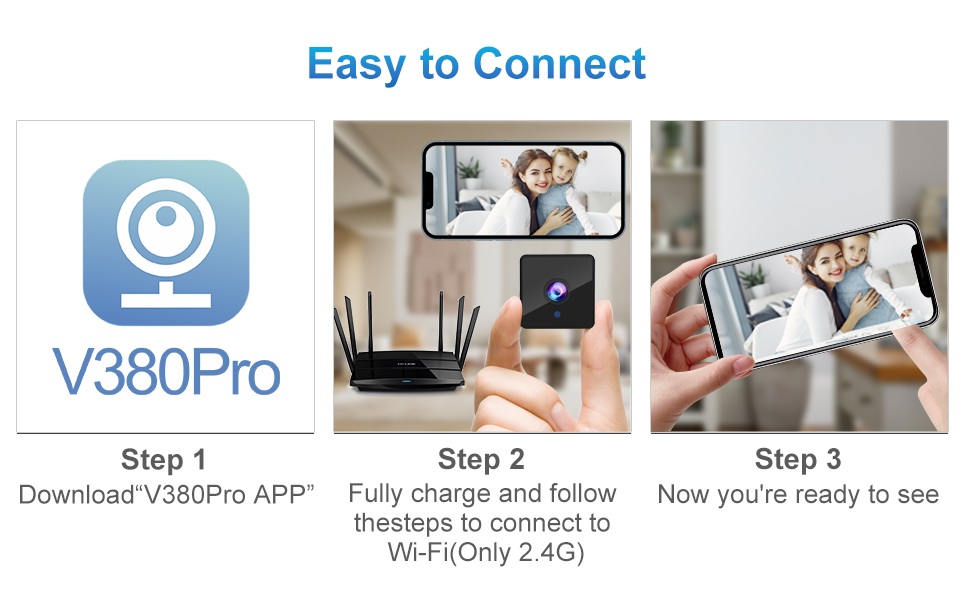
Figure 4.2: Easy Connection Steps. This graphic illustrates the three-step process for connecting the Rettru Q18 camera: downloading the V380 Pro app, charging and connecting to 2.4G Wi-Fi, and then accessing the live view.
5. 운영
5.1 라이브 View 그리고 녹음
Once connected, open the V380 Pro app to access the live video feed. You can manually initiate recording or configure continuous recording if a Micro SD card is inserted.
- Tap on the camera feed in the app to enter live view.
- Use the on-screen controls to take snapshots, record video, or access settings.
- Ensure a Micro SD card (up to 128GB) is inserted for local video storage.
5.2 동작 감지 및 알림
The camera features AI human detection to minimize false alarms. When motion is detected, the camera can send alerts to your smartphone and record video.
- Navigate to the camera settings in the V380 Pro app.
- Enable "Motion Detection" and "AI Human Detection."
- Configure alert sensitivity and notification preferences.
- You can also activate the built-in siren (105dB) through the app to deter intruders.
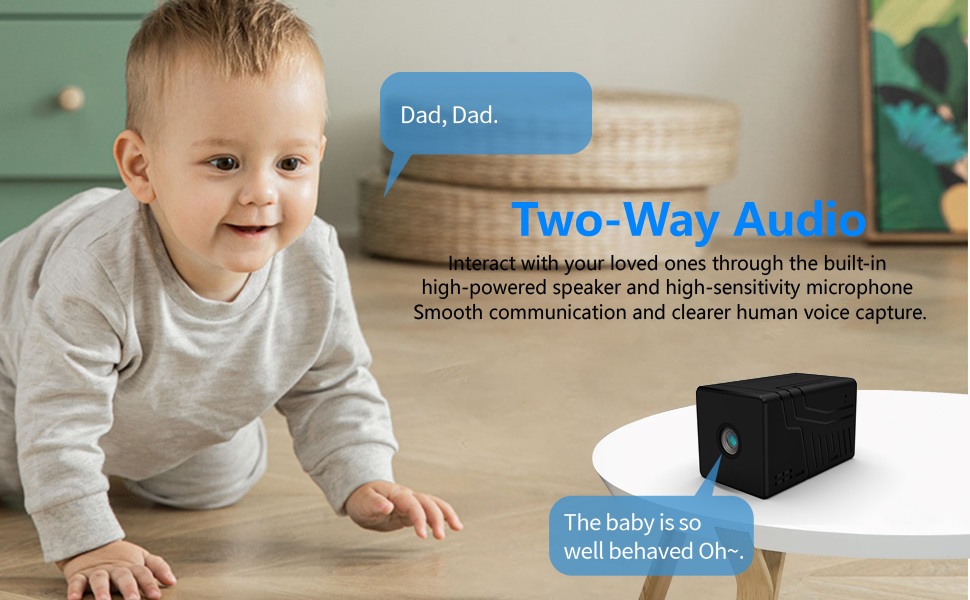
Figure 5.1: AI Motion Detection and Alerts. This image demonstrates the camera's AI motion detection capability, showing a person triggering an alert on a smartphone, with options for notification and video playback.
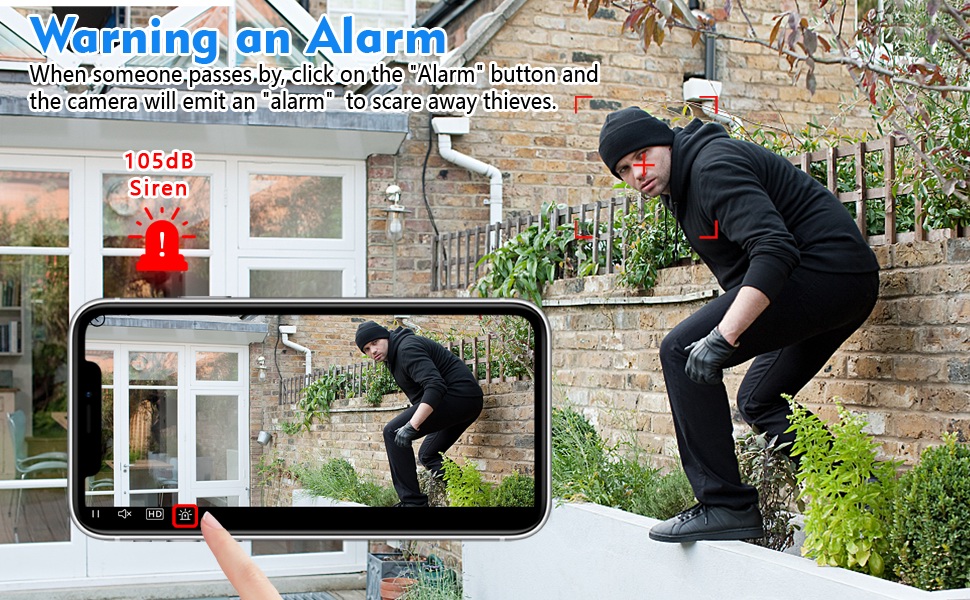
Figure 5.2: Activating the Alarm. This image illustrates the "Warning an Alarm" feature, where a user can click an "Alarm" button on their phone to activate the camera's siren when motion is detected, such as a person climbing a fence.
5.3 야간 투시경
The camera automatically switches to night vision mode in low-light conditions, providing clear black-and-white video without a visible red glow from infrared LEDs.
- Night vision range is approximately 28 feet.
- Ensure no obstructions block the camera's view for optimal night vision performance.
5.4 양방향 오디오
Utilize the built-in speaker and microphone for two-way communication through the V380 Pro app.
- 라이브에서 view, 마이크 아이콘을 탭하여 카메라를 통해 말하세요.
- Ensure your phone's volume is adjusted to hear audio from the camera.
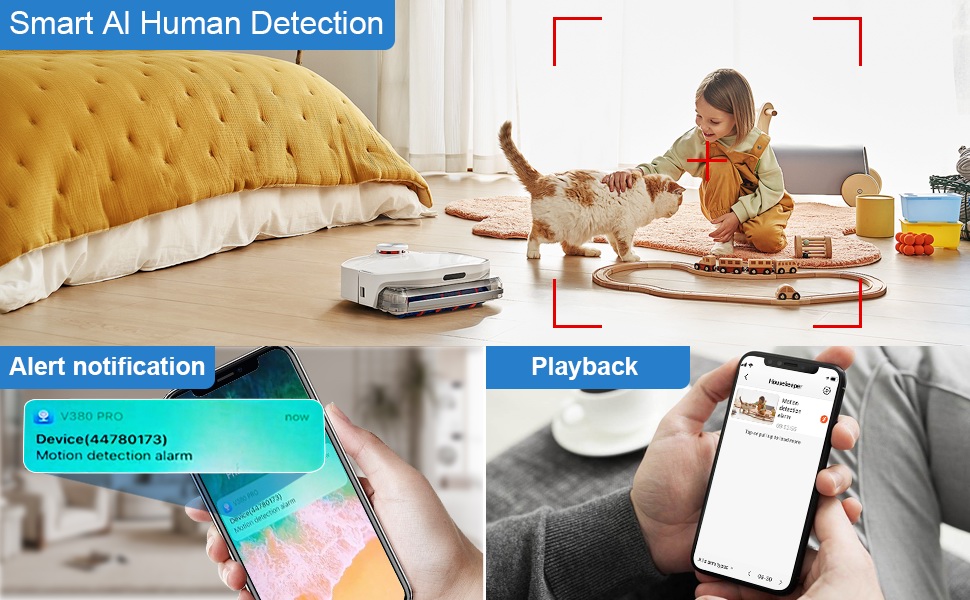
Figure 5.3: Two-Way Audio Communication. This image illustrates the two-way audio functionality, allowing users to interact with individuals near the camera, such as speaking to a baby.
6. 유지관리
6.1 청소
To maintain optimal image quality, regularly clean the camera lens. Use a soft, dry, lint-free cloth. Avoid abrasive cleaners or solvents that could damage the lens or camera body.
6.2 보관
When not in use for extended periods, store the camera in a cool, dry place away from direct sunlight and extreme temperatures. Ensure the battery is partially charged (around 50%) before storage to prolong its lifespan.
7. 문제 해결
If you encounter issues with your Rettru Q18 camera, refer to the following common problems and solutions:
| 문제 | 해결책 |
|---|---|
| 카메라가 Wi-Fi에 연결되지 않습니다. |
|
| 앱에 비디오 피드가 없습니다. |
|
| 동작 감지 알림을 받지 못합니다. |
|
| Poor audio quality during two-way communication. |
|
| Camera battery drains quickly. |
|
8. 사양
| 특징 | 세부 사항 |
|---|---|
| 모델명 | Q18 |
| 비디오 캡처 해상도 | HD 4K Resolution (2560x1440) |
| 효과적인 스틸 해상도 | 5 MP |
| 연결 기술 | 무선(Wi-Fi 2.4GHz) |
| 전원 | 배터리 구동(1800mAh 리튬 이온) |
| 배터리 수명 | 최대 6시간 연속 녹화, 100일 대기 |
| View잉 각도 | 160도 |
| 나이트 비전 범위 | 28 피트 |
| 스토리지 지원 | 최대 128GB의 마이크로 SD 카드(포함되지 않음) |
| 컨트롤러 유형 | V380 프로 앱 |
| 특별 기능 | 2-Way Audio, HD 4K Resolution, Motion Sensor, Night Vision, Portable, AI Human Detection, Built-in Siren |
| 실내/실외 사용 | Indoor, Outdoor (IP65 rating) |
| 장착 유형 | Wall-Mounted & Surface-Mounted (with magnetic base) |
| 제품 치수 | 21.6 x 13.3 x 13.3 inches (Note: These are likely packaging dimensions; the camera itself is compact.) |
| 품목 무게 | 2.65온스 / 75그램 |
9. 보증 및 지원
Rettru products are manufactured with quality and reliability in mind. For warranty information or technical support, please contact the manufacturer directly through their official website or the contact information provided with your purchase. Please have your model number (Q18) and purchase details ready when contacting support.