
HOCO S19 Metal Grey
Hoco S19 Small Heartful ENC Noise Reduction Wireless Headphones
사용자 설명서
소개
Thank you for choosing the Hoco S19 Small Heartful ENC Noise Reduction Wireless Headphones. This manual provides detailed instructions on how to set up, operate, and maintain your new wireless headphones. Please read this manual carefully before use to ensure optimal performance and longevity of your device.
안전 정보
- 기기를 극한의 온도, 습도 또는 부식성 물질에 노출시키지 마십시오.
- Keep the device away from water and liquids. It is not water resistant.
- 기기를 분해하거나 개조하지 마십시오. 보증이 무효화됩니다.
- 제공되거나 인증된 충전 케이블만 사용하세요.
- 청력 손상을 방지하려면 장시간 높은 볼륨으로 청취하지 마십시오.
패키지 내용
다음 품목이 패키지에 포함되어 있는지 확인하세요.
- Hoco S19 Wireless Headphone
- 이어쿠션
- 충전 케이블(USB)
- 사용자 설명서

이미지: 앞면 view of the Hoco S19 retail packaging, showing the headphone and key features.
제품 끝view
Familiarize yourself with the components of your Hoco S19 headphone.

이미지: 오른쪽 view of the Hoco S19 wireless headphone, highlighting the ear hook design and control buttons.
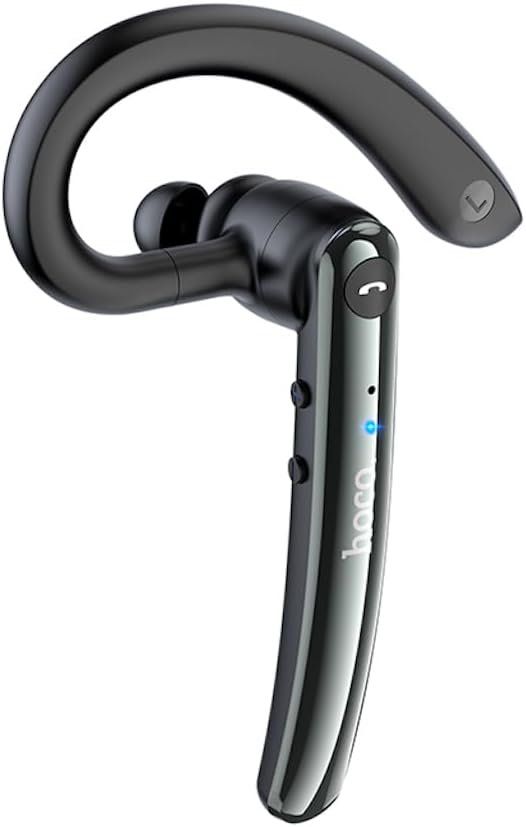
이미지: 왼쪽 view of the Hoco S19 wireless headphone, showing the ergonomic ear hook and main body.

이미지: 뒤로 view of the Hoco S19 wireless headphone, displaying the charging port, model number (S19), input voltage, and various certification marks.
주요 구성 요소:
- 이어후크: Designed for secure and comfortable fit.
- 본문: Houses the battery, chip, and controls.
- 다기능 버튼: 전원, 페어링, 통화 관리 및 음악 제어에 사용됩니다.
- 볼륨 버튼: 음량을 조절하려면.
- 마이크로폰: Dual microphones for ENC noise reduction.
- 충전 포트: 충전 케이블을 연결합니다.
- LED 표시등: 전원, 페어링 및 충전 상태를 표시합니다.

Image: Inside of the Hoco S19 packaging, illustrating the location of the main and auxiliary microphones for enhanced call clarity.
설정
1. 헤드폰 충전
Before first use, fully charge the headphone. The battery capacity is 90mAh.
- Connect the charging cable to the headphone's charging port and the other end to a USB power source (e.g., computer, wall adapter).
- The LED indicator will show charging status (e.g., red light).
- Charging takes approximately 1 hour. The LED indicator will change or turn off once fully charged.
2. 기기와 페어링 (블루투스)
The Hoco S19 uses Bluetooth 5.0 for stable connectivity.
- 전원 켜기: Press and hold the Multi-function Button until the LED indicator flashes blue and red alternately, indicating pairing mode.
- 블루투스 활성화: 스마트폰, 태블릿 또는 기타 블루투스 지원 기기에서 블루투스 설정으로 이동하여 블루투스를 켜세요.
- 검색 장치: 기기가 자동으로 주변의 블루투스 기기를 검색합니다.
- Select "Hoco S19": From the list of available devices, select "Hoco S19".
- 페어링 확인: Once connected, the LED indicator on the headphone will flash blue slowly or turn off, and you will hear a voice prompt confirming the connection.
If pairing fails, turn off the headphone and your device's Bluetooth, then repeat the steps.
작동 지침
전원 켜기/끄기
- 전원 켜기: 다기능 버튼을 약 3초 동안 길게 누르면 LED 표시등이 파란색으로 깜빡이고 음성 안내가 나옵니다.
- 전원 끄기 : Press and hold the Multi-function Button for approximately 5 seconds until the LED indicator turns red and you hear a voice prompt.
함수 호출
- 전화 받기/종료: Press the Multi-function Button once during an incoming call to answer. Press it again during a call to end.
- 전화 거부: Press and hold the Multi-function Button for approximately 2 seconds during an incoming call to reject.
- 마지막 번호 재다이얼: 통화 중이 아닐 때는 다기능 버튼을 두 번 누르세요.
음악 재생
- 재생/일시 중지: Press the Multi-function Button once during music playback.
- 다음 트랙: 볼륨 높이기 버튼을 길게 누르세요.
- 이전 트랙 : 볼륨 낮추기 버튼을 길게 누릅니다.
볼륨 조절
- 볼륨 업: 볼륨 높이기 버튼을 짧게 누르세요.
- 볼륨 작게 : 볼륨 낮추기 버튼을 짧게 누르세요.
ENC 소음 감소
The Hoco S19 features double-mark ENC (Environmental Noise Cancellation) for clearer calls. This feature is active during calls to reduce background noise.
언어 프롬프트
The headphone supports Chinese and English voice prompts. To switch languages, triple-click the Multi-function Button when the headphone is not connected to any device.
유지
- 청소: Use a soft, dry cloth to clean the headphone. Do not use harsh chemicals or abrasive materials.
- 저장: 헤드폰은 직사광선과 극한 온도 변화를 피해 서늘하고 건조한 곳에 보관하십시오.
- 배터리 관리 : To prolong battery life, avoid fully discharging the battery frequently. Charge the headphone regularly, even if not in use for extended periods.
문제 해결
| 문제 | 가능한 원인 | 해결책 |
|---|---|---|
| 헤드폰 전원이 켜지지 않습니다. | 배터리가 부족합니다. | Charge the headphone for at least 1 hour. |
| 기기와 페어링할 수 없습니다. | Bluetooth not enabled on device; headphone not in pairing mode; too far from device. | Ensure Bluetooth is on. Put headphone in pairing mode (flashing blue/red). Keep devices within 10 meters. |
| 소리가 나지 않거나 음질이 좋지 않습니다. | 볼륨이 너무 낮습니다. 헤드폰이 연결되지 않았습니다. 간섭이 발생하고 있습니다. | Increase volume. Reconnect headphone. Move away from sources of interference. |
| 통화 품질이 좋지 않습니다. | 주변 소음; 마이크가 가려짐. | Ensure microphone is clear. ENC noise reduction should help in noisy environments. |
명세서
| 특징 | 세부 사항 |
|---|---|
| 모델명 | S19 |
| 연결 기술 | 무선(블루투스) |
| 블루투스 버전 | 5.0 (Chip: Realtek RTL8763BMF) |
| 배터리 용량 | 90mAh |
| 충전 시간 | 약 1시간 |
| 토크/음악 시간 | 최대 9시간 |
| 대기 시간 | 최대 200시간 |
| 소음 감소 | Double-mark ENC (Environmental Noise Cancellation) |
| Supported Prompts | 중국어와 영어 |
| 재료 | 아크릴로니트릴 부타디엔 스티렌(ABS) |
| 품목 무게 | 12그램 |
| 색상 | 메탈 그레이 |
| 방수 레벨 | 방수가 되지 않음 |
보증 및 지원
HOCO products are designed and manufactured to the highest quality standards. For information regarding warranty coverage, please refer to the warranty card included with your purchase or visit the official HOCO web대지.
For technical support, troubleshooting assistance, or service inquiries, please contact your local HOCO distributor or the customer service department through the contact information provided on the HOCO official web사이트 또는 구매 영수증.
온라인 리소스: For additional information, FAQs, and product updates, please visit the official HOCO web대지.
Ask a question about this manual
Ask about setup, troubleshooting, compatibility, parts, safety, or missing instructions. Manuals+ will review the question and use this page’s manual context to help answer it.