
소개
Welcome to the user manual for your Qubo NEO2NW mobile phone. This device is specifically designed for seniors, featuring large buttons, a clear display, and essential functions for easy communication. Please read this manual carefully to understand how to use your phone safely and effectively.
제품 끝view
The Qubo NEO2NW is a user-friendly flip phone equipped with features tailored for convenience and safety.

영상: The Qubo NEO2NW flip phone in its open position, displaying its large, easy-to-read keypad and clear screen. A charging dock is visible in the background, indicating its charging method.

영상: A black flip phone displaying the digital time '22:10' on its screen. This image provides multiple views of the phone, highlighting its large keypad and clear display.
주요 특징:
- Large buttons for easy dialing and navigation.
- Clear 2.4-inch display with adjustable font size.
- SOS emergency button for quick contact with pre-set numbers.
- Loud ringtone and speaker for improved audibility.
- Charging dock for convenient and stable charging.
- Basic functions: Call, SMS, Phonebook, Alarm Clock, Camera, FM Radio, Torch.
설정
1. 언박싱 및 구성품
Carefully unpack your Qubo NEO2NW phone and ensure all components are present.

영상: 오버view of the box contents, including the Qubo NEO2NW phone, its charging dock, a USB cable, a power adapter, the battery, and printed user manuals.
2. SIM 카드 및 배터리 설치
- 전화기의 뒷면 덮개를 제거하십시오.
- Insert your Micro SIM card(s) into the designated slot(s) (supports Dual SIM).
- If desired, insert a MicroSD memory card (up to 32GB) into the memory card slot.
- Insert the 800mAh Lithium-ion battery, ensuring the contacts align.
- 뒷면 덮개를 교체하십시오.
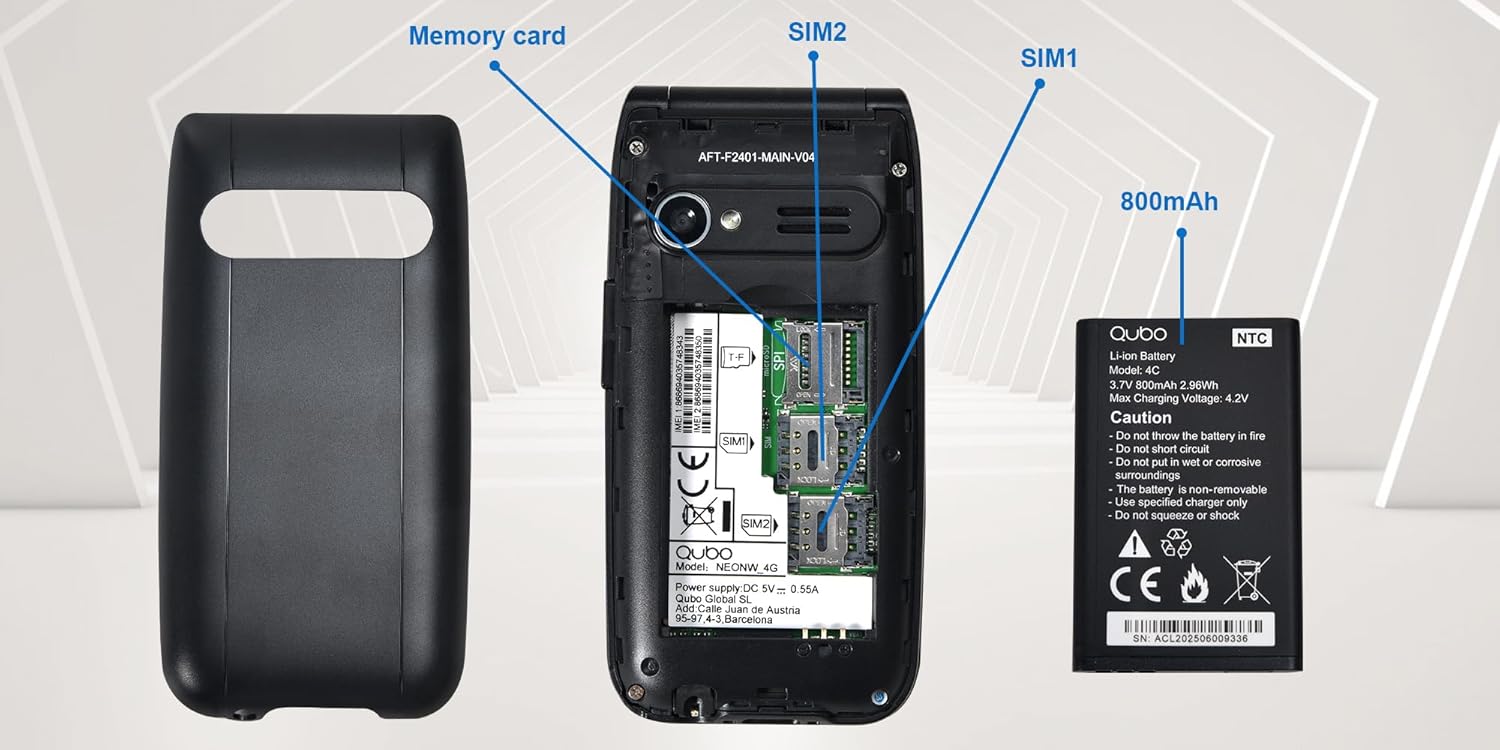
영상: 자세한 view of the phone's interior, highlighting the slots for two Micro SIM cards (SIM1, SIM2) and a memory card. The 800mAh battery is shown separately.
3. 휴대폰 충전
처음 사용하기 전에 휴대폰을 완전히 충전하십시오.
- Connect the USB Type-C cable to the phone and the power adapter. Plug the adapter into a wall outlet.
- Alternatively, place the phone in the charging dock. Ensure it is seated correctly and the charging indicator appears on the screen.
- 완전 충전에는 약 2.3시간이 걸립니다.

영상: This image shows the Type-C charging interface on the Qubo NEO2NW phone, along with an illustration of its battery compartment and icons indicating low power consumption and power-saving technology.
작동 지침
1. 전원 켜기/끄기
- 전원을 켜려면: 누르고 계세요 전원/통화 종료 button (red button) until the screen lights up.
- 전원을 끄려면: 길게 누르세요. 전원/통화 종료 button until the power off options appear, then select 'Power off'.
2. 전화 걸고 받기
- 전화를 걸려면: 키패드를 사용하여 전화번호를 입력하고 누르세요. 부르다 button (green button).
- 전화번호부에서: Navigate to the Phonebook, select a contact, and press the 부르다 단추.
- 대답하려면: 전화가 울리면 누르세요 부르다 단추.
- 통화를 종료하려면: 를 누르세요 전원/통화 종료 단추.
3. SMS 송수신
- 로 이동합니다 메시지 메뉴.
- Select 'New Message' to compose.
- 수신자 번호를 입력하거나 연락처에서 선택하세요.
- 키패드를 사용하여 메시지를 입력합니다.
- '보내기'를 누르세요.
4. SOS 비상 기능
The SOS button allows you to quickly contact pre-set emergency numbers.
- SOS 번호 설정: 이동하다 설정 > SOS 설정 to add up to 5 emergency contacts.
- SOS 활성화: 긴급 상황 발생 시, 버튼을 길게 누르십시오. 위급 신호 button on the back of the phone for a few seconds.
- The phone will automatically call the pre-set numbers in sequence until one answers. It will also send an emergency SMS to these contacts.

영상: This image demonstrates the SOS emergency call feature. It shows the Qubo NEO2NW phone with a highlighted SOS button and a visual representation of how it connects to up to 5 pre-programmed family numbers in an emergency.
5. Display and Font Settings
The phone features a 2.4-inch screen with options for large fonts for better readability.

영상: The Qubo NEO2NW phone's screen displaying large, clear fonts and the option to switch font sizes. The image also points out the loud ringtone capability and the large, tactile buttons on the keypad.
유지
- 휴대전화를 건조하게 유지하세요. 습기는 전자 회로를 손상시킬 수 있습니다.
- 극한의 온도를 피하세요. 고온은 전자기기의 수명을 단축시키고 배터리를 손상시킬 수 있습니다.
- 휴대전화를 청소할 때 강한 화학 물질, 세척 용제 또는 강력한 세제를 사용하지 마세요. 부드러운 천으로 닦으세요.amp 옷감.
- 휴대전화를 조심스럽게 다루세요. 떨어뜨리거나, 두드리거나, 흔들지 마세요.
- Use only Qubo-approved batteries, chargers, and accessories.
문제 해결
| 문제 | 가능한 원인 | 해결책 |
|---|---|---|
| 전화기 전원이 켜지지 않습니다 | 배터리가 방전되었거나 올바르게 설치되지 않았습니다. | Charge the battery for at least 30 minutes. Ensure the battery is correctly inserted. |
| 전화를 걸거나 받을 수 없습니다 | 유성 카드가 없거나, 유성 카드가 활성화되어 있지 않거나, 네트워크 서비스 지역을 벗어났습니다. | Ensure SIM card is inserted and active. Check network signal. Contact your service provider. |
| SOS 버튼이 작동하지 않습니다 | SOS numbers not set or incorrect. | Verify that emergency numbers are correctly configured in SOS settings. Ensure sufficient network signal. |
| 음질이 좋지 않음 | Low volume, poor network, or speaker/microphone obstruction. | Adjust call volume. Move to an area with better network coverage. Ensure speaker and microphone are clear. |
명세서
| 특징 | 세부 사항 |
|---|---|
| 모델명 | Qubo Flip Phone Charging Dock |
| 디스플레이 크기 | 2.4 인치 |
| 디스플레이 해상도 | 240 x 320 픽셀 |
| 운영 체제 | 카이오스 |
| 숫양 | 64메가바이트 |
| CPU 속도 | 260MHz |
| 셀룰러 기술 | 2G, 3G (GSM, UMTS) |
| SIM 카드 슬롯 | Dual SIM (Micro SIM) |
| Max Flash Memory Support | 32GB(마이크로SD) |
| 후방 카메라 | 0.3 MP |
| 배터리 용량 | 800mAh(리튬이온) |
| 충전 시간 | 약 2.3시간 |
| 통화 시간 | 약 4시간 |
| 대기 시간 | 약. 8 일 |
| 연결성 | USB 타입 C, 3.5mm 헤드폰 잭 |
| 치수 | 10.5 x 5.3 x 1.7cm |
| 특별 기능 | SOS Button, FM Radio, Torch, GPS |
보증 및 지원
For warranty information, please refer to the warranty card included in your product packaging. For technical support or further assistance, please contact Qubo customer service.
- 제조업체: 쿠보
- ASIN: B0C5GXR2VR
- 모델 번호: 6e39af81-1411-4b00-b5ae-d8778c6ab86c
- 연락하다: Refer to the official Qubo website or documentation for up-to-date contact information.