
1. 서론
The MOBI CONNECT Smart DualScan Bluetooth Thermometer (Model 700026) is designed for accurate and versatile temperature measurement. It offers multiple reading methods including ear, forehead, room, and object temperature. This device features a backlit screen, LED fever indicators, and memory recall for up to 20 previous readings. It supports both Fahrenheit and Celsius modes and can connect via Bluetooth to the MOBI Smart App for enhanced tracking and management capabilities.

Image: The MOBI CONNECT Smart DualScan Bluetooth Thermometer, its packaging, and a smartphone displaying the companion app.
2. 패키지 내용
패키지에 모든 품목이 들어 있는지 확인하세요.
- 1 x MOBI CONNECT Smart DualScan Bluetooth Thermometer
- 1 x Protective Cap (for forehead mode)
- 1 x 보관 주머니
- 1 x 사용자 설명서
- 1 x 빠른 시작 가이드
- AAA 배터리 2개

이미지: 상세 view of the thermometer with its components labeled for easy identification.
3. 설정
3.1. 배터리 설치
- Open the battery compartment cover located on the back of the thermometer.
- AAA 배터리 2개를 올바른 극성(+/-)에 맞춰 삽입합니다.
- 배터리 덮개를 단단히 닫으세요.
3.2. 전원 켜기 / 끄기
- 전원을 켜려면 SCAN/Power button. The device will perform a self-test and display the last reading.
- The thermometer will automatically power off after approximately 30 seconds of inactivity to conserve battery life.
3.3. Switching Temperature Units (Fahrenheit/Celsius)
기기의 전원이 켜진 상태에서 버튼을 길게 누르세요. 방법 button for 3 seconds to switch between Fahrenheit (°F) and Celsius (°C).
4. 작동 모드
4.1. 이마 측정
- Ensure the protective cap is on the probe.
- 를 누르세요 SCAN/Power 버튼을 눌러 온도계를 켭니다.
- Position the thermometer approximately 0.5 to 1 inch (1-2.5 cm) from the center of the forehead.
- 를 누르고 계세요 주사 button. A beep will sound, and the temperature will be displayed on the LCD screen.

Image: Demonstrating forehead temperature measurement.
4.2. 귀 측정
- Gently remove the protective cap from the probe.
- 를 누르세요 SCAN/Power 버튼을 눌러 온도계를 켭니다.
- Carefully insert the probe into the ear canal. For children under 1 year, gently pull the ear straight back. For children over 1 year and adults, gently pull the ear up and back.
- 를 누르고 계세요 주사 button. A beep will sound, and the temperature will be displayed on the LCD screen.

Image: Removing the protective cap for ear measurement.

Image: Demonstrating ear temperature measurement.
4.3. Room and Object Temperature Measurement
The thermometer can also measure ambient room temperature and the temperature of objects (e.g., liquids, surfaces). To switch to these modes, press the 방법 button repeatedly until the desired icon (room or object) appears on the display. Then, point the thermometer at the object or area and press 주사.
4.4. 발열 표시기
The LCD display changes color to indicate temperature status:
- 녹색 백라이트: Indicates a normal body temperature.
- 빨간색 백라이트: Indicates a high body temperature (fever warning).
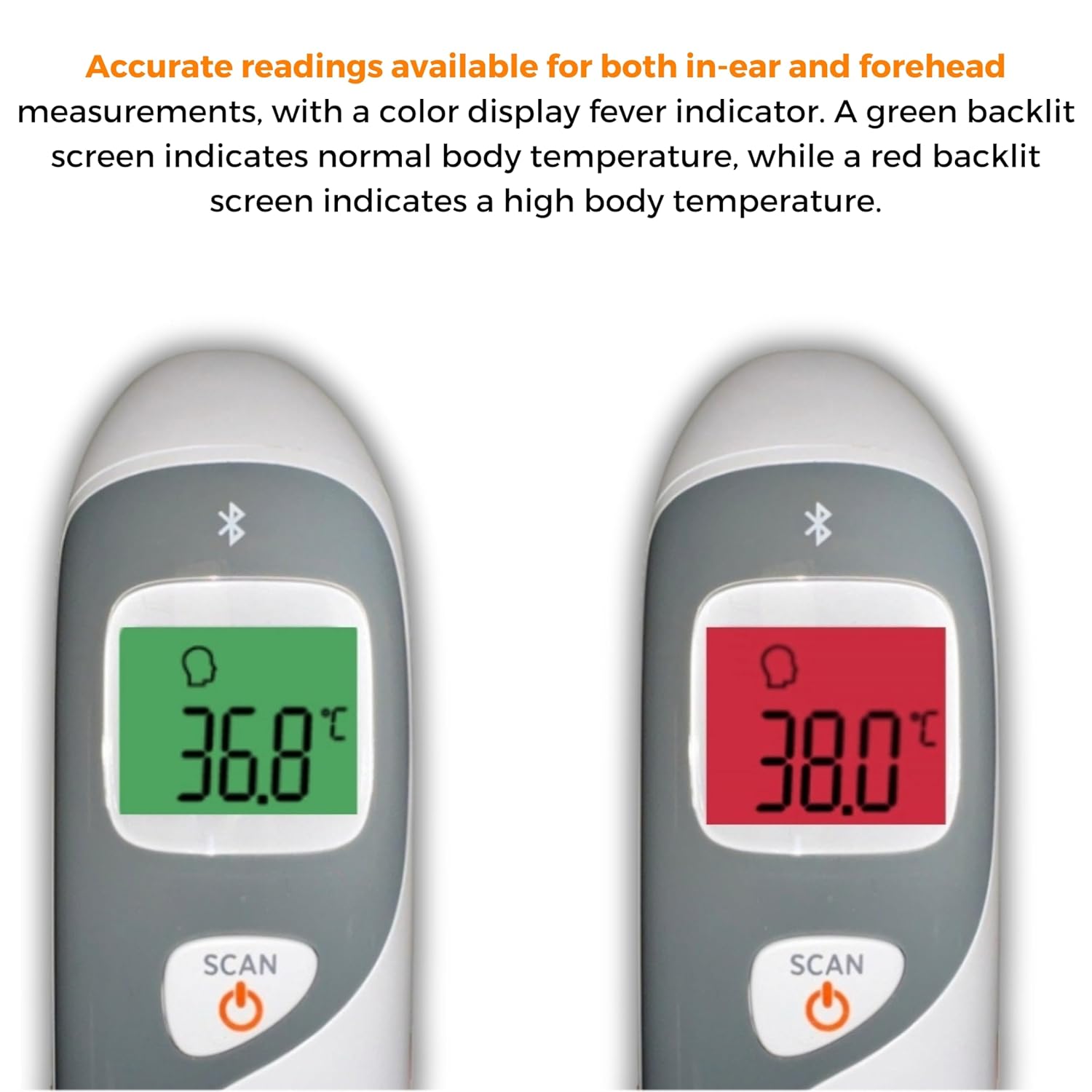
Image: The thermometer's color-changing LCD display indicating normal (green) and high (red) temperatures.
4.5. 메모리 리콜
The thermometer stores the last 20 temperature readings. To access these readings, press the MEM/MUTE button while the device is on. Each press will cycle through the stored readings.
5. Bluetooth Connectivity and MOBI Smart App
The MOBI CONNECT Smart DualScan Thermometer can be used independently or paired with your smartphone via Bluetooth for enhanced tracking and features through the MOBI Smart App.
5.1. 앱 다운로드 및 페어링
- Download the "MOBI Smart" app from your device's app store (available on iOS and Android).
- 스마트폰에서 Bluetooth가 활성화되어 있는지 확인하세요.
- Open the MOBI Smart App and follow the on-screen instructions to pair your thermometer.
5.2. 앱 기능
- 자동 추적: Automatically records temperature readings from the thermometer.
- 다중 사용자 프로files: 전문가를 생성하고 관리하세요files for each family member to track their health data independently.
- 데이터 로깅: Add comments to each reading for context.
- Reporting & Graphs: View powerful reports and graphs for daily, weekly, monthly, or yearly temperature trends.
- 내보내기 옵션: Export data for sharing with healthcare professionals.
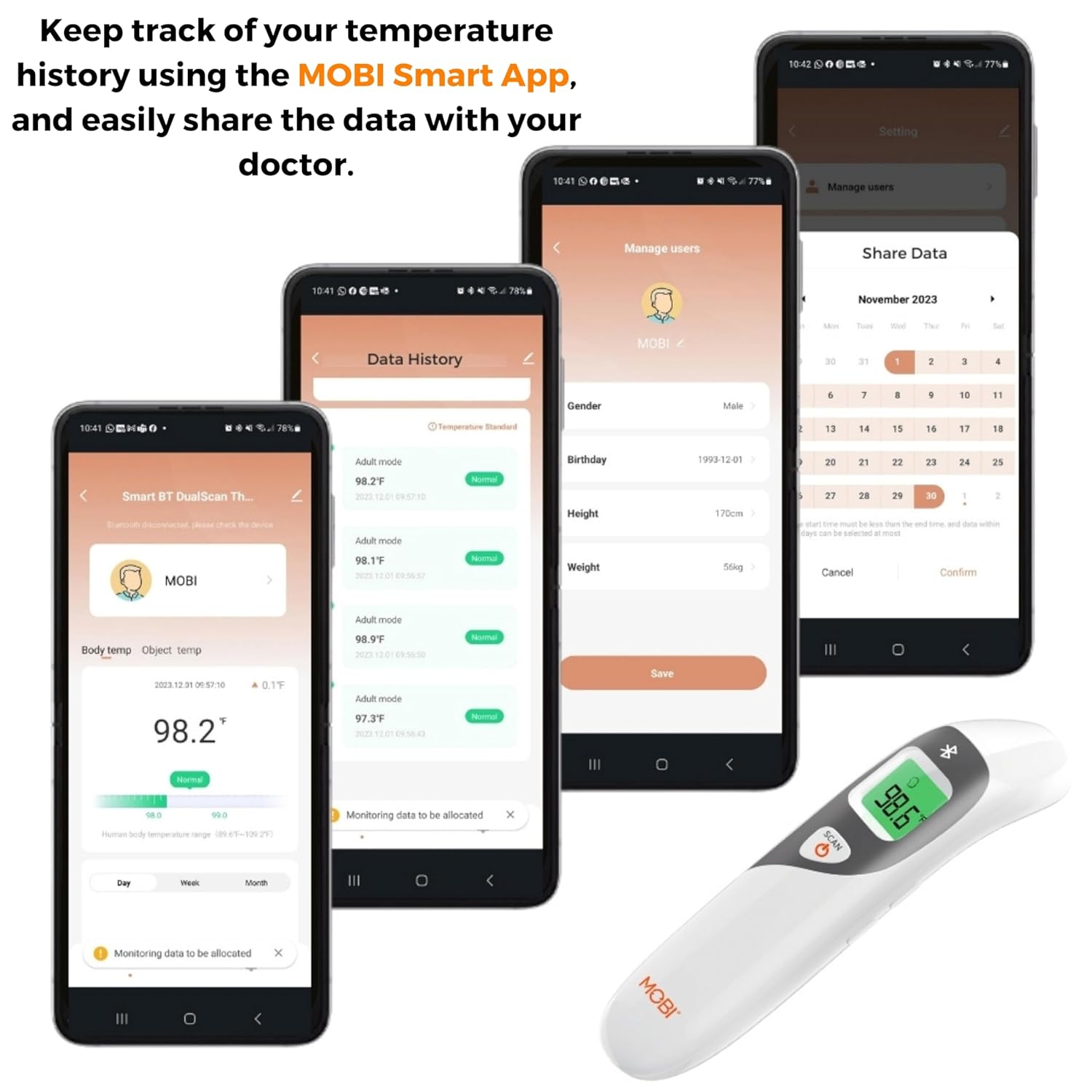
Image: Screenshots of the MOBI Smart App interface, showing data tracking and user management.
5.3. 공식 제품 영상
영상: 공식 발표view of the MOBI Smart DualScan Bluetooth Ear & Forehead Thermometer, demonstrating its features and usage.
6. 유지관리
6.1. 청소
온도계를 청소하려면 부드러운 천으로 닦으십시오.amp cloth. Do not immerse the device in water or use abrasive cleaners. Ensure the probe is clean before each use, especially for ear measurements.
6.2. 보관
Store the thermometer in its protective pouch in a cool, dry place, away from direct sunlight and extreme temperatures. Remove batteries if the device will not be used for an extended period.
7. 문제 해결
- "Lo" or "Hi" Reading: Indicates a temperature outside the measurable range. Ensure proper placement and try again.
- 부정확한 판독:
- Check for proper probe placement (ear or forehead).
- 프로브가 깨끗한지 확인하십시오.
- Verify the correct mode (Adult/Child/Object) is selected if applicable.
- Allow the thermometer to acclimate to room temperature for 30 minutes if it has been in a significantly different environment.
- 블루투스 연결 문제:
- 스마트폰에서 Bluetooth가 활성화되어 있는지 확인하세요.
- Restart the thermometer and the MOBI Smart App.
- Ensure the thermometer is within range of your smartphone.
- 디스플레이 없음: 배터리 설치를 확인하고 필요한 경우 배터리를 교체하십시오.
8. 사양
| 모델 번호 | 700026 |
| 전원 | AAA 배터리 2개 사용 |
| 디스플레이 유형 | 백라이트가있는 LCD |
| 연결성 | 블루투스 |
| 측정 모드 | Ear, Forehead, Room, Object |
| 온도 단위 | 화씨(°F) / 섭씨(°C) |
| 기억 회상 | 최근 20개 독서 |
| 제품 관리 | 닦아내십시오 |
| 재료 | 플라스틱 |
| 제조업체 | Mobi Technologies Inc. |
9. 보증 및 지원
For warranty information or technical support, please contact Mobi Technologies Inc. directly. Refer to the product packaging or the official MOBI web최신 연락처 정보는 사이트에서 확인하세요.