
소개
Thank you for choosing the Metronic Vintage Bluetooth Turntable, Model 477360. This device allows you to enjoy your vinyl records at three different speeds (33, 45, and 78 RPM) and stream audio wirelessly via Bluetooth. It features integrated speakers for direct playback and a classic wood finish. This manual provides essential information for safe operation, setup, and maintenance of your turntable.
안전 지침
- 전원: Use only the provided 12V power adapter. Ensure the voltage는 귀하의 지역 전원 공급 장치와 일치합니다.
- 물과 습기: Do not expose the unit to water, rain, or excessive moisture. Do not place objects filled with liquids, such as vases, on the apparatus.
- 열원: Keep the turntable away from heat sources such as radiators, heat registers, stoves, or other apparatus (including amp열을 생성하는 발전기.
- 통풍: 적절한 환기를 유지하세요. 환기구를 막지 마세요.
- 청소: 청소하기 전에 전원 콘센트에서 제품의 플러그를 뽑으십시오. 부드럽고 마른 천을 사용하십시오. 액체 세척제나 스프레이형 세척제는 사용하지 마십시오.
- 서비스: 이 제품을 직접 수리하려고 하지 마십시오. 모든 서비스는 자격을 갖춘 서비스 담당자에게 문의하십시오.
- 놓기: Place the turntable on a stable, level surface to prevent vibrations and ensure proper playback.
패키지 내용
다음 품목이 패키지에 포함되어 있는지 확인하세요.
- Metronic Vintage Bluetooth Turntable (Model 477360) with pre-installed stylus
- 12-Volt Power Adapter
- 사용 설명서(본 문서)
제품 끝view
Familiarize yourself with the components of your Metronic turntable.

그림 1: 앞쪽 view of the Metronic turntable. The volume/power knob is visible on the left, and the Metronic brand name is on the right side of the wooden base.

그림 2: 각진 view of the turntable with the dust cover open. A clear vinyl record is on the platter, and the tonearm with its red stylus is positioned above it.

그림 3: Rear panel of the turntable. From left to right, it shows the 'Wireless connect' button, RCA Line Out ports (R and L), and the 12V power input.

그림 4: 상세한 view of the tonearm assembly, including the stylus cartridge, positioned over a vinyl record.
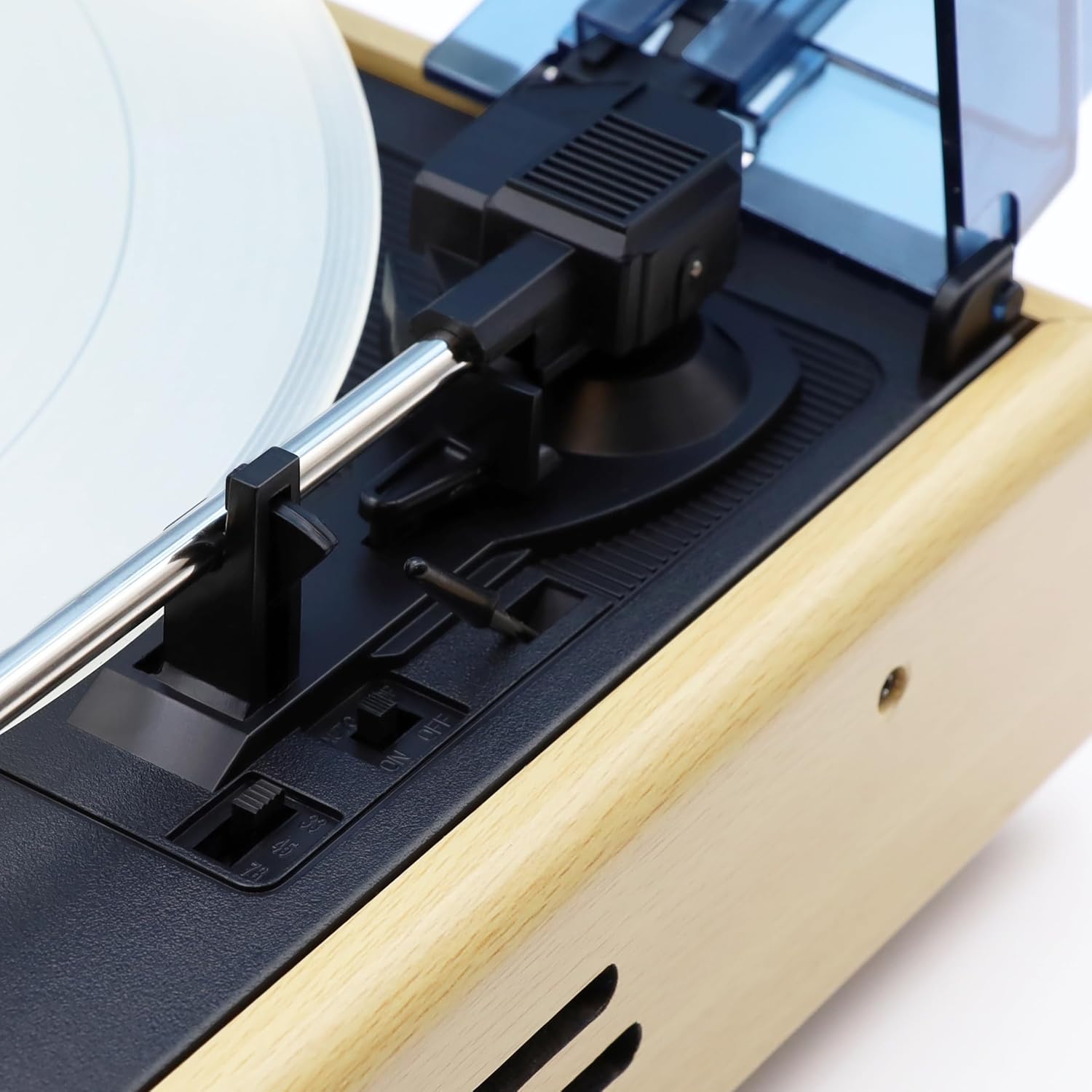
그림 5: Control switches located near the tonearm base. These include the speed selector (33, 45, 78 RPM) and the Auto-Stop ON/OFF switch.

그림 6: 옆 view of the turntable, showing the design of the wooden casing and the integrated speaker grille.
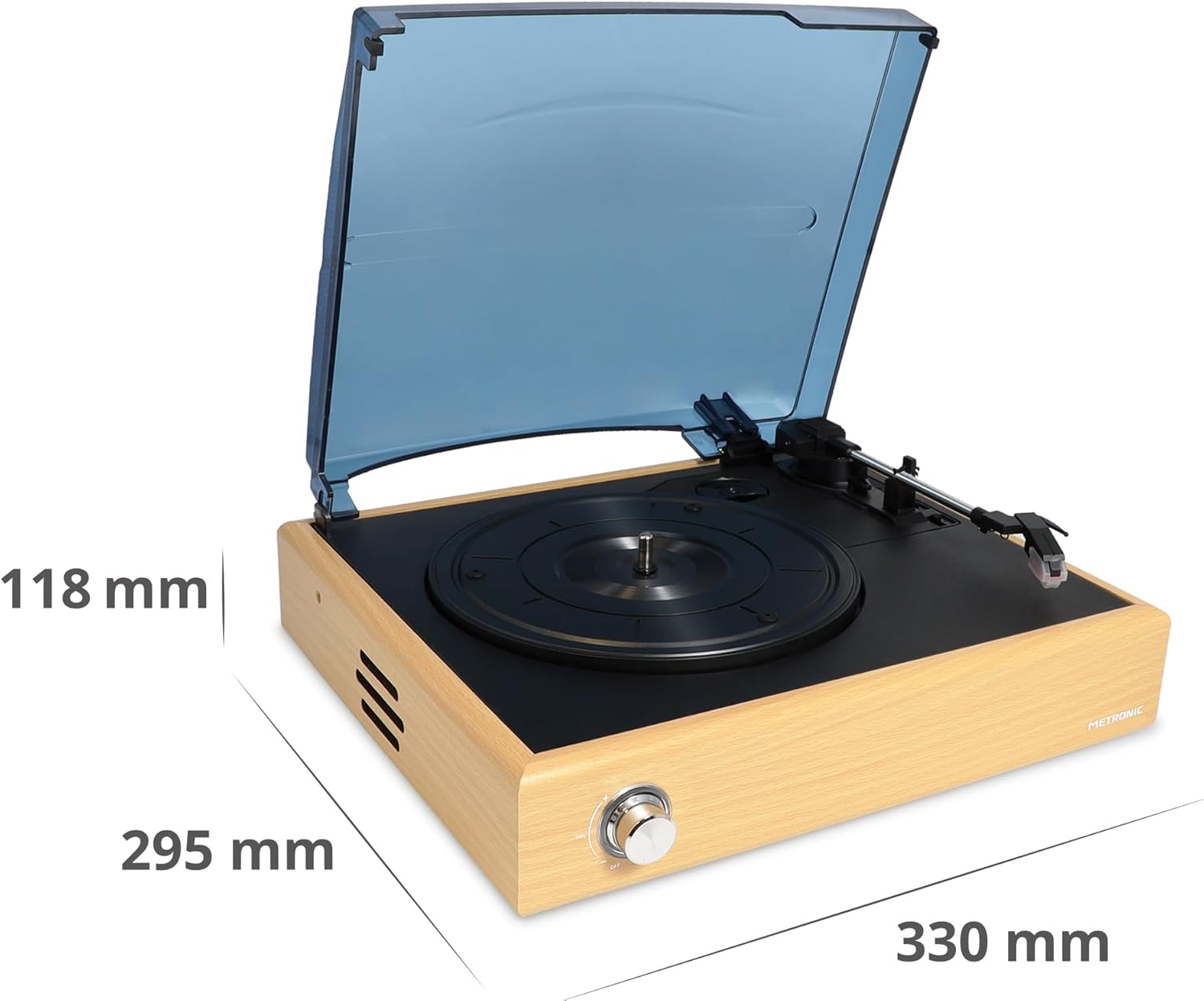
그림 7: Dimensional diagram of the turntable, indicating its length, width, and height.
설정
- 턴테이블을 개봉하세요: 모든 구성품을 포장에서 조심스럽게 꺼내세요. 나중에 운반하거나 보관할 수 있도록 포장을 보관하세요.
- 턴테이블을 놓으세요: Position the turntable on a flat, stable, and vibration-free surface. Ensure there is adequate space around the unit for ventilation.
- 스타일러스 보호필름을 제거하세요: Gently remove the clear plastic stylus protector from the needle cartridge. Be careful not to bend the stylus.
- 전원 연결: Insert the small end of the 12V power adapter into the DC IN port on the rear of the turntable. Plug the other end into a wall outlet.
- 먼지 커버: The turntable comes with a hinged dust cover. You can leave it open during playback or close it when not in use to protect the platter and tonearm.
작동 지침
비닐 레코드 재생
- 전원 켜기: Turn the Volume/Power knob clockwise until it clicks to power on the unit.
- 속도 선택: Set the speed selector switch (located near the tonearm base) to the appropriate speed for your record (33, 45, or 78 RPM). For 45 RPM records, place the included 45 RPM adapter on the spindle if needed.
- 장소 기록: 턴테이블 플래터 위에 LP 레코드를 조심스럽게 올려놓으세요.
- 자동 정지 기능: The Auto-Stop switch (next to the speed selector) can be set to ON or OFF. When ON, the platter will automatically stop spinning when the tonearm reaches the end of the record. When OFF, the platter will continue to spin.
- 톤암 위치 지정: 큐잉 레버를 사용하여 톤암을 부드럽게 들어 올리십시오. 톤암을 레코드의 원하는 시작 홈 위로 이동시키십시오.
- 하단 톤암: Slowly lower the tonearm onto the record using the cueing lever. The music will begin to play.
- 볼륨 조절: Use the Volume/Power knob to adjust the playback volume from the integrated speakers.
- 재생 종료: At the end of the record, if Auto-Stop is ON, the platter will stop. If OFF, manually lift the tonearm using the cueing lever and return it to the tonearm rest. Turn the Volume/Power knob counter-clockwise until it clicks to power off the unit.
블루투스 연결
The Metronic turntable can receive audio from a Bluetooth-enabled device (e.g., smartphone, tablet) and play it through its integrated speakers.
- 전원 켜기: Turn the Volume/Power knob clockwise to power on the turntable.
- 블루투스 모드 활성화: Press the 'Wireless connect' button on the rear panel (refer to Figure 3). The Bluetooth indicator light will flash, indicating it is in pairing mode.
- 기기에서 Bluetooth를 활성화하세요: On your smartphone or tablet, go to the Bluetooth settings and enable Bluetooth.
- Pair with Turntable: 검색 available devices. You should see "METRONIC" or a similar name appear in the list. Select it to pair.
- 재생: Once paired, the Bluetooth indicator light will become solid. You can now play audio from your device through the turntable's speakers. Adjust volume using both your device and the turntable's volume knob.
- 연결 해제: To disconnect, simply turn off Bluetooth on your device or press the 'Wireless connect' button again on the turntable.
유지
- 장치 청소: Wipe the turntable's exterior with a soft, dry, lint-free cloth. Do not use abrasive cleaners, waxes, or solvents.
- 스타일러스 관리: The stylus (needle) is delicate. Clean it periodically with a soft brush, brushing gently from back to front. Avoid touching the stylus with your fingers. A worn or damaged stylus can damage your records and degrade sound quality. Replace the stylus if you notice a significant drop in sound quality or visible damage.
- 먼지 커버: Keep the dust cover closed when the turntable is not in use to prevent dust accumulation on the platter and tonearm. Clean the dust cover with a soft, damp 옷감.
- 기록 관리: 레코드를 깨끗하게 유지하고 먼지가 쌓이지 않도록 하세요. 레코드가 휘어지는 것을 방지하기 위해 슬리브에 넣어 세워서 보관하세요.
문제 해결
| 문제 | 가능한 원인 | 해결책 |
|---|---|---|
| 전원이 없습니다 | 전원 어댑터가 연결되지 않았습니다. 전원 콘센트가 작동하지 않습니다. 기기가 켜져 있지 않습니다. | Ensure power adapter is securely connected to the unit and a working outlet. Turn the Volume/Power knob clockwise until it clicks. |
| 스피커에서 소리가 나지 않음 | Volume too low; Stylus protector still on; Stylus damaged; Bluetooth mode active. | Increase volume. Remove stylus protector. Check stylus for damage. Ensure Bluetooth mode is not active if playing vinyl. |
| 기록 건너뛰기 | Record is dirty or scratched; Turntable not level; Stylus worn or dirty. | Clean the record. Place the turntable on a level surface. Clean or replace the stylus. |
| 블루투스가 연결되지 않습니다 | Turntable not in pairing mode; Device Bluetooth off; Device too far. | Press 'Wireless connect' button to enter pairing mode. Ensure Bluetooth is enabled on your device. Keep devices within range (approx. 10 meters). |
| 접시가 회전하지 않음 | Unit not powered on; Auto-Stop engaged at end of record. | Ensure unit is powered on. If tonearm is at the end of a record and Auto-Stop is ON, the platter will stop. Lift the tonearm and return it to rest. |
명세서
- 상표: 메트로 닉
- 모델 이름: 477360
- 색상: 천연목재
- 사이: 블루투스
- 특별 기능: Integrated Bluetooth receiver, Auto-stop function
- 호환 장치: 스마트폰, 태블릿
- 회전 속도: 33, 45, 78 RPM
- 오디오 출력: Stereo 2 x 3 W (integrated speakers)
- 톤암 : Manual straight arm
- 전원 공급 장치: 12V 어댑터(포함)
- 재료: 목재
- 품목 무게: 700그램
- 치수(대략): 330mm(길이) x 295mm(폭) x 118mm(높이)
보증 및 지원
This Metronic turntable comes with a 2년 제조사 보증보증 청구를 위해 구매 증빙 서류를 보관하세요.
For technical support, troubleshooting beyond this manual, or warranty inquiries, please contact your retailer or visit the official Metronic web고객 서비스 정보를 제공하는 사이트입니다.