
1. 서론
This manual provides detailed instructions for the setup, operation, and maintenance of your Creative Sound Blaster Katana SE Multi-Channel Gaming Soundbar. Designed for an immersive audio experience, this soundbar features 180W peak power, a bi-amplified 4-driver design, Super X-Fi technology, and customizable RGB lighting. Please read this manual thoroughly before using your device to ensure optimal performance and safety.

Figure 1: Creative Sound Blaster Katana SE Gaming Soundbar
2. 중요한 안전 정보
- 이 지침을 읽어보세요.
- 이 지침을 잘 보관하세요.
- 모든 경고를 주의하세요.
- 모든 지시를 따르세요.
- 이 기기를 물 근처에서 사용하지 마십시오.
- 마른 천으로만 닦으십시오.
- 환기구를 막지 마십시오. 제조업체의 지침에 따라 설치하십시오.
- 라디에이터, 난방 조절기, 스토브 또는 기타 장치(다음을 포함)와 같은 열원 근처에 설치하지 마십시오. amp열을 생성하는 발전기.
- 전원 코드가 밟히거나 끼지 않도록 보호하세요. 특히 플러그, 편의용 콘센트 및 기기에서 나오는 부분은 보호하세요.
- 제조사가 지정한 부속품/액세서리만 사용하세요.
- 번개 폭풍 시 또는 장기간 사용하지 않을 때는 기기의 플러그를 뽑아두세요.
3. 패키지 내용
패키지에 모든 품목이 들어 있는지 확인하세요.
- Creative Sound Blaster Katana SE Soundbar
- Subwoofer (wired)
- 원격 제어
- 전원 어댑터
- USB-C 케이블
- 광케이블
4. 제품 오버view
The Sound Blaster Katana SE is an all-in-one soundbar designed for powerful and immersive audio. It features a sleek design with integrated controls and a front-facing display.
4.1. Soundbar Components
- 상단 패널 컨트롤: Power, Volume Up/Down, Source, Mode, SXFI.
- 전면 디스플레이: Shows current source (USB, AUX, OPTICAL, BT, TV), volume level, and selected sound mode.
- Front Headphone Jack: For connecting headphones directly.
- 내장 마이크: 음성 통신을 위해.
- RGB 조명 스트립: Customizable lighting effects located at the bottom of the soundbar.
- 운전자: 바이amplified 4-driver design for clear and precise audio.

그림 2: 전면 view of the Sound Blaster Katana SE with RGB lighting
4.2. 후면 패널 연결
The rear panel provides various ports for connecting to your devices:
- HDMI Out (ARC): 오디오 리턴 채널(ARC)을 지원하는 TV에 연결하기 위한 용도입니다.
- SXFI Out: Dedicated port for Super X-Fi enabled headphones.
- USB 오디오 입력: For digital audio connection to PC/Mac.
- 보조 입력: 3.5mm 아날로그 오디오 입력.
- 광학 입력: 디지털 광 오디오 입력.
- 서브 아웃: For connecting the wired subwoofer.
- 전원 입력: 전원 어댑터용.

Figure 3: Rear panel with HDMI ARC, SXFI Out, USB Audio In, Aux In, Optical In, Sub Out, and Power Input.
4.3. 서브우퍼
The included wired subwoofer enhances bass response for a more dynamic audio experience.

그림 4: 내부 view showing the soundbar's bi-amplified drivers and the subwoofer's design.
5. 설정
Follow these steps to set up your Sound Blaster Katana SE:
- 놓기: Place the soundbar on a stable surface below your TV or monitor. Position the subwoofer on the floor near the soundbar for optimal bass.
- 서브우퍼 연결: Connect the wired subwoofer cable to the 'Sub Out' port on the soundbar's rear panel.
- 전원 연결: Connect the power adapter to the soundbar's power input and then plug it into a wall outlet.
- 오디오 소스 연결: Choose your preferred audio connection method (HDMI ARC, Optical, USB, Aux, or Bluetooth) and connect the appropriate cable.
Video 1: Official product video demonstrating the Sound Blaster Katana SE's features and connectivity options.
6. 연결 옵션
The Sound Blaster Katana SE offers a wide range of connectivity to suit various devices:
- HDMI Out (ARC): Connect to your TV's HDMI ARC port for high-quality audio and control.
- USB 오디오 입력: Ideal for connecting to PCs, Macs, or gaming consoles that support USB audio.
- 보조 입력: 아날로그 오디오 출력이 있는 장치에 연결하려면 3.5mm 오디오 케이블을 사용하십시오.
- 광학 입력: For digital audio connection from TVs, game consoles, or other media players.
- 블루투스 5.0 : Pair wirelessly with your mobile devices, tablets, or computers for convenient audio streaming.
- SXFI Out: Connect Super X-Fi certified headphones for a personalized holographic audio experience.

Figure 5: Soundbar showcasing versatile connectivity with gaming consoles and mobile devices.
7. 사용 설명서
7.1. 전원 켜기/끄기
사운드바 상단 패널 또는 리모컨의 전원 버튼을 눌러 기기를 켜거나 끄세요.
7.2. 볼륨 조절
Use the Volume Up (+) and Volume Down (-) buttons on the soundbar or remote to adjust the audio level. The current volume will be displayed on the front panel.
7.3. 소스 선택
Press the 'Source' button on the soundbar or remote to cycle through available input sources (HDMI ARC, USB, Aux, Optical, Bluetooth).
7.4. 사운드 모드
The soundbar features optimized sound modes for different content types. Press the 'Mode' button on the soundbar or remote to switch between:
- 음악: 음악 재생에 최적화되었습니다.
- 영화 산업: 영화 감상에 최적화된 오디오.
- 노름: Tailored for immersive gaming soundscapes.
- Effects Off: Neutral audio profile.
7.5. 리모컨 사용
The included remote control provides full functionality for the soundbar, including power, volume, source, mode, SXFI, RGB lighting, and custom buttons.
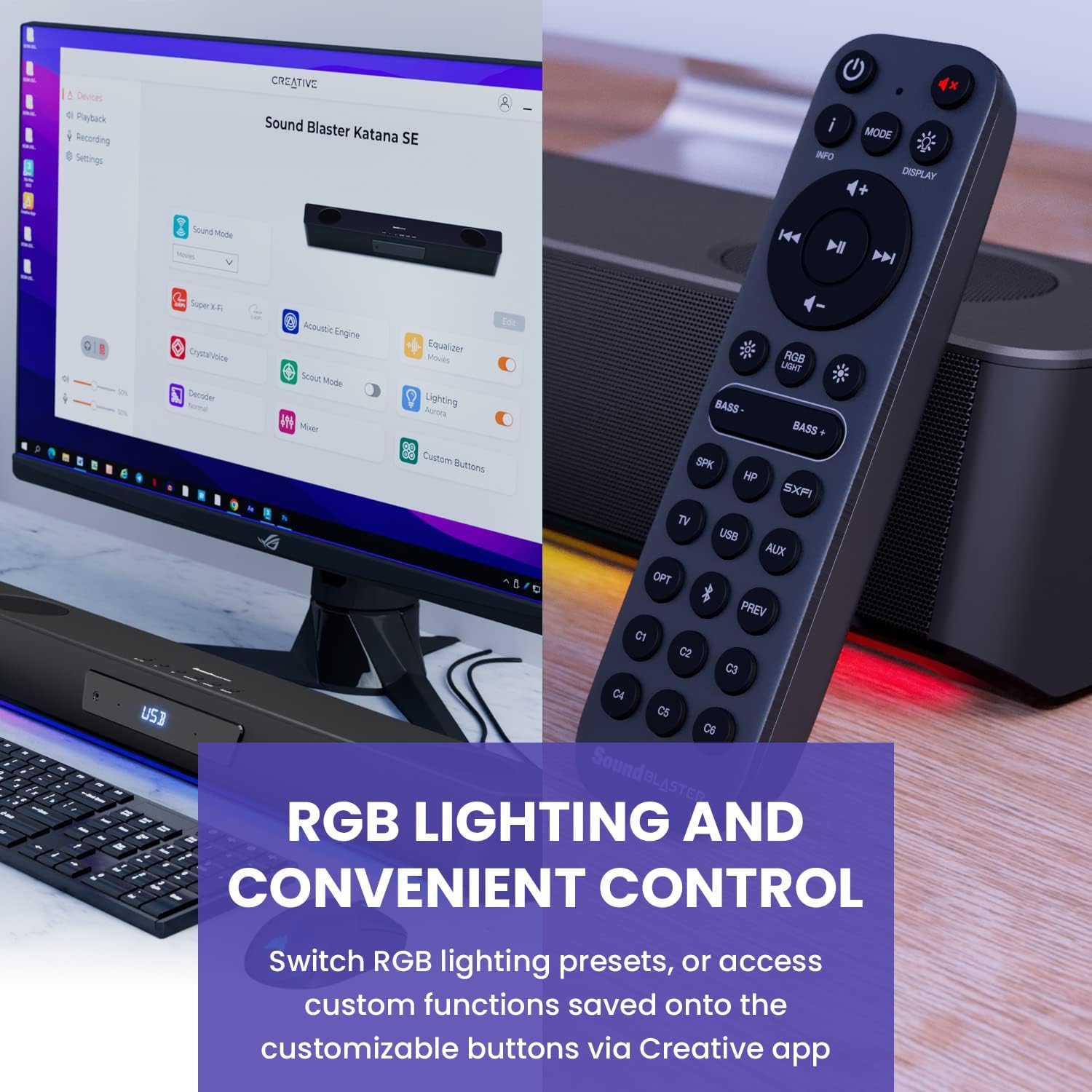
Figure 6: Remote control for the Sound Blaster Katana SE.
7.6. Creative App Customization
For advanced customization, download the Creative app on your PC or Mac. The app allows you to:
- Tune Audio Performance: Adjust EQ settings and activate Sound Blaster processing technologies.
- RGB 조명 사용자 정의: Select from various RGB presets or create your own custom lighting effects.
- Map Custom Functions: Assign specific commands to the six customizable buttons on the remote control.

Figure 7: Creative app interface showing sound mode, Super X-Fi, Acoustic Engine, Equalizer, CrystalVoice, Scout Mode, Lighting, Decoder, Mixer, and Custom Buttons.
8. Super X-Fi Technology
Super X-Fi technology personalizes your headphone audio experience for optimized and realistic listening. It recreates the soundstag헤드폰에 내장된 멀티 스피커 시스템의 e.
- SXFI 배틀 모드: 경쟁 우위 확보tage in FPS games by accurately pinpointing enemy locations through enhanced audio cues.

Figure 8: Super X-Fi and SXFI Battle Mode for enhanced gaming audio.
9. 내장 마이크
The Sound Blaster Katana SE includes a built-in beamforming microphone, allowing you to participate in calls or in-game voice chat directly through the soundbar.
10. RGB 조명
The integrated RGB lighting strip can be customized to match your setup or mood. Use the remote control to cycle through presets or the Creative app for advanced color and effect adjustments.
11. 유지관리
To ensure the longevity and performance of your Sound Blaster Katana SE:
- 부드럽고 마른 천으로 닦아 장치를 깨끗하게 유지하십시오.
- Avoid using liquid cleaners or aerosols.
- 환기구가 막히지 않았는지 확인하세요.
- 장치를 극단적인 온도나 습도에 노출시키지 마십시오.
12. 문제 해결
사운드바에 문제가 발생하면 다음의 일반적인 해결 방법을 참조하십시오.
- 소리 없음: Check all cable connections (power, audio source, subwoofer). Ensure the correct input source is selected on the soundbar. Verify the volume is not muted or too low.
- 왜곡된 소리: Try reducing the volume. Check audio cable integrity. Ensure the audio source is providing a clean signal.
- Bluetooth 연결 문제: Ensure the soundbar is in Bluetooth pairing mode. Delete the soundbar from your device's Bluetooth list and re-pair. Move closer to the soundbar to reduce interference.
- 원격 제어가 작동하지 않음: Check battery levels and replace if necessary. Ensure there are no obstructions between the remote and the soundbar.
- RGB 조명이 작동하지 않음: Check settings in the Creative app. Ensure RGB lighting is enabled via the remote or app.
13. 사양
| 특징 | 사양 |
|---|---|
| 모델명 | 51MF8415AA000 27585486 |
| 스피커 유형 | 사운드바 |
| 장착 유형 | 탁상 마운트 |
| 특징 | Bass Boost, Built In Microphone, Radio, Stereo Pairing, USB Port |
| 제품의 권장 용도 | For Gaming Consoles, For Computers |
| 호환 장치 | 데스크탑, 노트북, MP3 플레이어, 프로젝터, 스마트폰, 태블릿, 텔레비전 |
| 단위 수 | 1.0 카운트 |
| 서라운드 사운드 채널 구성 | 5.1 |
| 색상 | 180W Peak Power with Bluetooth 5.0 |
| 포함된 구성 요소 | 원격 |
| 제품 치수 | 25.6인치 깊이 x 4.3인치 너비 x 3.1인치 높이 |
| 품목 무게 | 5.9 파운드 |
| 방수 | 거짓 |
| 보증 유형 | 제한된 |
| 항목 수 | 1 |
| 제어 방법 | 원격 |
| 무선 통신 기술 | 블루투스 |
| 스피커 크기 | 1 인치 |
| 전원 | 코드식 전기 |
| 트위터 직경 | 1 인치 |
| 방수 레벨 | 방수가 되지 않음 |
| 고객 패키지 유형 | 직진성 |
| 오디오 드라이버 유형 | 동적 드라이버 |
| 서브우퍼 연결 기술 | 무선 전화 |
| 전력 수준의 수 | 1 |
| 제품의 특정 용도 | Gaming Consoles, Computers |
| 한국어: | 054651195639 |
| 제조업체 | 크리에이티브 랩스 |
| 모양 | 직육면체 |
| 품목 무게 | 5.9파운드 |
| ASIN | B0C5DFMB93 |
| 품목 모델 번호 | MF8415 |
| 첫 번째 이용 가능 날짜 | 16년 2023월 XNUMX일 |
| 상표 | 창의적인 |
| 스피커 최대 출력 전력 | 100 와트 |
| 주파수 응답 | 20000Hz |
| 연결 기술 | 블루투스 |
| 오디오 출력 모드 | 서라운드, 스테레오 |
14. 보증 및 지원
Your Creative Sound Blaster Katana SE comes with a Limited Warranty. For detailed warranty information, product registration, technical support, and customer service, please visit the official Creative web사이트를 참조하거나 패키지에 포함된 보증 카드를 참조하세요.


