
amazon basics B0C58TDFPR
Amazon Basics 휴대용 짐벌 안정기 사용 설명서
Model: B0C58TDFPR
소개
The Amazon Basics Handheld Gimbal Stabiliser is designed to provide smooth and steady footage for your smartphone photography and videography. This manual provides essential information for setting up, operating, maintaining, and troubleshooting your device.

Image: The Amazon Basics Handheld Gimbal Stabiliser with a smartphone attached, ready for use.
패키지 내용
시작하기 전에 패키지에 모든 품목이 들어 있는지 확인하세요.
- 1N Handheld Gimbal with attached holder
- 1N Charging cable
- 1N 사용 설명서(이 문서)
- 1 삼각대
- 1N Hanging belt
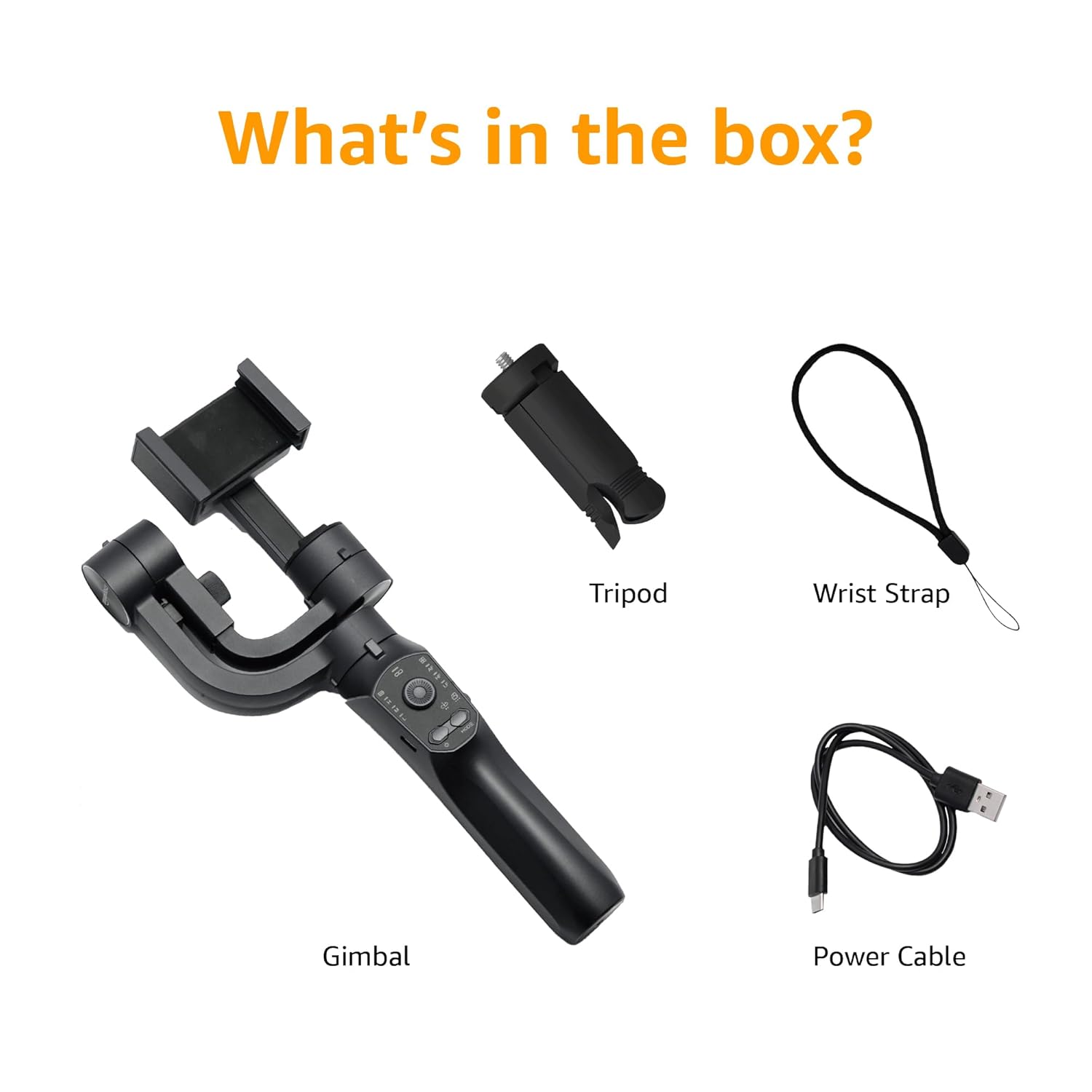
Image: A visual representation of the package contents, including the gimbal, tripod, power cable, and wrist strap.
제품 구성 요소
Familiarize yourself with the different parts of your gimbal stabiliser:
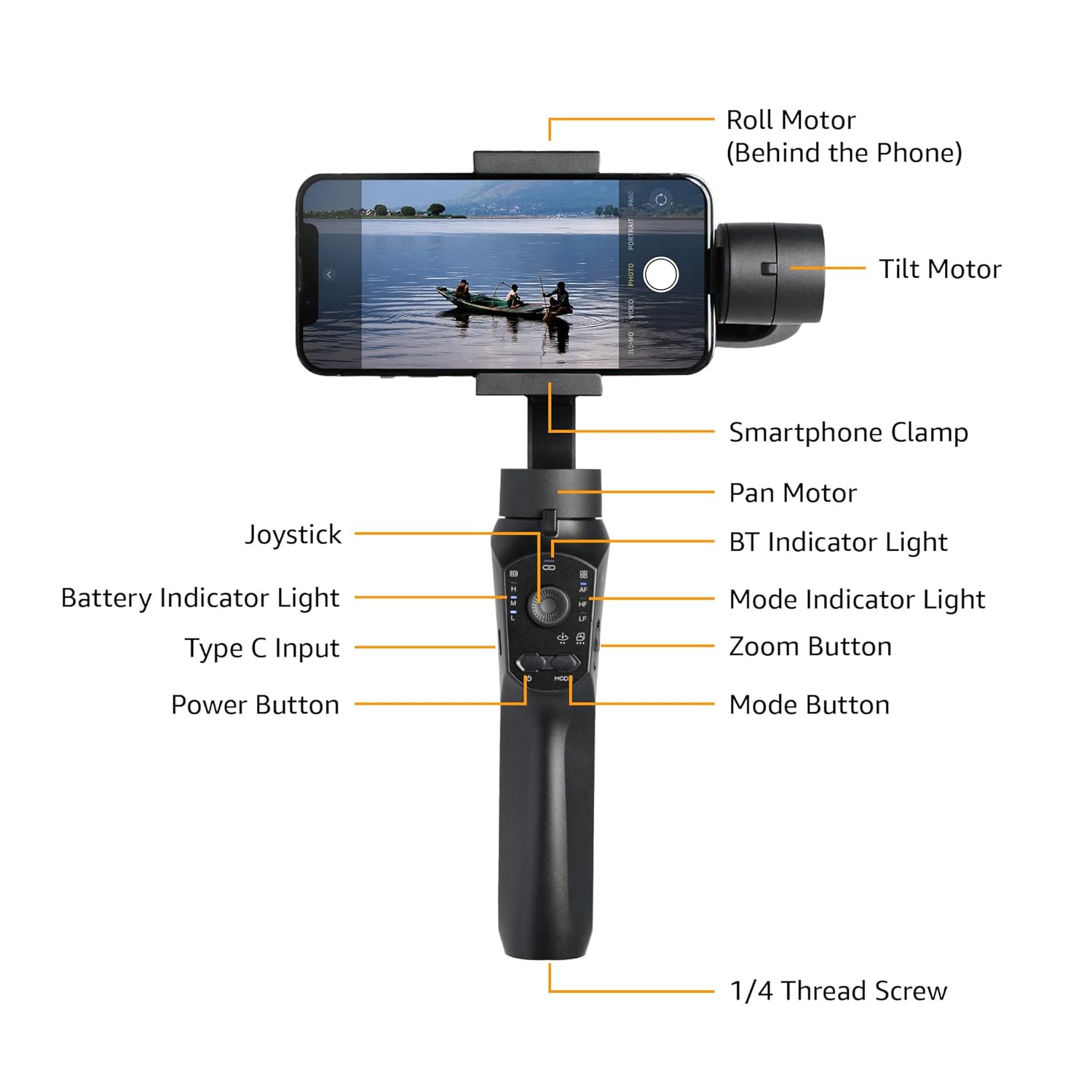
Image: Labeled diagram showing the various components of the gimbal, including the Roll Motor, Tilt Motor, Smartphone Clamp, Pan Motor, BT Indicator Light, Mode Indicator Light, Zoom Button, Mode Button, Power Button, Type C Input, Battery Indicator Light, Joystick, and 1/4 Thread Screw.
- 롤 모터: Controls the roll axis (rotation along the lens axis).
- 틸트 모터: Controls the tilt axis (up and down movement).
- 스마트폰 CLamp: 스마트폰을 안전하게 고정해줍니다.
- 팬 모터: Controls the pan axis (left and right rotation).
- 조종간: 짐벌 움직임을 수동으로 제어하기 위한 것입니다.
- 블루투스 표시등: Bluetooth 연결 상태를 나타냅니다.
- 배터리 표시등: 현재 배터리 수준을 보여줍니다.
- C형 입력: Charging port for the gimbal.
- 전원 버튼: 짐벌을 켜거나 끕니다.
- 모드 표시등: 현재 작동 모드를 표시합니다.
- 줌 버튼: Controls digital zoom (via app).
- 모드 버튼: 서로 다른 작동 모드 간 전환.
- 1/4 Thread Screw: For attaching accessories like the included tripod.
설정
- 짐벌을 충전하세요: Before first use, fully charge the gimbal using the provided Type-C charging cable. The battery indicator light will show charging status.
- Install the Smartphone:
- 스마트폰 cl을 확장하세요amp 스마트폰을 조심스럽게 중앙에 놓으세요.
- Ensure the phone is balanced as centrally as possible within the clamp to reduce motor strain.
- Manual Balancing (Crucial):
Important: Do not switch on this Gimbal without manual balancing. Doing so may lead to motor damage and fast battery draining.
- With the smartphone mounted, adjust the position of the phone within the clamp until it remains level when you release it. This minimizes the work the motors need to do.
- Adjust the horizontal arm if necessary to achieve perfect balance.
- 전원 켜기: Press and hold the Power Button until the gimbal powers on and stabilizes.
- 앱 다운로드: Download the "Gimbal Pro" app from your smartphone's app store (available for Android and iOS). This app unlocks advanced features and controls.
- 블루투스를 통해 연결: Open the Gimbal Pro app and follow the on-screen instructions to connect your gimbal via Bluetooth. The BT Indicator Light will confirm a successful connection.

Image: An illustration demonstrating the three axes of stabilization: Tilt Axis, Roll Axis, and Pan Axis, which work together to keep footag꾸준해요.
작동 지침
기본 동작
- 전원 켜기/끄기: 전원 버튼을 길게 누릅니다.
- 조이스틱 제어: 조이스틱을 사용하여 짐벌의 좌우 회전 및 상하 회전 움직임을 수동으로 제어하십시오.
- 모드 버튼: Press the Mode Button to cycle through different operating modes (e.g., Pan Follow, Lock Mode, FPV). The Mode Indicator Light will change accordingly.
- 줌 버튼: Use the Zoom Button to zoom in or out within the Gimbal Pro app.
- Multifunction Push Key: This key allows you to focus or zoom, providing a more professional photography experience.
Advanced Features (via Gimbal Pro App)
The Gimbal Pro app unlocks a variety of advanced shooting modes and features:
- Facial Tracking: Automatically tracks a subject's face to keep them in frame.
- 타임 랩스: 놀라운 타임랩스 영상을 촬영해보세요.
- 느린: Record high-frame-rate videos for slow-motion effects.
- 지능형 줌: Provides precise zoom control.
- 히치콕 모드: Creates a "Dolly Zoom" effect.
- 매드 독 모드: A dynamic, fast-response mode.
- 시작 모드 : Rotates the camera 360 degrees along the roll axis.
- FPV 모드 : Follows the gimbal's orientation for an immersive first-person view.
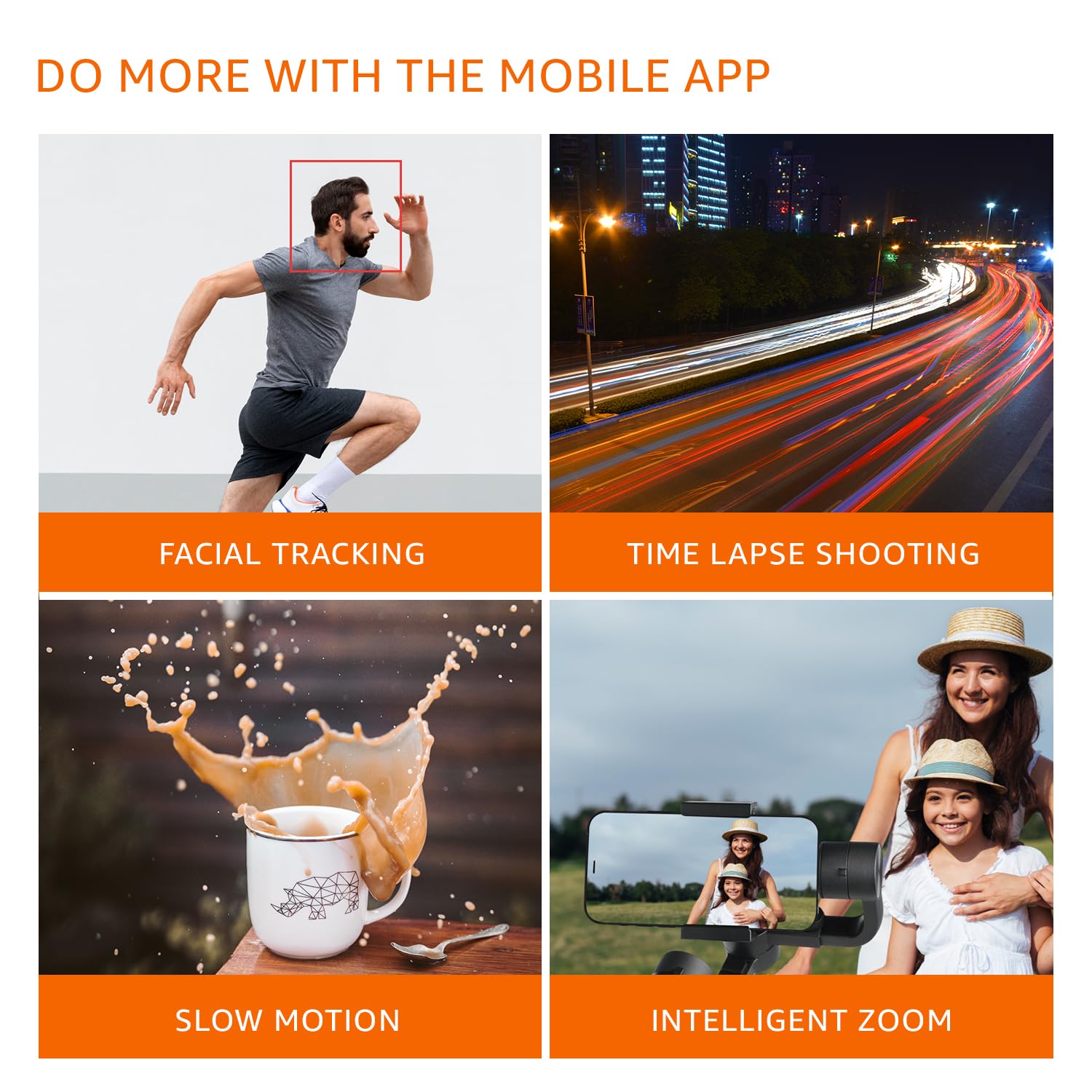
이미지: 시각적 examples of features available through the mobile app, including Facial Tracking, Time Lapse Shooting, Slow Motion, and Intelligent Zoom.

Image: Icons illustrating various shooting modes such as Mad Dog Mode, Hitchcock Mode, Inception Mode, and FPV Mode, available on the gimbal.
Portrait-to-Landscape Rotation
The gimbal supports effortless rotation between portrait and landscape orientations for versatile shooting.

Image: A three-panel image demonstrating the gimbal's ability to effortlessly rotate a smartphone from portrait to landscape orientation.
배터리 및 충전
The gimbal is equipped with a 3600mAh Lithium Ion battery, providing up to 10 hours of operational time.
- 충전 중: Connect the provided Type-C cable to the gimbal's charging port and a suitable USB power source.
- 전원 은행 기능: The gimbal can also function as a power bank to charge your smartphone during extended shoots. Connect your smartphone to the gimbal's Type-C port using a compatible cable.
- 배터리 표시기: Monitor the battery level using the Battery Indicator Lights on the control panel.
유지
- 청소: 부드럽고 마른 천으로 짐벌을 닦으십시오. 강한 화학 약품이나 연마성 재질은 사용하지 마십시오.
- 저장: 짐벌은 직사광선과 극한 온도 변화를 피해 서늘하고 건조한 곳에 보관하십시오.
- 배터리 관리 : For long-term storage, charge the battery to approximately 50-60% to prolong its lifespan. Recharge every 3 months if not in use.
- 과부하를 피하세요: Do not mount smartphones heavier than the recommended payload capacity (approx. 180 grams, as per user experience). Overloading can damage the motors.
문제 해결
| 문제 | 가능한 원인 | 해결책 |
|---|---|---|
| 짐벌의 전원이 켜지지 않습니다. | 배터리가 부족합니다. | 짐벌을 완전히 충전하세요. |
| Gimbal motors vibrate or do not stabilize properly. | Improper manual balancing. | Ensure the smartphone is perfectly balanced before powering on. Refer to the "Manual Balancing" section under Setup. |
| Gimbal disconnects from phone or app features not working. | Bluetooth connection issue; App malfunction. |
|
| 푸tage is still shaky. | Improper balancing; Exceeding gimbal's stabilization limits. |
|
명세서
| 특징 | 세부 사항 |
|---|---|
| 모델 번호 | B0C58TDFPR |
| 안정화 | 3-Axis (Pan, Tilt, Roll) |
| 배터리 유형 | 리튬 이온 |
| 배터리 용량 | 3600mAh |
| 운영 시간 | 최대 10시간 |
| 충전 포트 | C타입 |
| 호환 장치 | 스마트폰 |
| 제품 크기(LxWxH) | 10 x 7 x 28.9cm |
| 품목 무게 | 460g |
| 색상 | 검은색 |
| 제조업체 | SHENZHEN JX ROBOT TECHNOLOGY CO. LTD |

Image: A diagram illustrating the dimensions of the gimbal in both folded and extended states.
보증 및 지원
This Amazon Basics Handheld Gimbal Stabiliser comes with a 1년 한정 보증 구매일로부터.
For warranty claims, technical support, or any product-related inquiries, please contact Amazon Basics customer service or refer to the official Amazon support channels.
Ask a question about this manual
Ask about setup, troubleshooting, compatibility, parts, safety, or missing instructions. Manuals+ will review the question and use this page’s manual context to help answer it.