
소개
This manual provides detailed instructions for the setup, operation, and maintenance of your Zetta Z16 Digital Camcorder. Please read this manual thoroughly before using the device to ensure proper functionality and to maximize its performance.
제품 끝view
The Zetta Z16 is a compact digital camcorder designed for security and surveillance. It features a 160-degree rotatable lens and multiple recording modes.

Figure 1: Zetta Z16 Digital Camcorder. 정면 view of the compact Zetta Z16 device.
구성 요소 및 제어

Figure 2: Zetta Z16 at a Glance. This diagram illustrates the key components and controls of the Zetta Z16 Digital Camcorder, including the LED indicator, card slot, mode switches, power button, camera lens, microphone, and USB port.
- LED 표시등: 상태정보를 제공합니다.
- 카드 슬롯: For inserting a FAT32 formatted SD card.
- Surveillance Mode Switch: Activates surveillance recording.
- On-the-GO Mode Switch: Activates motion detection recording.
- Custom Mode Switch: For advanced configurations via "Zetta Widget" software.
- 켜기/끄기 버튼: 장치의 전원을 켜거나 끕니다.
- 카메라 렌즈: 160-degree rotatable lens for video capture.
- 마이크로폰: 음성 녹음용입니다.
- USB 포트: 충전 및 컴퓨터 연결용.

그림 3: 상단 View of Zetta Z16 Controls. This image shows the top panel of the camcorder, highlighting the SD card slot, the status LED, and the mode selection buttons.

그림 4: 하단 View of Zetta Z16. The bottom of the device displays the Zetta branding, input voltage information (5V), and a warning regarding cover removal.
설정
- 기기 충전: Before first use, fully charge the Zetta Z16 using the provided USB cable and a 5V power adapter. The LED indicator will show charging status.
- SD 카드 삽입: Ensure the device is off. Insert a FAT32 formatted SD card into the card slot. A minimum of 8GB and maximum of 128GB is recommended for optimal performance.
- 초기 전원 켜기: Press and hold the On/Off button for 2 seconds. The green light will flash, indicating the camera is operational.
작동 모드
The Zetta Z16 offers several operating modes to suit different surveillance needs.
1. Custom Mode (Advanced Configuration)
This mode allows for detailed customization of recording settings using the "Zetta Widget" software on a computer. Connect the camcorder to your computer via USB to access these settings.

Figure 5: Zetta Widget Software Interface. This image displays the software used for advanced configuration, allowing users to adjust video quality, resolution, frame rate, and other recording parameters.
- Download "Zetta Widget": Obtain the software from the official Zetta web대지.
- PC에 연결: Use a USB cable to connect the Z16 to your computer.
- 설정 구성:
- 루프 녹음: Enable/disable continuous recording that overwrites older files.
- 가장 타임스트amp: Add date and time stamps to recordings.
- 예약 녹화 : Set specific times for the camera to record.
- 모션 감지 녹화: Activate recording only when motion is detected.
- 자동 전원 켜기/끄기: Schedule power cycles.
- 음성 인식 녹음: Initiate recording based on sound detection.

Figure 6: Scheduled Recording Configuration. The Zetta Widget allows users to set up recording schedules and define triggers such as voice, vibration, or motion detection.
2. On-the-GO Mode (Motion Detection)
In this mode, the camera records only when motion is detected within a range of 3-5 meters. Recording stops when the memory card is full. Video resolution is 1280 x 720 pixels.
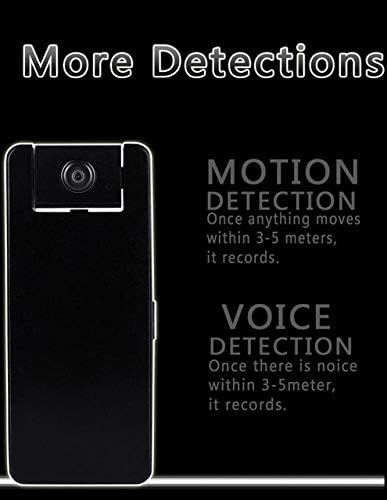
Figure 7: Motion and Voice Detection. This graphic explains how motion detection triggers recording when movement occurs within 3-5 meters, and voice detection triggers recording when noise is detected within the same range.
3. 연속 모드
The Z16 features a built-in 1200 mAh rechargeable battery, allowing for up to 10 hours of continuous video recording. The video resolution in this mode is 640 x 360 pixels.
유지
- 청소: 부드럽고 마른 천으로 카메라 렌즈와 외부를 닦으십시오. 연마성 세척제나 용제는 사용하지 마십시오.
- 저장: 본 기기는 직사광선과 극한의 온도를 피해 시원하고 건조한 곳에 보관하세요.
- 배터리 관리 : 배터리 수명을 연장하려면 배터리를 자주 완전히 방전시키지 마십시오. 사용하지 않을 때에도 정기적으로 기기를 충전하십시오.
- 펌웨어 업데이트: Check the Zetta website periodically for firmware updates to ensure optimal performance and access to new features. The "UPGRADE" label on the bottom of the device indicates this capability.
- SD 카드 관리 : Regularly back up important recordings and format the SD card to maintain performance and prevent data corruption.
문제 해결
| 문제 | 가능한 원인 | 해결책 |
|---|---|---|
| 장치의 전원이 켜지지 않습니다. | 배터리가 부족합니다. 기기가 충전되지 않았습니다. | Charge the device fully. Ensure the power button is held for 2 seconds. |
| Recording not starting. | SD card not inserted or not formatted correctly (FAT32); incorrect mode selected. | Insert a FAT32 formatted SD card. Check mode selection. Use Zetta Widget for advanced settings. |
| 비디오 품질이 좋지 않습니다. | 렌즈가 더럽거나, 조명이 부족하거나, 해상도 설정이 잘못되었을 수 있습니다. | Clean the lens. Ensure adequate lighting. Adjust video resolution in Custom Mode via Zetta Widget. Note that Continuous Mode records at 640x360. |
| 동작 감지가 작동하지 않습니다. | On-the-GO mode not activated; sensitivity settings too low. | Ensure On-the-GO mode is selected. Adjust motion detection sensitivity using Zetta Widget. |
| 장치가 응답하지 않습니다. | 소프트웨어 오류. | Locate the reset pinhole (often near the SD card slot or on the bottom) and gently press with a thin object (e.g., paperclip) to reset the device. Refer to Figure 4 for the "RESET" label on the bottom. |
명세서
- 모델: Z16
- 비디오 해상도: 720p (1280x720 in On-the-GO mode), 640x360 (in Continuous mode)
- 렌즈: 160도 회전 가능
- 배터리: 1200mAh 충전식
- Continuous Recording Time: 최대 10시간
- 연결성: 유선 (USB)
- 저장: MicroSD card (FAT32 format required)
- 전원 입력: 5V, 10W
- 권장 사용: 실내 보안
- 특별 기능: Motion Detection, Voice Activation, Scheduled Recording, Loop Recording, Timestamp, 휴대용
- IP 등급: IP54
보증 및 지원
For warranty information and technical support, please refer to the official Zetta web사이트를 방문하거나 판매점에 문의하세요. 보증 청구를 위해 구매 영수증을 보관하세요.
Web대지: www.zetta.com.hk
경고: Removal of the device cover will void any and all warranties. (As indicated on the product's bottom label).