
소개
Thank you for choosing the Technics EAH-AZ60M2 Wireless in-Ear Noise-Cancelling Headphones. This manual provides essential information for the proper setup, operation, and maintenance of your new headphones. Please read this manual thoroughly before use to ensure optimal performance and longevity of the product.

Image: The Technics EAH-AZ60M2 wireless in-ear headphones, shown alongside their compact black charging case.
상자 안에 무엇이 들어있나요?
Upon opening the packaging, please verify that all the following components are included:
- Technics EAH-AZ60M2 Wireless In-Ear Noise-Cancelling Headphones (Left and Right earbuds)
- 충전 케이스
- USB-C 충전 케이블
- Multiple sizes of Earpieces (7 pairs)
- 사용 설명서 (본 문서)
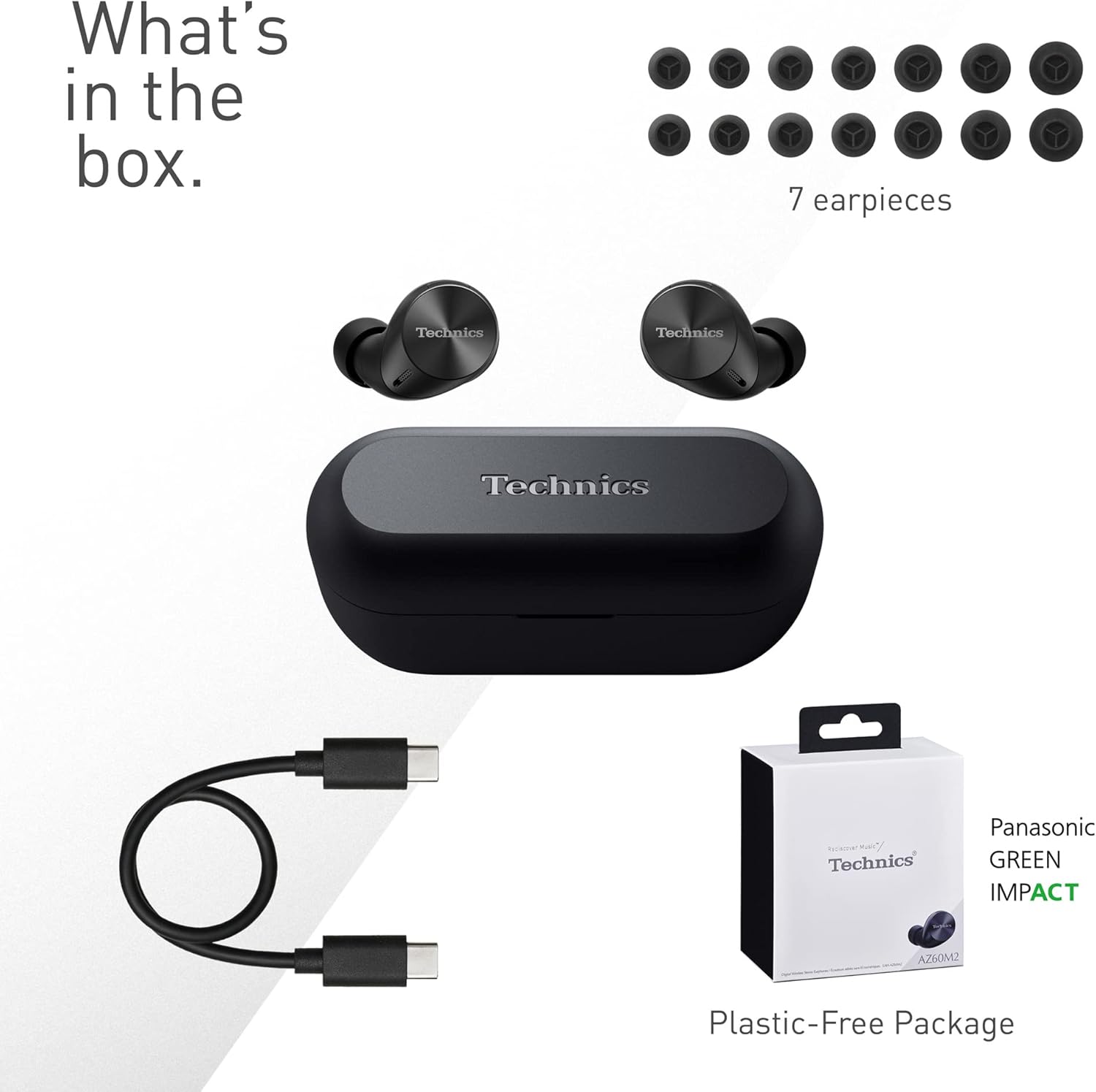
Image: A visual representation of the items included in the product packaging: the two earbuds, the charging case, a USB-C charging cable, and a selection of seven different earpiece sizes.
설정
초기 충전
처음 사용하기 전에 헤드폰과 충전 케이스를 완전히 충전하세요.
- 양쪽 이어버드를 충전 케이스에 넣습니다.
- USB-C 충전 케이블을 케이스의 충전 포트와 USB 전원에 연결하세요.
- 케이스의 표시등으로 충전 상태를 확인할 수 있습니다. 케이스와 이어버드를 완전히 충전하는 데는 일반적으로 약 2.5시간이 소요됩니다.
장치와 페어링
The EAH-AZ60M2 headphones use Bluetooth for wireless connection.
- 이어버드가 들어있는 충전 케이스를 엽니다. 이어버드가 자동으로 페어링 모드로 진입합니다.
- 기기(스마트폰, 태블릿, PC)에서 Bluetooth를 활성화하고 사용 가능한 기기를 검색하세요.
- Select "EAH-AZ60M2" from the list of found devices.
- Once connected, a confirmation sound will play from the headphones.
Technics 오디오 연결 앱
For enhanced control and customization, download the "Technics Audio Connect" app from your device's app store (Google Play for Android 6.0+ or App Store for iOS 12+). The app allows you to:
- 배터리 수준을 확인하세요.
- Select EQ sound modes.
- Adjust noise cancelling levels.
- 터치 센서 기능을 사용자 정의하세요.
- 펌웨어 업데이트를 수행합니다.
작동 지침
헤드폰 착용하기
Select the earpieces that provide the most comfortable and secure fit for optimal sound quality and noise cancellation. The app can assist in finding the best fit. Insert the earbuds gently into your ears and rotate them slightly to ensure a snug seal.

Image: A person wearing the Technics EAH-AZ60M2 headphones, illustrating their comfortable, low-profile design. The image also displays the wide range of eartip sizes available for a customized fit.
터치 컨트롤
The headphones feature touch-sensitive panels on each earbud for controlling playback, calls, and noise modes. Functions can be customized via the Technics Audio Connect App.
| 행동 | 왼쪽 이어버드 | 오른쪽 이어 버드 |
|---|---|---|
| 싱글 탭 | 재생/일시정지, 전화 받기 | 재생/일시정지, 전화 받기 |
| 더블 탭 | 앞으로 트랙 건너 뛰기 | 볼륨을 높이다 |
| 트리플 탭 | 트랙 뒤로 건너뛰기 | 볼륨 낮추기 |
| 길게 누르기 | Toggle Noise Cancelling/Ambient Mode | 음성 지원 |
소음 제어 모드
The EAH-AZ60M2 features Dual Hybrid Active Noise Cancelling for immersive listening and Ambient Sound Modes for situational awareness.
- 능동 소음 제거(ANC): 외부 소음을 줄여 집중해서 들을 수 있도록 도와줍니다.
- Natural Ambient Mode: Allows you to hear surrounding sounds naturally.
- 주의 모드: Focuses on human voices, making it easier to hear announcements or conversations without removing the headphones.
Toggle between these modes by long-pressing the left earbud's touch sensor, or adjust settings precisely using the Technics Audio Connect App.

Image: A close-up of a single Technics EAH-AZ60M2 earbud, highlighting its key audio features including Hi-Res Audio Wireless support, LDAC compatibility, 8mm drivers, and Noise Cancelling capabilities.
다 지점 연결
The headphones support multipoint connection, allowing simultaneous pairing with up to three devices (e.g., a smartphone, tablet, and PC). This enables seamless switching between audio sources without re-pairing.
- To switch audio, simply play content on the desired device. The headphones will automatically connect to the active audio source.
- Note: LDAC playback is not possible when connected to three devices simultaneously.

Image: A person sitting at a desk, demonstrating the smart 3-device switching feature of the Technics EAH-AZ60M2 headphones, with connection lines illustrating simultaneous pairing to a smartphone, tablet, and laptop.
Making and Receiving Calls (JustMyVoice Technology)
The EAH-AZ60M2 incorporates JustMyVoice Technology, utilizing 8 separate microphones and advanced wind noise reduction to isolate and amplify your speech while minimizing background noise during calls.
- 전화 받기: 양쪽 이어버드를 한 번 탭하세요.
- 통화 종료: 통화 중에 한쪽 이어버드를 한 번 탭하세요.
- 전화 거부: 한쪽 이어버드를 길게 누르세요.
- 이어폰 한쪽만 사용: You can use one earbud independently while the other is charging or stored.

Image: A person outdoors, demonstrating the JustMyVoice Technology feature of the Technics EAH-AZ60M2 headphones, with visual cues indicating sound pickup and voice isolation.
충전 및 배터리 수명
The EAH-AZ60M2 headphones offer extended listening times with the included charging case.
- 이어버드 배터리 수명: Up to 7 hours of playback with Active Noise Cancelling (ANC) enabled.
- 케이스 포함 전체 재생: Up to 24 hours of total playback time with multiple charges from the case.
- 빠른 충전: A 15-minute quick charge provides approximately 70 minutes of playback.
Qi 무선 충전
The charging case supports Qi wireless charging. Simply place the case on a compatible Qi wireless charger (sold separately) to charge.

Image: An illustration depicting the battery life of the Technics EAH-AZ60M2 headphones, showing 7 hours of listening time for the earbuds and an additional 24 hours of backup with the charging case.
유지
청소
- Regularly clean the earbuds, especially the earpieces and mesh grilles, with a soft, dry, lint-free cloth.
- Remove earpieces and clean them with mild soap and water if necessary, ensuring they are completely dry before reattaching.
- 마른 면봉으로 이어버드와 케이스 내부의 충전 접점을 모두 닦으세요.
- 연마성 세척제, 알코올 또는 용제를 사용하지 마십시오.
방수성
The EAH-AZ60M2 earbuds are IPX4 water resistant, meaning they are protected against splashing water from any direction. This makes them suitable for light rain or intensive workouts.
- 충전 케이스는 방수가되지 않습니다.
- 이어버드를 물에 담그지 마세요.
- 이어버드를 충전 케이스에 다시 넣기 전에 완전히 말랐는지 확인하십시오.
저장
사용하지 않을 때는 이어폰을 충전 케이스에 넣어 보호하고 충전 상태를 유지하십시오. 직사광선과 극한 온도 변화를 피해 서늘하고 건조한 곳에 보관하십시오.
문제 해결
| 문제 | 가능한 원인 | 해결책 |
|---|---|---|
| 헤드폰에서 소리가 나지 않습니다. | Headphones not paired or connected. Low battery. Volume too low. | Ensure headphones are paired and connected to your device. Charge headphones. Increase volume on both headphones and device. |
| Cannot pair headphones. | Headphones not in pairing mode. Device Bluetooth off. Interference. | Ensure earbuds are in the case and lid is open to enter pairing mode. Turn device Bluetooth off and on. Move closer to device. Forget device and re-pair. |
| 소음 차단 기능이 효과적이지 않습니다. | Poor earbud fit. ANC mode not active. | Try different earpiece sizes for a better seal. Ensure ANC is enabled via touch control or app. |
| 통화 품질이 좋지 않습니다. | Environmental noise. Single earbud use. | Ensure both earbuds are used for optimal call quality. Move to a quieter environment. |
| 헤드폰이 충전되지 않습니다. | Poor contact. Faulty cable/charger. | 이어버드가 케이스에 제대로 장착되었는지 확인하십시오. 충전 접점을 청소하십시오. 다른 USB-C 케이블이나 전원을 사용해 보십시오. |
For further assistance, refer to the Technics Audio Connect App or visit the official Technics support web대지.
명세서
| 특징 | 세부 사항 |
|---|---|
| 모델명 | EAH-AZ60M2 |
| 품목 모델 번호 | EAH-AZ60M2EK |
| 상표 | 공예 |
| 색상 | 검은색 |
| 연결 기술 | 무선(블루투스) |
| 폼 팩터 | 인이어 |
| 소음 제어 | 능동형 소음 제거(듀얼 하이브리드) |
| 드라이버 크기 | 8mm |
| 마이크 | 8 (for JustMyVoice Technology) |
| 다 지점 연결 | 최대 3개 장치 |
| 방수성 | IPX4(이어버드만 해당) |
| 이어버드 배터리 수명(ANC 켜짐) | 최대 7시간 |
| 케이스 포함 총 배터리 사용 시간 | 최대 24시간 |
| 충전 케이스 배터리 | 24 Hours average life |
| 충전 중 | USB-C, Qi 무선 충전 |
| 제품 무게 (이어폰) | 7그램(약 0.247온스) |
| 운반 케이스 무게 | 28그램 |
| 제품 치수 | 1.1 x 0.91 x 1.02인치(이어버드) |
보증 및 지원
For information regarding warranty coverage, terms, and conditions, please refer to the warranty card included with your product or visit the official Technics web대지.
For technical support, product registration, or frequently asked questions, please visit the Technics support page or contact their customer service.
- Technics Official Web대지: www.technics.com
- 기술 오디오 연결 앱: Google Play Store와 Apple App Store에서 이용할 수 있습니다.